
1. Important Safety Information
Read all instructions carefully before using the dehumidifier. Keep this manual for future reference. Always follow basic safety precautions to reduce the risk of fire, electric shock, or injury.
- Ensure the power supply matches the voltage specified on the unit's rating label.
- Do not operate the dehumidifier with a damaged power cord or plug.
- Do not block air inlets or outlets. Maintain at least 8 inches (20 cm) clearance around the unit.
- Always unplug the unit before cleaning or performing any maintenance.
- Do not use the dehumidifier in areas where flammable gases or liquids are stored.
- This appliance is not intended for use by persons (including children) with reduced physical, sensory or mental capabilities, or lack of experience and knowledge, unless they have been given supervision or instruction concerning use of the appliance by a person responsible for their safety.
2. Product Overview
The WPSOERT Model WP06 Dehumidifier is designed to efficiently remove excess moisture from indoor spaces up to 5500 square feet, improving air quality and comfort. It features smart humidity control, multiple operating modes, and convenient drainage options.

Figure 2.1: Front view of the WPSOERT 80 Pints Dehumidifier (Model WP06).
Key Features:
- High Capacity: Extracts up to 80 pints of moisture per day (under 95°F, 90% RH).
- Coverage Area: Suitable for spaces up to 5500 Sq. Ft.
- Humidity Control: Adjustable humidity levels from 30% to 80%.
- Drainage Options: 1.58 Gallon (6 L) removable water tank for manual drainage and continuous drainage with an included hose.
- Operating Modes: DEHU (Dehumidifying), DRY (Drying), CONT (Continuous).
- User-Friendly: Digital display, 24-hour timer, child lock, auto defrost, auto restart, portable design with 360° universal wheels and ergonomic handles.
- Maintenance: Removable and washable filter.
3. Setup and Installation
3.1 Unpacking
- Carefully remove the dehumidifier from its packaging.
- Remove all packing materials, including any tape or protective films.
- Check for any shipping damage. If the unit is damaged, do not operate it and contact customer support.
3.2 Placement
Place the dehumidifier on a flat, stable surface in the area where dehumidification is desired. Ensure there is at least 8 inches (20 cm) of clear space around all sides of the unit for proper airflow.
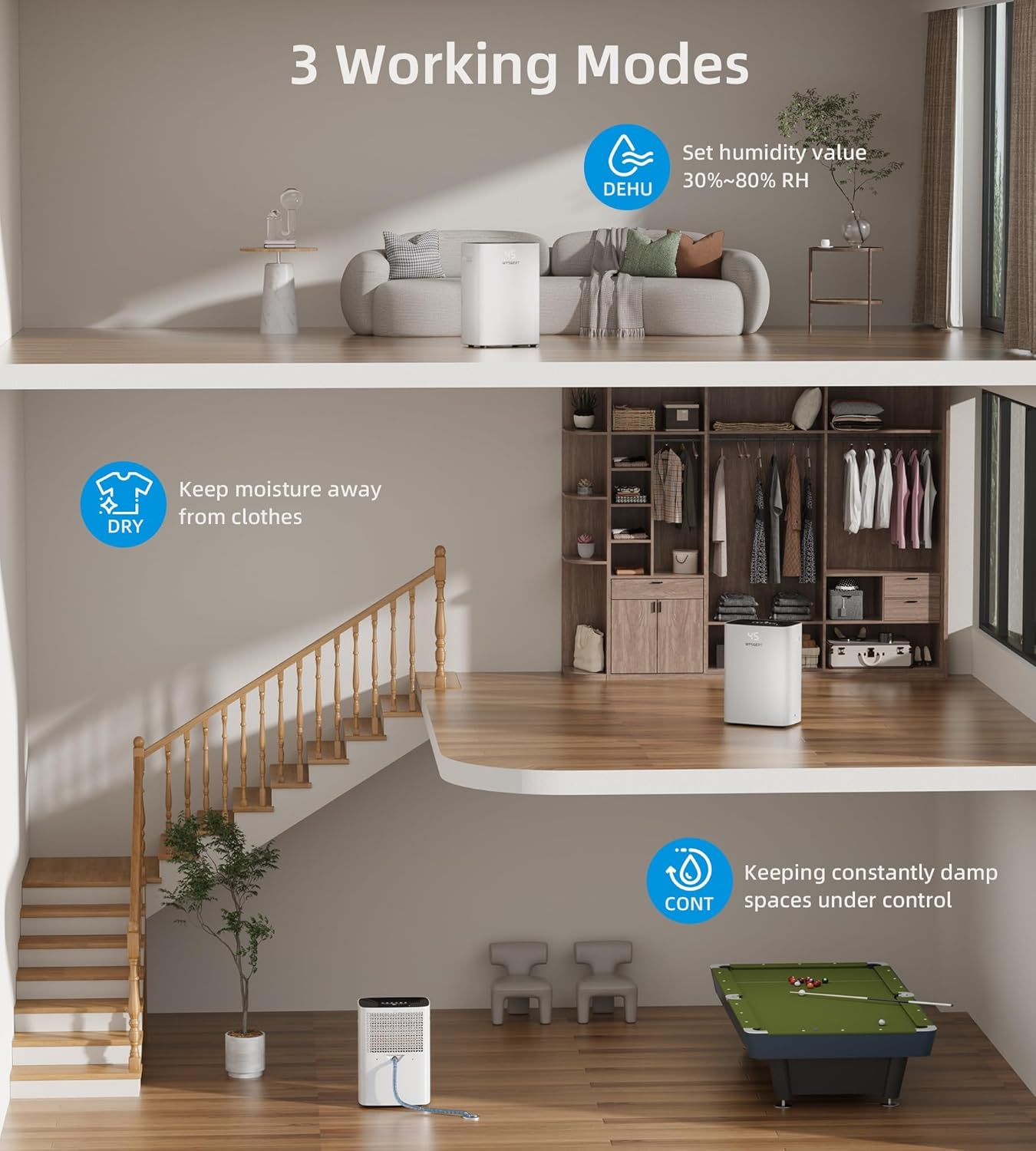
Figure 3.1: Optimal placement for effective dehumidification in a large area.
For optimal performance, ensure all doors and windows in the room are closed when the dehumidifier is operating.

Figure 3.2: Close doors and windows for maximum dehumidification efficiency.
3.3 Drainage Options
Your dehumidifier offers two methods for water removal: manual drainage using the water tank or continuous drainage via a hose.

Figure 3.3: Two drainage options: Manual and Continuous.
3.3.1 Manual Drainage (Water Tank)
The unit is equipped with a 1.58 Gallon (6 L) water tank. When the tank is full, the dehumidifier will automatically stop operating and illuminate the 'Full Water' indicator. Empty the tank as follows:
- Gently pull out the water tank from the back of the unit.
- Carefully carry the tank to a sink or drain.
- Pour out the collected water.
- Slide the empty water tank back into the unit until it clicks into place. The dehumidifier will resume operation if the humidity level is still above the set point.
3.3.2 Continuous Drainage (Drain Hose)
For continuous operation without needing to empty the water tank, use the included drain hose. This is ideal for basements or areas with a nearby floor drain.
- Locate the drain outlet on the back of the dehumidifier.
- Unscrew the outlet cap.
- Remove the gray piston from the drain outlet. Important: If the gray piston is not removed, water will flow to the water tank, and continuous drainage will not function.
- Connect one end of the drain hose to the drain outlet.
- Ensure the other end of the hose is placed in a suitable drain, ensuring a downward slope for gravity drainage.
4. Operating Instructions
4.1 Control Panel
The dehumidifier features an intelligent touch control panel with a digital display for easy operation and monitoring.

Figure 4.1: Intelligent Touch Control Panel.
4.2 Power On/Off
- Press the POWER button to turn the unit on or off.
4.3 Setting Humidity Level
- Press the HUMI button to adjust the desired humidity level. The setting range is from 30% to 80% Relative Humidity (RH).
- The unit will operate until the set humidity level is reached, then cycle on and off to maintain it.
4.4 Operating Modes
The dehumidifier offers three distinct operating modes:

Figure 4.2: Three Working Modes.
- DEHU Mode (Dehumidifying): In this mode, the dehumidifier automatically starts and stops based on your desired humidity level, ensuring optimal comfort.
- DRY Mode (Drying): This mode utilizes an ideal fan speed to effectively dry clothes, helping to keep them dry.
- CONT Mode (Continuous): The dehumidifier runs continuously, reducing room humidity to the minimum level possible, suitable for constantly damp spaces.
4.5 Timer Function
The 24-hour timer allows you to preset the running time, helping to reduce energy consumption.

Figure 4.3: 24-Hour Timer Function.
- Press the TIMER button to set the desired operating duration from 1 to 24 hours.
- The unit will automatically turn off or on after the set time has elapsed.
4.6 Child Lock
The child lock feature prevents accidental operation or changes to settings, ensuring safety in households with children.

Figure 4.4: Child Lock Feature.
- To activate the child lock, press and hold the LOCK button for 3 seconds.
- To deactivate, press and hold the LOCK button for another 3 seconds.
4.7 Automatic Restart
In the event of a power outage, the dehumidifier will automatically restart with its previous settings once power is restored.

Figure 4.5: Automatic Restart After Power Outage.
4.8 Automatic Defrost
The unit is equipped with an automatic defrost function. If frost builds up on the evaporator coils, the dehumidifier will temporarily stop dehumidifying and run the fan to melt the frost. This ensures efficient operation in cooler environments.

Figure 4.6: Automatic Defrost Mechanism.
5. Maintenance
Regular maintenance ensures the longevity and efficient operation of your dehumidifier.
5.1 Cleaning the Air Filter
The dehumidifier features a removable and washable filter to maintain air quality and unit efficiency. A dirty filter can reduce airflow and dehumidification performance.

Figure 5.1: Washable Filter (part of Humanized Design features).
- Ensure the dehumidifier is turned off and unplugged from the power outlet.
- Locate the air filter, typically at the back or side of the unit.
- Gently pull out the filter.
- Wash the filter with clean water (not hotter than 104°F / 40°C) and a mild detergent.
- Rinse thoroughly and allow the filter to air dry completely before reinserting it. Do not expose to direct sunlight.
- Reinsert the dry filter into the unit.
It is recommended to clean the filter every two weeks or more frequently depending on usage and air quality.
5.2 Cleaning the Unit Exterior
- Wipe the exterior of the dehumidifier with a soft, damp cloth.
- Do not use harsh chemicals, abrasive cleaners, or solvents, as these can damage the surface.
5.3 Storage
- If storing the unit for an extended period, ensure the water tank is empty and clean.
- Clean the air filter.
- Wrap the power cord neatly.
- Store the dehumidifier in a cool, dry place, away from direct sunlight and extreme temperatures.
6. Troubleshooting
Before contacting customer support, please refer to the following troubleshooting guide for common issues.
| Problem | Possible Cause | Solution |
|---|---|---|
| Dehumidifier does not turn on. | No power supply. Power cord not securely plugged in. | Ensure the unit is plugged into a working electrical outlet. Check the circuit breaker. |
| Unit is running but not collecting water. | Humidity level is below the set point. Room temperature is too low (below 41°F / 5°C). Air filter is clogged. Doors/windows are open. | Adjust the set humidity to a lower percentage. Dehumidifiers operate best in warmer conditions. Clean the air filter. Close all doors and windows. |
| 'Full Water' indicator is on, but tank is not full. | Water tank is not correctly seated. Float switch malfunction. | Remove and reinsert the water tank, ensuring it is properly aligned. Contact customer support if the issue persists. |
| Continuous drainage not working. | Gray piston not removed from drain outlet. Drain hose is kinked or blocked. Hose not sloped downwards. | Ensure the gray piston is removed from the drain outlet. Check the hose for kinks or blockages. Ensure the hose has a continuous downward slope to the drain. |
| Unit is noisy. | Unit is not on a level surface. Air filter is clogged. | Place the unit on a flat, stable surface. Clean the air filter. |
7. Specifications
| Brand | Wpsoert |
| Model Name | WP06 |
| Floor Area Coverage | 5500 Square Feet |
| Dehumidification Capacity | 80 Pints per Day (at 95°F, 90% RH) |
| Water Tank Volume | 1.58 Gallons (6 L) |
| Product Dimensions (D x W x H) | 13.8" x 9.8" x 19.7" |
| Item Weight | 32 pounds |
| Wattage | 480 watts |
| Air Flow Capacity | 220 CFPH |
| Operation Modes | Dehumidification, Continuous Dehumidification, Dryer |
| Material | Acrylonitrile Butadiene Styrene (ABS) |
| Included Components | Dehumidifier, Removable Water Tank, Drain Hose, Power Cord, Removable Washable Filter, User Manual |
| Special Features | Digital Display, 24H Timer, Detachable & Washable Filter, Ergonomic Handle, Portable, Quiet Operation, Bucket Storage, Auto and Manual Drainage, Continuous Draining, Removable & Visual Water Tank, Adjustable Humidity Control, Automatic Defrost, Automatic Moisture Removal, Automatic Restart, Automatic Shutoff, Child Lock |
8. Warranty and Support
8.1 Warranty Information
Specific warranty details for your WPSOERT Dehumidifier are typically provided with the product packaging or can be found on the manufacturer's official website. Please refer to the documentation included with your purchase for comprehensive warranty terms and conditions.
8.2 Customer Support
If you encounter any issues not covered in the troubleshooting section or require further assistance, please contact WPSOERT customer support. Contact information can usually be found in your product packaging or on the official WPSOERT website.