
Tapo Tapo S515D KIT
TP-Link Tapo Smart 3 Way Dimmer Switch Kit User Manual
Model: Tapo S515D KIT
Brand: Tapo
Introduction
This manual provides comprehensive instructions for the installation, operation, and maintenance of your TP-Link Tapo Smart 3 Way Dimmer Switch Kit (Model: Tapo S515D KIT). This smart lighting control kit offers advanced features such as 0-100% brightness control, energy monitoring, and compatibility with various smart home platforms including Matter, Amazon Alexa, Apple HomeKit, Google Home, and Samsung SmartThings. Please read this manual thoroughly before installation and use to ensure proper functionality and safety.
Package Contents
Verify that all components are present in your package:
- 1x Tapo S515D Smart Wi-Fi Dimmer Switch (Main Dimmer)
- 1x Satellite Dimmer Switch
- 2x Wall Plates
- 5x Wire Nuts
- Wire Labels
- Quick Start Guide (this manual)

Image: The Tapo S515D KIT box showing the main dimmer switch, satellite dimmer switch, and wall plates.
Safety Information
Important Safety Precautions:
- Electrical Wiring: Installation requires working with electrical wiring. If you are unfamiliar with electrical wiring, it is highly recommended to consult a certified electrician.
- Neutral Wire Required: This device requires a neutral wire for proper operation. Ensure your electrical box has a neutral wire before attempting installation.
- 2.4GHz Wi-Fi: A 2.4GHz Wi-Fi network is required for setup and smart functionality.
- Bulb Compatibility: The dimmer is designed to dim both energy-efficient LEDs and traditional incandescent bulbs. For optimal performance, consult your bulb's support to check its dimming type compatibility.
- Kit Requirement: The Tapo S515D KIT requires both units (main and satellite) to be used together for 3-way functionality. The satellite dimmer cannot work separately or with traditional 3-way switches.
- Power Load: Supports a maximum power load of 15A for general use and 600W for incandescent bulbs.
- Operating Voltage: Operates on a 100-120V power supply at 50/60Hz.
- Temperature & Humidity: Operating temperature range: 32°F~104°F (0°C~40°C). Operating humidity: 10%~90% non-condensing.
- Certifications: This product is FCC, UL, and RoHS certified, ensuring compliance with safety and environmental standards.
- Two-Factor Authentication (2FA): For enhanced security, the device includes two-factor authentication.
Setup and Installation
The Tapo app provides a step-by-step guide for installation. Ensure power is off at the circuit breaker before beginning any wiring.
Wiring Diagram
Follow the detailed wiring instructions provided in the Tapo app. The diagram below illustrates a typical 3-way wiring setup. Note that there is no need to distinguish between the two traveler wires.

Image: A detailed wiring diagram showing connections for the Main Dimmer, Satellite Dimmer, Power Source, and Light Bulbs, including Neutral, Line, Load, Traveler, and Ground wires.
- Ground: Usually green or bare copper.
- Neutral: Usually white, and not connected to the dumb switch.
- Line/Load: Usually black, and connected to the dumb switch.
If you are unsure about any wiring steps, please consult a qualified electrician.
App Setup
- Download the Tapo app from the Apple App Store or Google Play Store.
- Create a TP-Link ID or log in with an existing one.
- Follow the in-app instructions to add your Tapo S515D KIT. The app will guide you through connecting to your 2.4GHz Wi-Fi network and configuring the switches.
- Bluetooth is used for initial setup only.
Operating Instructions
Physical Control
The Tapo S515D KIT allows control from both the main and satellite dimmer switches.

Image: A diagram labeling the components of the Tapo S515D switch, including No-Screw Face Plate, Brightness Indicators, LED, On/Off Button, Decrease/Increase Brightness buttons, Reset, and Restart.
- On/Off Button: Press to turn lights on or off.
- Decrease/Increase Brightness: Use the dedicated buttons to adjust brightness from 0-100%.
- Brightness Indicators: LEDs indicate the current brightness level.
- Reset Button: Used for factory reset (refer to troubleshooting).
- Restart Button: Used to restart the device.

Image: Three scenes demonstrating 10%, 50%, and 100% brightness levels, illustrating the 0-100% brightness control feature.
App Control
Manage your lights from anywhere using the Tapo app.

Image: A person using the Tapo app on a smartphone to control a smart light switch, showing power, brightness presets, and energy usage.
Voice Control
The Tapo S515D KIT is compatible with major voice assistants.
- Amazon Alexa: "Alexa, dim the light to 50%."
- Apple HomeKit (Siri): "Hey Siri, turn on the living room lights."
- Google Assistant: "Hey Google, set the kitchen light to 75%."
- Samsung Bixby: Control via Samsung SmartThings integration.

Image: A couple on a couch with an Amazon Echo device, demonstrating voice control with the text "Alexa, dim the light to 50%."
Schedules and Timers
Automate your lighting to fit your daily routine.
- Set lights to turn on/off at specific times.
- Schedule dimming levels throughout the day.

Image: An outdoor scene with lights turning on at 6:00 PM, illustrating the scheduling feature.
Away Mode
Enhance home security by simulating occupancy when you are away.
- Randomly turns lights on and off to give the impression that someone is home.

Image: A house exterior at dusk with lights on, demonstrating the Away Mode feature.
Fade On/Off
Enjoy smooth lighting transitions to prevent eye strain.
- Adjusts the light from dim to bright or vice versa gradually.
Energy Monitoring
Track your energy consumption and save on electricity bills.
- Monitor daily energy usage of connected lights.
- View detailed energy insights and estimated energy bill costs through the Tapo app.

Image: The Tapo app's energy monitoring screen showing daily, monthly, and yearly energy usage data and bill estimates.
Matter Compatibility
The Tapo S515D KIT is Matter-certified, ensuring broad compatibility and a unified smart home experience.
- Matter-certified devices from different brands can work together seamlessly.
- Compatible with major smart home platforms: Amazon Alexa, Apple HomeKit, Google Home, and Samsung SmartThings.
- Provides flexible and unified control over your smart home devices.
- Does not require an internet connection for local control once set up, as Matter devices communicate within the local network (LAN).
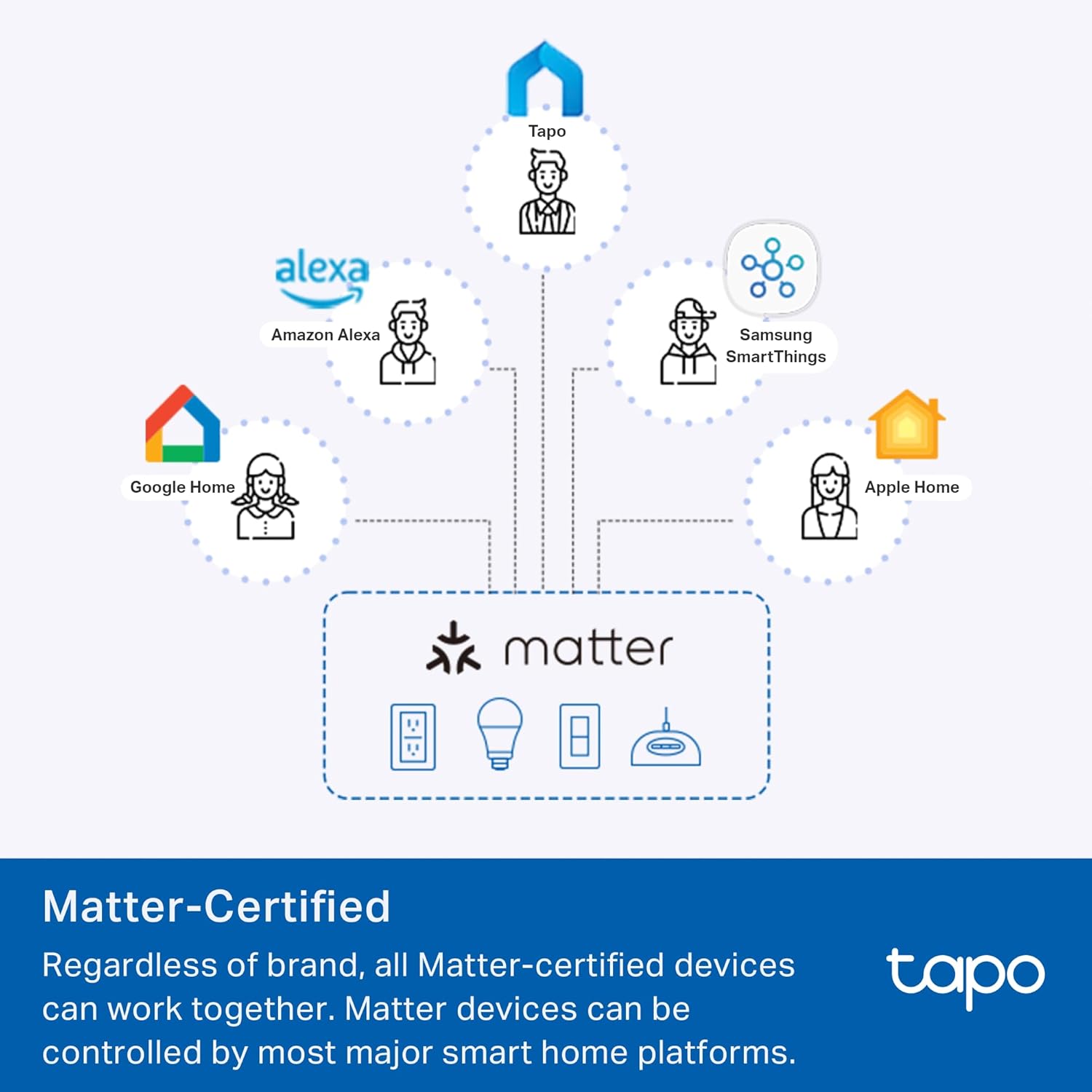
Image: A diagram illustrating Matter compatibility, showing how Tapo devices connect with Amazon Alexa, Apple Home, Google Home, and Samsung SmartThings.
Specifications
| Feature | Detail |
|---|---|
| Model Number | Tapo S515D KIT |
| Brand | Tapo |
| Operation Mode | ON-OFF-ON |
| Current Rating | 15 Amps |
| Operating Voltage | 100-120 Volts |
| Contact Type | Normally Closed |
| Connector Type | Clamp |
| Terminal | Screw |
| Dimensions (L x W x H) | 1.31 x 1.31 x 0.69 inches |
| Circuit Type | 3-way |
| Actuator Type | Toggle |
| Contact Material | Plastic |
| International Protection Rating | IP00 |
| Number of Positions | 2 |
| Lower Temperature Rating | 32 Degrees Fahrenheit (0°C) |
| Upper Temperature Rating | 104 Degrees Fahrenheit (40°C) |
| Controller Type | Amazon Alexa, Apple HomeKit, Google Assistant, IFTTT, SmartThings |
| Control Method | App, Remote, Voice |
| Connectivity Protocol | Matter, Wi-Fi (2.4GHz) |
| Color | White |
| Wattage | 600 Watts (incandescent), 15A (general) |
| Item Weight | 9.9 ounces |
| Manufacturer | TP-Link |
| Certifications | FCC, UL, RoHS |
Troubleshooting
This section addresses common issues you might encounter.
Switch Not Responding / Lights Not Turning On
- Check Power: Ensure the circuit breaker for the switch is ON.
- Neutral Wire: Verify that the neutral wire is correctly connected. This switch requires a neutral wire.
- Wiring: Double-check all wiring connections against the diagram in the Tapo app. Ensure the main dimmer and satellite dimmer are correctly identified and wired.
- Bulb Compatibility: Confirm that your light bulbs are dimmable and compatible with the dimmer switch. Some CFL lights may flicker.
- Restart: Press the Restart button on the switch.
- Factory Reset: If issues persist, perform a factory reset by pressing and holding the Reset button for approximately 10 seconds until the LED indicator blinks rapidly. Note: This will erase all settings and require re-setup.
Dimming Not Working Properly (0-100%)
- Bulb Calibration: The Tapo app often has a calibration feature for dimmers to optimize performance with specific light bulbs. Access this setting in the device's settings within the Tapo app and follow the calibration steps.
- Bulb Type: Ensure the bulbs are designed for dimming. Non-dimmable bulbs may not dim or may flicker.
Cannot Connect to Wi-Fi / App
- 2.4GHz Wi-Fi: Ensure your smartphone is connected to a 2.4GHz Wi-Fi network during setup. The switch does not support 5GHz Wi-Fi.
- Signal Strength: Ensure the switch is within range of your Wi-Fi router.
- Router Settings: Check your router settings for any MAC filtering or firewall rules that might block new devices.
- App Version: Ensure your Tapo app is updated to the latest version.
- Reboot: Try rebooting your Wi-Fi router and the smart switch.
Warranty and Support
For technical support, warranty information, and further assistance, please contact TP-Link Tapo support:
- Phone Support: (866) 225-8139
- Product Support Website: myproducts.tp-link.com/us
- Email Support: support.USA@tp-link.com
Specifications are subject to change without notice. Tapo is a registered trademark of TP-Link USA Corporation. All other brands and product names are trademarks or registered trademarks of their respective holders.
Related documentsTapo S515D KIT


Ask a question about this manual
Ask about setup, troubleshooting, compatibility, parts, safety, or missing instructions. Manuals+ will review the question and use this page’s manual context to help answer it.