
1. Introduction
Welcome to the comprehensive user manual for your Google Pixel 9 Pro XL 5G smartphone. This guide provides essential information to help you set up, operate, and maintain your device, ensuring you get the most out of its advanced features and capabilities.
The Google Pixel 9 Pro XL is designed for ultimate performance and style, featuring an advanced AI-powered triple-camera system, an expansive 6.8-inch OLED display, a lightning-fast Tensor G4 processor, and an adaptive battery. It runs on Android 14 with guaranteed software updates, offering seamless integration with Google services and robust privacy features.
2. Product Overview
The Google Pixel 9 Pro XL combines premium design with powerful hardware. Below is an overview of its key physical and technical characteristics.
2.1 Physical Design
The device features a premium design with a glass front and back, protected by Gorilla Glass Victus 2, and an aluminum frame. It weighs approximately 7.7 ounces (221 grams) and measures 6.41 x 3.02 x 0.33 inches. The phone is available in various colors, including Obsidian, Porcelain, Rose Quartz, and Hazel.

Figure 2.1: Google Pixel 9 Pro XL in Obsidian.
2.2 Display
The Pixel 9 Pro XL is equipped with a 6.8-inch LTPO OLED display, offering a resolution of 1344x2992 pixels (486 PPI) and a 120Hz refresh rate. It supports HDR10+ and boasts a peak brightness of up to 3000 nits, ensuring excellent visibility even in direct sunlight.

Figure 2.2: The 6.8-inch Super Actua display of the Pixel 9 Pro XL.
2.3 Processor and Memory
Powered by the Google Tensor G4 (4 nm) octa-core processor and 16GB of RAM, the device delivers robust performance for demanding applications and seamless multitasking. It comes with 256GB of internal storage.

Figure 2.3: The Tensor G4 chip powers advanced Pixel features.
2.4 Camera System
The Pixel 9 Pro XL features an advanced triple-camera system on the rear, including a 50MP wide lens (f/1.7), a 48MP telephoto lens (f/2.8 with 5x optical zoom), and a 48MP ultrawide lens (f/1.7, 123° field of view). The front camera is 42MP (f/2.2). It supports 8K video recording.
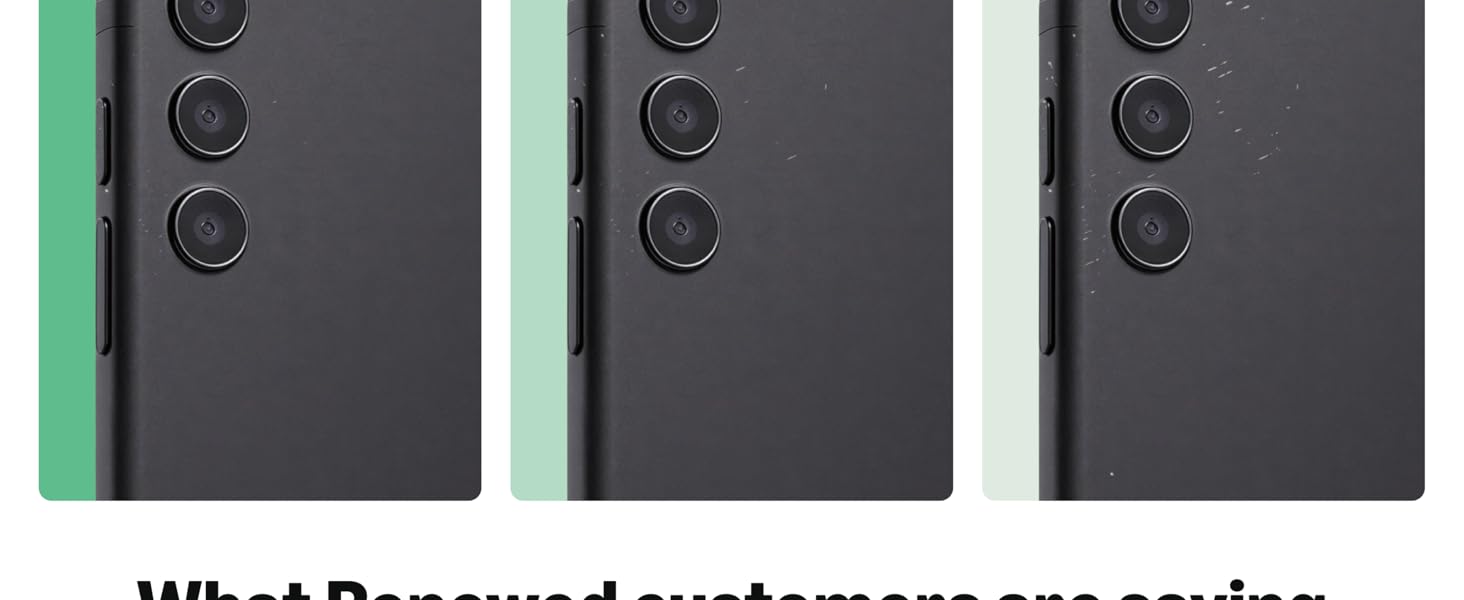
Figure 2.4: The Pixel 9 Pro XL rear camera system.
2.5 Battery
A 5060 mAh battery provides extended usage. The device supports fast charging up to 45W with compatible chargers and wireless charging using Qi standards.
3. Setup
3.1 Unboxing and Initial Inspection
Upon receiving your Google Pixel 9 Pro XL, carefully unbox the device and check for all included accessories, such as the charging cable. Inspect the phone for any physical damage before proceeding with setup.
Video 3.1: Unboxing the Google Pixel 9 Pro XL, showing the phone and included charging cable.
3.2 Powering On and Basic Configuration
- Press and hold the power button on the side of the device until the Google logo appears.
- Follow the on-screen prompts to select your language, connect to a Wi-Fi network, and accept the terms and conditions.
- Sign in with your Google account or create a new one. This is essential for accessing Google services and apps.
- Set up your preferred security method, such as fingerprint unlock (under-display sensor), Face ID, PIN, or password.
- Transfer data from your old device if prompted, or set up as a new phone.
4. Operating Your Device
4.1 Navigation and Interface
The Pixel 9 Pro XL runs on Android 14, offering an intuitive and customizable user interface. Use gestures or the traditional navigation bar to move between apps, access the home screen, and view recent applications.
4.2 Customizing Your Device
- Wallpapers & Style: Personalize your home screen and lock screen with various wallpapers, themes, and icon shapes.
- Widgets: Add widgets to your home screen for quick access to information and app functions.
- Quick Settings: Swipe down from the top of the screen to access quick settings for Wi-Fi, Bluetooth, brightness, and more.
4.3 AI Features and Google Integration
Leverage the power of Google's AI with features like Gemini for on-the-spot information, voice commands, and advanced photo processing. The Tensor G4 chip enhances these AI capabilities for a smoother and more intelligent user experience.
Video 4.1: A review showcasing the Google Pixel 9 Pro XL's features and performance.
5. Camera Features
The Pixel 9 Pro XL's camera system is designed to capture stunning photos and videos in various conditions. Here are some key features:
- 50MP Main Camera: For high-resolution, detailed shots.
- 48MP Ultrawide Lens: Capture expansive landscapes and group photos with a 123° field of view.
- 48MP Telephoto Lens: Offers 5x optical zoom for clear, close-up shots from a distance.
- Night Sight: Enhanced low-light photography for bright and detailed images in challenging lighting.
- Portrait Mode: Create professional-looking portraits with blurred backgrounds.
- 8K Video: Record ultra-high-definition videos.
Video 5.1: Demonstrating the camera capabilities of the Google Pixel 9 Pro XL.
6. Performance and Battery
The Google Pixel 9 Pro XL is engineered for sustained performance and long-lasting battery life.
6.1 Google Tensor G4
The custom-designed Tensor G4 chip optimizes performance for AI tasks, gaming, and everyday use, ensuring a smooth and responsive experience. It also contributes to enhanced security and power efficiency.
6.2 Battery Life and Charging
The 5060 mAh battery is designed to last a full day or more with moderate usage. Fast charging (up to 45W) allows for quick power-ups, and wireless charging provides convenient cable-free power.
7. Specifications
| Feature | Specification |
|---|---|
| Display | 6.8" LTPO OLED, 1344x2992 px, 120Hz, HDR10+, 3000 nits peak brightness |
| Processor | Google Tensor G4 (4 nm), Octa-core |
| RAM | 16 GB |
| Storage | 256 GB |
| Rear Camera | 50MP (wide), 48MP (telephoto, 5x optical zoom), 48MP (ultrawide) |
| Front Camera | 42MP |
| Battery | 5060 mAh, 45W Fast Charging, Wireless Charging |
| Operating System | Android 14 (with 7 major software updates) |
| Connectivity | 5G (SA/NSA/Sub6/mmWave), 4G LTE, 3G, Bluetooth 5.3, Wi-Fi |
| Dimensions | 6.41 x 3.02 x 0.33 inches |
| Weight | 7.7 ounces (0.48 Pounds) |
| Security | Finger Print Under Display, Face ID |
8. Maintenance
To ensure the longevity and optimal performance of your Google Pixel 9 Pro XL, follow these maintenance guidelines:
- Software Updates: Regularly install system updates to receive the latest security patches and feature enhancements. Google provides 7 major software updates for this device.
- Cleaning: Use a soft, lint-free cloth to clean the screen and body. Avoid harsh chemicals or abrasive materials.
- Battery Care: Avoid extreme temperatures. For optimal battery health, try to keep the charge between 20% and 80% when possible.
- Storage Management: Periodically clear unnecessary files and apps to free up storage space and maintain performance.
- Protection: Consider using a protective case and screen protector to guard against drops and scratches.
9. Troubleshooting
If you encounter issues with your device, try the following troubleshooting steps:
- Restart Device: A simple restart can resolve many minor software glitches.
- Check for Updates: Ensure your device's software is up to date. Go to Settings > System > System update.
- Clear App Cache: If an app is misbehaving, try clearing its cache. Go to Settings > Apps > See all apps > [App Name] > Storage & cache > Clear cache.
- Network Issues: For connectivity problems, try toggling Wi-Fi or mobile data off and on. You can also reset network settings via Settings > System > Reset options > Reset Wi-Fi, mobile & Bluetooth.
- Factory Reset: As a last resort, you can perform a factory reset. Warning: This will erase all data on your device. Back up important data before proceeding. Go to Settings > System > Reset options > Erase all data (factory reset).
10. Warranty and Support
This Google Pixel 9 Pro XL is a renewed product. Renewed products are fully functional and come with generic or original accessories and packaging. They typically include a return policy of 365 days for refund/replacement.
10.1 Amazon Renewed Conditions
Amazon Renewed products are categorized by their cosmetic condition and battery life:
- Excellent: No cosmetic damage visible from 12 inches away. Screen: No scratches. Battery life: Greater than 80%.
- Good: Light scratches, barely visible from 12 inches away. Screen: No scratches. Battery life: Greater than 80%.
- Acceptable: Light scratches, clearly visible from 12 inches away. Screen: May have scratches, invisible when turned on. Battery life: Greater than 80%.
Figure 10.1: Amazon Renewed product condition guidelines.
10.2 Additional Support
For further assistance, please refer to the official Google Pixel support website or contact your seller for specific warranty details and service options.


