1. Important Safety Instructions
Read all instructions carefully before using the appliance. Keep this manual for future reference. Failure to follow these instructions may result in electric shock, fire, or personal injury.
- Electrical Safety: Ensure the oven is properly grounded. Do not operate with a damaged power cord or plug. Disconnect power before servicing.
- Hot Surfaces: The oven interior and exterior surfaces become hot during operation. Use oven mitts when handling hot items. Keep children away from the oven during and after use.
- Child Safety: This oven is equipped with a safety lock feature to prevent accidental operation by children. Activate the child lock when the oven is not in use. The triple-layer tempered glass door is designed to remain cool to the touch on the outside, reducing burn risk.
- Proper Ventilation: Ensure adequate ventilation around the oven as specified in the installation instructions.
- Flammable Materials: Do not store or use flammable materials near the oven.
- Cleaning: Always allow the oven to cool completely before cleaning. Refer to the 'Care and Maintenance' section for detailed cleaning instructions.
2. Product Overview
The GarveeTech 24-inch Electric Convection Wall Oven offers a versatile cooking experience with its 2.5 cubic feet capacity and multiple cooking functions. It features intuitive touch controls, a 360° rotisserie, and advanced convection heating for even cooking.

Image: The GarveeTech 24-inch Electric Convection Wall Oven, highlighting its 2.5 cubic feet large capacity, suitable for roasting a whole chicken.
Key Features:
- 2.5 Cu.Ft. Capacity: Spacious interior to accommodate various dishes, including a whole chicken.
- 360° Rotisserie: Ensures even cooking and browning for poultry and roasts.
- 8 Cooking Functions: Includes Roast, Bake, Double Grill, Broil, and more.
- Touch Control Panel: User-friendly interface for precise temperature and time settings.
- Triple-Layer Tempered Glass Door: Provides effective heat insulation and anti-scalding protection.
- Safety Lock: Prevents unintended operation, enhancing home safety.
3. Installation
Proper installation is crucial for the safe and efficient operation of your GarveeTech wall oven. It is recommended that installation be performed by a qualified electrician or installer.
3.1 Pre-Installation Checks
- Power Supply: Ensure a dedicated 240V, 3000W electrical circuit is available.
- Cabinet Dimensions: Verify that your cabinet opening meets the standard dimensions for a 24-inch wall oven. Refer to the diagram below for precise measurements.
- Clearances: Maintain adequate clearances from adjacent cabinets and combustible materials.
3.2 Installation Steps (General Guidelines)
- Carefully remove the oven from its packaging.
- Connect the oven to the dedicated electrical supply according to local electrical codes.
- Slide the oven into the prepared cabinet opening.
- Secure the oven to the cabinet using the provided mounting screws.
- Test all functions to ensure proper operation.
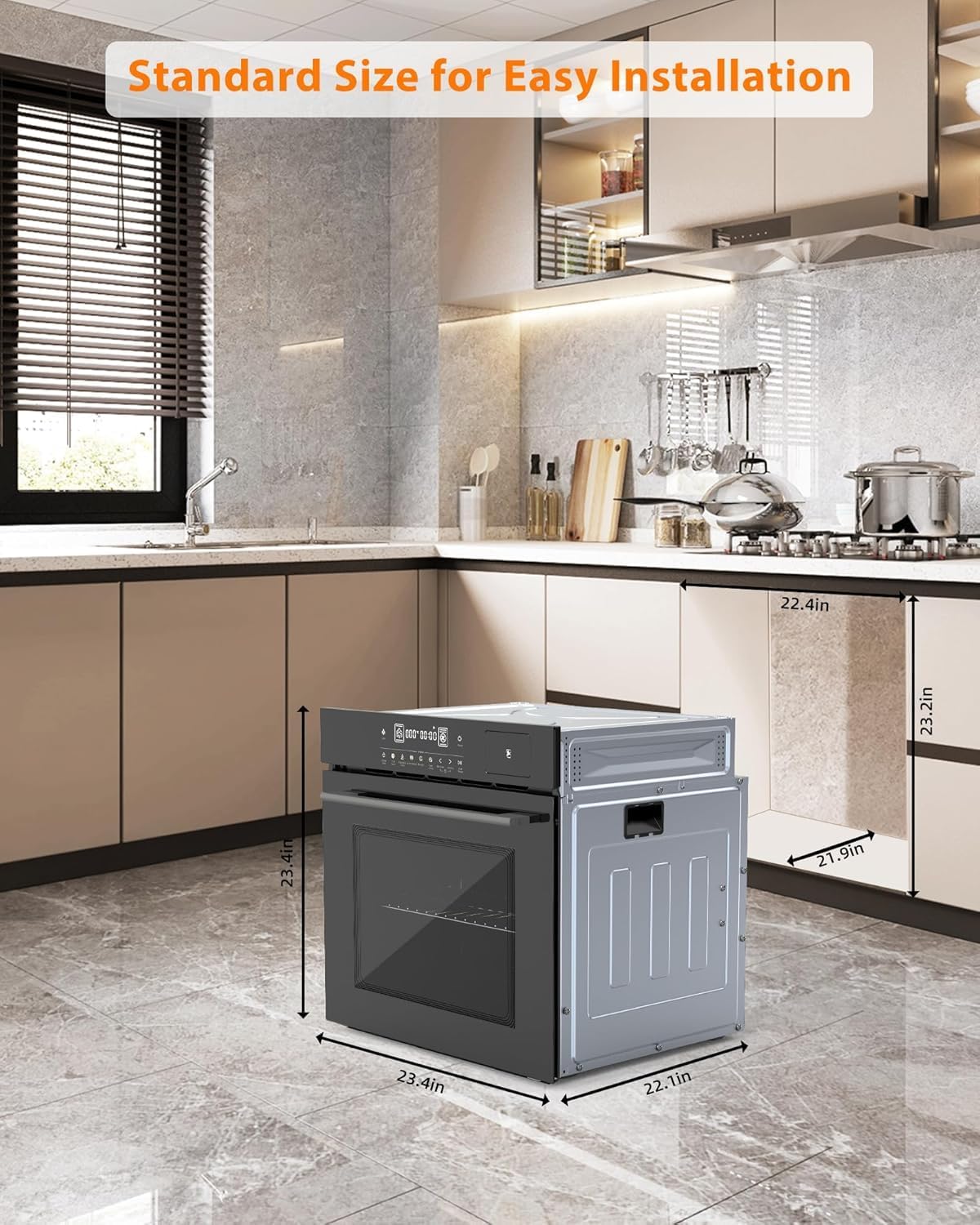
Image: A diagram illustrating the standard dimensions for installing the 24-inch electric wall oven, including width, height, and depth measurements for proper fit.
4. Operating Your Oven
Your GarveeTech wall oven features an intuitive touch control panel and various cooking modes to simplify your culinary tasks.
4.1 Control Panel Overview
The sleek black tempered glass touch display allows for easy selection of functions, temperature, and time settings.
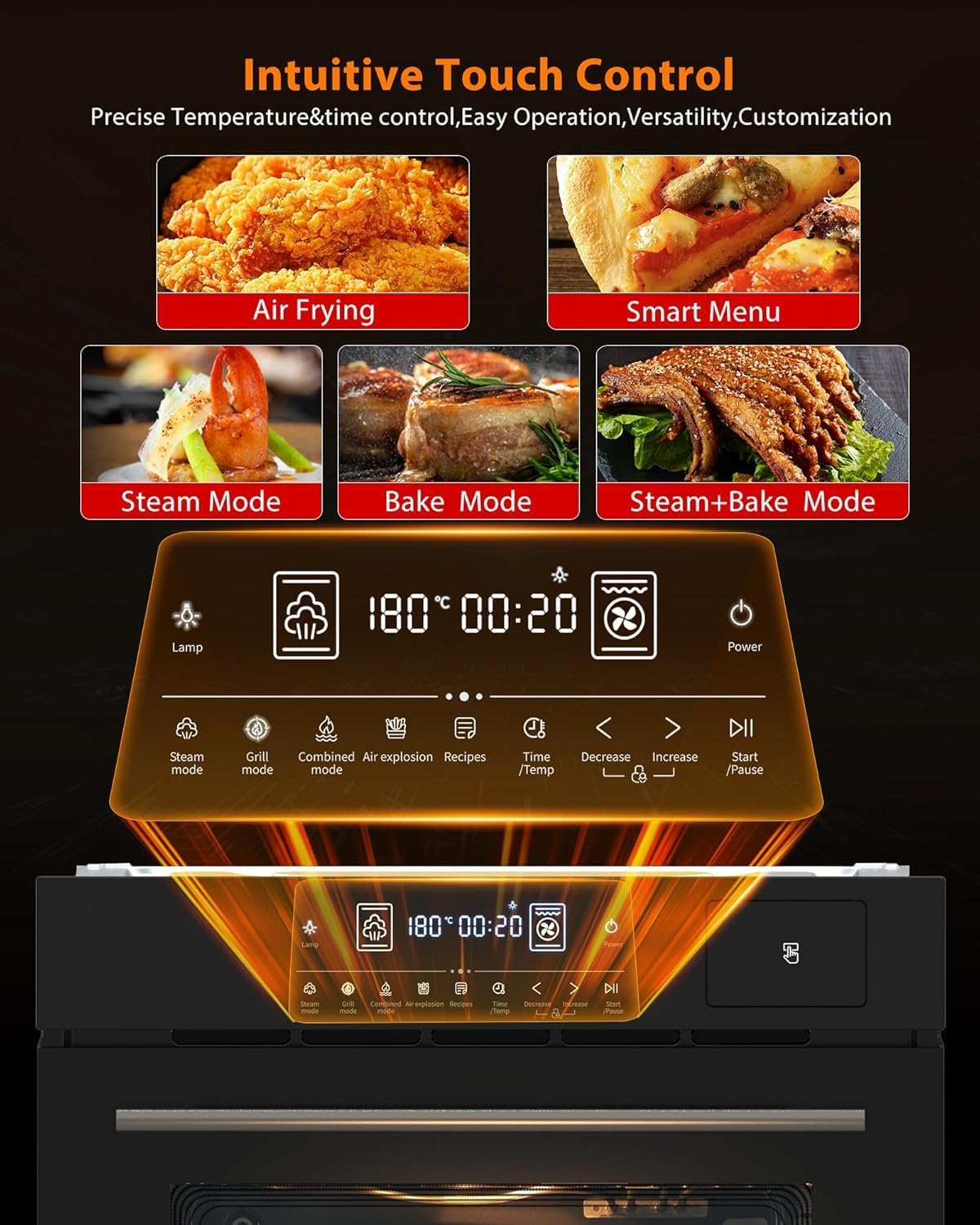
Image: A detailed view of the oven's intuitive touch control panel, showing icons for lamp, various cooking modes, temperature/time settings, and power.
4.2 Basic Operation
- Power On/Off: Touch the 'Power' icon to turn the oven on or off.
- Setting Temperature and Time: Use the 'Time/Temp' icon and the increase/decrease arrows to adjust settings.
- Start/Pause: Press the 'Start/Pause' icon to begin or temporarily stop a cooking cycle.
- Timer Function: The multi-function timer can be set for automatic on/off times.
4.3 Cooking Functions
The oven offers a variety of cooking modes to suit different recipes:
- 360° Rotisserie: Ideal for roasting whole chickens or large cuts of meat, ensuring even cooking and a crispy exterior.
- Convection Baking/Roasting: Utilizes a fan to circulate heated air (3D Surround Heating, All-round 3D Heating, Precision Airflow) for faster and more uniform cooking.
- Grill/Broil: For browning and crisping the top of dishes.
- Defrost Function: A rapid defrost feature for frozen foods.
- Automatic Programming Modes: Five pre-set modes including Roast, Bake, Double Grill, and Broil, with pre-set temperature and time. The oven also features 108 programmed smart menus for one-touch access to various dishes.
- Special Functions: Includes 'Keep Warm' to maintain food temperature, 'Drying' for dehydrating, and 'Steam Cleaning' for easy maintenance.

Image: The oven interior demonstrating the 3D surround heating technology, with heating elements surrounding a roasted chicken for even cooking.

Image: A visual representation of different cooking functions available, showing examples like scheduling, defrosting, keeping warm, drying, and steam cleaning.

Image: The oven's control panel highlighting the '108 Automatic Menus' feature, offering one-touch cooking options for a wide range of dishes.
5. Care and Maintenance
Regular cleaning and maintenance will ensure the longevity and optimal performance of your oven.
5.1 Cleaning the Interior
The oven features an easy-to-clean enamel tank that is resistant to stains and heat discoloration. For best results:
- Allow the oven to cool completely before cleaning.
- Wipe down the interior with a damp cloth and mild detergent after each use.
- For stubborn stains, use a non-abrasive oven cleaner suitable for enamel surfaces.
- Utilize the 'Steam Cleaning' function for easier removal of baked-on residue.
5.2 Cleaning the Exterior
The exterior, including the tempered glass door and control panel, can be cleaned with a soft cloth and a non-abrasive cleaner. Avoid spraying cleaners directly onto the control panel.

Image: A hand wearing a yellow glove cleaning the interior enamel surface of the oven with a blue sponge, demonstrating the ease of cleaning.
6. Troubleshooting
If you encounter issues with your oven, refer to the following common problems and solutions. If the problem persists, contact customer support.
| Problem | Possible Cause | Solution |
|---|---|---|
| Oven does not turn on | No power supply; circuit breaker tripped; oven not properly plugged in. | Check power connection; reset circuit breaker; ensure plug is fully inserted. |
| Oven not heating properly | Incorrect temperature setting; door not fully closed; heating element issue. | Verify temperature setting; ensure door is sealed; contact service if heating element is suspected. |
| Display not working | Power interruption; control panel malfunction. | Cycle power to the oven; if issue persists, contact customer support. |
| Child lock engaged | Safety lock activated. | Refer to the control panel instructions to deactivate the child lock. |
7. Product Specifications
| Specification | Detail |
|---|---|
| Brand | GarveeTech |
| Model Info | KD-SingleWallOven-Black-WjQfocA |
| Capacity | 2.5 Cubic Feet (70L) |
| Item Weight | 92.9 pounds |
| Package Dimensions | 26.81 x 25.83 x 25.79 inches |
| Voltage | 240V |
| Wattage / Annual Energy Consumption | 3000 Watts |
| Fuel Type | Electric |
| Oven Cooking Mode | Radiant |
| Burner Type | Ceramic |
| Special Features | Child Lock, 360° Rotisserie, Convection, Timer |
| Defrost | Auto Defrost |
| Material Type | Alloy Steel |
| Color | Black |
8. Warranty and Customer Support
GarveeTech is committed to providing high-quality products and customer satisfaction. For warranty information or technical assistance, please contact our customer support team.
Please have your model number (KD-SingleWallOven-Black-WjQfocA) and purchase date available when contacting support.
For the most up-to-date warranty details and support contact information, please visit the official GarveeTech website or refer to your purchase documentation.


