
1. Introduction
Thank you for choosing the XINDADA HW12 Ultra 3 Smartwatch. This manual provides essential information for setting up, operating, and maintaining your device. Please read it carefully to ensure optimal performance and longevity of your smartwatch.
2. Setup
2.1 System Requirements
- Android 5.0 or higher
- iOS 10.0 or higher
2.2 Charging the Smartwatch
Before first use, fully charge your smartwatch. The device uses a wireless charger. Place the smartwatch on the charging base, ensuring the charging contacts align. The screen will indicate charging status.
2.3 App Installation (WearFit Pro)
Download the 'WearFit Pro' application from your smartphone's app store (Google Play Store for Android or Apple App Store for iOS). Install the app and grant necessary permissions.
2.4 Pairing with Your Smartphone
- Ensure Bluetooth is enabled on your smartphone.
- Open the 'WearFit Pro' app.
- Follow the in-app instructions to search for and connect to your HW12 Ultra 3 Smartwatch. The smartwatch uses Bluetooth 5.2 for a stable connection.
- Confirm the pairing request on both your smartphone and smartwatch.
3. Operating Instructions
3.1 Basic Navigation
The smartwatch features a full-screen touch display. Swipe left, right, up, or down to navigate through menus and features. Press the side button to return to the home screen or access the app menu.
3.2 Display and Watch Dials
The HW12 Ultra 3 features a 2-inch square display with a resolution of 320x390 pixels. You can customize your watch face from 5 local dials and 3 menu styles available on the device, or explore more options through the WearFit Pro app's dial market.

Image: The smartwatch display showcasing its high-color development and slim bezels, highlighting a new visual experience with 320x390 resolution and 2.10 inch IPS HD screen.
3.3 Intelligent Voice Assistant
Activate the intelligent AI voice assistant to perform various tasks hands-free. You can make calls, check the weather, ask for directions, or find restaurants by simply speaking to your smartwatch.

Image: The smartwatch screen showing the intelligent voice assistant interface, ready to receive commands.
3.4 Notifications and Dynamic Island
Receive message alerts and other notifications directly on your smartwatch. The Dynamic Island feature adapts to display important notifications and events with various animations, providing a dynamic user experience.

Image: The smartwatch display illustrating the Dynamic Island feature, showing hover message notifications and battery status.
3.5 Gesture Control and Remote Photography
The smartwatch supports new gesture controls for convenient operation. For example, you can answer calls with a touch of your finger or shake the watch to take a photo remotely when connected to your phone's camera function via the mobile app.
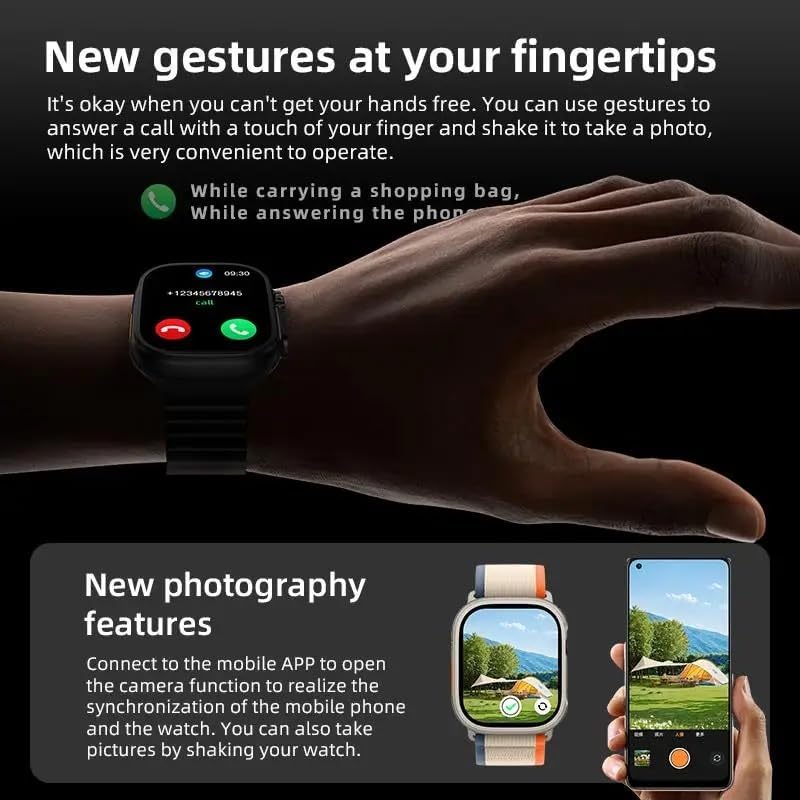
Image: A user demonstrating new gestures for answering calls and the remote photography feature, showing the smartwatch connected to a smartphone camera.
3.6 Multiple Sports Modes
The HW12 Ultra 3 Smartwatch supports a variety of sports modes, including outdoor running, outdoor cycling, mountaineering, and triathlon. The professional algorithm optimizes data collection for more accurate sports tracking.

Image: The smartwatch screen showing sports data, including duration, heart rate, calories burned, steps, and distance, during an outdoor activity.
3.7 Connectivity Features
- Bluetooth Calls: Make and receive calls directly from your smartwatch.
- NFC: Utilize NFC functionality for various applications (check local availability and compatibility).
- Music Control: Control music playback on your smartphone from your watch.
3.8 Health Monitoring
- Heart Rate Monitoring: The smartwatch is equipped with a 1688 heart rate chip for continuous monitoring.
- Health Reminders: Receive reminders for activity, hydration, and other health-related alerts.
3.9 Other Functions
- Weather: Get real-time weather updates.
- Alarm Clock: Set alarms directly on your watch.
- Timer & Stopwatch: Built-in tools for timing activities.
- Calculator: Access a basic calculator.
- Password Settings: Enhance security by setting a password for your smartwatch.
- Language Settings: Supports multiple languages including Simplified Chinese, English, Arabic, French, German, Spanish, Portuguese, Russian, Thai, Hindi, Turkish, Persian, Hebrew, Indonesian, Ukrainian.
- Do Not Disturb Mode: Silence notifications during specific times.
- Raise Wrist to Wake Screen: Automatically activate the display when you raise your wrist.
4. Maintenance
4.1 Water Resistance
The HW12 Ultra 3 Smartwatch has an IP68 water resistance rating, meaning it is protected against dust and can withstand immersion in water up to 1.5 meters for 30 minutes. It is suitable for daily use and light water activities, but not recommended for diving or high-pressure water activities.
4.2 Cleaning and Care
- Wipe the smartwatch regularly with a soft, dry cloth.
- Avoid using harsh chemicals or abrasive materials.
- Ensure the charging contacts are clean and dry before charging.
5. Troubleshooting
5.1 Device Not Turning On
Ensure the smartwatch is fully charged. Connect it to the wireless charger and wait for a few minutes before attempting to power it on again.
5.2 Unable to Pair with Smartphone
- Check if Bluetooth is enabled on your smartphone.
- Ensure the smartwatch is within range of your smartphone.
- Restart both your smartwatch and smartphone.
- Clear the Bluetooth cache on your smartphone and try pairing again.
5.3 Inaccurate Health Data
Ensure the smartwatch is worn snugly on your wrist, not too tight or too loose. Keep the sensor clean. Environmental factors and individual physiology can affect accuracy.
5.4 Short Battery Life
Reduce screen brightness, limit background app refresh, and disable unnecessary notifications to extend battery life. Ensure the smartwatch is fully charged each time.
6. Specifications
| Brand | XINDADA |
| Model | HW12 Ultra 3 |
| Main Control Chip | 5691 |
| Bracelet Memory | 128M |
| Bluetooth Version | 5.2 |
| Heart Rate Chip | 1688 |
| Display Screen | 2-inch square, 320 x 390 resolution |
| Battery Capacity | 550 mAh |
| Standby Time | Approximately 25 days |
| Usage Time | Approximately 14 days |
| Charging Method | Wireless Charger |
| Waterproof Rating | IP68 |
| G-Sensor | 3-axis |
| Companion App | WearFit Pro |
7. Warranty and Support
For warranty information or technical support, please refer to the documentation provided with your purchase or contact the retailer. Keep your proof of purchase for any warranty claims.