
XINDADA HW12 Ultra 3
XINDADA HW12 Ultra 3 Smart Watch User Manual
Model: HW12 Ultra 3
Brand: XINDADA
1. Introduction
The XINDADA HW12 Ultra 3 Smart Watch is a versatile wearable device designed to enhance your daily life with advanced features. It combines communication, health monitoring, and fitness tracking capabilities in a sleek, modern design.
Key features include Bluetooth calling, music control, voice assistant, NFC, gesture control, and comprehensive health monitoring. This manual provides detailed instructions on how to set up, operate, and maintain your smartwatch.

Figure 1: XINDADA HW12 Ultra 3 Smart Watch with a customizable Snoopy watch face and an orange strap.
2. Setup
2.1 Charging the Smart Watch
Before first use, fully charge your smartwatch. The device uses a wireless charger. Connect the wireless charger to a power source and place the watch on the charging pad. The watch display will indicate charging status.
- Battery Capacity: 550mAH
- Standby Time: Approximately 25 days
- Usage Time: Approximately 14 days
2.2 App Installation and Pairing
To unlock the full functionality of your smartwatch, download and install the WearFit pro application on your smartphone. The app is compatible with Android 5.0+ and iOS 10.0+ devices.
- Scan the QR code provided in the watch's initial setup screen or search for "WearFit pro" in your smartphone's app store.
- Install the application.
- Open the WearFit pro app and follow the on-screen instructions to create an account or log in.
- Enable Bluetooth on your smartphone.
- In the WearFit pro app, navigate to the device pairing section and select your HW12 Ultra 3 Smart Watch from the list of available devices.
- Confirm the pairing request on both your smartphone and the smartwatch.
Ensure your smartphone's Bluetooth is active (version 5.2 recommended for optimal performance) during the pairing process.
3. Operating Instructions
3.1 Display and Navigation
The HW12 Ultra 3 features a 2-inch square TFT display with a resolution of 320x390 pixels, offering a clear and vibrant visual experience. Navigation is primarily through full-screen touch gestures.

Figure 2: The 2.10-inch high-color screen development with 320x390 resolution and 249PPI IPS HD display.
- Swipe Up/Down: Access quick settings or notifications.
- Swipe Left/Right: Navigate between different widgets or main menu screens.
- Tap: Select an item or open an application.
- Press and Hold: Customize watch faces or access specific functions.
3.2 Voice Assistant
The smartwatch integrates an intelligent AI voice assistant. You can activate it to make calls, check the weather, ask for directions, or find nearby restaurants. Simply wake up the assistant with the designated voice command or gesture.

Figure 3: The intelligent voice assistant allows for hands-free commands and information retrieval.
3.3 Notifications and Dynamic Island
Receive message alerts and other notifications directly on your watch. The innovative Dynamic Island feature adapts to your usage status, displaying various animations and important notifications or events dynamically.

Figure 4: The Dynamic Island feature provides interactive and adaptive notifications.
3.4 Gesture Control and Remote Photography
The smartwatch supports new gesture controls for convenient operation. For example, you can answer calls with a simple finger touch or shake the watch to take a photo remotely when connected to your phone's camera.
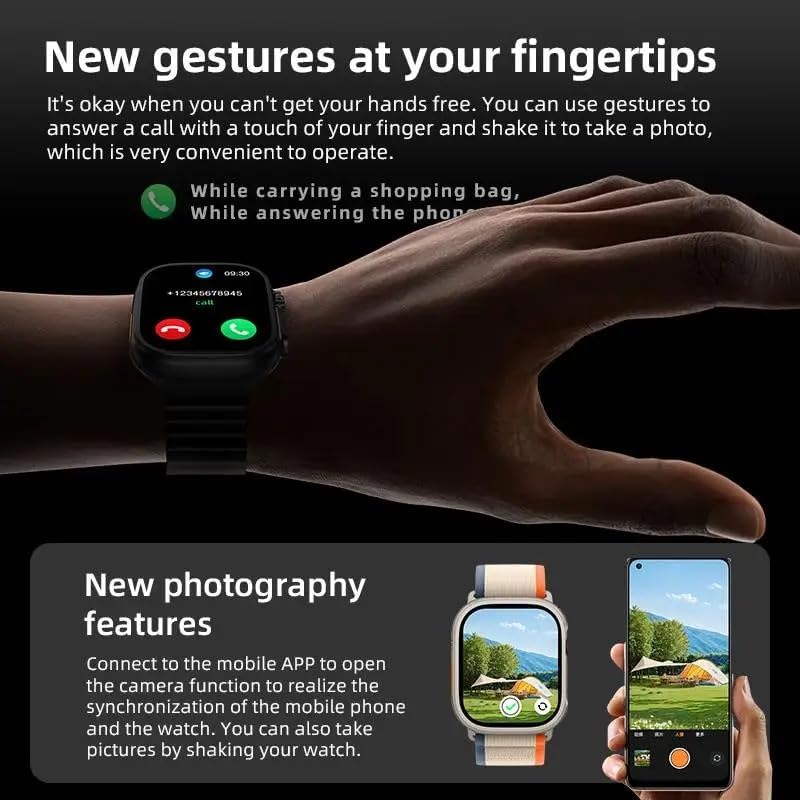
Figure 5: Gesture controls allow for hands-free call answering, and the watch can remotely trigger your phone's camera.
3.5 Sports Modes and Activity Tracking
The HW12 Ultra 3 supports multiple sports modes, including outdoor running, cycling, mountaineering, and triathlon. It uses a professional algorithm model to optimize and accurately track your sports data, such as steps, calories burned, and distance.

Figure 6: The smartwatch tracks various sports activities, providing detailed metrics like duration, calories, and distance.
3.6 Additional Features
- Bluetooth Calls: Make and receive calls directly from your watch.
- Music Control: Control music playback on your connected smartphone.
- Health Monitoring: Monitor heart rate (chip 1688), blood pressure, and breathing rate.
- NFC: Supports NFC functionality (specific uses may vary by region and setup).
- Dial Market & Customization: Access a wide range of watch faces (5 local, 50+ in dial market) and customize your album dial.
- Find Your Phone: Locate your misplaced smartphone using the watch.
- Health Reminders: Set reminders for activity, hydration, etc.
- Wallet & Business Card Holder: Digital wallet and business card storage features.
- Calendar & Weather: Access calendar events and real-time weather updates.
- Stopwatch & Timer: Built-in tools for timing activities.
- Alarm Clock & DND Mode: Set alarms and enable Do Not Disturb mode.
- Raise Wrist to Wake: Automatically activate the screen by raising your wrist.
- Calculator: A convenient calculator on your wrist.
- Screen-off Dial: Display a minimal dial when the screen is off.
- Siren v1.0: A siren feature for emergencies or alerts.
- Incoming Call Ringtones: Customize ringtones for incoming calls.
- Vibration Mode: Set vibration alerts.
- Audio Drainage: Feature to expel water from the speaker.
- Password Settings: Secure your watch with a password.
4. Maintenance
To ensure the longevity and optimal performance of your XINDADA HW12 Ultra 3 Smart Watch, follow these maintenance guidelines:
- Water Resistance: The watch has an IP68 waterproof rating, meaning it is resistant to dust and can withstand immersion in water up to 1.5 meters for 30 minutes. It is suitable for daily use, hand washing, and light rain. Avoid hot water, saunas, or diving.
- Cleaning: Regularly clean the watch and strap with a soft, dry cloth. If necessary, use a slightly damp cloth and mild soap, then dry thoroughly. Avoid harsh chemicals or abrasive materials.
- Storage: Store the watch in a cool, dry place when not in use.
- Avoid Extreme Temperatures: Do not expose the watch to extreme hot or cold temperatures, as this can affect battery life and component integrity.
5. Troubleshooting
If you encounter issues with your smartwatch, try the following troubleshooting steps:
- Watch Not Turning On: Ensure the watch is fully charged. Connect it to the wireless charger and wait a few minutes before attempting to power it on.
- Cannot Pair with Phone:
- Ensure Bluetooth is enabled on both the watch and your phone.
- Make sure the WearFit pro app is open and running.
- Restart both the watch and your phone.
- Check if the watch is already paired with another device. Disconnect if necessary.
- Ensure your phone meets the system requirements (Android 5.0+ / iOS 10.0+).
- Inaccurate Health Data:
- Ensure the watch is worn snugly on your wrist, not too loose or too tight.
- Clean the sensor on the back of the watch.
- Note that health data is for reference only and not for medical diagnosis.
- Notifications Not Appearing:
- Check notification settings in the WearFit pro app and on your phone.
- Ensure the watch is connected via Bluetooth.
- Disable Do Not Disturb mode on the watch if it's active.
- Short Battery Life:
- Reduce screen brightness.
- Limit background app refresh.
- Turn off unnecessary features like always-on display if available.
If the problem persists, refer to the WearFit pro app's help section or contact customer support.
6. Specifications
| Feature | Specification |
|---|---|
| Brand | XINDADA |
| Model | HW12 Ultra 3 |
| Display | 2-inch square TFT, 320*390 resolution |
| Main Control Chip | 5691 |
| Memory (Armband) | 128MB |
| Bluetooth Version | 5.2 |
| Heart Rate Chip | 1688 |
| Battery Capacity | 550mAH |
| Standby Time | 25 days |
| Usage Time | Approx. 14 days |
| Charging Port | Wireless Charger |
| Waterproof Rating | IP68 |
| Sensor | G-sensor 3-axis |
| Local Watch Faces | 5 |
| Dial Market | 50+ |
| Menu Style | 3 |
| Companion App | WearFit pro |
| System Requirements | Android 5.0+ / iOS 10.0+ |
| Supported Languages | Simplified Chinese, English, Arabic, French, German, Spanish, Portuguese, Russian, Thai, Hindi, Turkish, Persian, Hebrew, Indonesian, Ukrainian |
| Color | Orange |
7. Warranty and Support
This product comes with a standard manufacturer's warranty. Please refer to the warranty card included in your product packaging for specific terms and conditions. For technical support, troubleshooting assistance, or warranty claims, please contact XINDADA customer service through the WearFit pro app or the contact information provided on the official XINDADA website.
Keep your purchase receipt as proof of purchase for warranty purposes.
Ask a question about this manual
Ask about setup, troubleshooting, compatibility, parts, safety, or missing instructions. Manuals+ will review the question and use this page’s manual context to help answer it.