1. Introduction and Overview
The AUGUESLD SK-120 is a compact and versatile 120W Buck Boost Power Converter designed for various DC power applications. It features a full-view VA color LCD screen for clear display of real-time voltage, current, and power values. This module offers adjustable output voltage from 0-36V and current up to 6A, with an input voltage range of 6.0-36V. It incorporates multiple protection functions to ensure safe and reliable operation.

Figure 1: Front and internal view of the SK-120 Buck Boost Power Converter, showcasing its display and internal components.
2. Product Features
- Wide Input/Output Range: Input DC 6.0-36V, Output DC 0-36V, Max Output Current 6A, Max Output Power 120W.
- VA Color LCD Screen: Full-view display for clear and intuitive viewing of voltage, current, and power.
- Comprehensive Protection: Includes anti-reverse connection, anti-reverse current, under-voltage protection, over-voltage protection, over-current protection, over-temperature protection, and over-power protection.
- Versatile Application: Suitable for use as a desktop small power supply, solar charging controller, and various DIY electronic projects.
- MPPT Functionality: Supports MPPT solar charging when an external temperature probe is connected.

Figure 2: Detailed view of the SK-120's control panel, highlighting the VSET, SW, ISET, Encoder, and Power buttons, along with display sections for voltage, current, and power.

Figure 3: Internal layout of the SK-120, showing high-quality solid-state capacitors, intelligent temperature-controlled fan, dual inductance design, and input/output terminals.
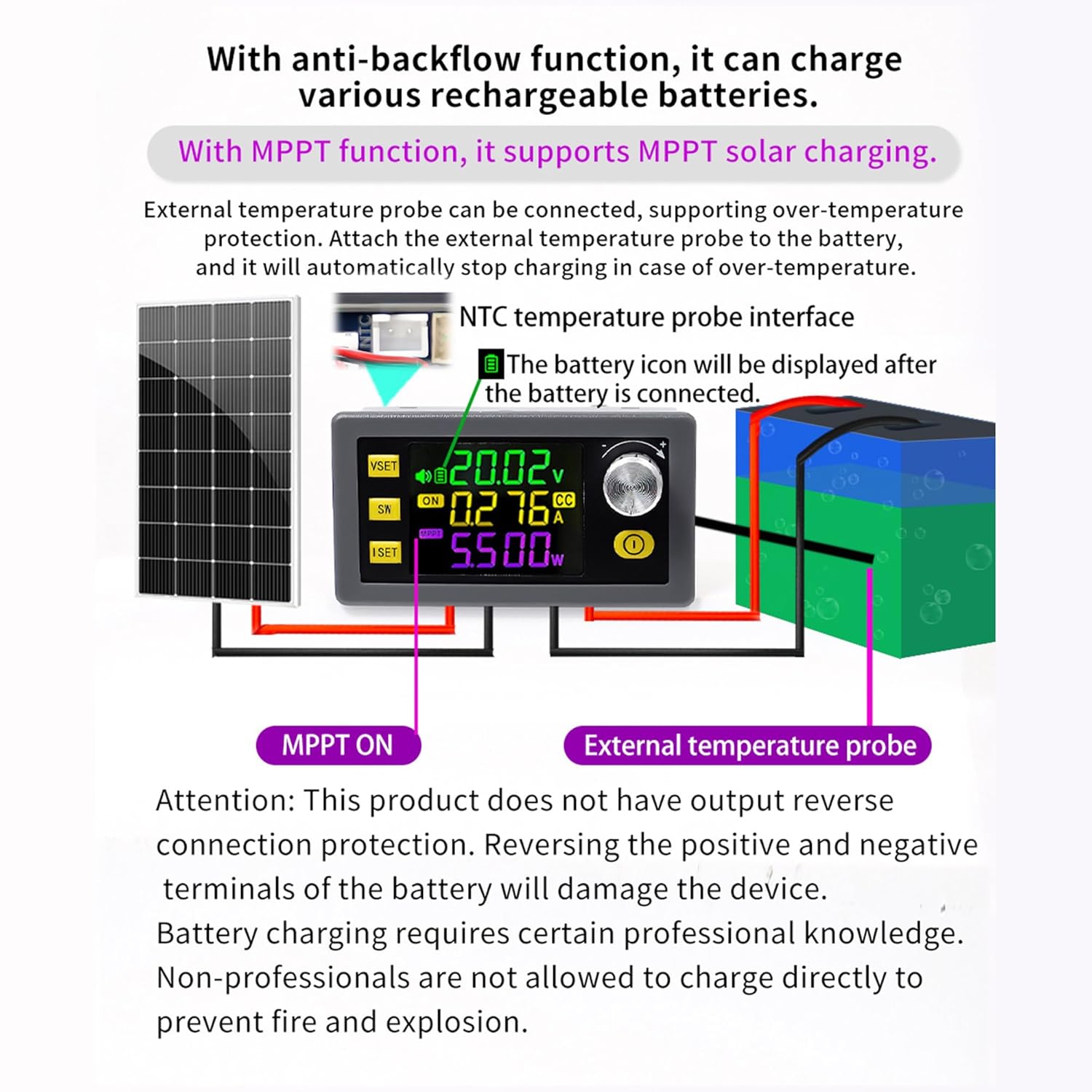
Figure 4: Illustration of the SK-120's anti-backflow function for battery charging and support for MPPT solar charging with an external NTC temperature probe. Important: This product does not have output reverse connection protection. Reversing positive and negative terminals of the battery will damage the device. Battery charging requires professional knowledge.
3. Package Contents
Upon opening the package, you should find the following item:
- 1 x DC Buck Boost Power Converter (SK120)
4. Setup and Installation
The SK-120 is designed for easy integration into various projects. Ensure proper wiring and observe polarity to prevent damage.
4.1 Wiring Connections
Connect your input power source to the IN+ and IN- terminals and your load to the OUT+ and OUT- terminals. Refer to Figure 3 for a visual guide on wiring.
4.2 Physical Dimensions and Mounting
Consider the product dimensions for proper enclosure or mounting. The module measures approximately 79mm (W) x 43mm (H) x 50mm (D) and weighs 108g. A suggested opening size for panel mounting is 71.3mm x 39mm.

Figure 5: Dimensions of the SK-120 module and recommended panel opening size for installation.
4.3 Terminal Upgrade
The module features upgraded plug-and-pull terminals for easy disassembly and replacement, simplifying installation and maintenance.

Figure 6: Close-up view of the built-in buzzer and the convenient plug-and-pull terminals for easy wiring.
5. Operating Instructions
The SK-120 features an intuitive interface for setting and monitoring parameters.
5.1 Setting Voltage and Current
To set the output voltage or current:
- On the main UI, briefly press the VSET button to set the voltage. The LCD will display "SET" in the lower row, and "CV" will flash, indicating the voltage setting position is selected and blinking.
- Briefly press the SW button or rotate the encoder to shift between digits.
- Rotate the encoder to adjust the value.
- After setting is complete, briefly press the VSET button again to exit and save.
- To set the current, briefly press the ISET button. The setting steps are the same as for voltage.

Figure 7: Visual guide for setting the output voltage (CV) and current (CC) using the VSET, SW, and ISET buttons, and the encoder.
5.2 Quick Setting of Voltage or Current
For quick adjustments, you can set the parameter FET to CV (Constant Voltage) or CC (Constant Current) in the system parameter settings UI. Then, rotate the encoder on the main UI to directly enter the voltage or current setting UI and quickly adjust the value.
5.3 Input/Output Voltage Display
On the main UI, briefly press the SW button to switch between displaying input voltage (IN) and output voltage (OUT).
5.4 Checking Power, Capacity, Energy, Time, and Temperature
On the main UI, briefly press the encoder button to cycle through displaying power (W), capacity (Ah), energy (Wh), time (h), and temperature (°C) in rotation.
5.5 Key Lock Function
To prevent accidental changes, you can lock the set voltage and current. Press and hold the encoder button for 2 seconds to lock the operation. A lock symbol will appear on the display. To unlock, press and hold the encoder button for another 2 seconds.

Figure 8: Instructions for quick setting of voltage/current, toggling input/output display, and using the key lock feature.

Figure 9: Guide on how to cycle through displaying power, capacity, energy, time, and temperature, and how to activate/deactivate the key lock.
5.6 Operational Demonstration Video
Watch this video for a visual demonstration of the SK-120 Buck Boost Converter's key operational features, including power-on, setting voltage and current, and navigating display modes.
Video: This video demonstrates the power-on sequence, setting voltage using the VSET and SW buttons with the encoder, and setting current using the ISET and SW buttons with the encoder. It also shows how to rapidly adjust voltage and cycle through various display parameters like power, capacity, energy, time, and temperature. The video concludes by showing how to access data group settings and system parameter settings, and how to toggle input/output voltage display and lock the encoder.
6. Maintenance
To ensure the longevity and optimal performance of your SK-120 Buck Boost Power Converter, follow these general maintenance guidelines:
- Keep the device clean and free from dust and debris. Use a soft, dry cloth for cleaning.
- Ensure adequate ventilation around the module, especially for the intelligent temperature-controlled fan, to prevent overheating.
- Avoid exposing the device to extreme temperatures, humidity, or corrosive environments.
- Regularly check all wiring connections to ensure they are secure and free from damage.
7. Troubleshooting
The SK-120 is equipped with multiple protection features to safeguard the device and connected equipment. If the module stops functioning or displays an error, check the following:
- Under-voltage Protection (UVP): If the input voltage drops below the set threshold (default 5.5V), the output may shut off. Verify your input power source.
- Over-voltage Protection (OVP): If the output voltage exceeds the set threshold (default 38V), the output will be disabled. Check your voltage settings and load.
- Over-current Protection (OCP): If the output current exceeds the set threshold (default 6.2A), the output will be disabled. Reduce the load or check for short circuits.
- Over-temperature Protection (OTP): If the internal temperature exceeds the set threshold (default 95°C), the output will shut off. Ensure proper ventilation and reduce load if necessary.
- Over-power Protection (OPP): If the output power exceeds the set threshold (default 125W), the output will be disabled. Reduce the load.
- Anti-reverse Connection: The module has protection against reverse input polarity. However, ensure correct polarity for output connections, especially when charging batteries, as output reverse connection protection is not present.
If issues persist after checking these points, refer to the contact information in the Support section.
8. Specifications
Detailed technical specifications for the SK-120 Buck Boost Power Converter:

Figure 10: Comprehensive table outlining the electrical and physical specifications of the SK-120 module.
| Parameter | Value |
|---|---|
| Input Voltage Range | DC 6.0-36V |
| Output Voltage Range | DC 0-36V |
| Maximum Output Current | 6A |
| Maximum Output Power | 120W |
| Voltage Accuracy | 0.5% + 1 word |
| Current Accuracy | 0.5% + 3 word |
| Resolution of Current | 0.001A |
| Resolution of Voltage | 0.001V |
| Soft Start | YES |
| Buzzer | YES |
| Efficiency of Conversion | About 88% |
| Screen Size | Over 1.8-inch LCD (38mm x 29mm viewable area) |
| Anti-reverse, Anti-backflow | YES |
| Under-voltage Protection | Adjustable (5.5-36V, default 5.5V) |
| Over-voltage Protection | Adjustable (0 to 38V, default 38V) |
| Over-current Protection | Adjustable (0 to 6.2A, default 6.2A) |
| Over-power Protection | Adjustable (0 to 150W, default 125W) |
| Over-temperature Protection | Adjustable (0 to 110°C, default 95°C) |
| Over-time Out | Adjustable (0 to 100h, off by default) |
| Over-capacity | Adjustable (0 to 9999Ah, disabled by default) |
| Over-energy | Adjustable (0 to 4200KWh, off by default) |
| Product Dimensions | 2"D x 3.1"W x 1.7"H (approx. 50mm x 79mm x 43mm) |
| Item Weight | 4.66 ounces (approx. 132g) |
| Manufacturer | AUGUESLD |
| Country of Origin | China |
9. Warranty and Support
AUGUESLD is committed to customer satisfaction. We offer 7*24 Hours After-sales Service to address any questions or quality issues you may encounter with your product.
For support, please contact us through the platform where you purchased the product or refer to the contact information provided with your purchase. Please have your model number (SK120) and purchase details ready when contacting support.


