
Product Overview
The BenQ GP520 is a high-performance 4K UHD home cinema projector designed to deliver an immersive viewing experience. It features advanced image technologies and smart functionalities for effortless setup and versatile entertainment.
Key Features
- Stunning 4K UHD clarity with HDR10+ and BenQ CinematicColor.
- 2600 ANSI Lumens brightness for vibrant images up to 180 inches.
- Automatic Cinema Mode for environmental adaptation (ambient light, wall color, distance).
- Intelligent image alignment: auto-focus, 2D Keystone, digital zoom, screen fit, obstacle avoidance.
- Built-in Google TV and Certified Netflix for seamless streaming.
- ALLM (Auto Low Latency Mode) for smooth gaming.
- Integrated 2 x 12W speakers for impressive audio.
- Extensive connectivity: Dual HDMI 2.1, USB-C, USB-A, Bluetooth 5.2, Wi-Fi 6.
Package Contents
- BenQ GP520 Projector
- Remote Control
- Power Cable (with UK and DE plug adapters)
- User Manual (this document)
- Warranty Card
Setup Guide
Unpacking and Placement
Carefully remove the projector and all accessories from the packaging. Place the projector on a stable, flat surface. Ensure adequate ventilation around the unit. Consider the projection distance to achieve your desired screen size.

Image: Front view of the BenQ GP520 projector, showcasing the lens and control buttons.
Power Connection
Connect the provided power cable to the projector's power input and then to a wall outlet. The projector is designed for use with the included power adapters.
Initial Setup and Smart Image Alignment
Upon first power-on, the projector will guide you through initial setup. The GP520 features intelligent image alignment for an effortless setup. This includes:
- Auto Focus: Automatically adjusts for a sharp image.
- Auto 2D Keystone & Rotation: Corrects image distortion from angled projection.
- Digital Zoom: Adjusts image size without moving the projector.
- Screen Fit: Automatically adjusts the image to fit your screen.
- Image Reposition: Allows fine-tuning of image placement.
- Obstacle Avoidance: Detects and adjusts projection around obstacles.

Image: Diagram illustrating the smart image alignment features including auto focus, 2D keystone, digital zoom, screen fit, image reposition, and obstacle avoidance.
Connectivity
The GP520 offers a variety of connection options:
- HDMI 2.1: Connect gaming consoles, Blu-ray players, or streaming devices.
- USB-C: For video input (DP Alt Mode) and power delivery.
- USB-A: For media playback from USB drives or power supply.
- Bluetooth 5.2: Connect external audio devices.
- Wi-Fi 6: For network connectivity and streaming.
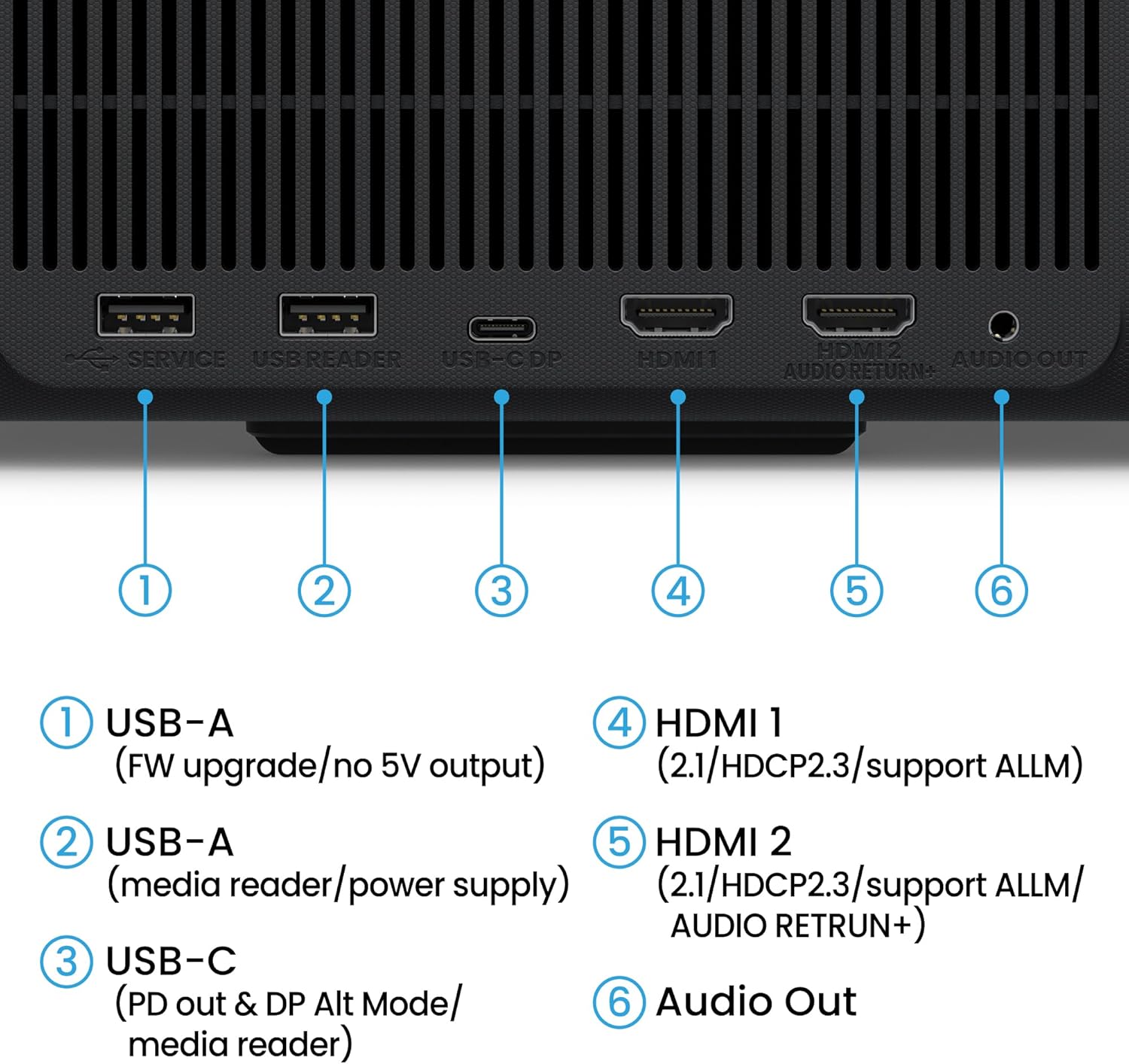
Image: Detailed view of the rear connectivity ports on the BenQ GP520 projector, including USB-A, USB-C, HDMI 1, HDMI 2, and Audio Out.
Operating Instructions
Powering On/Off
Press the power button on the projector or the remote control to turn the unit on or off. Allow a few moments for the projector to warm up or cool down.
Navigation and Google TV
Use the provided remote control to navigate the on-screen menus. The BenQ GP520 comes with integrated Google TV, providing access to a wide range of streaming services, including certified Netflix. Use the directional pad and select button on the remote to browse content and settings.
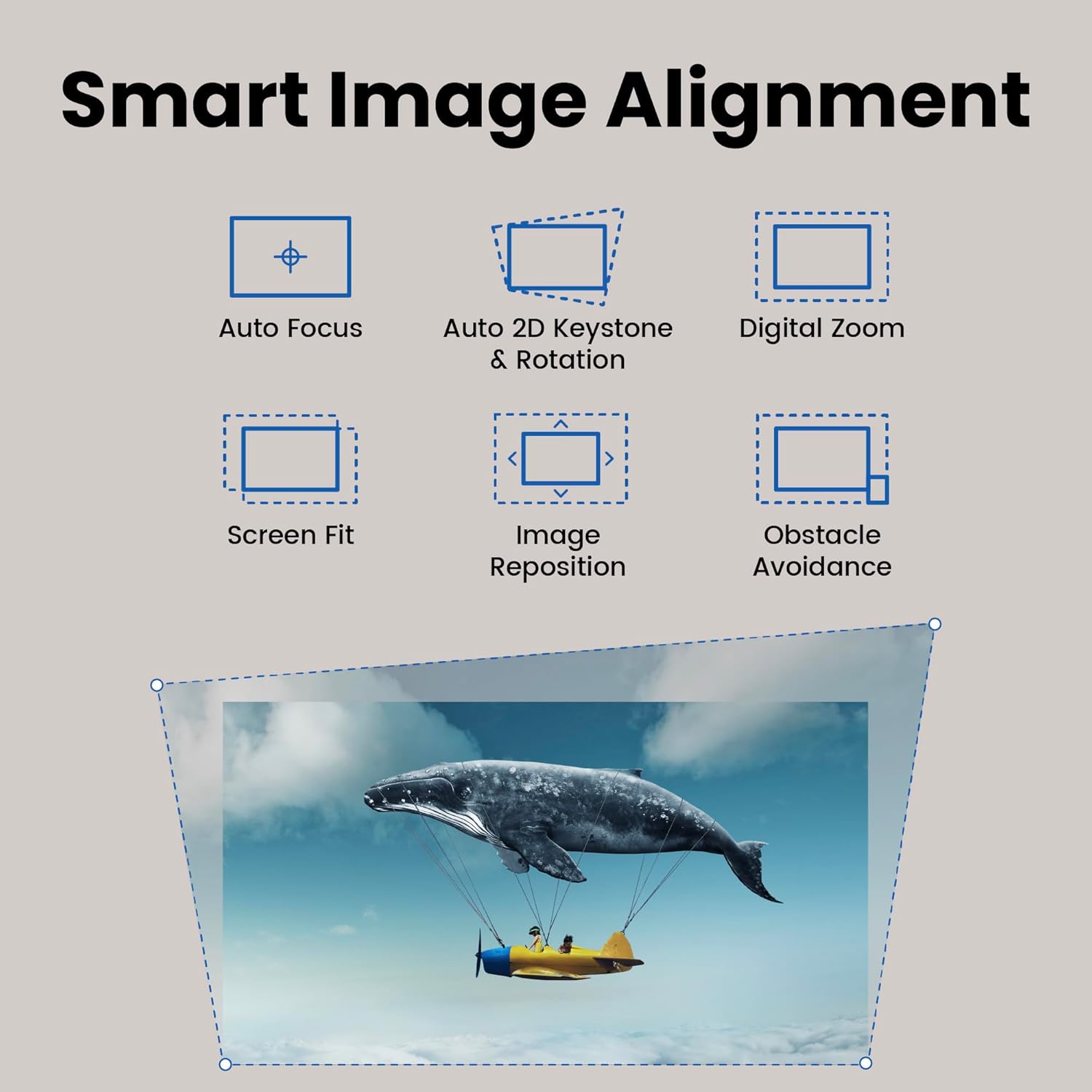
Image: Screenshot of the BenQ GP520 projector displaying the Google TV interface with various streaming apps like Netflix, YouTube, and Prime Video.
Auto Cinema Mode
The Auto Cinema Mode automatically optimizes the image quality based on your viewing environment. This feature considers:
- Ambient Light Adaptation: Adjusts brightness and contrast based on room lighting.
- Wall Color Correction: Compensates for non-white projection surfaces.
- Distance-Based Adjustment: Optimizes image based on projection distance.

Image: Graphic illustrating the Auto Cinema Mode features: Ambient Light Adaptation, Wall Color Correction, and Distance-Based Adjustment, with a projected image of animals in a savanna.
Audio Settings
The projector is equipped with two powerful 12W speakers. You can adjust the volume using the remote control. For external audio, connect Bluetooth speakers or soundbars via Bluetooth 5.2, or use the Audio Out port.
Gaming Mode (ALLM)
For an optimal gaming experience, the GP520 supports ALLM (Auto Low Latency Mode) via its HDMI 2.1 ports. This feature automatically reduces input lag when a compatible gaming console is connected, ensuring smooth and responsive gameplay.
Maintenance
Cleaning the Lens
Use a soft, lint-free cloth specifically designed for optical lenses to gently wipe the projector lens. Avoid using abrasive cleaners or excessive force, which can scratch the lens.
Air Filter Maintenance
Regularly check and clean the air filters to ensure proper airflow and prevent overheating. Refer to the on-screen menu for filter status and cleaning instructions. Typically, filters can be cleaned with a soft brush or vacuum cleaner.
General Cleaning
Wipe the exterior of the projector with a soft, dry cloth. For stubborn marks, a slightly damp cloth with mild detergent can be used, but ensure no liquid enters the device.
Troubleshooting
No Image Displayed
- Ensure the power cable is securely connected and the projector is powered on.
- Verify that the correct input source (HDMI 1, HDMI 2, USB-C) is selected.
- Check if the lens cap is removed.
Image is Blurry
- Run the auto-focus function or manually adjust the focus.
- Ensure the projector is placed within the recommended projection distance for your screen size.
- Clean the projector lens if it appears dirty.
No Sound
- Check the volume levels on the projector and the connected source device.
- Verify the audio output settings in the projector's menu.
- If using external speakers, ensure they are properly connected and powered on.
Remote Control Not Working
- Replace the batteries in the remote control (requires 2 AAA batteries).
- Ensure there is a clear line of sight between the remote and the projector's IR receiver.
Specifications
| Feature | Detail |
|---|---|
| Brand | BenQ |
| Model Number | GP520 |
| Display Resolution | 3840 x 2160 (4K UHD) |
| Brightness | 2600 ANSI Lumens |
| Display Type | DLP |
| Connectivity Technology | HDMI 2.1 (x2), USB-A, USB-C, Bluetooth 5.2, Wi-Fi 6 |
| Special Features | MEMC, Auto Cinema Mode, Google TV, Certified Netflix |
| Audio | 2 x 12W Speakers |
| Dimensions (L x W x H) | 24.1 x 22.5 x 15.1 cm |
| Power Source | AC Power (External Power Supply) |
| Recommended Use | Home Cinema, Video Games |
Warranty and Support
Warranty Information
The BenQ GP520 projector comes with a limited warranty. Please refer to the warranty card included in your product packaging for detailed warranty terms and conditions, including coverage period and limitations. Retain your proof of purchase for warranty claims.
Customer Support
For technical assistance, troubleshooting, or customer service inquiries, please visit the official BenQ website or contact their customer service hotline. You can find up-to-date support information and resources at:


