
1. Product Overview
The First Ear Plus CIC (Completely-in-Canal) hearing aids are designed for adults and seniors experiencing mild to moderate hearing loss. These discreet devices offer advanced features to enhance your listening experience.
- Omnidirectional Microphone: Captures sound from all directions for a natural listening experience.
- Noise-Reduction Technology: Helps to minimize background noise, improving clarity in various environments.
- Long Battery Life: Provides up to 18 hours of use per charge, ensuring all-day functionality.
- Portable Charging Case: Offers three full recharges on the go, extending usage time without needing a power outlet.
- Discreet Design: Nearly invisible when worn, providing comfort and confidence.
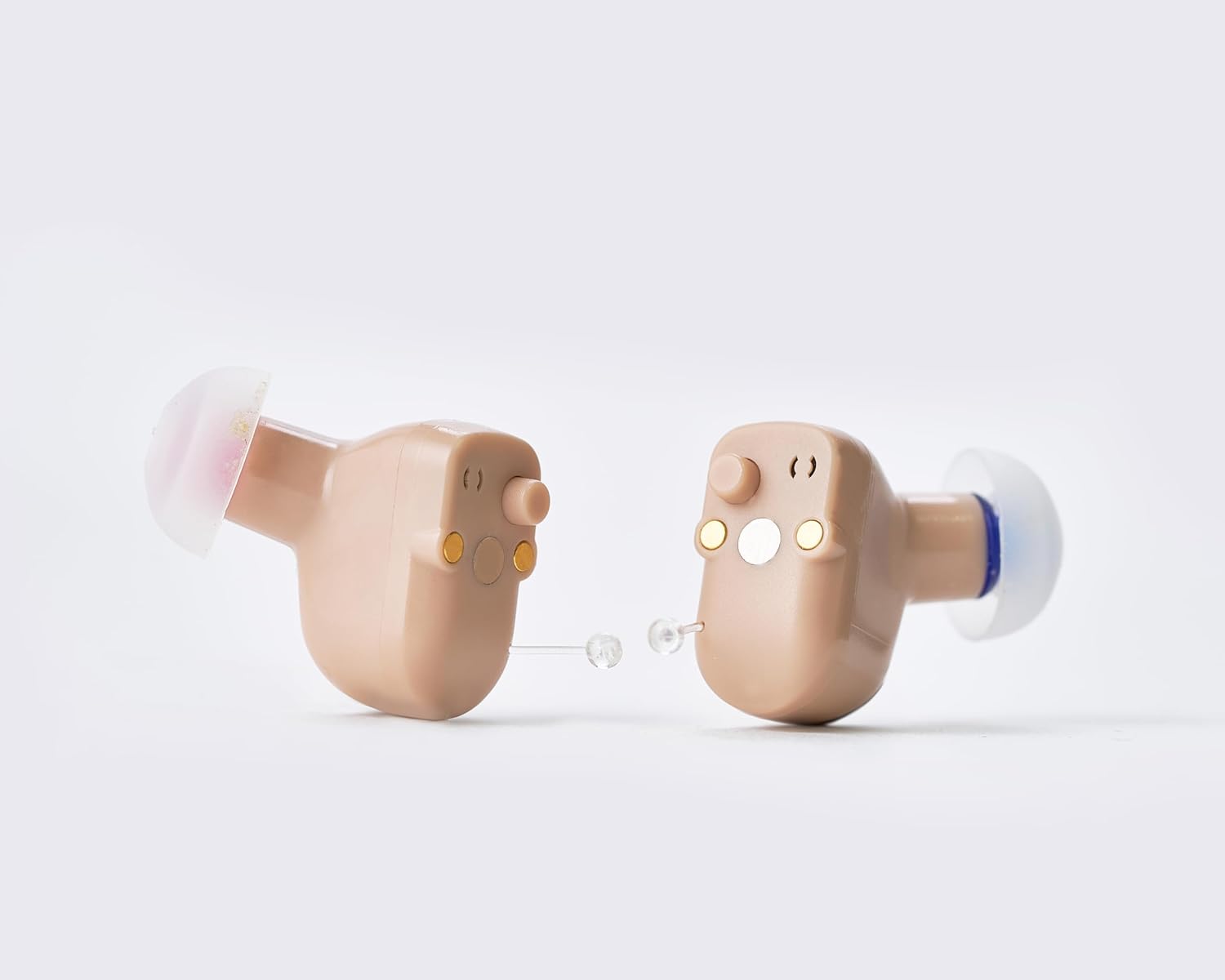
- Customizable Fit: Includes three dome sizes (ear-tips) to ensure a secure and comfortable fit for different ear canals.
- Two Program Settings: Easily switch between 'Quiet' and 'Conversation' modes to optimize sound for different situations.
- Automatic On & Off: Hearing aids automatically power on when removed from the charging case and turn off when placed back in.


2. Setup and Initial Use
2.1 Charging the Devices
Before first use, ensure both the hearing aids and the charging case are fully charged. The charging case provides power to the hearing aids and can store multiple charges.
- Place the First Ear Plus CIC hearing aids into their respective slots in the charging case. Ensure they are correctly seated (L for left, R for right).
- Connect the charging cable to the charging case and plug it into a compatible USB power source.
- The LED indicators on the case will show the charging status. A full charge for the case allows for approximately three full recharges of the hearing aids.

2.2 Selecting and Fitting Ear Domes
Proper fit is crucial for comfort and optimal sound quality. The First Ear Plus CIC comes with three different sizes of ear domes (ear-tips) to ensure a comfortable and secure fit.
- Experiment with the provided ear dome sizes to find the one that feels most comfortable and creates a good seal in your ear canal. A good seal helps prevent feedback (whistling sounds).
- Gently attach the selected ear dome to the hearing aid.
- Carefully insert the hearing aid into your ear canal until it feels snug and secure. Avoid forcing it.
3. Operating Instructions
3.1 Power On/Off
The First Ear Plus CIC hearing aids feature automatic power management for convenience.
- To Power On: Simply remove the hearing aids from the charging case. They will automatically activate and be ready for use.
- To Power Off: Place the hearing aids back into their designated slots in the charging case. They will automatically power off and begin charging if needed.
3.2 Program Settings
Your hearing aids come with two distinct program settings to adapt to different listening environments.
- Quiet Program: Ideal for situations with minimal background noise, such as watching TV, listening to music, or quiet conversations.
- Conversation Program: Designed to enhance speech clarity in more dynamic environments, such as group discussions or moderately noisy settings.
To switch between programs, locate the small push-button control on the hearing aid. Press the button briefly to cycle through the available programs. You may hear an audible indicator (e.g., a beep) confirming the program change.


4. Maintenance and Care
Regular cleaning and proper care will extend the lifespan of your First Ear Plus CIC hearing aids and ensure optimal performance.
4.1 Daily Cleaning
- After each use, gently wipe the hearing aids with a soft, dry cloth to remove any earwax or debris.
- Use the small cleaning brush (if provided) to carefully clear any wax from the ear dome and sound outlet.
- Do not use water, solvents, or cleaning fluids directly on the hearing aids, as this can damage the electronic components.
4.2 Charging Case Care
- Keep the charging case clean and free of dust. Wipe it with a dry cloth as needed.
- Ensure the charging contacts inside the case are clean to maintain efficient charging.
4.3 Storage
- When not in use, store the hearing aids in their charging case to protect them and keep them charged.
- Store the case and hearing aids in a cool, dry place, away from direct sunlight, extreme temperatures, and humidity.
- Keep out of reach of children and pets.
5. Troubleshooting
If you experience issues with your First Ear Plus CIC hearing aids, refer to the following common troubleshooting steps:
| Problem | Possible Cause | Solution |
|---|---|---|
| No sound or very low sound | Battery is low or depleted Ear dome is clogged with wax Hearing aid not properly inserted | Place hearing aids in charging case to recharge Clean the ear dome and sound outlet Re-insert the hearing aid, ensuring a snug fit |
| Whistling or feedback sound | Improper fit or loose ear dome Earwax buildup in ear canal Hand or object too close to the ear | Try a different size ear dome for a better seal Consult a healthcare professional for earwax removal Ensure nothing is obstructing the hearing aid |
| Sound is distorted or unclear | Ear dome is partially clogged Low battery Environmental interference | Clean the ear dome thoroughly Recharge the hearing aids Move to a quieter environment or switch program settings |
| Hearing aids not charging | Improper placement in case Charging cable or power source issue Dirty charging contacts | Ensure hearing aids are correctly seated in the case Try a different cable or power adapter Gently clean the charging contacts on both the aids and the case |
If the problem persists after attempting these solutions, please refer to the manufacturer's support resources.
6. Specifications
Technical specifications for the First Ear Plus CIC hearing aids:
- Item Model Number: CIC2W-NEW
- Batteries: 1 Lithium Ion battery required (included)
- Manufacturer: Wenatone
- Color: Beige & Black
- Material: Plastic
- Style: Completely in Canal
- Power Source: Battery Powered
- Maximum Output: <110dB
- HF Average Output: 101±4dB
- Full-on Gain: 23 dB±4dB
- Equivalent Input Noise: 32dB
- Frequency Range: F1≤250Hz F2≥5000Hz
- Total Harmonic Distortion: 3%

7. Warranty and Support
For information regarding product warranty, returns, or additional support, please refer to the documentation included with your purchase or visit the official NANO HEARING AIDS website. Specific warranty terms and conditions may vary.
Legal Disclaimer
Statements regarding dietary supplements have not been evaluated by the FDA and are not intended to diagnose, treat, cure, or prevent any disease or health condition. This product is an over-the-counter hearing aid for adults with perceived mild to moderate hearing loss.

