
1. Introduction
This manual provides essential information for the safe and effective operation of your WnewTools XL830L Digital Multimeter. The XL830L is a general-purpose digital multimeter designed for measuring AC/DC voltage, DC current, resistance, diode, and transistor hFE. It features a clear LCD display with a blue backlight and overload protection on all ranges.
2. Safety Information
Please read all safety warnings and operating instructions carefully before using this instrument. Failure to follow these instructions may result in electric shock, fire, or damage to the meter.
- Always ensure the meter is in the correct range and function before making measurements.
- Do not exceed the maximum input values for any range.
- Exercise extreme caution when working with voltages above 30V AC RMS, 42V peak, or 60V DC. These voltages pose a shock hazard.
- Inspect test leads for damaged insulation or exposed metal before use. Replace if damaged.
- Do not operate the meter if it appears damaged or if the case is open.
- Remove test leads from the circuit before changing functions or ranges.
- Replace the battery when the low battery indicator appears to ensure accurate readings.
3. Package Contents
Verify that all items listed below are included in your package:
- 1 x WnewTools XL830L Digital Multimeter
- 2 x Test Probes (Red and Black)
- 1 x English User Manual
- 1 x SMD Chip Component LCR Testing Tool (Tweezer style)

Image 3.1: Contents of the WnewTools XL830L Digital Multimeter package, including the multimeter, test leads, user manual, and SMD testing tool.
4. Product Features
The WnewTools XL830L Digital Multimeter offers the following key features:
- Clear, easy-to-read LCD display with blue backlight.
- Overload protection on all measurement ranges.
- Rugged rubber boot for enhanced durability and protection.
- Integrated stand for convenient hands-free operation.
- Low battery voltage indication.
- Portable and compact design.
- Data Hold function to freeze displayed readings.
- Diode Test facility.
- 20-position rotary switch for function and range selection.
- Measures AC & DC Voltage, DC Current, Resistance, Audible Continuity, and Transistor hFE.
5. Component Identification

Image 5.1: Front panel of the XL830L Digital Multimeter.
- LCD Display: Shows measurement readings, units, and indicators.
- Backlight Button: Activates the blue backlight for the LCD display.
- Data Hold Button: Freezes the current reading on the display.
- Rotary Switch: Used to select measurement functions and ranges.
- 10ADC Input Jack: For DC current measurements up to 10A.
- COM Input Jack: Common (negative) input for all measurements. Connect the black test lead here.
- VΩmA Input Jack: Positive input for voltage, resistance, and current (up to 200mA) measurements. Connect the red test lead here.
- hFE Socket: For testing NPN/PNP transistors.
6. Setup
6.1 Battery Installation
The XL830L Multimeter requires a 9V battery (not included). To install or replace the battery:
- Ensure the multimeter is turned OFF and test leads are disconnected.
- Locate the battery compartment cover on the back of the unit.
- Remove the screw securing the cover and open it.
- Connect a new 9V battery to the battery clip, observing correct polarity.
- Place the battery into the compartment and replace the cover, securing it with the screw.
6.2 Connecting Test Leads
Always connect the black test lead to the COM jack. Connect the red test lead to the appropriate jack based on the measurement type:
- For Voltage, Resistance, Diode, Continuity, and Current (up to 200mA): Connect the red lead to the VΩmA jack.
- For High DC Current (up to 10A): Connect the red lead to the 10ADC jack.
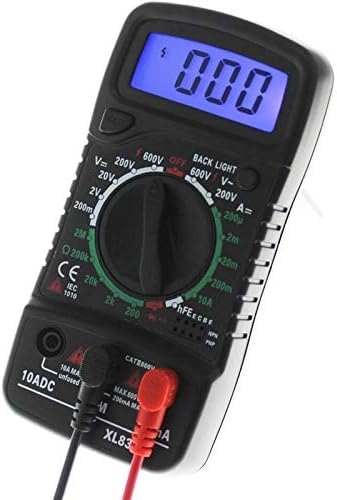
Image 6.1: The XL830L Digital Multimeter with red and black test leads properly connected to the input jacks, and the blue backlight activated.
7. Operating Instructions
7.1 General Measurement Principles
- Turn the rotary switch to the desired function and range.
- Connect the test leads to the circuit or component under test.
- Read the measurement value on the LCD display.
- If the reading is outside the selected range, switch to a higher range.
- Always disconnect test leads from the circuit before changing the rotary switch position.
7.2 DC Voltage Measurement (V–)
- Connect the red test lead to the VΩmA jack and the black test lead to the COM jack.
- Set the rotary switch to the desired DC Voltage range (e.g., 2V, 20V, 200V, 600V). Start with the highest range if the voltage is unknown.
- Connect the test probes in parallel across the component or circuit to be measured.
- Read the voltage value on the display. If a negative sign appears, it indicates reversed polarity.
7.3 AC Voltage Measurement (V∼)
- Connect the red test lead to the VΩmA jack and the black test lead to the COM jack.
- Set the rotary switch to the desired AC Voltage range (e.g., 200V, 600V). Start with the highest range if the voltage is unknown.
- Connect the test probes in parallel across the AC voltage source.
- Read the voltage value on the display.
7.4 DC Current Measurement (A–)
Caution: Never connect the meter in parallel with a voltage source when measuring current, as this can blow the fuse or damage the meter.
- Turn off power to the circuit.
- For currents up to 200mA, connect the red test lead to the VΩmA jack. For currents up to 10A, connect the red test lead to the 10ADC jack. Connect the black test lead to the COM jack.
- Set the rotary switch to the desired DC Current range (e.g., 200µA, 2mA, 20mA, 200mA, 10A). Start with the highest range if the current is unknown.
- Open the circuit where current is to be measured and connect the test probes in series with the circuit.
- Apply power to the circuit and read the current value.
7.5 Resistance Measurement (Ω)
Caution: Ensure the circuit is de-energized and all capacitors are discharged before measuring resistance.
- Connect the red test lead to the VΩmA jack and the black test lead to the COM jack.
- Set the rotary switch to the desired Resistance range (e.g., 200Ω, 2kΩ, 20kΩ, 200kΩ, 2MΩ).
- Connect the test probes across the component whose resistance is to be measured.
- Read the resistance value on the display.
7.6 Diode Test
- Connect the red test lead to the VΩmA jack and the black test lead to the COM jack.
- Set the rotary switch to the Diode symbol (→|–).
- Connect the red probe to the anode and the black probe to the cathode of the diode. The display will show the forward voltage drop (typically 0.5V to 0.8V for silicon diodes).
- Reverse the probes. The display should show “OL” (Open Loop) for a good diode. A reading in both directions or “OL” in both directions indicates a faulty diode.
7.7 Transistor hFE Test
- Set the rotary switch to the hFE position.
- Determine if the transistor is NPN or PNP.
- Insert the transistor leads (Emitter, Base, Collector) into the corresponding holes in the hFE socket.
- Read the hFE value (DC current gain) on the display.
7.8 Continuity Test
- Connect the red test lead to the VΩmA jack and the black test lead to the COM jack.
- Set the rotary switch to the Continuity symbol (♫).
- Touch the test probes across the circuit or component. If resistance is below approximately 50Ω, the buzzer will sound, indicating continuity.
7.9 Using the SMD Chip Component LCR Testing Tool
The included tweezer-style testing tool is designed for convenient measurement of small surface-mount components (SMD). It connects to the multimeter's input jacks.
- Connect the red plug of the SMD testing tool to the VΩmA jack and the black plug to the COM jack.
- Select the appropriate measurement function on the multimeter (e.g., Resistance, Diode).
- Carefully grasp the SMD component with the tweezer tips.
- Read the measurement on the multimeter's display.
8. Maintenance
8.1 Cleaning
To clean the meter, wipe the case with a damp cloth and a mild detergent. Do not use abrasives or solvents. Ensure the meter is completely dry before use.
8.2 Battery Replacement
Refer to Section 6.1 for instructions on replacing the 9V battery when the low battery indicator appears on the display.
8.3 Storage
If the meter is not to be used for an extended period, remove the battery to prevent leakage and store the meter in a cool, dry place.

Image 8.1: The XL830L Digital Multimeter shown with its integrated kickstand extended for convenient viewing on a workbench.
9. Troubleshooting
If your multimeter is not functioning correctly, refer to the following common issues and solutions:
- No display or dim display: Check battery installation and replace if necessary.
- “OL” or “1” displayed: Indicates an over-range condition or open circuit. Select a higher range or check connections.
- Incorrect readings: Ensure test leads are properly connected, the correct function/range is selected, and the battery is not low.
- No continuity beep: Check if the continuity function is selected and if the circuit resistance is within the audible range.
- Meter does not turn on: Verify battery is installed correctly and has sufficient charge.
10. Specifications
| Measurement Type | Ranges | Resolution |
|---|---|---|
| DC Voltage | 200mV, 2V, 20V, 200V, 600V | 0.1mV to 1V |
| AC Voltage | 200V, 600V | 100mV to 1V |
| DC Current | 200µA, 2mA, 20mA, 200mA, 10A | 0.1µA to 10mA |
| Resistance | 200Ω, 2kΩ, 20kΩ, 200kΩ, 2MΩ | 0.1Ω to 1kΩ |
| Transistor hFE Test | NPN & PNP (0-1000) | 1b=10mA, Vce=3V |
General Specifications:
- Maximum Voltage: 250V (for certain ranges, refer to dial markings)
- Power Source: 9V Battery (not included)
- Dimensions (L x W x H): Approximately 8.66 x 3.15 x 5.91 inches
- Item Weight: Approximately 9.2 ounces (260 Grams)
- UPC: 769902994175
- Part Number / Model Number: ATOOL1591454 / XL830L
11. Warranty and Support
Specific warranty information for the WnewTools XL830L Digital Multimeter is not provided in this manual. For warranty details, technical support, or service inquiries, please refer to the product packaging or contact WnewTools customer service directly through their official channels or the retailer where the product was purchased.