
1. Introduction
This manual provides essential instructions for the safe and effective use of your WnewTools 908D 220V 60W LED Digital Display Soldering Station. Please read this manual thoroughly before operation and retain it for future reference. This soldering station is designed for various electronic soldering tasks, offering precise temperature control and user-friendly features.
2. Safety Instructions
WARNING: Improper use can lead to electric shock, burns, or fire. Always follow these safety guidelines.
- Always work in a well-ventilated area to avoid inhaling solder fumes.
- Wear appropriate personal protective equipment, including safety glasses, to protect against splashes of molten solder.
- Do not touch the soldering iron tip or heating element when the unit is powered on or cooling down, as temperatures can reach up to 480°C (896°F).
- Place the soldering iron in its designated holder when not in use. Never leave a hot iron unattended.
- Ensure the power cord is not damaged and is properly connected to a grounded outlet.
- Keep the work area clean and free of flammable materials.
- Do not use the soldering station near water or in damp conditions.
- Unplug the unit from the power source before cleaning, maintenance, or when not in use for an extended period.
- This appliance is not intended for use by persons (including children) with reduced physical, sensory, or mental capabilities, or lack of experience and knowledge, unless they have been given supervision or instruction concerning use of the appliance by a person responsible for their safety.
3. Package Contents
Verify that all items listed below are present in your package:
- 1 x 908D Soldering Iron Station (Control Unit with Soldering Iron)
- 1 x Solder Handle with 1 tip
- 1 x Cleaning Ball
- 1 x Soldering Iron Holder

Image 3.1: The WnewTools 908D Soldering Station kit, including the control unit, soldering iron, holder, and cleaning ball.
4. Product Features
The WnewTools 908D Soldering Station incorporates several features designed for efficient and precise soldering:
- Portable Design: Compact and lightweight for easy transport and use.
- Anti-Static Protection: Designed to prevent electrostatic discharge, protecting sensitive electronic components.
- Advanced Temperature Control: Utilizes a precise temperature control circuit for stable and accurate heating.
- Durable Heating Core: Constructed from high-quality materials for extended service life.
- Ergonomic Handle: Made with high-temperature resistant and environmentally friendly materials, featuring a steel tube and heat isolation ring for user comfort.
- LED Digital Display: Provides real-time monitoring of the set and actual temperature.
- Celsius/Fahrenheit Display: Allows users to switch between temperature units.
- Sleep Function: Automatically enters sleep mode after 10 minutes of inactivity to prevent tip oxidation, extend tip lifespan, and conserve energy.
- Rapid Heat-Up: Achieves 0°C to 300°C (32°F to 572°F) in approximately 18 seconds.

Image 4.1: Close-up view of the soldering iron handle and the control unit with its digital display.
5. Setup Instructions
- Unpack Components: Carefully remove all items from the packaging and verify against the package contents list.
- Position the Holder: Place the soldering iron holder on a stable, heat-resistant surface within your work area.
- Insert Cleaning Ball: Place the cleaning ball into the designated slot in the holder.
- Connect Power: Ensure the soldering station's power switch is in the 'OFF' position. Plug the power cord into a suitable 220V/50Hz grounded electrical outlet.
- Initial Inspection: Before powering on, visually inspect the soldering iron tip for proper seating and ensure all connections are secure.

Image 5.1: The WnewTools 908D Soldering Station showing the control unit, soldering iron, and power cord with an EU plug.
6. Operating Instructions
- Power On: Flip the power switch on the control unit to the 'ON' position. The LED digital display will illuminate.
- Set Temperature: Use the rotary knob on the control unit to adjust the desired temperature. The LED display will show the set temperature, then quickly switch to display the actual tip temperature as it heats up. The temperature range is 220°C to 480°C.
- Celsius/Fahrenheit Selection: A small switch or button near the display allows you to toggle between Celsius (°C) and Fahrenheit (°F) temperature readings.
- Heating: The soldering iron will rapidly heat to the set temperature. The LED indicator light next to 'HEATER' will glow when the heating element is active.
- Soldering: Once the desired temperature is reached, the iron is ready for use. Apply solder to the joint, not directly to the iron tip.
- Sleep Function: If the soldering iron is left idle in its holder for approximately 10 minutes, it will automatically enter sleep mode. The temperature will drop to a lower, safe level to prevent tip oxidation and save energy. To reactivate, simply pick up the iron or adjust the temperature knob.
- Power Off: After use, return the soldering iron to its holder. Flip the power switch to the 'OFF' position and allow the iron to cool completely before storing.

Image 6.1: A user holding the soldering iron, with the control unit's LED display showing the temperature.

Image 6.2: Detailed view of the control unit, highlighting the temperature adjustment dial, power switch, and digital display.
7. Maintenance
Regular maintenance ensures optimal performance and extends the lifespan of your soldering station.
- Tip Cleaning: Always clean the soldering iron tip before and after each use. Use the provided cleaning ball to remove excess solder and oxidation. A clean tip ensures efficient heat transfer.
- Tip Tinning: After cleaning, tin the tip with a small amount of fresh solder. This protects the tip from oxidation and improves its performance.
- Tip Replacement: If the tip becomes excessively corroded or damaged, replace it with a compatible tip. Ensure the iron is cool and unplugged before changing tips.
- Unit Cleaning: Periodically wipe the control unit and handle with a soft, dry cloth. Do not use abrasive cleaners or solvents.
- Storage: Store the soldering station in a dry, dust-free environment when not in use. Ensure the iron is completely cool before storage.
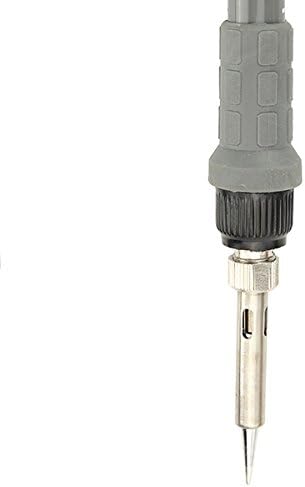
Image 7.1: A close-up of the soldering iron tip, emphasizing the importance of keeping it clean and tinned.
8. Troubleshooting
If you encounter issues with your soldering station, refer to the following common problems and solutions:
| Problem | Possible Cause | Solution |
|---|---|---|
| Soldering iron not heating | Power switch off; Loose power connection; Faulty heating element. | Ensure power switch is ON; Check power cord connection; Contact support if heating element is suspected faulty. |
| Temperature display inaccurate | Sensor issue; Incorrect calibration (unlikely for user). | Ensure tip is properly seated; If problem persists, contact support. |
| Solder not melting easily | Tip is oxidized or dirty; Temperature set too low. | Clean and tin the soldering tip; Increase the set temperature. |
| Iron enters sleep mode too often | Normal operation; Iron left idle for 10 minutes. | This is a feature. Pick up the iron or adjust temperature to reactivate. |
If the problem persists after attempting these solutions, please contact customer support.
9. Specifications
| Parameter | Value |
|---|---|
| Model Number | 908D (ATOOL1059873) |
| Voltage | AC 220V/50Hz |
| Power | 60W |
| Temperature Range | 220°C - 480°C (428°F - 896°F) adjustable |
| Operating Temperature | 0°C - 40°C (32°F - 104°F) |
| Storage Temperature | -20°C - 80°C (-4°F - 176°F) |
| Storage Humidity | 35% - 45% |
| Item Weight | 710 Grams (1.57 pounds) |
| Product Dimensions | 8.66 x 3.15 x 5.91 inches |
| UPC | 769902978885 |

Image 9.1: Visual representation of the soldering station's dimensions and its portable nature.
10. Warranty and Support
For warranty information or technical support, please refer to the documentation provided with your purchase or contact WnewTools customer service through the retailer where the product was purchased. Please have your model number (908D) and purchase date available when contacting support.