
1. Introduction
The EAPRO TRON-Solar Inverter with AI-MPPT Technology is designed to provide efficient and reliable power for your home or business. This advanced inverter maximizes solar energy capture and delivers clean, stable power through its pure sine wave technology. It features dual battery support for flexible energy management and an interactive multicolor LCD display for easy monitoring and adjustments. This manual provides essential information for the safe and effective installation, operation, and maintenance of your EAPRO TRON-Solar Inverter.
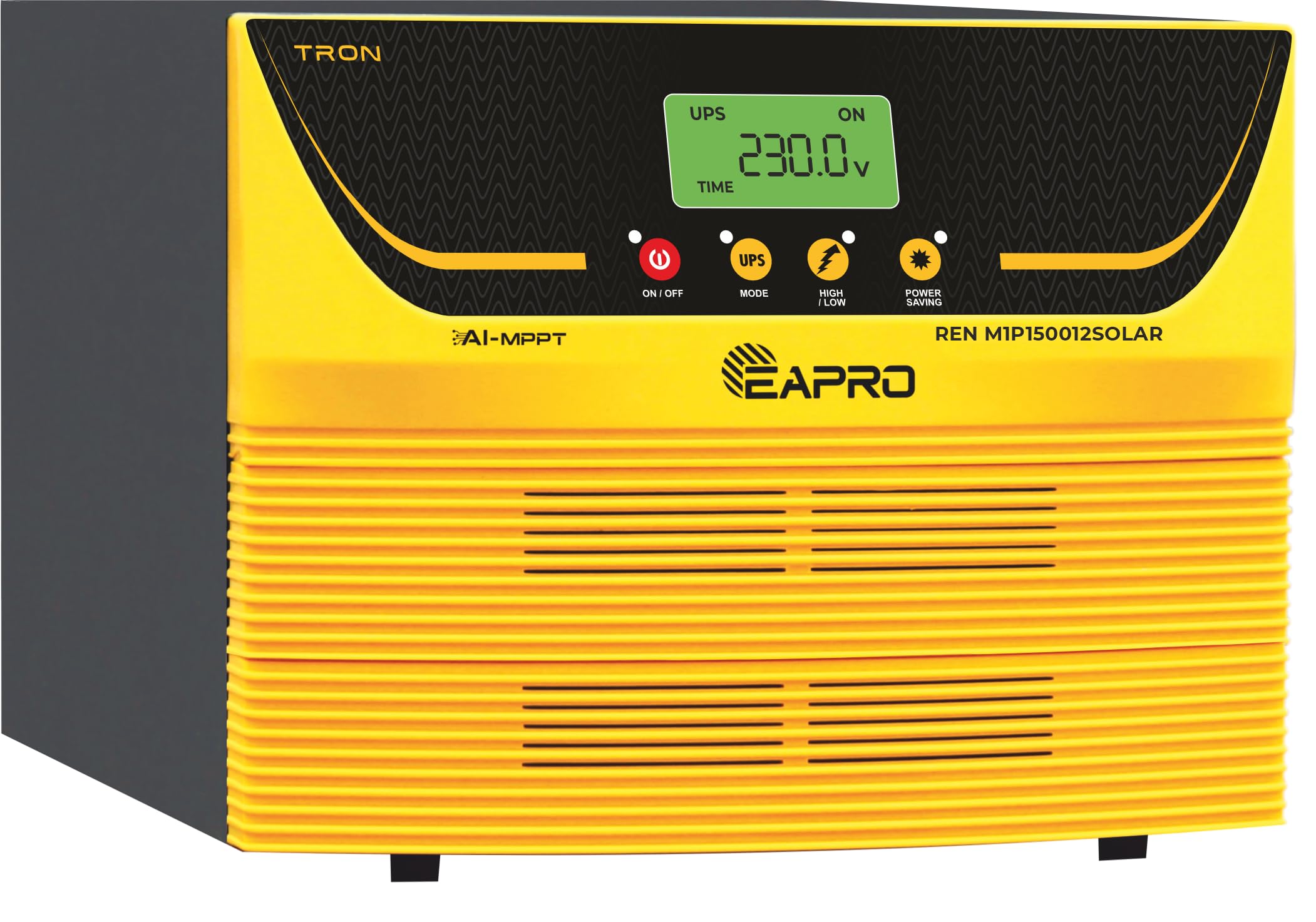
Figure 1.1: EAPRO TRON-1500 AI-MPPT Solar Inverter. This image shows the front panel of the inverter, highlighting its AI-MPPT technology and pure sine wave output capabilities.
2. Safety Information
Please read and understand all safety instructions before installing or operating the inverter. Failure to follow these instructions may result in electric shock, fire, serious injury, or death.
- Qualified Personnel: Installation and maintenance should only be performed by qualified personnel.
- Disconnect Power: Always disconnect all power sources (AC, DC, and solar) before performing any maintenance or wiring.
- Proper Grounding: Ensure the inverter is properly grounded according to local and national electrical codes.
- Ventilation: Install the inverter in a well-ventilated area to prevent overheating. Do not block ventilation openings.
- Avoid Moisture: Do not expose the inverter to rain, snow, spray, or any type of liquid.
- Battery Safety: Work with batteries carefully. Wear eye protection and remove jewelry. Do not short-circuit battery terminals.
- Flammable Materials: Do not install the inverter near flammable materials or in areas where flammable gases or fumes may accumulate.
3. Product Features
The EAPRO TRON-Solar Inverter incorporates several advanced features for optimal performance:
- AI-MPPT Technology: Optimizes solar energy capture for maximum efficiency, ensuring you get the most from your solar setup.
- Power Capacity: Delivers 1050 VA, providing reliable power for essential appliances and devices.
- Dual Battery Support: Flexible configuration allows you to connect two batteries, enhancing power management and backup options.
- Advanced Pure Sine Wave Technology: Produces clean, stable power, protecting sensitive electronics from damage and ensuring smooth operation.
- Interactive Multicolor LCD Display: Easily monitor performance and settings with a vibrant, user-friendly interface.
- BIS Approved: Complies with Indian standards for safety and performance, giving you confidence in your purchase.
4. Setup and Installation
Follow these general steps for setting up your EAPRO TRON-Solar Inverter. Refer to the detailed wiring diagrams in the separate installation guide for specific connections.
- Unpacking and Inspection: Carefully unpack the inverter and inspect it for any shipping damage. Report any damage to your dealer immediately.
- Mounting Location: Choose a cool, dry, and well-ventilated location, away from direct sunlight, heat sources, and moisture. Ensure adequate clearance around the inverter for airflow.
- Battery Connection: Connect the batteries to the inverter's DC terminals. Ensure correct polarity (+ to + and - to -). The inverter supports dual battery configurations for extended backup.
- Solar Panel Connection: Connect your solar panels to the inverter's solar input terminals. Ensure the solar array voltage and current are within the inverter's specifications.
- AC Input Connection: Connect the AC mains supply to the inverter's AC input terminal.
- AC Output Connection: Connect your loads (appliances) to the inverter's AC output terminals.

Figure 4.1: Intelligent Solar Selection based on built-in Real Time Clock (R.T.C.). This feature optimizes solar power utilization throughout the day.

Figure 4.2: Maximum utilization of Solar Power through monitoring of abrupt weather conditions. The inverter intelligently adapts to changing weather for continuous power.

Figure 4.3: Dual Battery PCU capable of powering heavy loads. This illustrates the inverter's capacity to support significant household appliances.
5. Operating Instructions
Once installed, the EAPRO TRON-Solar Inverter is designed for user-friendly operation. The interactive multicolor LCD display provides real-time information and allows for configuration adjustments.
5.1 Powering On/Off
- To Power On: Ensure all connections are secure. Press and hold the ON/OFF button until the display illuminates.
- To Power Off: Disconnect all loads. Press and hold the ON/OFF button until the display turns off.
5.2 LCD Display and Navigation
The interactive LCD display provides critical operational data. Use the navigation buttons (typically Up, Down, Enter) to scroll through menus and view parameters.

Figure 5.1: Interactive Multicolor LCD display. This image highlights the clear and informative display, showing current output voltage and operational status.
5.3 Accessible Parameters via Operating Display
The display allows you to monitor various parameters:
- AC Mains voltage
- Output Load in %
- Battery input voltage
- Battery Charging/Discharging current (Bar Graph)
- Solar KWH used
- Solar Status
- Warnings or Protections (Overload, Short Circuit, Fuse Trip, Over Temp, Empty Battery Blinking, PV Reverse Protection)
5.4 Smart Solar Selection Logic
The inverter features intelligent solar selection logic based on a built-in Real Time Clock (RTC). This logic includes:
- Provision for charging by solar power only.
- Setting critical parameters for solar operation.
- Ability to provide rated output power directly from solar panels (if solar is available) in addition to battery power.
- Intelligently prioritizes solar power and takes the balance from mains supply.
6. Maintenance
Regular maintenance ensures the longevity and optimal performance of your EAPRO TRON-Solar Inverter.
- Cleaning: Periodically clean the exterior of the inverter with a dry, soft cloth. Ensure ventilation openings are free from dust and debris. Do not use liquid cleaners.
- Battery Inspection: Regularly check battery terminals for corrosion and ensure connections are tight. Monitor battery water levels for flooded lead-acid batteries.
- Ventilation: Ensure the installation area remains well-ventilated and that nothing obstructs the inverter's cooling fins.
- Professional Inspection: It is recommended to have a qualified technician inspect the inverter and solar system annually.
7. Troubleshooting
This section provides solutions to common issues you might encounter. For problems not listed here, please contact customer support.
7.1 Common Issues and Solutions
- No Power Output: Check AC input, battery connections, and ensure the inverter is switched on. Verify circuit breakers are not tripped.
- Overload Shut Down: Reduce the connected load. The inverter will automatically attempt to restart after a short period. If the issue persists, check for faulty appliances.
- Battery Low Alarm: This indicates low battery voltage. Check if batteries are charging from solar or mains. Reduce load to conserve power.
- Short Circuit Protection: Disconnect all loads and check for any short circuits in your wiring or appliances. The inverter will reset after the short is cleared.
- Over Temperature: Ensure the inverter has adequate ventilation. Clear any obstructions from cooling vents. Allow the inverter to cool down.
- PV Reverse Protection: This indicates incorrect polarity of solar panel connections. Disconnect solar panels and re-connect with correct polarity.
8. Specifications
The following table details the technical specifications for the EAPRO TRON-Solar Inverter Model REN M1P150012SOLAR FHUPS0642X0-1050VA-12V-50A MPPT-L SMART.

Figure 8.1: Technical Specifications. This table provides detailed electrical parameters and protection features of the inverter.

Figure 8.2: Accessible Parameters and Solar Logic. This image details what can be monitored on the display and the intelligent solar management features.
| Parameter | Value |
|---|---|
| Brand | EAPRO |
| Model Number | REN M1P150012SOLAR 12V |
| Product Dimensions (L x W x H) | 11.81" x 11.81" x 11.81" |
| Item Weight | 10 Kilograms |
| Nominal Battery Voltage | 12 Volts |
| Output Frequency | 50 ± 1 Hz |
| Harmonic distortion in O/P waveform (Resistive load) | ≤ 3% |
| Solar Charge Controller Type | SINGLE CHANNEL INTERLEAVED MPPT |
| Max PV Input Power | 550-850 Watt |
| Max Solar Input Voltage (Vmp) | 25-50V |
| Max Solar DC Input Voltage (Voc) | 60V |
| Max Solar Input current | 30±1Amp |
| Solar Battery Charging Current (settable) | 40 Amps (default) (Settable 5A to 50A) |
9. Warranty Information
The EAPRO TRON-Solar Inverter comes with a limited warranty, ensuring quality and reliability. For specific terms, conditions, and the duration of your warranty, please refer to the warranty card included with your product at the time of purchase. Keep your purchase receipt as proof of purchase for warranty claims.
10. Customer Support
For any queries, technical assistance, or to register a complaint, please contact EAPRO customer support through the following channels:

Figure 10.1: EAPRO Customer Support. This image provides various methods to contact support.
- Call: +91-8650115000 (Monday to Saturday, 9:00 AM to 6:00 PM. Service not available on Sundays and national holidays.)
- Website: Visit www.eapro.in to register your complaint.
- WhatsApp: Send product-related documents directly to +91-9068563156.
- Email: info@eapro.in


