
1. Introduction
This manual provides essential instructions for the safe and effective use of your KingPavonini Red Light Therapy Belt. Please read this manual thoroughly before operating the device and retain it for future reference.

Figure 1: KingPavonini Red Light Therapy Belt
2. Important Safety Information
Observe the following safety precautions to prevent injury or damage to the device:
- Do not use the device if you are pregnant, have a pacemaker, or have any serious medical conditions without consulting a healthcare professional.
- Avoid direct eye exposure to the LED lights. Protective eyewear is recommended.
- Do not use on broken skin or open wounds.
- Keep out of reach of children.
- Unplug the device when not in use or before cleaning.
- Do not immerse the device in water or other liquids.
- If the device feels uncomfortably hot, discontinue use immediately.
3. Setup
3.1 Unpacking and Inspection
Carefully remove all components from the packaging. Inspect the belt and accessories for any signs of damage. If any damage is found, do not use the device and contact customer support.
3.2 Connecting Power
The KingPavonini Red Light Therapy Belt can be powered via a wall outlet or a power bank (not included).
- Connect the adapter cord to the control panel.
- For wall outlet use: Plug the adapter into a standard 12V, 2A wall outlet.
- For power bank use: Connect the USB cord to the control panel, then plug the USB end into a 5V, 2A or over power bank.

Figure 2: Connecting the power adapter to the control panel.

Figure 3: Powering the device via wall outlet or power bank.
3.3 Wearing the Belt
The belt is designed for versatile application on various body parts. Ensure the LED side is facing the skin.
- Wrap the belt around the desired area (e.g., back, waist, shoulder, knee).
- Secure the belt using the elastic compression straps for a snug fit. A closer contact ensures more effective light delivery.

Figure 4: Wearing the therapy belt on the lower back.
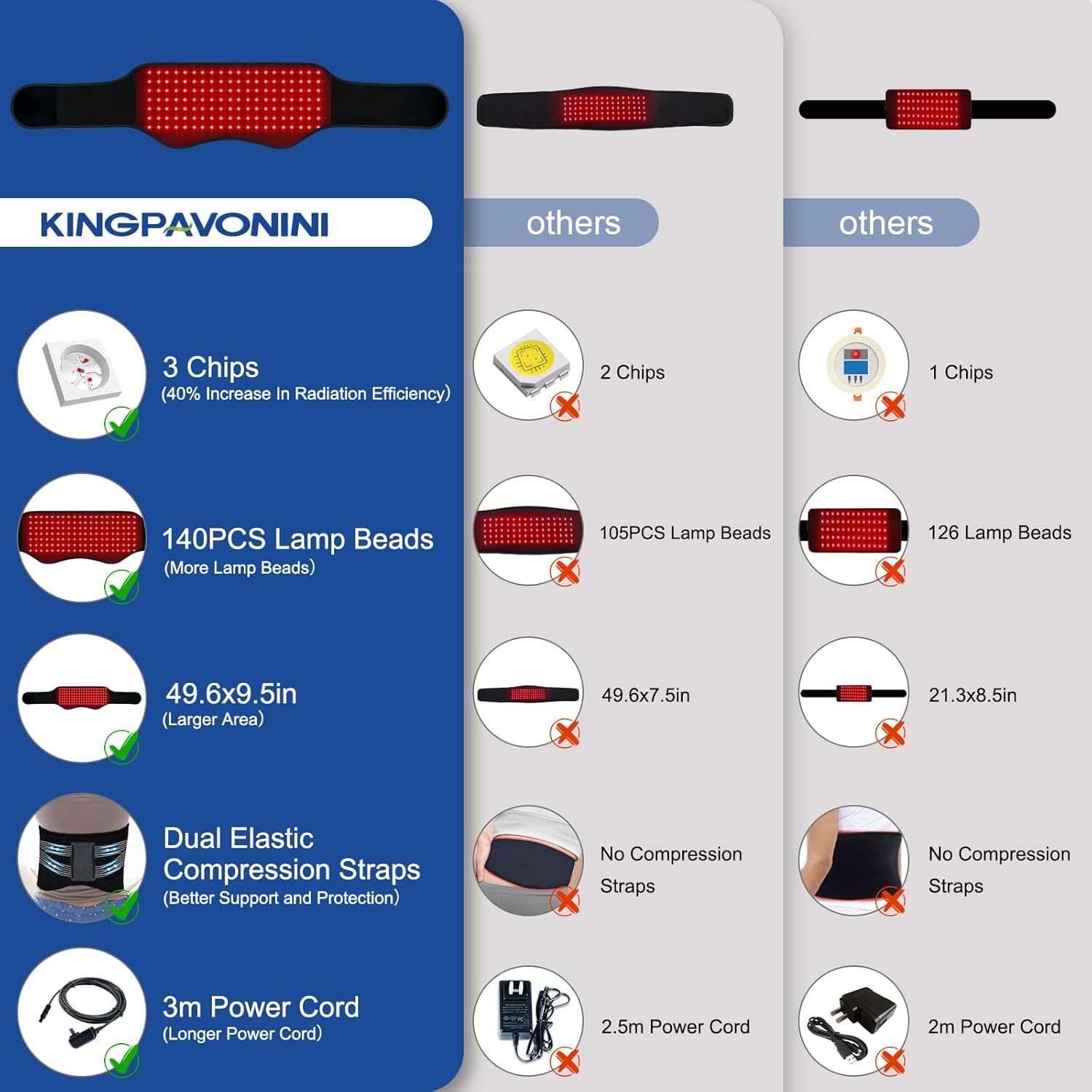
Figure 5: Versatile application areas for the therapy belt.
4. Operation
4.1 Control Panel Overview
The device is operated using the wired control panel. The display shows the current mode and timer setting.

Figure 6: Control Panel and its functions.
4.2 Power On/Off
Press the power button on the control panel to turn the device on or off.
4.3 Selecting Light Modes
The belt features 4 light modes:
- 630nm Red Light: Visible red light for surface revitalization.
- 660nm Red Light: Visible red light for circulation and vitality.
- 850nm Infrared Light: Invisible infrared light for deeper soothing warmth.
- ALL: Combines 630nm, 660nm, and 850nm for comprehensive coverage.
Press the 'Mode' button to cycle through the available light modes.
4.4 Pulse Modes
The device offers two pulse modes (10Hz and 40Hz) for enhanced therapy. Press the 'Pulse' button to activate or change pulse frequency.
4.5 Adjusting Brightness/Intensity
There are 5 adjustable brightness levels (L0-L4) which correspond to temperature ranges from 88°F to 113°F. Use the '+' and '-' buttons to adjust the intensity.

Figure 7: Light penetration depths for different wavelengths.
4.6 Setting the Timer
The device includes 6 timer settings: 5, 10, 15, 20, 25, and 30 minutes. Press the 'Timer' button to select your desired session duration. The device will automatically shut off after the set time.
4.7 Recommended Usage
For optimal results, use the device for 30 minutes daily. Adjust settings according to personal comfort and needs.
Video 1: An official KingPavonini video demonstrating the red light therapy belt in use and its features.
5. Maintenance
5.1 Cleaning
Ensure the device is unplugged before cleaning.
- Wipe the surface of the belt with a soft, damp cloth.
- Do not use abrasive cleaners or harsh chemicals.
- Allow the device to air dry completely before storing or next use.
5.2 Storage
Store the device in a cool, dry place away from direct sunlight and extreme temperatures. Keep it in its original packaging or a protective bag to prevent dust accumulation.
6. Troubleshooting
| Problem | Possible Cause | Solution |
|---|---|---|
| Device does not turn on. | Power cable not properly connected. Power source issue. | Ensure all connections are secure. Try a different power outlet or power bank. Verify the power adapter/USB cable is functioning. |
| Lights are not visible. | Infrared lights are invisible. Brightness level is too low. | Note that 850nm infrared lights are not visible to the naked eye. Red lights (630nm/660nm) should be visible. Increase the brightness level using the '+' button. |
| Device feels too hot. | Brightness level is too high. | Decrease the brightness level using the '-' button. Discontinue use if discomfort persists. |
7. Specifications
- Model Number: RB-Black-new
- Product Dimensions: 48 x 8.6 x 0.2 inches
- Weight: 1.94 pounds
- LED Count: 140 LEDs with 420 chips (3 chips per bead)
- Wavelengths: 630nm (Red Light), 660nm (Red Light), 850nm (Infrared Light)
- Light Modes: 630nm, 660nm, 850nm, ALL
- Pulse Modes: 10Hz, 40Hz
- Brightness Levels: 5 levels (L0-L4), 88°F to 113°F
- Timer Settings: 5, 10, 15, 20, 25, 30 minutes
- Power Options: Wall outlet (12V, 2A) or Power Bank (5V, 2A or over)
- Cord Length: 3-meter power cord
8. Warranty and Support
KingPavonini offers dedicated support and a lifetime replacement policy for your peace of mind. For any questions, concerns, or warranty claims, please contact KingPavonini customer service directly.
Manufacturer: KingPavonini
Seller: KingPavonini
For assistance, please refer to the contact information provided with your purchase or visit the official KingPavonini store on Amazon: KingPavonini Store