
FIRElood LH55-Z2-NS2
FIRElood LH55-Z2-NS2 Wood Burner Kit Instruction Manual
Model: LH55-Z2-NS2 | Brand: FIRElood
1. Introduction
The FIRElood LH55-Z2-NS2 Wood Burner Kit is a professional pyrography tool designed for detailed and versatile wood burning artistry. Featuring precise digital temperature control and two distinct pen types, this kit allows for a wide range of artistic expressions from fine lines to broad shading. It is suitable for various materials including wood, leather, gourds, and more.
2. Package Contents
Your FIRElood LH55-Z2-NS2 Wood Burner Kit includes the following items:
- Wood burning machine (main unit)
- 2 Pyrographic Wood Burning Pens (one wire-nib, one solid-point)
- 36 Pen Tips (various shapes and sizes)
- Pen Holder with cleaning sponge tray
- Screwdriver
- Stainless Steel Tweezers
- Small Wooden Board (for practice)
- Carving Pen
- User Manual

Image: All components included in the FIRElood LH55-Z2-NS2 Wood Burner Kit.
3. Setup
- Connect the Pens: Connect the desired wood burning pen(s) to the corresponding ports on the main unit. Ensure a secure connection by twisting the connectors until they lock into place.
- Prepare the Cleaning Sponge: Moisten the sponge provided in the pen holder with water. This sponge is essential for cleaning carbon buildup from the pen tips during operation.
- Place the Pen in Holder: Always place the pen in the safety stand when not in use to prevent accidental burns or damage.

Image: Proper connection of the wood burning pens to the main unit.

Image: Close-up of the main unit showing the digital display, temperature control knob, and detachable pen connections.
Setup and Operation Overview Video
Video: A comprehensive overview of the LH55-Z2-NS2 Wood Burner Kit, demonstrating initial setup and basic operation.
4. Operating Instructions
- Power On: Turn on the main power switch located on the unit. The digital display will illuminate, showing the current temperature.
- Adjust Temperature: Use the control knob to set the desired temperature. The kit supports a wide temperature range from 200℃ to 750℃, allowing for various shades and effects.
- Select Pen Type: The kit includes two distinct pen types for different artistic needs:
- Wire-Nib Detailer: Press the 'I' button to activate this pen. It is ideal for fine outlining, feathering, crosshatching, and intricate details.
- Solid-Point Pen: Press the 'II' button to activate this pen. It is suitable for basic pyrography, outlining, shading, heat-transfer, and rendering larger areas.
- Practice First: Always test the desired color intensity and line thickness on a practice wood piece before working on your main artwork. This helps in understanding how different temperatures and tips affect the burn.
- Material Compatibility: The wood burning pen heads are versatile and suitable for various materials including paper, gourds, wood, leather, leaves, bark, straw, and deer antlers.
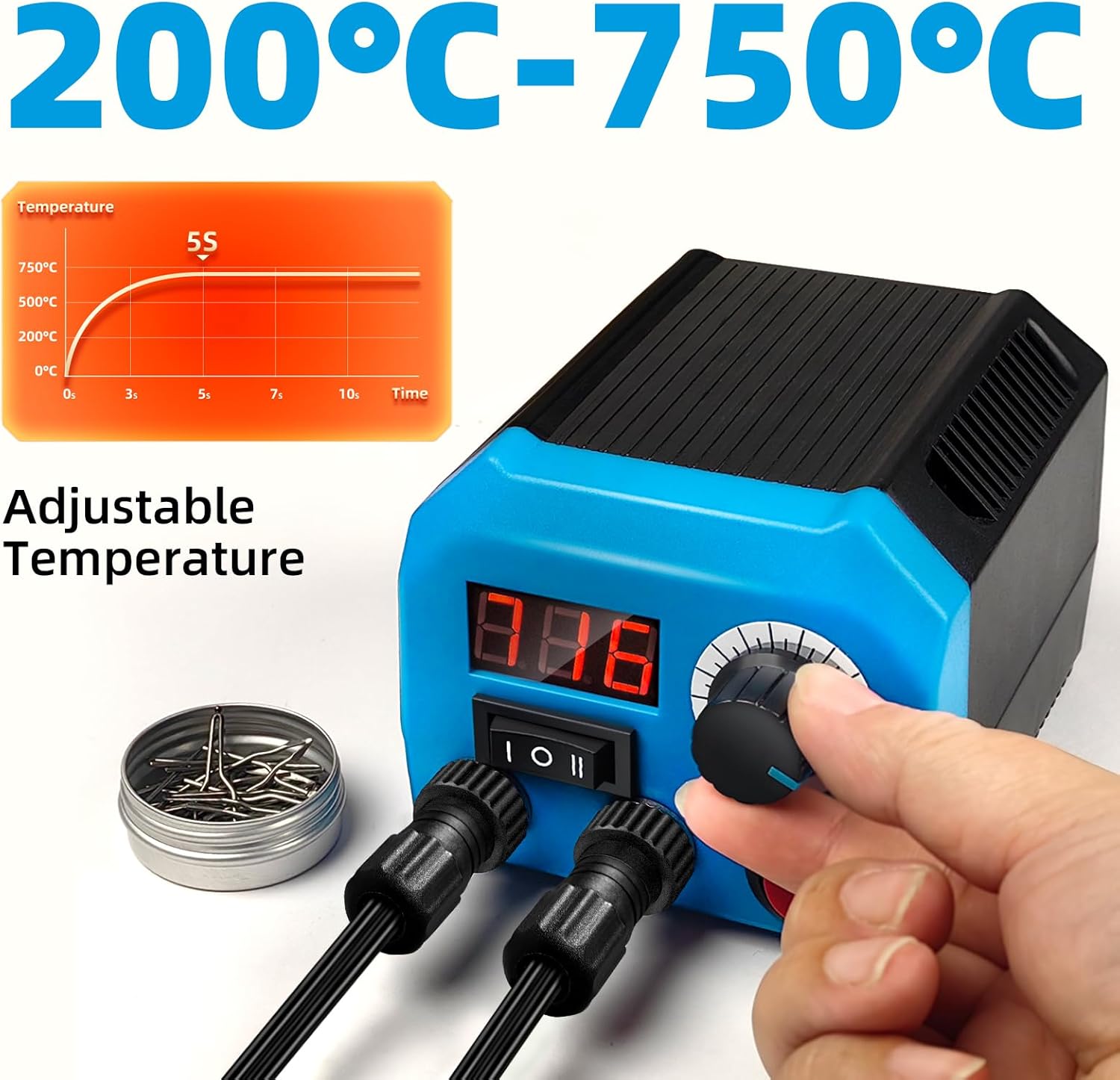
Image: The digital display shows the adjustable temperature range from 200°C to 750°C.

Image: Illustration of the wire-nib detailer for fine work and the solid-point pen for broader strokes and shading.
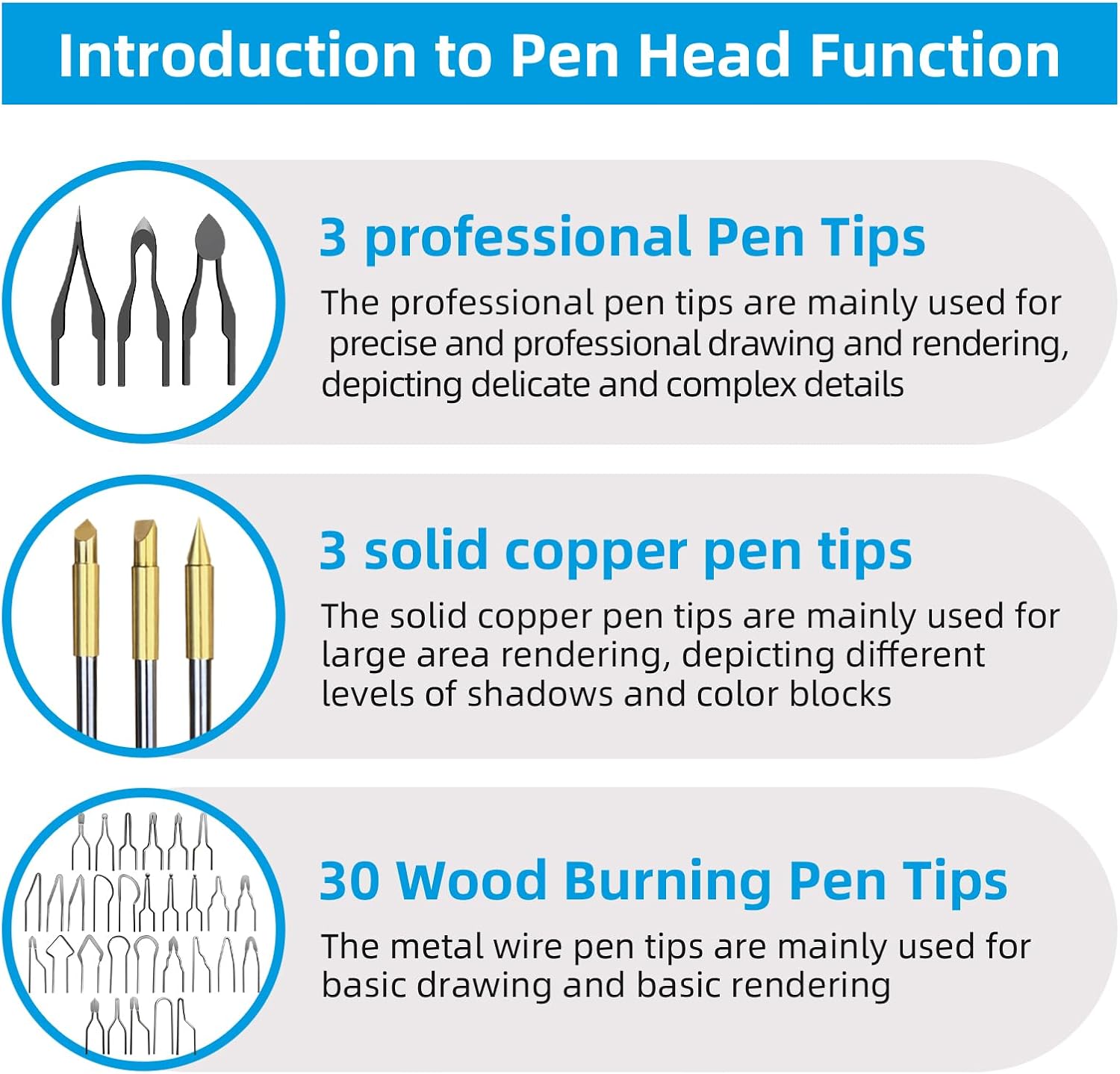
Image: A visual guide to the 36 included pen tips, categorized by their primary function (professional, solid copper, and wood burning tips).
5. Maintenance
- Cleaning Tips: Regularly wipe the pen tips on the moistened sponge to remove carbon buildup. This maintains optimal performance and prevents uneven burning.
- Replacing Wire-Nib Tips: To change tips on the wire-nib pen, use the provided screwdriver to loosen the two screws that secure the tip. Carefully remove the old tip, insert the new one, and tighten the screws. Always use the stainless steel tweezers for handling hot tips.
- Replacing Solid-Point Tips: For the solid-point pen, allow the pen to cool completely. Then, carefully screw off the old tip and screw on the new one.
Proper maintenance ensures the longevity and consistent performance of your wood burning kit.
6. Troubleshooting
- Pen Tip Not Heating: Ensure the pen is securely connected to the unit. Verify that the correct pen button (I or II) is activated and the temperature setting is above 0. Check if the tip is properly installed and not loose.
- Tip Stuck in Pen: If a tip becomes stuck, allow the pen to cool completely before attempting removal. Use the provided screwdriver and/or tweezers to carefully dislodge it. Do not force it when hot, as this can cause damage.
- Inconsistent Burning: Ensure the sponge is adequately moistened for cleaning. Carbon buildup on the tip can lead to inconsistent heat transfer. Adjust temperature settings as needed for different wood types and desired effects.
7. Specifications
| Feature | Specification |
|---|---|
| Brand | FIRElood |
| Model Number | LH55-Z2-NS2 |
| Power Source | Corded Electric |
| Voltage | 120 Volts |
| Wattage | 30 watts |
| Upper Temperature Rating | 750 Degrees Celsius |
| Special Feature | Portable, Digital Temperature Display |
| Handle Material | Nylon |
| Item Weight | 3.25 pounds |
| Product Dimensions | 4.57 x 3.98 x 3.46 inches |
8. Warranty & Support
Warranty: The main host unit of the FIRElood LH55-Z2-NS2 Wood Burner Kit comes with a one-year warranty from the date of purchase.
Support: For any questions, technical assistance, or warranty claims, please contact FIRElood customer service. Refer to the product packaging or the official FIRElood website for the most current contact information.
Related documentsLH55-Z2-NS2


Ask a question about this manual
Ask about setup, troubleshooting, compatibility, parts, safety, or missing instructions. Manuals+ will review the question and use this page’s manual context to help answer it.