Introduction
This manual provides comprehensive instructions for the assembly, operation, maintenance, and troubleshooting of your Realspace Vallori Mesh/Fabric High-Back Chair. Please read this manual carefully before assembly and use to ensure proper function and safety.

Image: The Realspace Vallori Mesh/Fabric High-Back Chair, showcasing its cream color, mesh back, fabric seat, adjustable headrest, and retractable footrest.
Safety Information
For your safety and to prevent damage to the chair, please observe the following guidelines:
- Always ensure the chair's weight limit of 275 lbs is not exceeded.
- Use caution when adjusting the reclining position to avoid injury.
- Keep hands and fingers clear of moving parts during adjustments.
- Ensure all bolts and screws are securely tightened after assembly and periodically check for looseness.
- Do not stand on the chair.
- Use the chair only for its intended purpose as an office chair.
Setup and Assembly
Assembly of the Realspace Vallori chair typically takes approximately 30 minutes. It is recommended to assemble the chair on a soft, clean surface to prevent scratches. Ensure all components are present before beginning.
Components Checklist:
- Chair Base with Casters
- Gas Lift Cylinder
- Seat Cushion
- Backrest
- Armrests (2)
- Headrest
- Lumbar Pillow
- Retractable Footrest Mechanism
- Assembly Hardware (screws, washers, Allen wrench)
Assembly Steps (General Guide):
- Attach Casters to Base: Insert the casters into the holes on the chair base until they click into place.
- Insert Gas Lift: Place the gas lift cylinder into the center hole of the chair base.
- Attach Mechanism to Seat: Secure the seat mechanism to the underside of the seat cushion using the provided screws.
- Connect Seat to Gas Lift: Place the assembled seat onto the gas lift cylinder.
- Attach Backrest: Secure the backrest to the seat mechanism using the appropriate screws.
- Install Armrests: Attach the armrests to the seat and/or backrest as per the specific design.
- Attach Headrest: Slide or screw the headrest into its designated slot on the backrest.
- Install Footrest: Attach the retractable footrest mechanism to the underside of the seat.
- Final Check: Ensure all connections are tight and the chair is stable before use.

Image: The Realspace Vallori chair fully assembled and positioned in an office environment, demonstrating its integration into a workspace.
Operating Instructions
Your Realspace Vallori chair offers several adjustable features to enhance your comfort and support.
1. Seat Height Adjustment (Pneumatic 1-touch)
To adjust the seat height, locate the lever on the right side, beneath the seat.
- To raise the seat: While seated, lift the lever and slightly lift your weight off the seat. The seat will rise. Release the lever at the desired height.
- To lower the seat: While seated, lift the lever and apply your weight to the seat. The seat will lower. Release the lever at the desired height.
2. Reclining Positions
The chair features multiple reclining positions, allowing you to switch from an upright sitting position to a comfortably reclined state.
- To recline: Locate the recline lever (often on the left side, or integrated with the height lever). Pull the lever outwards or upwards, then lean back to the desired angle. Release the lever to lock the position.
- To return upright: While seated, lean forward slightly and pull the recline lever. The backrest will return to its upright position. Release the lever to lock.
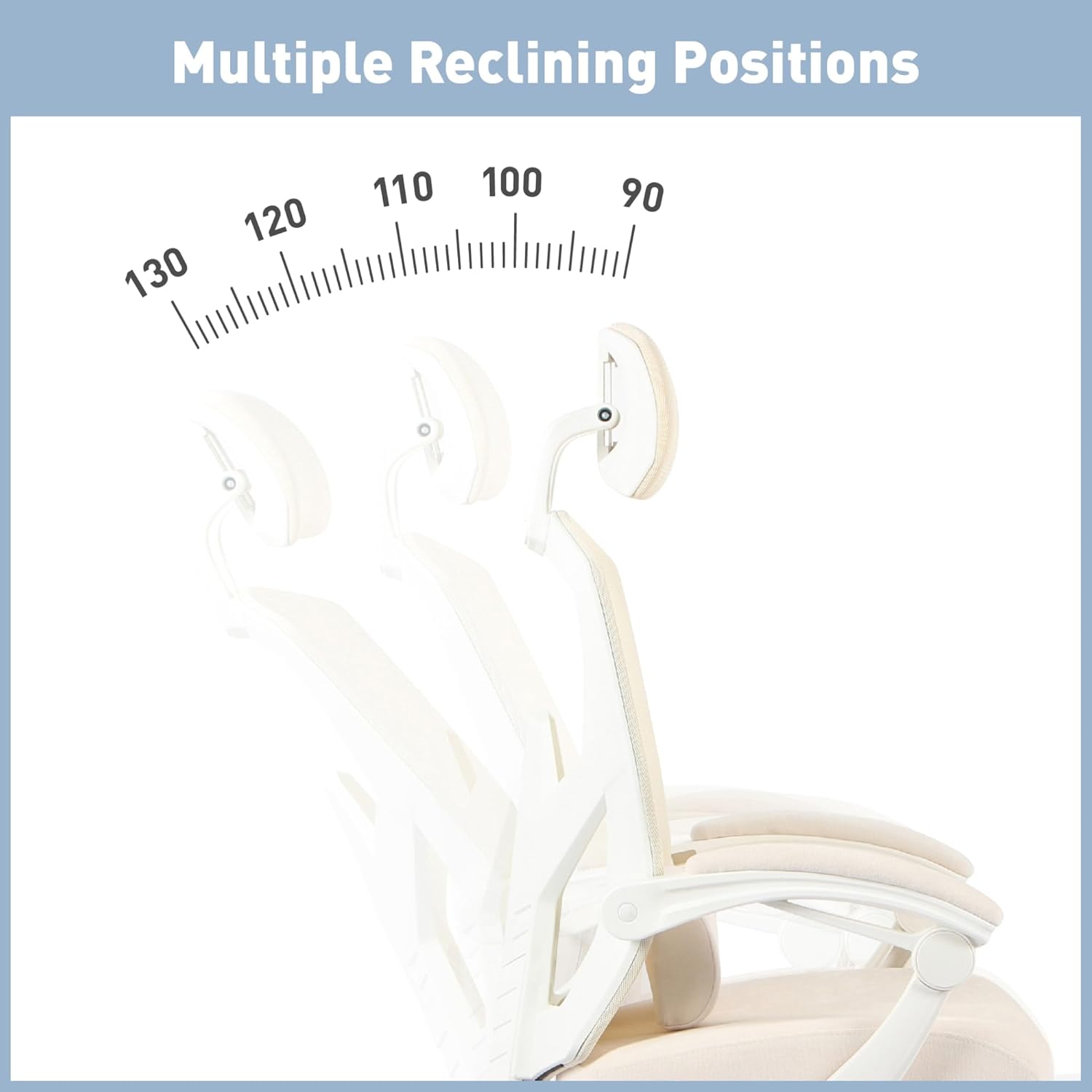
Image: Visual representation of the chair's multiple reclining positions, illustrating the range of motion from upright to a relaxed recline.

Image: A sequence of images demonstrating the smooth reclining action of the Realspace Vallori chair from a side perspective.
3. Retractable Footrest
The integrated footrest allows you to elevate your feet for enhanced relaxation, especially when reclined.
- To extend the footrest: Pull the footrest handle located beneath the front of the seat outwards. The footrest will slide out.
- To retract the footrest: Push the footrest back under the seat until it is fully stowed.
4. Adjustable Headrest
The headrest can be adjusted to provide optimal neck and head support.
- To adjust: Gently push or pull the headrest up or down to your preferred height. It will typically lock into place at various intervals.
5. Lumbar Pillow
The included lumbar pillow provides additional support for your lower back. Position it to best suit your comfort needs.
6. Padded Armrests
The padded armrests are fixed but are designed to shift with the chair when reclined, maintaining comfort and support for your arms.
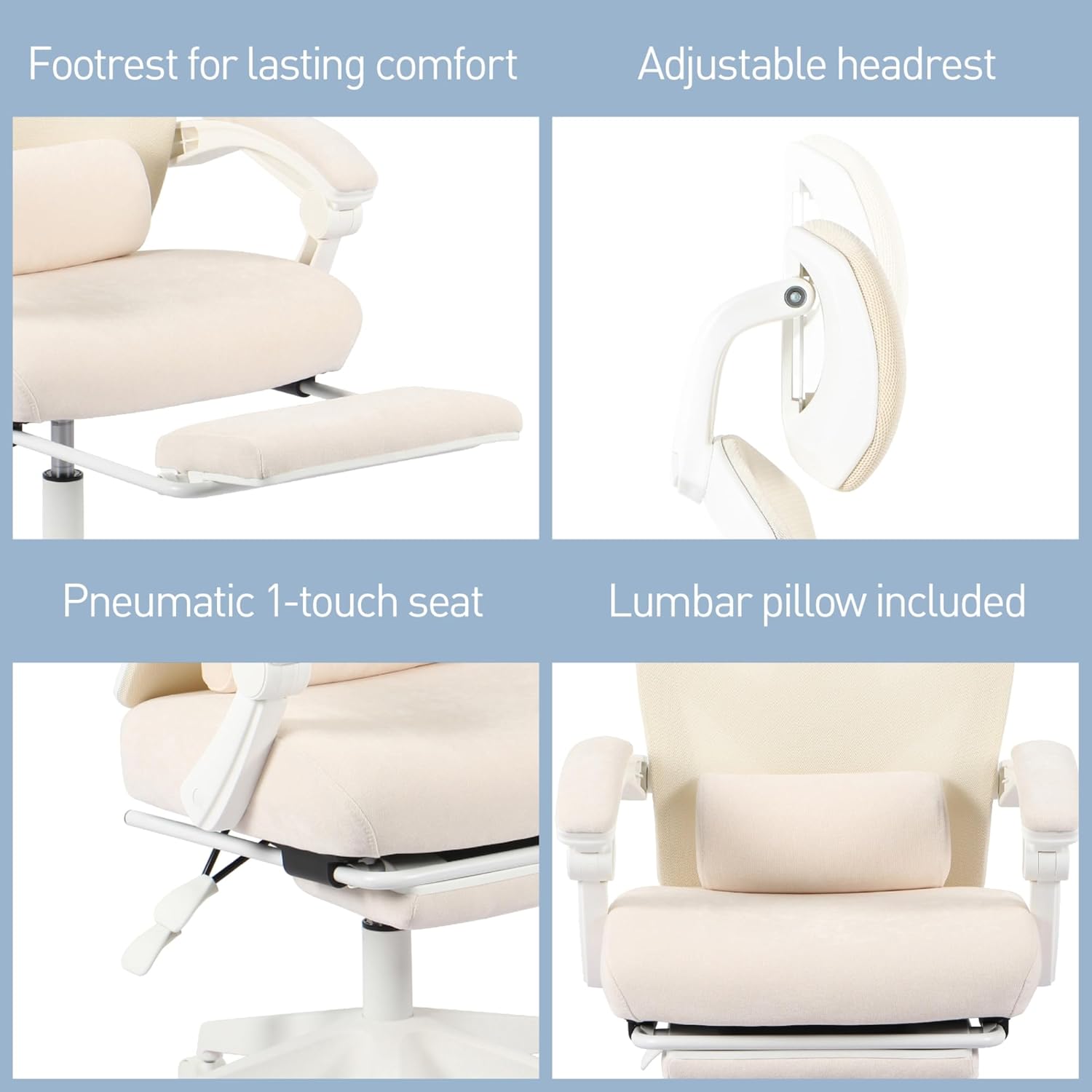
Image: Detailed views of key features including the retractable footrest, adjustable headrest, pneumatic seat height adjustment lever, and the removable lumbar support pillow.
Maintenance
Regular maintenance will help prolong the life and appearance of your Realspace Vallori chair.
- Cleaning:
- For mesh and fabric surfaces, use a soft brush or vacuum cleaner to remove dust and debris.
- For spills, blot immediately with a clean, damp cloth. Use a mild soap solution if necessary, then wipe with a clean, damp cloth and allow to air dry. Avoid harsh chemicals.
- For plastic and metal parts, wipe with a soft, damp cloth.
- Hardware Check: Periodically check all bolts and screws to ensure they are tight. Re-tighten as needed to maintain stability and safety.
- Caster Care: Keep casters free of hair and debris to ensure smooth movement. Clean with a damp cloth if necessary.
- Gas Lift: The gas lift is a sealed unit and requires no maintenance. If it fails, contact customer support for replacement.
Troubleshooting
If you encounter issues with your chair, refer to the following common problems and solutions:
| Problem | Possible Cause | Solution |
|---|---|---|
| Chair wobbles or is unstable. | Loose assembly hardware. | Check and tighten all screws and bolts, especially those connecting the seat to the mechanism and the backrest. |
| Seat does not adjust height. | Gas lift malfunction or lever not engaged. | Ensure the height adjustment lever is fully engaged. If the issue persists, the gas lift may need replacement. Contact customer support. |
| Chair does not recline or lock. | Recline mechanism jammed or lever not engaged. | Check the recline lever for obstructions. Ensure it is fully pulled/pushed to engage or disengage the lock. |
| Casters do not roll smoothly. | Debris caught in casters. | Turn the chair over and remove any hair, lint, or debris from the caster wheels. |
| Footrest is difficult to extend/retract. | Mechanism obstruction or lack of lubrication. | Check for any objects blocking the footrest's path. Ensure the mechanism is clean. A small amount of silicone lubricant can be applied to moving parts if needed. |
Specifications
Key specifications for the Realspace Vallori Mesh/Fabric High-Back Chair:
- Brand: Realspace
- Model: Vallori
- Color: Cream
- Back Style: Mesh
- Special Feature: Retractable Footrest
- Weight Capacity: Up to 275 lbs
- Item Weight: 18.95 pounds
- Product Dimensions: 28.35 x 14.96 x 25.59 inches (L x W x H)
- Included Components: Adjustable Headrest, Lumbar Pillow, Arm Rests
- Seat Height Range: 18.25" - 22" (approximate, based on image)
- Overall Height Range: 44.5" - 48.25" (approximate, based on image)
- Seat Width: 19.25" (approximate, based on image)
- Seat Depth: 16.5" (approximate, based on image)
- Back Height: 27.75" (approximate, based on image)
- Base Diameter: 28" (approximate, based on image)
- UPC: 735854699444
- Manufacturer Part Number: HLC-3509FX-1MW
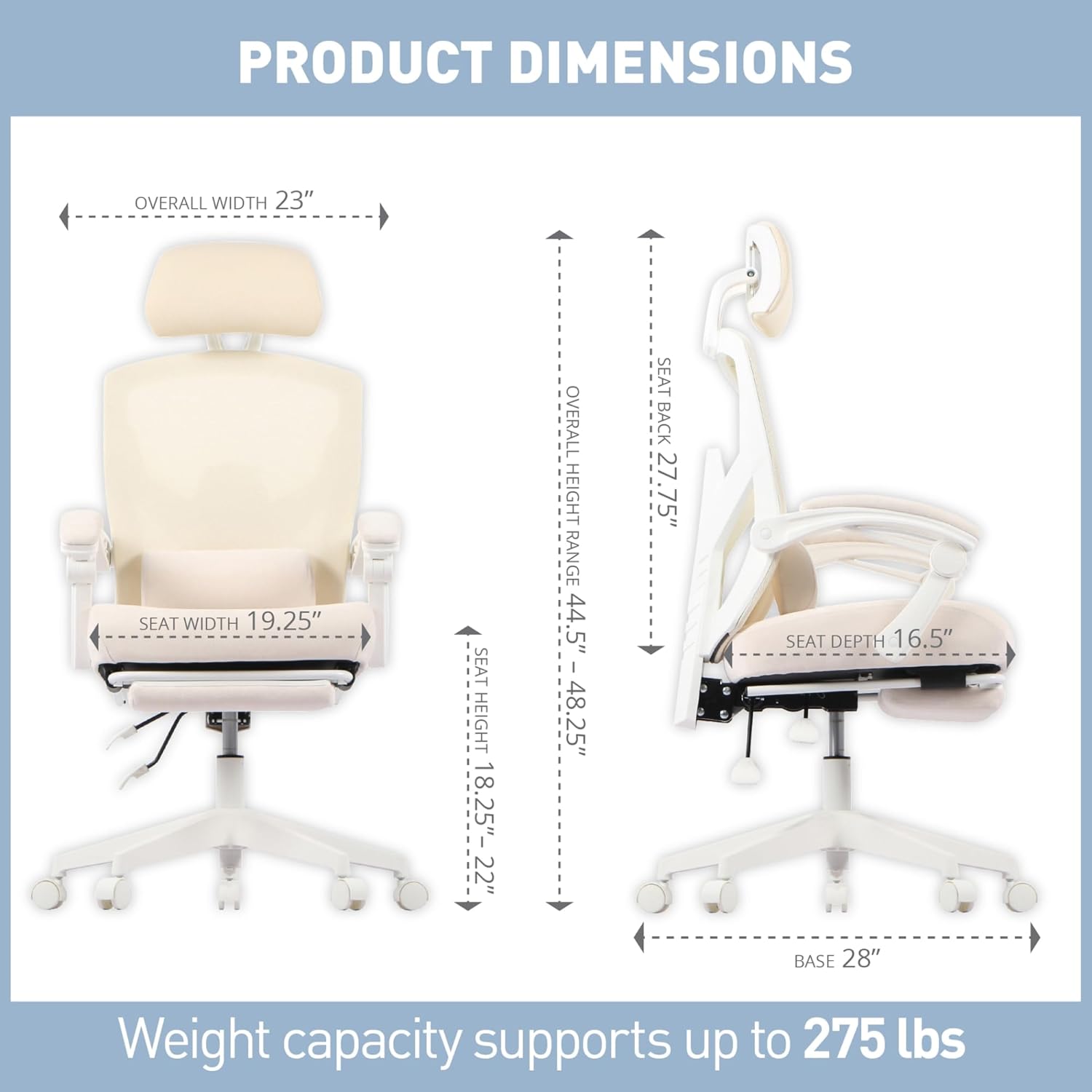
Image: A detailed diagram showing the various dimensions of the Realspace Vallori chair, crucial for understanding its physical footprint and fit.
Warranty Information
Specific warranty details for the Realspace Vallori chair may vary. Please refer to the warranty card included with your purchase or visit the official Realspace website for the most current and detailed warranty information. Keep your proof of purchase for any warranty claims.
Customer Support
If you require further assistance, have questions not covered in this manual, or need to report a missing part or defect, please contact Realspace customer support:
- Website: Visit the Realspace Store on Amazon or the official Realspace corporate website.
- Contact Information: Refer to your product packaging or the Realspace website for phone numbers or email support.


