
1. Introduction
This manual provides detailed instructions for the setup, operation, and maintenance of your SEUNKWANG EWEADN GS75 Wireless Mechanical Keyboard. This 75% layout keyboard offers versatile connectivity, customizable RGB lighting, and a comfortable typing experience.

Image 1.1: The SEUNKWANG EWEADN GS75 Wireless Mechanical Keyboard, showcasing its blue and white keycaps and compact layout.
2. Package Contents
Verify that all items are present in your package:
- SEUNKWANG EWEADN GS75 Wireless Mechanical Keyboard
- Extra keycaps (4 pieces)
- Replacement switches (2 pieces)
- Keycap puller
- Keyboard cable (USB-C)
- User Manual
- Dust Cover
3. Key Features
- 75% Layout with Multimedia Knob: Compact design with 82 keys and a dedicated knob for volume control.
- Tri-Mode Connectivity: Supports Bluetooth 5.0, 2.4GHz wireless, and USB-C wired connections.
- Hot-Swappable PCB: Compatible with 3-pin or 5-pin mechanical switches for easy customization.
- Gasket Mounted Design: Features a 6-layer padding system for enhanced typing feel and sound.
- Customizable RGB Backlight: Offers 16.8 million colors, multiple effects, and programmable lighting via software.
- PBT Double-Shot Keycaps: Durable keycaps with clear legends that resist fading and shine.
- Long-lasting Battery: Equipped with a 5000mAh battery, providing up to 160 hours of use with lights off.
- Dual System Support: Compatible with Windows and Mac operating systems.

Image 3.1: Visual summary of the EWEADN GS75's main features.
4. Setup Instructions
4.1. Connecting Your Keyboard
The GS75 keyboard supports three connection modes:
- USB-C Wired Mode: Connect the provided USB-C cable from the keyboard to your computer. The keyboard is plug-and-play in this mode.
- 2.4GHz Wireless Mode: Insert the 2.4G USB receiver into your computer's USB port. Switch the keyboard to 2.4G mode using the switch on the side (often labeled '2.4G' or 'R'). Press and hold FN + R to activate.
- Bluetooth 5.0 Mode: The keyboard can connect to up to 3 Bluetooth devices. Switch the keyboard to Bluetooth mode (often labeled 'BT'). Press and hold FN + Q, FN + W, or FN + E to select a Bluetooth channel (BT1, BT2, BT3) and initiate pairing. Search for 'GS75' on your device's Bluetooth settings and connect.
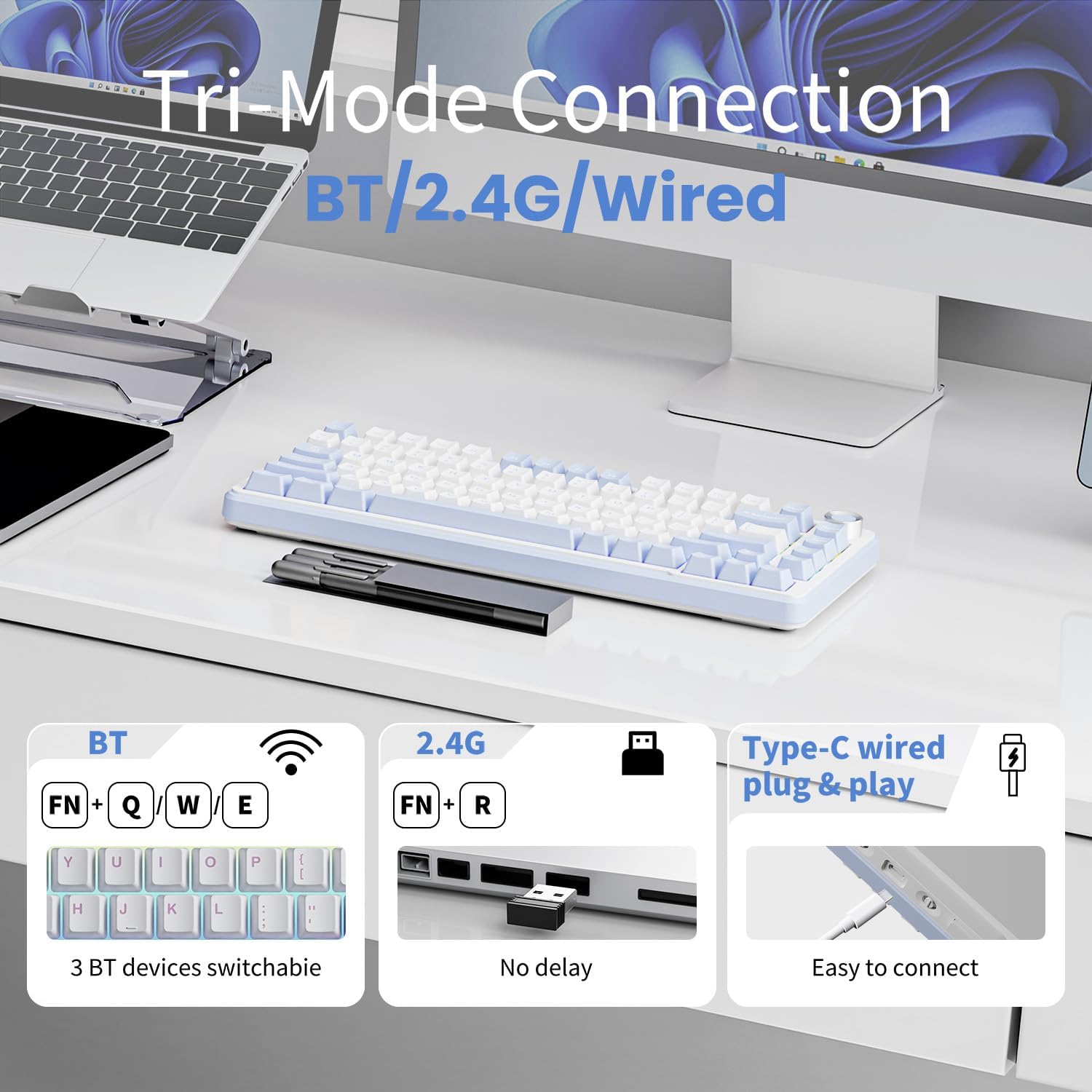
Image 4.1: Illustration of the keyboard's tri-mode connection options.
4.2. Operating System Compatibility
The keyboard supports both Windows and Mac operating systems. Use the side switch (labeled 'WIN' and 'MAC') to adjust the keyboard's layout and functionality for your specific OS.
4.3. Adjusting Keyboard Angle
The keyboard features adjustable kickstands on the underside. Extend these to achieve a more ergonomic typing angle if desired.
5. Operating Instructions
5.1. Multimedia Knob Functionality
The metal knob located on the top right of the keyboard provides quick audio control:
- Turn clockwise to increase volume.
- Turn counter-clockwise to decrease volume.
- Long-press to mute/unmute audio.

Image 5.1: The multimedia knob and its functions.
5.2. RGB Backlight Control
The keyboard features dynamic RGB lighting with 16.8 million colors and various effects. You can control the lighting directly on the keyboard or through the dedicated software.
- Press FN + X to turn the backlight on/off.
- Press FN + / to switch between different lighting effects.
- Press FN + Enter to switch colors within certain effects.
- Press FN + ESC (hold for 3 seconds) to restore factory lighting settings.
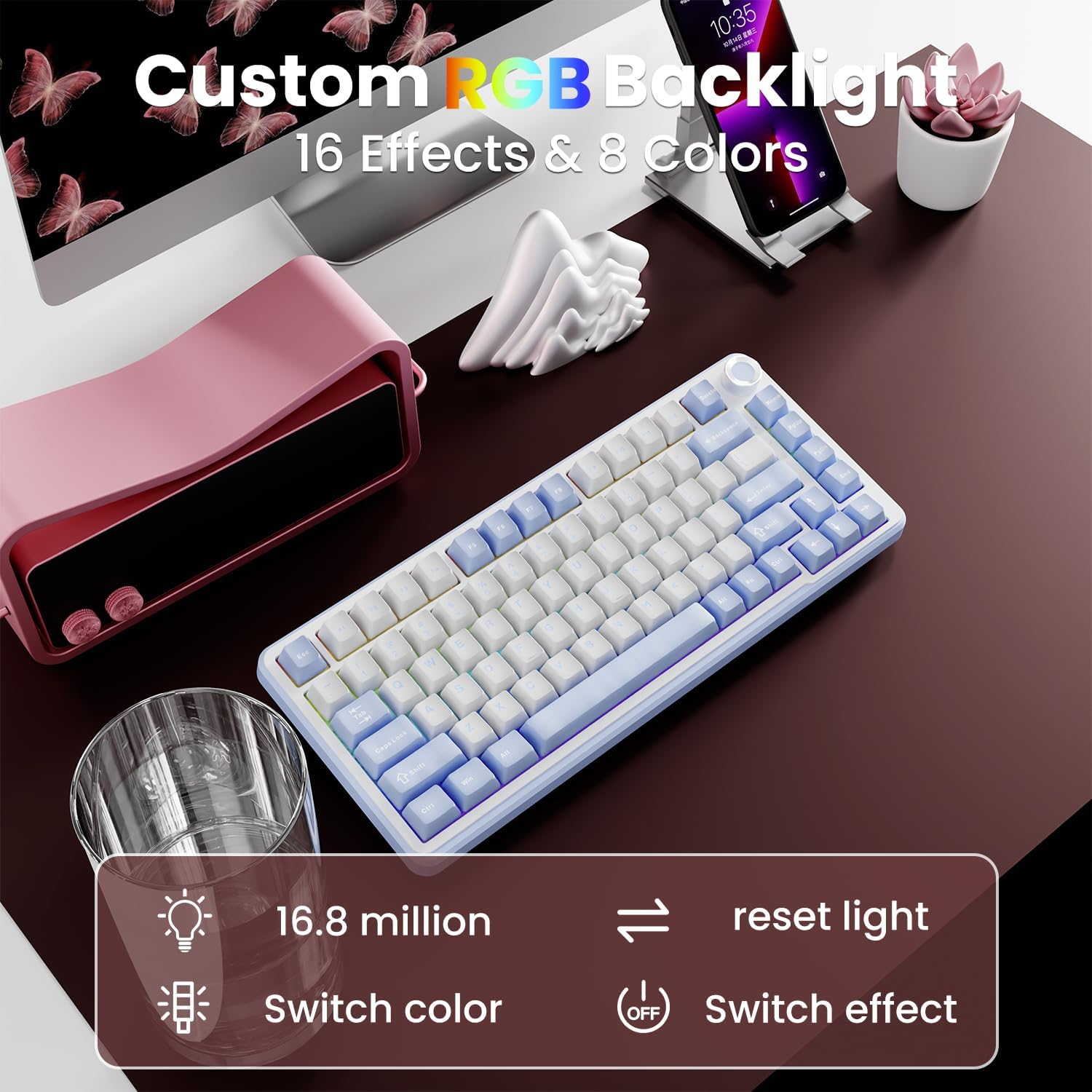
Image 5.2: On-board RGB control functions.
5.3. Programmable Software
For advanced customization of lighting, key assignments, and macros, download the official EWEADN GS75 software. This software allows you to:
- Customize individual key functions.
- Create and assign macros.
- Fine-tune RGB lighting effects and colors.
- Set music rhythm synchronization for lighting.

Image 5.3: The programmable software interface for the GS75 keyboard.
Watch this video for a guide on downloading and using the software:
Video 5.1: Instructions on how to download and install the EWEADN GS75 software for customization.
5.4. Battery Management
The GS75 keyboard is equipped with a 5000mAh battery. To maximize battery life:
- Turn off RGB lighting when not needed (up to 160 hours of use).
- The keyboard supports charging while in use.
- It features energy-saving technology and a sleep mode to conserve power during inactivity.

Image 5.4: Information on the keyboard's battery capacity and power management.
6. Maintenance
6.1. Keycap and Switch Care
The GS75 uses durable PBT double-shot keycaps. To clean, gently remove keycaps using the provided keycap puller and wipe with a soft, damp cloth. Avoid harsh chemicals.
The keyboard features a hot-swappable PCB, allowing for easy replacement of 3-pin or 5-pin mechanical switches without soldering. Use the provided switch puller to carefully remove and insert switches.

Image 6.1: Hot-swappable switches and their specifications.
6.2. Gasket Structure and Sound
The keyboard's gasket-mounted design incorporates a 6-layer padding system (including PET sound pads, PORON foam, IXPE switch pads, EPDM switch seat foam, and silicone bottom pads) to reduce noise and enhance typing acoustics, delivering a 'creamy' sound profile.
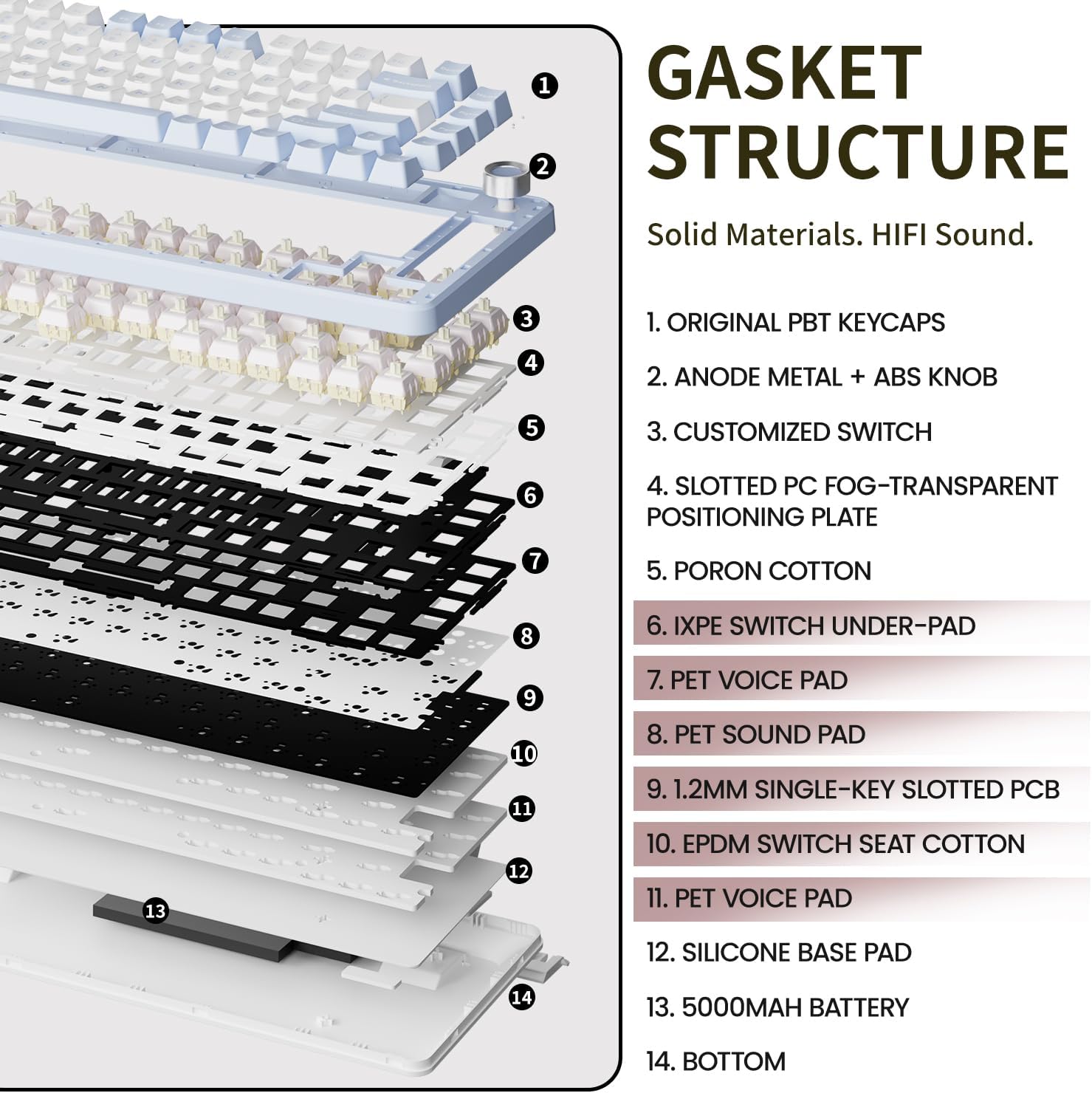
Image 6.2: Exploded view of the keyboard's gasket structure.
Experience the sound profile of the GS75 keyboard:
Video 6.1: A demonstration of the creamy sound produced by the GS75 Gaming Keyboard.
Video 6.2: A real sound test of the GS75 gaming keyboard.
7. Troubleshooting
- Connectivity Issues: Ensure the keyboard is switched to the correct mode (BT, 2.4G, or Wired). For Bluetooth, ensure your device's Bluetooth is on and the keyboard is in pairing mode. For 2.4G, ensure the USB receiver is properly inserted.
- RGB Lighting Not Working: Check battery level. If using software, ensure settings are applied correctly. Try resetting to factory settings (FN + ESC for 3 seconds).
- Keys Not Responding: Check if the keyboard is connected. If hot-swappable switches were recently changed, ensure they are seated correctly.
- Software Not Detecting Keyboard: Ensure the keyboard is connected via USB-C when first setting up the software.
8. Specifications
| Feature | Detail |
|---|---|
| Product Dimensions | 5.71 x 0.75 x 13.07 inches |
| Item Weight | 2.46 pounds |
| Connectivity Technology | 2.4G, Bluetooth 5.0, USB-C |
| Keyboard Description | Wireless Mechanical Gaming Keyboard |
| Special Features | Backlit, Customizable Display Keys, Ergonomic, Hot-Swappable, Hotkeys and Media Keys |
| Keyboard Backlighting Color Support | RGB (16.8 million colors) |
| Battery | 1 Lithium Ion battery (5000mAh, included) |
| Battery Life (lights off) | Up to 160 hours |
| Compatible Devices | Gaming Console, Laptop, PC, Smart TV, Smartphone |
| Manufacturer | EWEADN |
9. Warranty and Support
The EWEADN GS75 gaming keyboard comes with 48-month brand support. For any questions or concerns, please contact our expert team. We are always available to assist you.