
1. Introduction
The NULKOMMA JH4AS5101DZXJ is a brushless DC motor controller designed for electric bicycles and scooters. It provides stable speed control and sensitive response for braking and direction changes. The controller features a high-quality aluminum alloy shell with a groove design for efficient heat dissipation, protecting internal circuits from thermal overload. Its wires and waterproof interfaces are engineered for durability and low failure rates, ensuring reliable long-term use in various weather conditions.
2. What's in the Box
- 1 x NULKOMMA JH4AS5101DZXJ Electric Bicycle Controller
3. Product Visuals
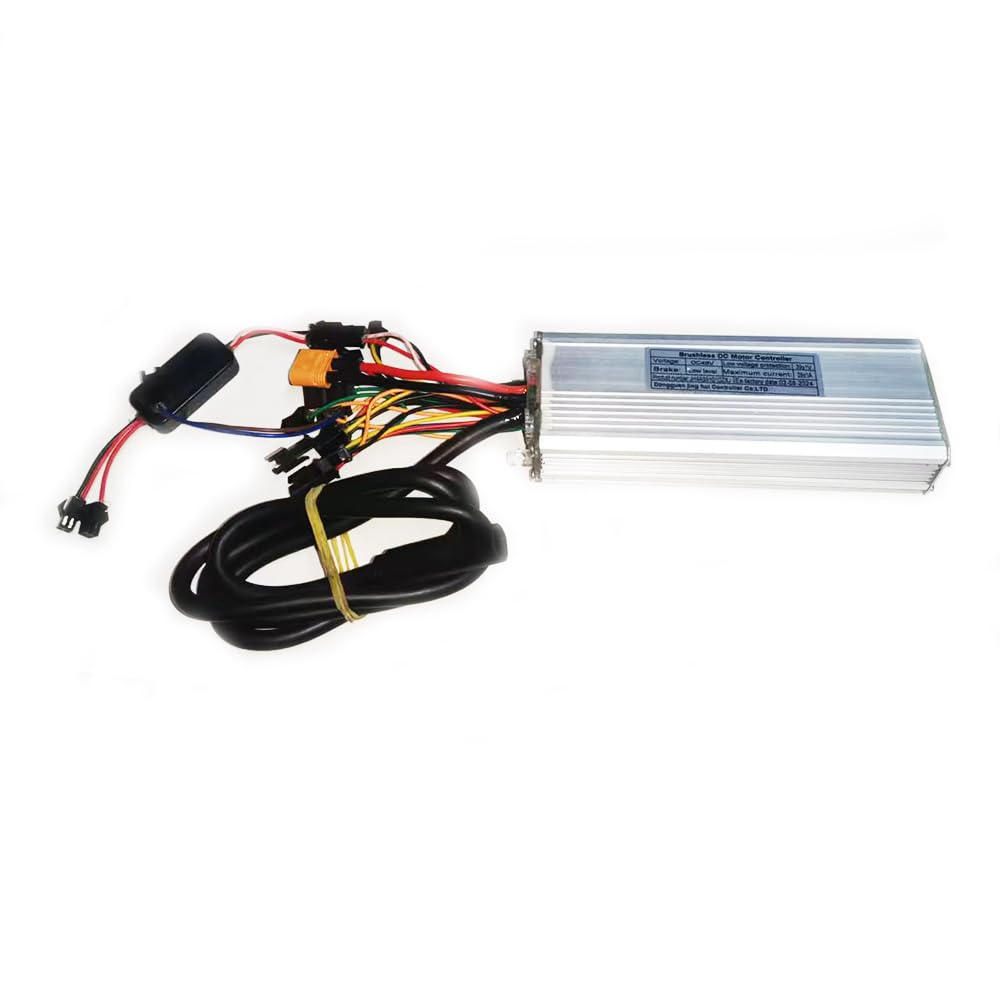
Image 1: The NULKOMMA JH4AS5101DZXJ Electric Bicycle Controller, showing the product label with specifications such as voltage (DC48V), low voltage protection (39±1V), and maximum current (28±1A).

Image 2: The NULKOMMA JH4AS5101DZXJ Electric Bicycle Controller, displaying its various colored wires and connectors for different functions, including power, motor phases, and auxiliary signals.
Video 1: An overview of the NULKOMMA JH4AS5101DZXJ Electric Bicycle Controller, demonstrating its physical appearance and the various connection points for installation.
4. Setup and Installation
- Safety First: Before installation, ensure the electric bicycle's power is completely off and the battery is disconnected to prevent electrical shock or damage.
- Identify Connectors: Carefully examine the JH4AS5101DZXJ controller. Each interface is labeled to guide correct connection. Refer to the labels for specific functions.
- Power Connection: Connect the main power cables (typically thicker red and black wires) to your e-bike's battery. Ensure correct polarity (red to positive, black to negative).
- Motor Phase Wires: Connect the three thicker motor phase wires (commonly blue, green, and yellow) from the controller to the corresponding motor wires.
- Hall Sensor Wires: Connect the five thinner Hall sensor wires from the controller to the motor's Hall sensor port.
- Throttle/Accelerator: Connect the throttle or accelerator cable to its designated port on the controller.
- Brake Levers: Connect the brake lever cables. This controller supports low-level brake signals, which cut motor power when brakes are applied.
- Display Meter: If your e-bike uses a display meter, connect its cable to the appropriate port on the controller.
- Auxiliary Connections: Connect any other auxiliary cables such as pedal assist sensor (PAS), speed sensor, or light connections as required by your e-bike's specific configuration.
- Secure and Mount: Secure all connections firmly, ensuring no exposed wires. Mount the controller in a protected location on your e-bike, allowing for adequate airflow to facilitate heat dissipation.
5. Operation
- Pre-Operation Check: After installation, double-check that all connections are secure and correctly made.
- Power On: Turn on the electric bicycle's main power switch. The display meter (if connected) should illuminate, indicating the system is active.
- Throttle Test: Gently engage the throttle/accelerator. The motor should respond smoothly and provide power.
- Brake Test: Test both brake levers. Engaging the brakes should immediately cut power to the motor.
- Function Verification: Verify that all other connected functions, such as pedal assist, lights, and horn (if applicable), are working correctly.
- Safety Check: Always perform a comprehensive safety check before riding, ensuring brakes, throttle, and steering are fully functional and responsive.
6. Maintenance
- Connection Inspection: Regularly inspect all wire connections for any signs of looseness, corrosion, or damage. Tighten loose connections or replace damaged wires as necessary.
- Cleaning: Keep the controller clean and free from dust, dirt, and moisture. Use a soft, dry cloth for cleaning. Avoid using harsh chemicals or abrasive materials.
- Environmental Protection: Avoid exposing the controller to extreme temperatures, direct sunlight, or heavy rain for prolonged periods.
- No Disassembly: Do not attempt to open the controller casing. Doing so may void the warranty and can expose sensitive internal components to damage.
- Moisture Exposure: If the controller becomes wet, immediately disconnect power and allow it to dry completely in a well-ventilated area before re-applying power.
7. Troubleshooting
- Motor Not Responding:
Possible Causes: Disconnected battery, loose throttle connection, incorrect motor phase/Hall sensor wiring, discharged battery.
Solutions: Check all relevant connections, ensure battery is charged, verify wiring according to the setup instructions. - Intermittent Power:
Possible Causes: Loose power connections, damaged wires.
Solutions: Inspect all power connections for a secure fit. Check for any frayed or damaged wires and replace if necessary. - Controller Overheating:
Possible Causes: Insufficient airflow, continuous high-load operation.
Solutions: Ensure the controller is mounted in a location with sufficient airflow. Reduce continuous high-load operation if possible. - Brakes Not Cutting Power:
Possible Causes: Incorrect or loose brake lever connections.
Solutions: Verify brake lever connections and ensure they are properly engaged. - Display Not Working:
Possible Causes: Loose display cable connection.
Solutions: Check the display cable connection to the controller.
For persistent issues or problems not listed here, it is recommended to consult a qualified e-bike technician or contact NULKOMMA customer support for assistance.
8. Specifications
| Feature | Specification |
|---|---|
| Model Number | JH4AS5101DZXJ |
| Voltage | DC48V |
| Low Voltage Protection | 39±1V |
| Maximum Current | 28±1A |
| Brake Level | Low level |
| Product Dimensions | 5.91 x 1.97 x 1.18 inches |
| Item Weight | 14.8 ounces |
| Manufacturer | NULKOMMA |
9. Warranty and Support
NULKOMMA offers a 180-day unconditional return and refund policy for products received. If you are not satisfied with your purchase, you may apply for a return and refund within this period.
For any product-related issues, technical assistance, or support inquiries, please contact NULKOMMA customer service via email. We are committed to providing timely and helpful assistance to ensure your satisfaction.