
1. Introduction
Thank you for choosing the EWEADN GS75 Wireless Mechanical Keyboard. This 75% layout gaming keyboard features a gasket-mounted design, hot-swappable switches, dynamic RGB backlighting, and versatile tri-mode connectivity (Bluetooth 5.0, 2.4GHz wireless, and USB-C wired). This manual provides detailed instructions to help you set up, operate, maintain, and troubleshoot your new keyboard.

Figure 1.1: EWEADN GS75 Wireless Mechanical Keyboard (Blue & White variant).
2. Product Features
- 75% Layout & RGB Backlight: Compact 82-key design with a sturdy metal knob for quick sound adjustments. Features dynamic RGB effects and programmable software for customization.
- Hot-swappable & Programmable: PCB supports 3-pin or 5-pin mechanical switches. Comes with pre-lubricated Cream Pink mechanical switches (50 million keystrokes). N-key rollover for simultaneous key presses. Driver support for light, key, and music rhythm programming.
- Gasket Mounted Design: Advanced gasket structure with 6-layer padding, noise reduction, two-color injection keycaps, precision-adjusted stabilizers, and pre-lubricated switches for smooth typing and Hi-Fi sound.
- Tri-Mode Wireless Connectivity: Supports Bluetooth 5.0, 2.4GHz wireless, and USB-C wired modes. Connects up to 5 devices simultaneously. Compatible with PC, laptops, tablets, mobile phones, PS, XBOX, and supports Win & Mac dual systems.
- Six-layer Padding ASMR Sound & 5000 mAh Battery: Features two layers of PET sound pads, PORON foam, IXPE switch pads, EPDM switch seat foam, and silicone bottom pads for effective noise reduction and Hi-Fi sound. Equipped with a 5000mAh battery providing up to 160 hours of battery life (lights off).
- Cherry Profile Double-shot PBT Keycaps: Durable PBT double-shot keycaps with clear, fade-resistant characters. Fine matte surface for comfortable typing.
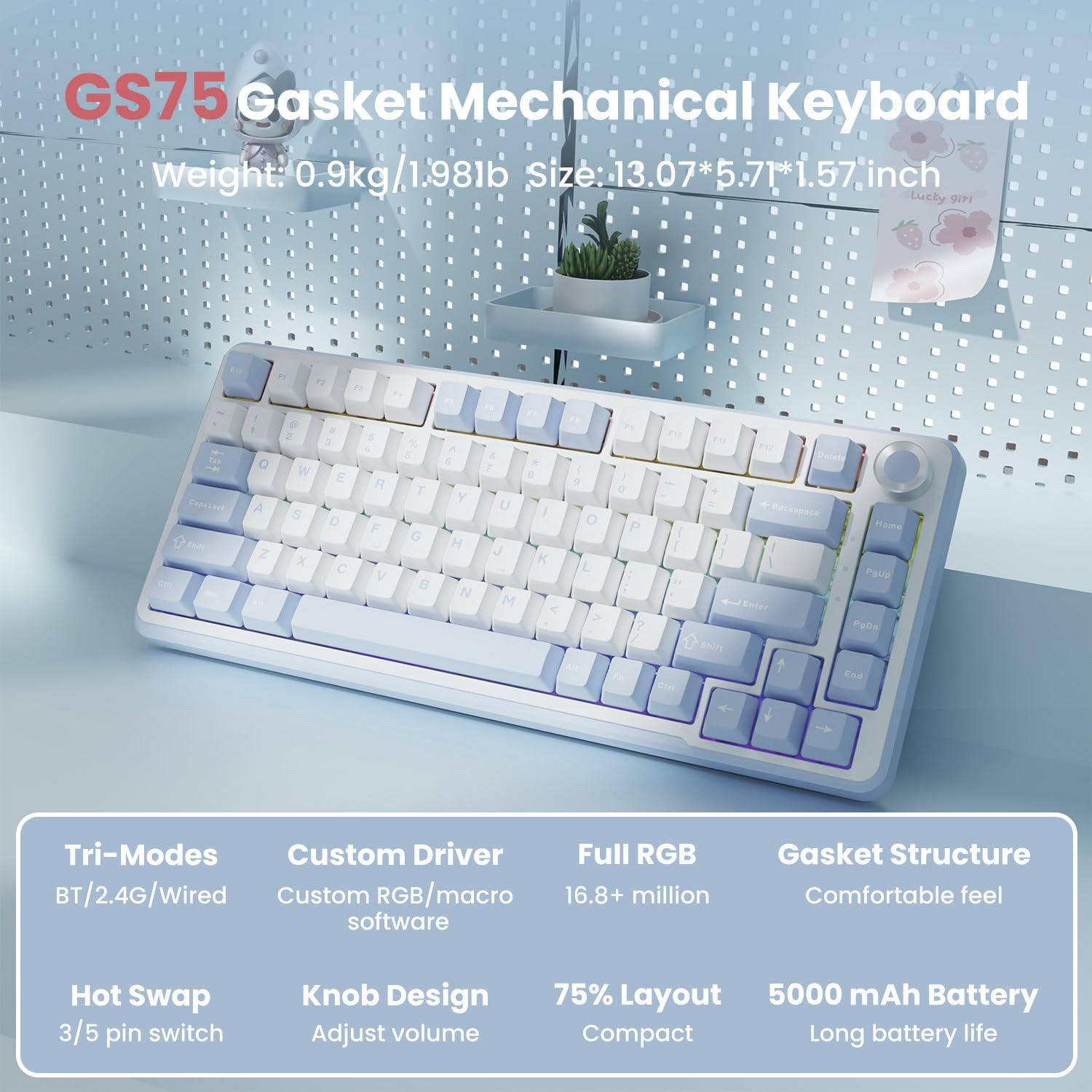
Figure 2.1: Overview of GS75 key features including Tri-Modes, Custom Driver, Full RGB, Gasket Structure, Hot Swap, Knob Design, 75% Layout, and 5000 mAh Battery.
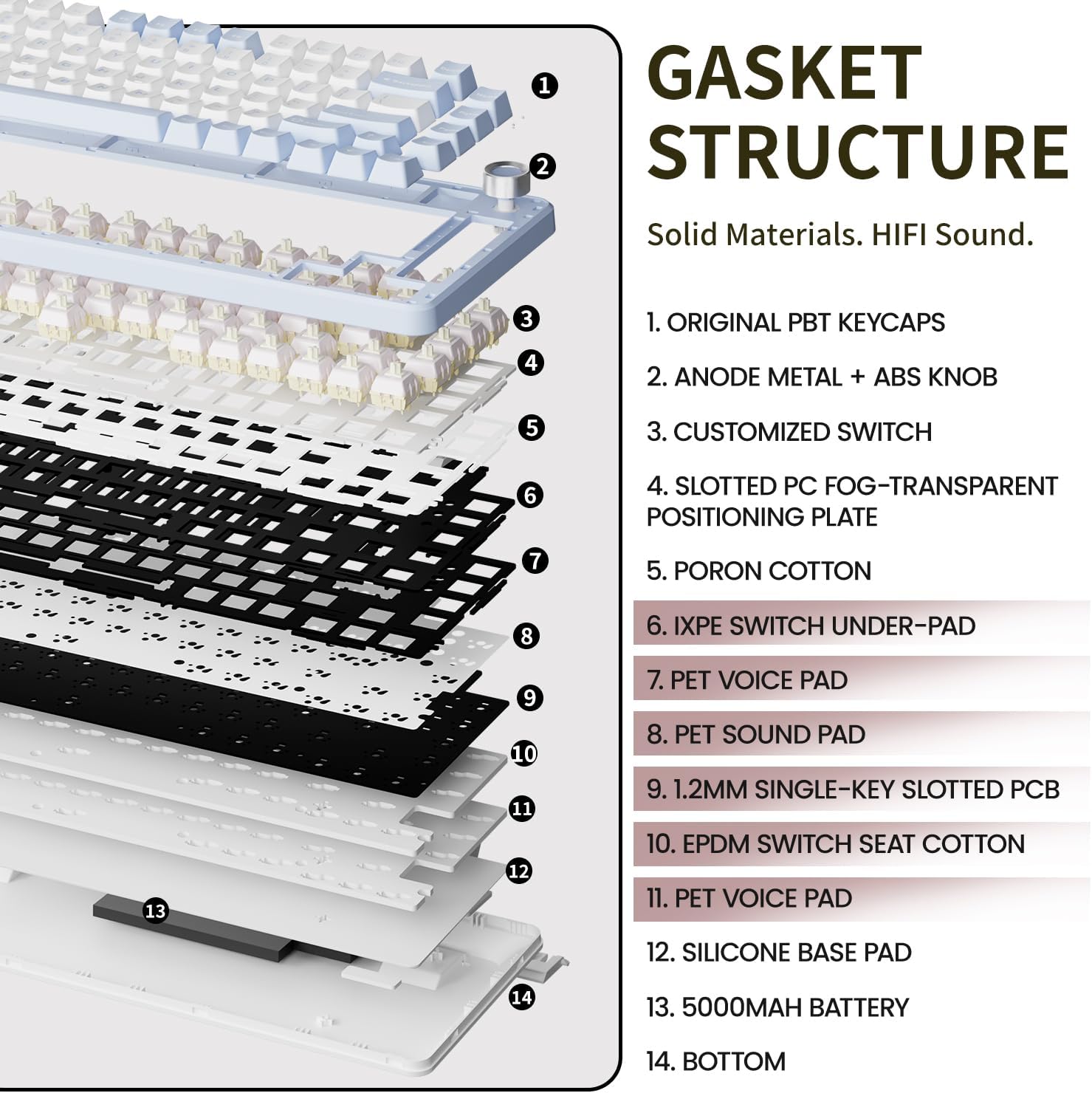
Figure 2.2: Detailed diagram illustrating the 6-layer gasket structure of the EWEADN GS75 keyboard, highlighting components like PBT keycaps, metal knob, customized switch, slotted PC plate, PORON cotton, IXPE switch under-pad, PET voice pad, 1.2mm single-key slotted PCB, EPDM switch seat cotton, silicone base pad, 5000mAh battery, and bottom casing.
3. Setup
3.1. Connectivity Modes
The EWEADN GS75 supports three connection modes: Bluetooth (BT), 2.4GHz Wireless, and USB-C Wired.
- Bluetooth Mode (BT):
Press and hold FN + Q/W/E to switch between BT1, BT2, or BT3. The keyboard can connect to up to three Bluetooth devices simultaneously. Ensure your device's Bluetooth is enabled and search for 'EWEADN GS75' to pair. - 2.4GHz Wireless Mode:
Press and hold FN + R to activate 2.4GHz mode. Insert the included 2.4GHz USB receiver into your computer's USB port. The keyboard will automatically connect. - USB-C Wired Mode:
Connect the keyboard to your device using the provided USB-C cable. This mode is plug-and-play and will automatically be detected.
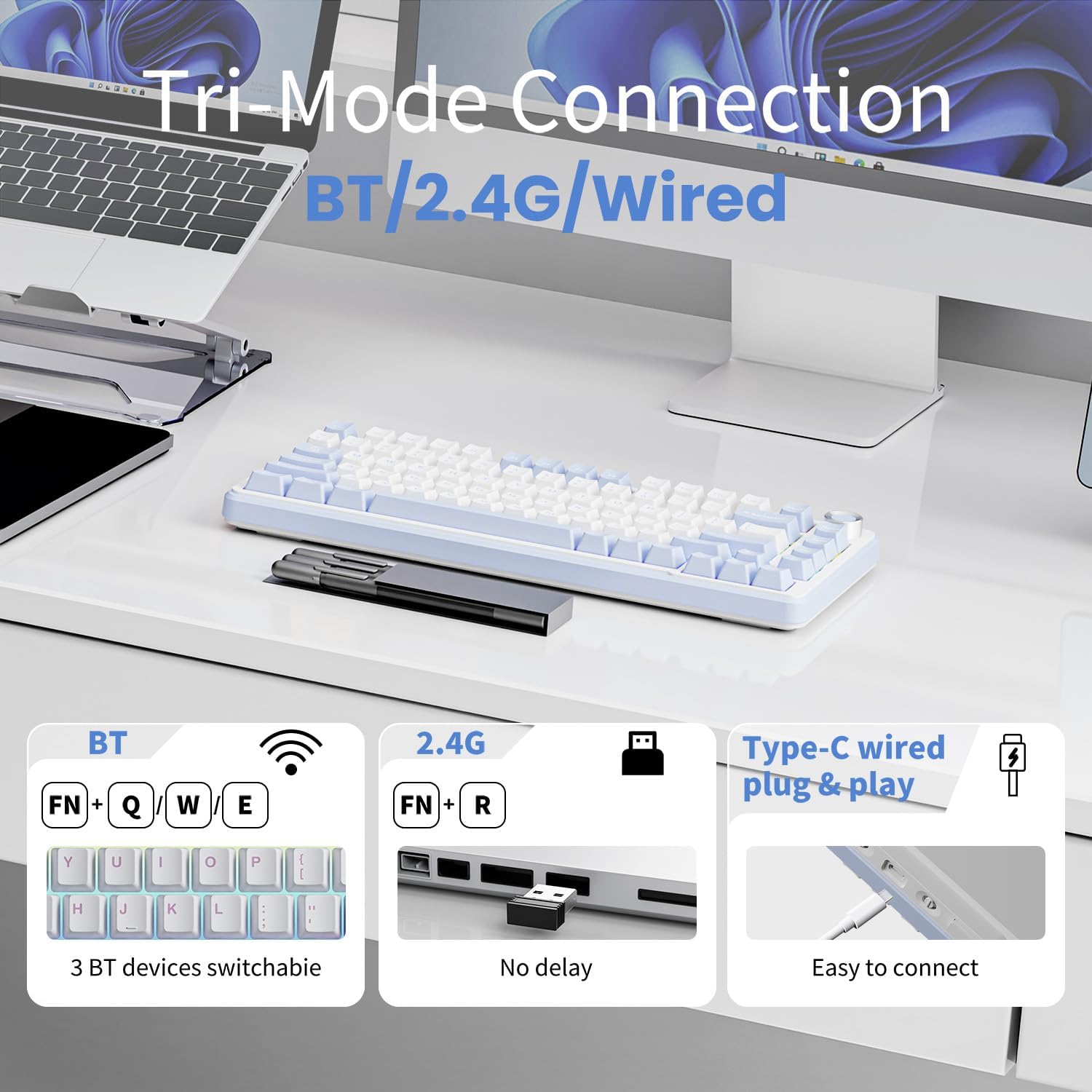
Figure 3.1: Visual guide for Tri-Mode Connection: Bluetooth (FN+Q/W/E), 2.4G (FN+R), and Type-C wired plug & play.
3.2. Software Installation
For advanced customization of lighting, key assignments, and macros, download the official EWEADN software. The software allows you to tailor the keyboard's functions to your preferences.
- Visit the official EWEADN website (refer to product packaging or support information for the exact URL).
- Locate and download the driver software for the GS75 model.
- Install the software following the on-screen instructions.

Figure 3.2: Screenshot of the programmable software for the EWEADN GS75, showing options for customizable buttons and lighting.
4. Operating Instructions
4.1. Basic Keyboard Functions
The 75% layout includes essential keys such as number keys, function keys (F1-F12), and arrow keys. All standard typing functions operate as expected.
4.2. RGB Backlight Control
The keyboard features 16 million RGB lighting effects. You can control the lighting directly from the keyboard:
- FN + X: Turn backlight on/off.
- FN + /: Switch between different light effects.
- FN + Enter: Switch between different lighting colors.
- FN + ESC (hold for 3 seconds): Restore factory lighting settings.
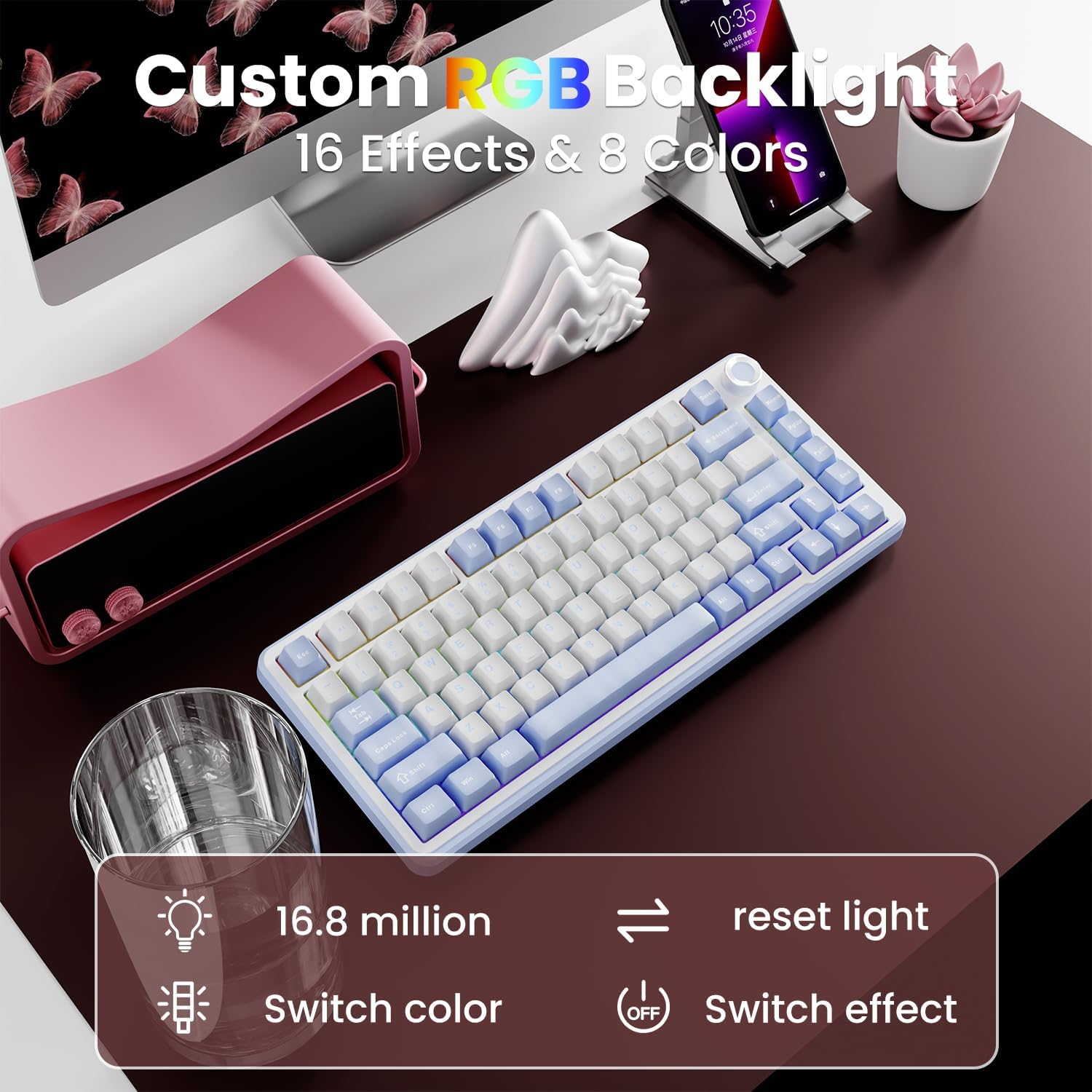
Figure 4.1: Controls for Custom RGB Backlight, including switching colors and effects.
4.3. Multimedia Knob
The metal knob provides quick and convenient multimedia control:
- Turn Clockwise: Increase volume.
- Turn Counter-clockwise: Decrease volume.
- Press: Mute/Unmute audio.

Figure 4.2: Illustration of the multimedia knob's functions: volume up, volume down, and mute.
4.4. Hot-swapping Switches
The EWEADN GS75 features a hot-swappable PCB, allowing you to easily change mechanical switches without soldering. It supports both 3-pin and 5-pin switches.
- To Remove a Switch: Use the included switch puller tool. Gently grip the switch from the top and bottom, then pull upwards until it detaches from the PCB.
- To Install a Switch: Align the pins of the new switch with the holes on the PCB. Press down firmly until the switch clicks into place. Ensure the pins are straight to avoid bending.

Figure 4.3: Demonstration of hot-swapping switches on the EWEADN GS75 keyboard, showing compatibility with 3-pin and 5-pin switches.
5. Maintenance
- Cleaning Keycaps: Use a keycap puller to remove keycaps. Clean them with a soft cloth dampened with mild soap and water. Ensure they are completely dry before reattaching.
- Cleaning the Keyboard Body: Use a soft, dry cloth to wipe down the keyboard body. For stubborn dirt, a slightly damp cloth can be used, but avoid excessive moisture.
- Dust Removal: Use compressed air to remove dust and debris from between the keycaps and switches.
- Storage: When not in use, store the keyboard in a dry, cool place away from direct sunlight and extreme temperatures. Use the included dust cover to protect it.
6. Troubleshooting
| Problem | Possible Cause | Solution |
|---|---|---|
| Keyboard not responding (Wireless) | Low battery; Incorrect mode selected; Pairing issue; Receiver not connected. | Charge the keyboard. Ensure correct mode (BT/2.4G) is selected. Re-pair Bluetooth or re-insert 2.4G receiver. |
| Keyboard not responding (Wired) | Loose cable connection; Faulty cable/port. | Ensure USB-C cable is securely connected. Try a different USB port or cable. |
| RGB backlight not working/incorrect | Backlight turned off; Incorrect setting. | Press FN + X to toggle backlight. Use FN + / and FN + Enter to adjust effects/colors. Reset to factory settings with FN + ESC (3s). |
| Keys not registering or double-typing | Loose switch; Debris under keycap/switch. | Remove keycap and switch, clean, then re-install. If issue persists, replace the switch. |
| Multimedia knob not functioning | Software conflict; Physical obstruction. | Restart your device. Ensure no software is overriding the knob's function. Check for any physical debris around the knob. |
7. Specifications
| Feature | Detail |
|---|---|
| Product Dimensions | 5.71 x 0.75 x 13.07 inches |
| Item Weight | 2.46 pounds |
| Manufacturer | EWEADN |
| Item Model Number | GS75 |
| Batteries | 1 Lithium Ion battery required (included) |
| Connectivity Technology | 2.4G, Bluetooth 5.0, USB-C |
| Keyboard Description | Wireless Mechanical Gaming Keyboard Cozy ASMR |
| Number of Keys | 75 |
| Keyboard Backlighting | RGB (16 Million Colors) |
| Keycap Material | Double-shot PBT |
| Switch Type | Cream Pink Mechanical Switches (Hot-swappable 3/5-pin) |
| Battery Capacity | 5000 mAh |
8. What's in the Box
- EWEADN GS75 Wireless Mechanical Keyboard
- USB-C Cable
- 2.4GHz USB Receiver
- Keycap Puller
- Switch Puller
- Extra Keycaps (4 pieces)
- Replacement Switches (2 pieces)
- Dust Cover
- User Manual (this document)
9. Official Product Video
Watch the official product video for a visual overview of the EWEADN GS75 keyboard's features and performance.
Video 9.1: EWEADN GS75: Get aesthetics and performance! This video showcases the keyboard's design, hot-swappable switches, RGB lighting, and comfortable typing experience.
10. Warranty and Support
The EWEADN GS75 gaming keyboard comes with 48-month brand support. As a responsible company, EWEADN is committed to customer satisfaction and product quality.
If you have any questions, concerns, or require assistance with your product, please do not hesitate to contact our support team. We are always available to assist you.
For support, please refer to the contact information provided on the product packaging or the official SEUNKWANG/EWEADN website.