
WEP 982-VI 2
WEP 982-VI 2 Cordless Soldering Station for Makita 20V Battery User Manual
Model: 982-VI 2 | Brand: WEP
1. Introduction
This manual provides instructions for the safe and effective operation and maintenance of your WEP 982-VI 2 Cordless Soldering Station. This portable soldering station is designed for versatility, offering both cordless battery power and direct DC power options. It features a fast-heating C235 cartridge heating element, precise temperature control, and an integrated design for convenience.
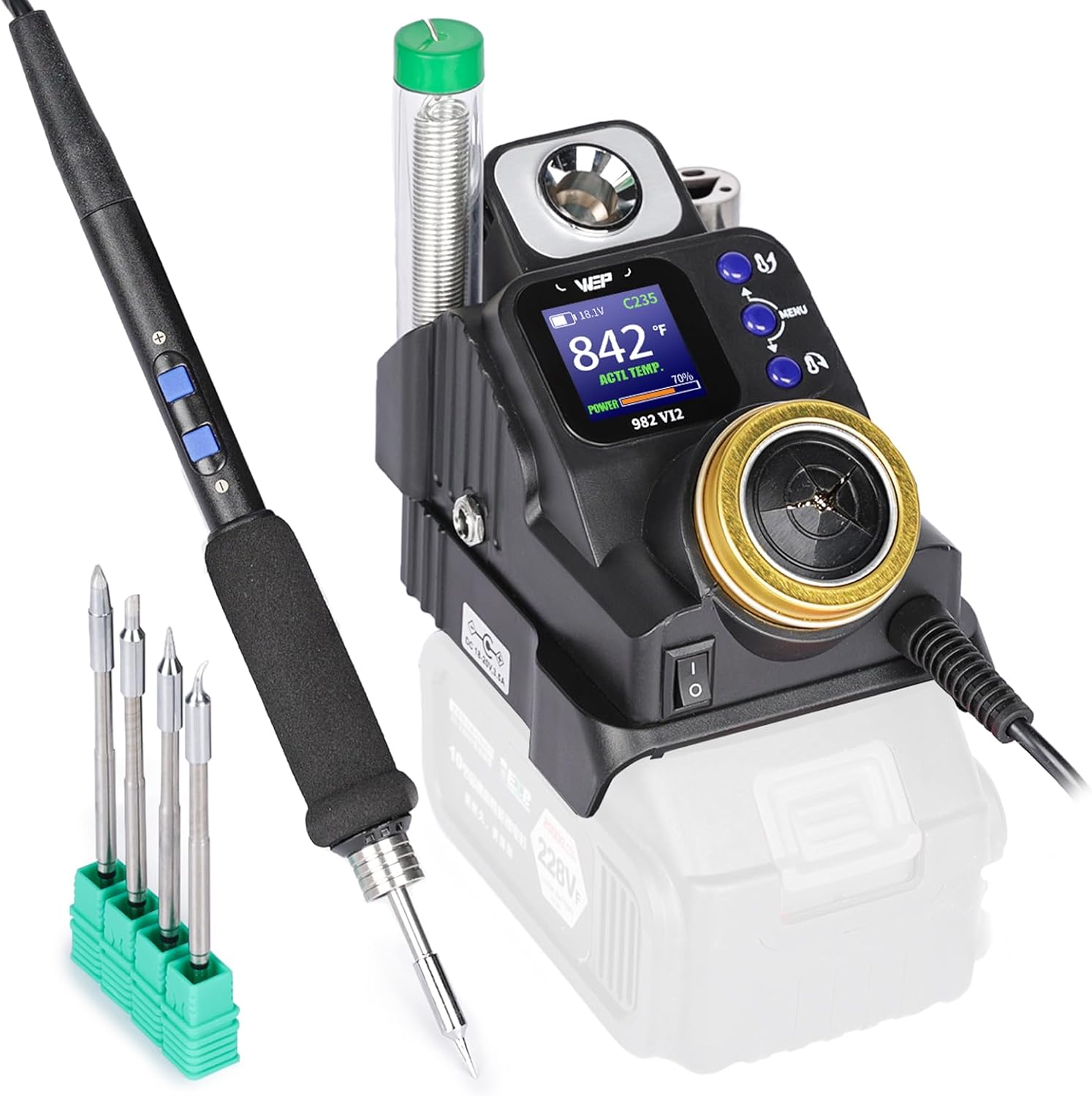
Image 1.1: The WEP 982-VI 2 Cordless Soldering Station, showing the main unit, soldering iron, and included tips.
2. Package Contents
Verify that all items listed below are present in your package:
- 1x WEP 982-VI 2 Cordless Soldering Station Main Unit
- 5x C235 Cartridge Heating Elements (2x I-type, 1x SI-type, 1x 3C-type, 1x 3.2D-type)
- 1x Lead-free Solder Wire (0.8mm, 10g)

Image 2.1: The included C235 cartridge heating elements (soldering tips) and lead-free solder wire.
3. Product Features
- Compact and Portable Design: The soldering station measures 6.1x3.3x3.8 inches and integrates a tip cleaner, metal tip replacement slots, solder wire storage, and a soldering iron holder with a residue tray.
- Dual Power Options: Supports portable batteries (compatible with common brands like Makita 20V) for cordless operation and direct DC power for flexible use.
- Fast-Heating C235 Cartridge Element: Utilizes C235 cartridge heating elements for rapid heating and easy replacement, offering improved energy efficiency.
- Quick Temperature Adjustment: Features shortcut buttons on the handpiece for immediate temperature changes without needing to return the iron to the holder.
- LCD Full-Color Display: Provides clear monitoring of set temperature, real-time temperature, battery level, power meter, and heating indicator.
- Temperature Unit Conversion: Supports both Celsius (℃) and Fahrenheit (℉) display modes.
- Enhanced Safety Features: Includes an automatic sleep mode when the iron is placed in the holder and an adjustable auto-shutdown function (0-8 minutes) to extend tip lifespan and improve safety.

Image 3.1: Dual power options: compatible with Makita 20V batteries or a 20V laptop charger.

Image 3.2: The C235 high-performance heating element and adjustable temperature range (194-842℉).

Image 3.3: Sleep mode activation and temperature unit conversion settings.

Image 3.4: Key advantages highlighting portability and cordless operation.
4. Setup
4.1 Battery/Power Adapter Installation
- Ensure the power switch on the soldering station is in the OFF position.
- To use with a battery: Align your compatible 20V battery (e.g., Makita 20V) with the battery slot on the bottom of the soldering station and slide it in until it clicks securely into place.
- To use with a DC power adapter: Connect a compatible 20V DC power adapter (5.5x2.1mm) to the DC input port on the side of the station.
4.2 Soldering Tip Installation
- Select the desired C235 cartridge heating element (soldering tip).
- Insert the tip fully into the handpiece receptacle. Ensure the marking line on the heating element reaches the rim of the handpiece's receptacle for proper contact and heating.
- Gently twist to ensure it is seated correctly.

Image 4.1: Steps for initial setup, including battery installation and power activation.

Image 4.2: Correct installation of the heating element (soldering tip).
5. Operating Instructions
5.1 Powering On and Initial Use
- Once the battery or power adapter is connected, flip the main power switch to the ON position.
- The LCD will illuminate, displaying the current temperature and settings.
- The soldering iron will heat up rapidly, typically reaching the set temperature within 5 seconds.
5.2 Temperature Adjustment
- Use the designated shortcut buttons on the soldering iron handpiece to increase or decrease the temperature.
- The LCD will show the set temperature and the real-time temperature.
5.3 Celsius/Fahrenheit Conversion
Access the menu settings on the soldering station to switch between Celsius (℃) and Fahrenheit (℉) temperature units according to your preference.
5.4 Sleep Mode and Auto Shutdown
- When the soldering iron is placed into its holder, it will automatically enter sleep mode to conserve energy and prolong tip life.
- The auto-shutdown feature can be adjusted from 0 to 8 minutes in the settings. The station will power off after the set idle time.

Image 5.1: The soldering station in use for electronic work.
6. Maintenance
6.1 Tip Cleaning
The integrated tip cleaner (brass wool) is located on the main unit. Regularly clean the soldering tip by gently wiping or poking it into the brass wool to remove excess solder and oxidation. This maintains optimal performance and extends tip life.
6.2 Tip Replacement
To replace a C235 cartridge heating element:
- Ensure the soldering iron is cool or use a heat-resistant tool to remove the old tip from the handpiece.
- Insert a new C235 tip, ensuring it is fully seated as described in Section 4.2.
6.3 Storage
When not in use, place the soldering iron in its holder. The integrated design includes a portable solder wire storage slot for convenience.

Image 6.1: Overview of integrated safety and maintenance features, including the tip cleaner and storage.
7. Safety Information
- This product is rated for 110-127V USA specifications. Do not connect this iron to a 220V power socket.
- Always work in a well-ventilated area to avoid inhaling solder fumes.
- Soldering tips become extremely hot. Avoid direct contact with skin or flammable materials.
- Always place the soldering iron in its designated holder when not actively soldering.
- Keep out of reach of children.
8. Troubleshooting
- Iron not heating: Ensure the battery is charged and properly installed, or the DC adapter is securely connected. Check that the power switch is ON. Verify the soldering tip is fully inserted into the handpiece.
- Temperature unstable: Ensure the tip is clean and properly seated. If issues persist, the tip may need replacement.
- Display not working: Check power connections. If the issue continues, contact technical support.
9. Specifications
| Feature | Detail |
|---|---|
| Model Number | 982-VI 2 |
| Dimensions (L x W x H) | 6.1 x 3.3 x 3.8 inches (155 x 85 x 97 mm) |
| Item Weight | 1.01 pounds |
| Power Source | Battery Powered (compatible with Makita 20V) / DC Power Adapter |
| Voltage | 110-127 Volts (USA specifications) |
| Upper Temperature Rating | 842 ℉ (450 ℃) |
| Heating Element Type | C235 Cartridge |
| Batteries Included | No |
| Batteries Required | Yes |
10. Warranty and Support
This soldering station kit is covered by a 1-year USA technical support warranty. For assistance, please contact our dedicated support team. WEP also offers an affordable range of compatible replacement parts.
For technical support or warranty claims, please contact WEP TOOLS directly.
Ask a question about this manual
Ask about setup, troubleshooting, compatibility, parts, safety, or missing instructions. Manuals+ will review the question and use this page’s manual context to help answer it.