
1. Introduction
Welcome to the TMEZON M790 2-Wire Video Intercom System. This manual provides detailed instructions for the installation, operation, and maintenance of your new video intercom system. Please read this manual thoroughly before installation and use to ensure proper functionality and safety. Keep this manual for future reference.
2. Product Overview
2.1. Components
The TMEZON M790 system typically includes the following components:
- Outdoor Doorbell Unit (with 1080p camera)
- Indoor Touch Screen Monitors (7-inch, quantity as per package)
- RFID Cards (8 pieces, 125 kHz)
- Mounting Brackets and Screws
- Wiring Connectors
- Power Adapters
2.2. Key Features
- 2-Wire Technology: Simplified wiring for easier installation.
- TuyaSmart App Integration: Remote live view, communication, and unlocking via smartphone (2.4G WiFi required).
- Smart Human Detection: Mobile notifications upon human activity detection at the door, with customizable detection zones and sensitivity.
- Two-Way Audio: Built-in microphone for clear communication with visitors from indoor unit or smartphone.
- Voice Message Function: Outdoor doorbell automatically enters message mode if no answer after 60 seconds.
- 7-inch Touch Screen Monitor: User-friendly interface for operation.
- 1080p Doorbell Camera: High-resolution camera with 140° viewing angle for clear images.
- Infrared Night Vision: LED infrared light provides clear images even at night.
- IP65 Weather Resistance: Durable outdoor unit suitable for various weather conditions.
- Multiple Unlocking Methods: Unlock via indoor unit, smartphone app, or RFID cards.
- Recording and Playback: Supports TF cards up to 128GB for automatic photo snapshots or video recording upon motion detection or doorbell press. Review recordings on the indoor unit or app.

Figure 2.1: Overview of the TMEZON M790 Video Intercom System components.
3. Setup
3.1. Installation Guidelines
Before beginning installation, ensure all power is disconnected. It is recommended to consult a qualified electrician for complex wiring or if you are unsure about any steps.
3.2. Wiring Diagram
The system utilizes a 2-wire connection for communication between the outdoor doorbell unit and the indoor monitors. Power is supplied to the monitors, which then power the doorbell unit.

Figure 3.1: Simplified 2-wire connection for the TMEZON M790 system.
3.3. Physical Installation
- Outdoor Unit Placement: Mount the doorbell unit at a suitable height (typically 1.4-1.6 meters from the ground) to ensure optimal camera view. Ensure it is protected from direct harsh weather, although it is IP65 rated.
- Indoor Monitor Placement: Install indoor monitors in convenient locations within your home, ensuring they are within reach of a power outlet.
- Wiring: Connect the outdoor unit to the indoor monitors using the provided 2-wire cable. Ensure all connections are secure and correctly aligned according to the wiring diagram.
- Power Connection: Connect the power adapters to the indoor monitors and plug them into a power source.
3.4. App Setup (TuyaSmart)
To utilize the remote features of your intercom system, download and configure the TuyaSmart application on your smartphone.
- Download App: Search for "TuyaSmart" in the App Store (iOS) or Google Play Store (Android) and install it.
- Register/Login: Open the app and create a new account or log in with an existing one.
- Add Device: Follow the in-app instructions to add your TMEZON M790 system. Ensure your smartphone is connected to a 2.4GHz WiFi network during the pairing process.
- Device Pairing: The app will guide you through connecting the intercom system to your home WiFi network.
- Share Access: You can share device access with family members through the TuyaSmart app.

Figure 3.2: TuyaSmart App interface for live view and remote unlocking.
4. Operating Instructions
4.1. Basic Operations
4.1.1. Answering Calls
When a visitor presses the doorbell, the indoor monitor(s) will ring and display the live video feed from the outdoor camera. You can answer the call by tapping the answer button on the monitor or through the TuyaSmart app.
4.1.2. Two-Way Audio
Once a call is answered, you can engage in two-way communication with the visitor. Speak clearly into the monitor's microphone or your smartphone's microphone, and listen for the visitor's response.

Figure 4.1: Two-way audio communication via the indoor monitor.
4.1.3. Unlocking the Door
The TMEZON M790 system offers three methods to unlock your door:
- Via Indoor Unit: Tap the unlock icon on the indoor monitor's touch screen during a call or live view.
- Via TuyaSmart App: Tap the unlock icon within the app interface when viewing the live feed or during a call.
- Via RFID Card: Present a pre-programmed RFID card to the designated reader area on the outdoor doorbell unit.
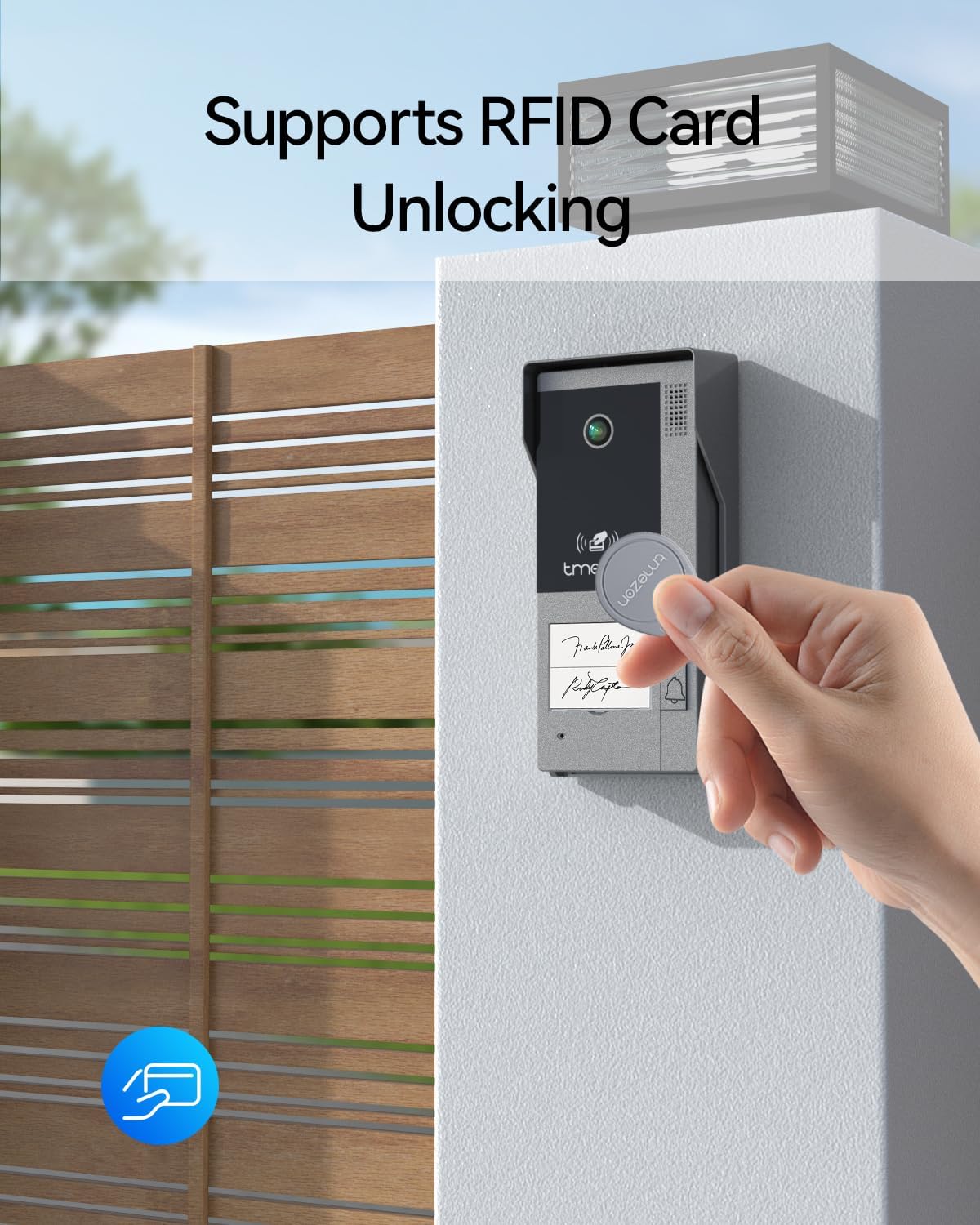
Figure 4.2: Unlocking the door using an RFID card.
4.1.4. Voice Message Function
If a visitor rings the doorbell and no one answers within 60 seconds, the outdoor unit will automatically prompt the visitor to leave a voice message. These messages can be reviewed later on the indoor monitor or via the TuyaSmart app.

Figure 4.3: Voice message feature activation on the doorbell unit.
4.2. Advanced Features
4.2.1. Human Detection and Recording
The system can detect human activity at your door and automatically capture snapshots or record video. You will receive instant mobile notifications. You can customize the detection sensitivity and define specific detection zones on the indoor monitor to reduce false alarms.

Figure 4.4: Smart human detection and automatic recording.
4.2.2. Night Vision
The outdoor doorbell unit is equipped with infrared LEDs to provide clear black and white images even in complete darkness, ensuring continuous monitoring day and night.

Figure 4.5: Enhanced night vision capabilities.
4.2.3. Dual Lock Control
The system supports controlling two separate electronic locks, such as a pedestrian gate and a vehicle gate, providing comprehensive access management.

Figure 4.6: Control of two separate electronic locks.
5. Maintenance
To ensure the longevity and optimal performance of your TMEZON M790 system, follow these maintenance guidelines:
- Cleaning: Regularly wipe the outdoor doorbell unit and indoor monitors with a soft, damp cloth. Avoid using abrasive cleaners or solvents that could damage the surfaces.
- Outdoor Unit Protection: While the outdoor unit is IP65 waterproof, ensuring it is not constantly submerged or exposed to extreme conditions will prolong its life.
- Software Updates: Check the TuyaSmart app periodically for any available firmware updates for your device. Keeping the software updated ensures optimal performance and security.
- Cable Inspection: Periodically inspect all wiring connections for any signs of wear or damage.

Figure 5.1: The IP65 waterproof design of the outdoor unit.
6. Troubleshooting
If you encounter issues with your TMEZON M790 system, refer to the table below for common problems and their solutions.
| Problem | Possible Cause | Solution |
|---|---|---|
| No image on indoor monitor. | Power issue, loose wiring, camera malfunction. | Check power supply to monitors. Verify all 2-wire connections are secure. Restart the system. |
| No audio during two-way communication. | Microphone/speaker issue, app settings. | Ensure volume is not muted. Check app audio settings. Inspect for physical damage to microphone/speaker. |
| Cannot connect to WiFi via TuyaSmart app. | Incorrect WiFi password, 5GHz network, weak signal. | Ensure you are connecting to a 2.4GHz WiFi network. Double-check WiFi password. Move router closer or use a WiFi extender. |
| RFID cards not unlocking door. | Card not programmed, incorrect placement, lock malfunction. | Ensure RFID cards are properly programmed to the system. Present the card directly to the reader area. Check the electronic lock connection. |
| Motion detection not working or too many false alarms. | Incorrect sensitivity settings, detection zone not configured. | Adjust motion detection sensitivity on the indoor monitor or app. Configure specific detection zones to exclude irrelevant areas. |
7. Specifications
| Feature | Detail |
|---|---|
| Model Number | MZ-M790*2/EU |
| Manufacturer | TMEZON |
| Color | Black and Silver |
| Package Dimensions | 28.2 x 19.1 x 15.8 cm |
| Item Weight | 1.98 kilograms |
| Connectivity | 2-Wire, 2.4GHz WiFi |
| Indoor Monitor Screen | 7-inch Touch Screen |
| Outdoor Camera Resolution | 1080p |
| Outdoor Camera Viewing Angle | 140° |
| Weather Resistance | IP65 |
| Storage Support | TF cards up to 128GB |
| RFID Card Frequency | 125 kHz |
8. Warranty and Support
For warranty information and customer support, please refer to the documentation provided with your purchase or contact TMEZON customer service directly. Keep your proof of purchase for warranty claims.
No official seller videos were found in the provided product data.


