
ATTACK SHARK L90
ATTACK SHARK L90 Ultra-Light Wireless Headset User Manual
Model: L90 | Brand: ATTACK SHARK
Introduction
Thank you for choosing the ATTACK SHARK L90 Ultra-Light Wireless Headset. This manual provides detailed instructions on how to set up, operate, maintain, and troubleshoot your new gaming headset. Please read this manual carefully before use to ensure optimal performance and longevity of your device.

The ATTACK SHARK L90 Ultra-Light Wireless Headset, shown in white, featuring its detachable microphone and the included USB dongle for wireless connectivity.
Package Contents
Upon unboxing, please verify that all the following items are included in your package:

A visual representation of all items included in the ATTACK SHARK L90 headset package.
- 1x ATTACK SHARK L90 Headset
- 1x User Manual
- 1x Detachable Microphone
- 1x USB C to A Charging Cable
- 1x USB A/USB C 2.4G Receiver (2-in-1 dongle)
- 1x USB C to 3.5mm AUX-IN Cable
Setup
1. Charging the Headset
Before first use, fully charge the headset. Connect the provided USB C to A charging cable to the headset's charging port and a USB power source. The RGB lights will indicate charging status. A full charge provides approximately 15 hours of use with RGB lights on, or 35 hours with RGB lights off.

The headset connected to a power source, illustrating its long-lasting battery life.
2. Attaching the Microphone
The L90 headset features a detachable noise-canceling microphone. Align the microphone's connector with the port on the headset and gently push until it clicks into place. Ensure it is securely connected for clear communication.

Illustration of the detachable microphone attachment and its noise-canceling capability.
Operating Instructions
Connection Modes
The ATTACK SHARK L90 headset supports three connection modes: 2.4GHz Wireless, Bluetooth, and Wired (3.5mm).
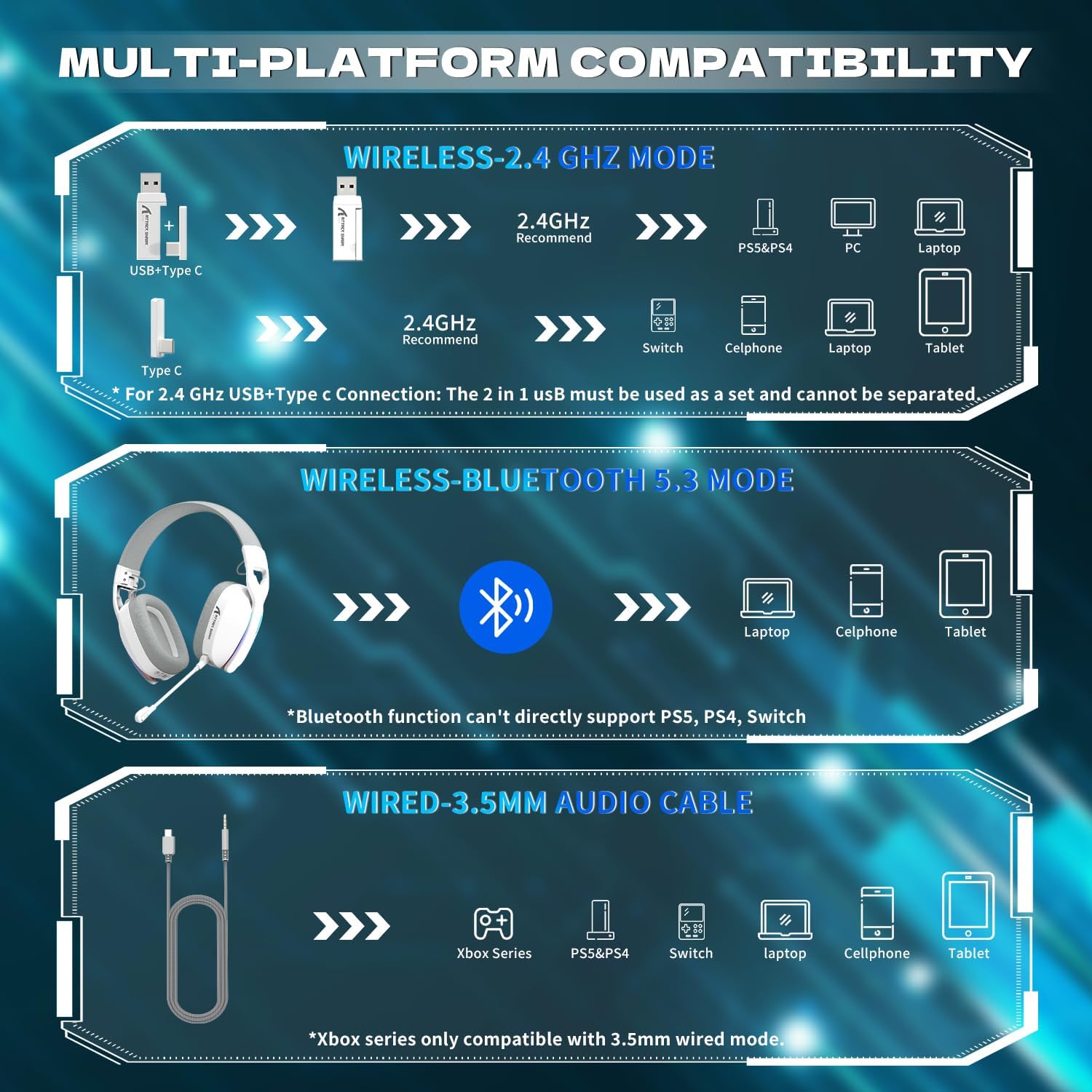
Overview of the headset's multi-platform compatibility across different connection modes.
1. 2.4GHz Wireless Mode
This mode provides ultra-low latency audio (≤20ms) for an immersive gaming experience. It uses a 2-in-1 USB & Type-C dual dongle.
- Insert the 2-in-1 USB & Type-C dongle into a compatible USB-A or USB-C port on your PC, PS4, PS5, or Switch.
- Ensure the headset is powered on. It should automatically connect to the dongle.
- Note: The 2-in-1 USB transmitter must be used as a combined unit and cannot be separated.

Visual representation of the 2.4GHz low latency wireless connection.
2. Bluetooth Mode
For devices supporting Bluetooth, such as laptops, cellphones, and tablets.
- To switch to Bluetooth mode, double-press the 'M' button (or Microphone Mute button) on the headset. The headset will enter pairing mode.
- On your device, search for Bluetooth devices and select "L90" to connect.
- Important: Bluetooth function cannot directly support Mac, PS5, PS4, or PC without an additional USB Bluetooth Adapter (not included).
3. Wired Mode (3.5mm Audio Cable)
For universal compatibility with devices like Xbox Series X/S, PS4, PS5, Switch, laptops, cellphones, and tablets.
- Connect the provided USB C to 3.5mm AUX-IN cable to the headset and the 3.5mm jack of your device.
- Note: Xbox Series consoles are only compatible with 3.5mm wired mode. For PS4/PS5/Xbox, volume adjustment is typically done via the controller in wired mode.
Controls
- Mode Switching: Double-press the Microphone Mute button to seamlessly switch between Bluetooth and 2.4G wireless modes.
- Volume Control: Use the volume wheel on the headset to adjust audio levels.
- Microphone Mute: Press the Microphone Mute button to toggle microphone on/off.
- RGB Lighting: Long press the Microphone Mute button to turn the dynamic RGB lighting on or off.
Audio Optimization (2.4GHz Mode)
When connected via 2.4GHz wireless mode, you can optimize your audio settings and customize stereo sound effects using the dedicated driver software. This software allows for adjustments like equalizer settings and Xear Dynamic Bass for an enhanced gaming experience.

The customization software interface for optimizing audio settings in 2.4GHz mode.
Maintenance
Cleaning
To maintain the headset's condition, gently wipe the ear cushions and headband with a soft, damp cloth. Avoid using harsh chemicals or abrasive materials. Ensure the headset is dry before storing.
Storage
The L90 headset features an ultralight and foldable design, making it easy to store and transport. When not in use, fold the headset to protect it from damage and save space.

The headset in its compact, folded configuration, highlighting its portability.
Troubleshooting
- No Sound/Connection Issues:
- Ensure the headset is charged and powered on.
- Verify the correct connection mode (2.4GHz, Bluetooth, or Wired) is selected and properly configured for your device. Double-press the Microphone Mute button to cycle through modes.
- For 2.4GHz wireless, ensure the 2-in-1 USB dongle is fully inserted and recognized by your device. Remember, the USB-A and Type-C parts of the dongle must be used together.
- For Bluetooth, ensure your device's Bluetooth is enabled and the headset is in pairing mode.
- For wired connection, ensure the 3.5mm cable is fully inserted into both the headset and your device.
- Microphone Not Working:
- Ensure the detachable microphone is securely attached.
- Check if the microphone is muted (press the Microphone Mute button).
- Verify microphone input settings on your connected device.
- Poor Sound Quality:
- Adjust the volume on both the headset and your connected device.
- Ensure the headset is within range of the 2.4GHz dongle or Bluetooth device.
- If using 2.4GHz mode, consider using the customization software to adjust equalizer settings.
- Xbox Compatibility:
- The ATTACK SHARK L90 headset is only compatible with Xbox Series consoles via the 3.5mm wired mode. Wireless connection is not supported for Xbox.
- Bluetooth Connection with Mac/PS4/PS5/PC:
- Direct Bluetooth connection is not supported for these platforms. An additional USB Bluetooth Adapter (not included) is required for Bluetooth functionality.
Specifications
| Feature | Specification |
|---|---|
| Model Name | L90 |
| Connectivity Technology | Wired, 2.4GHz Wireless, Bluetooth |
| Wireless Communication Technology | Bluetooth 4.0, 2.4GHz |
| Audio Driver Type | Dynamic Driver (40mm) |
| Sound Features | 7.1 Surround Sound, HiFi Stereo Sound |
| Microphone | Detachable Noise Canceling |
| Battery Life | Approx. 15 hrs (RGB ON), 35 hrs (RGB OFF) |
| Item Weight | 215 Grams (7.6 ounces) |
| Product Dimensions | 5.91 x 5.91 x 3.86 inches |
| Ear Placement | Over Ear |
| Control Method | Remote (on-headset controls) |
| Water Resistance Level | Not Water Resistant |
| Compatible Devices | Laptops, Desktops, Gaming Consoles (PS4, PS5, Switch, Xbox Series - wired only), Tablets, Cellphones |
Warranty and Support
This product comes with a user manual included in the box. For specific warranty information and technical support, please refer to the documentation provided with your purchase or visit the official ATTACK SHARK website. Keep your proof of purchase for warranty claims.
Related documentsL90


Ask a question about this manual
Ask about setup, troubleshooting, compatibility, parts, safety, or missing instructions. Manuals+ will review the question and use this page’s manual context to help answer it.