
1. Introduction
Welcome to the QTLLBT Military Smartwatch. This device is designed for active lifestyles, offering robust features and comprehensive health tracking. This manual provides essential information for setting up, operating, and maintaining your smartwatch.
Key features include a 2.01-inch HD display, IP68 waterproofing, Bluetooth calling, LED flashlight, barometer, compass, and over 100 sports modes, alongside continuous health monitoring.
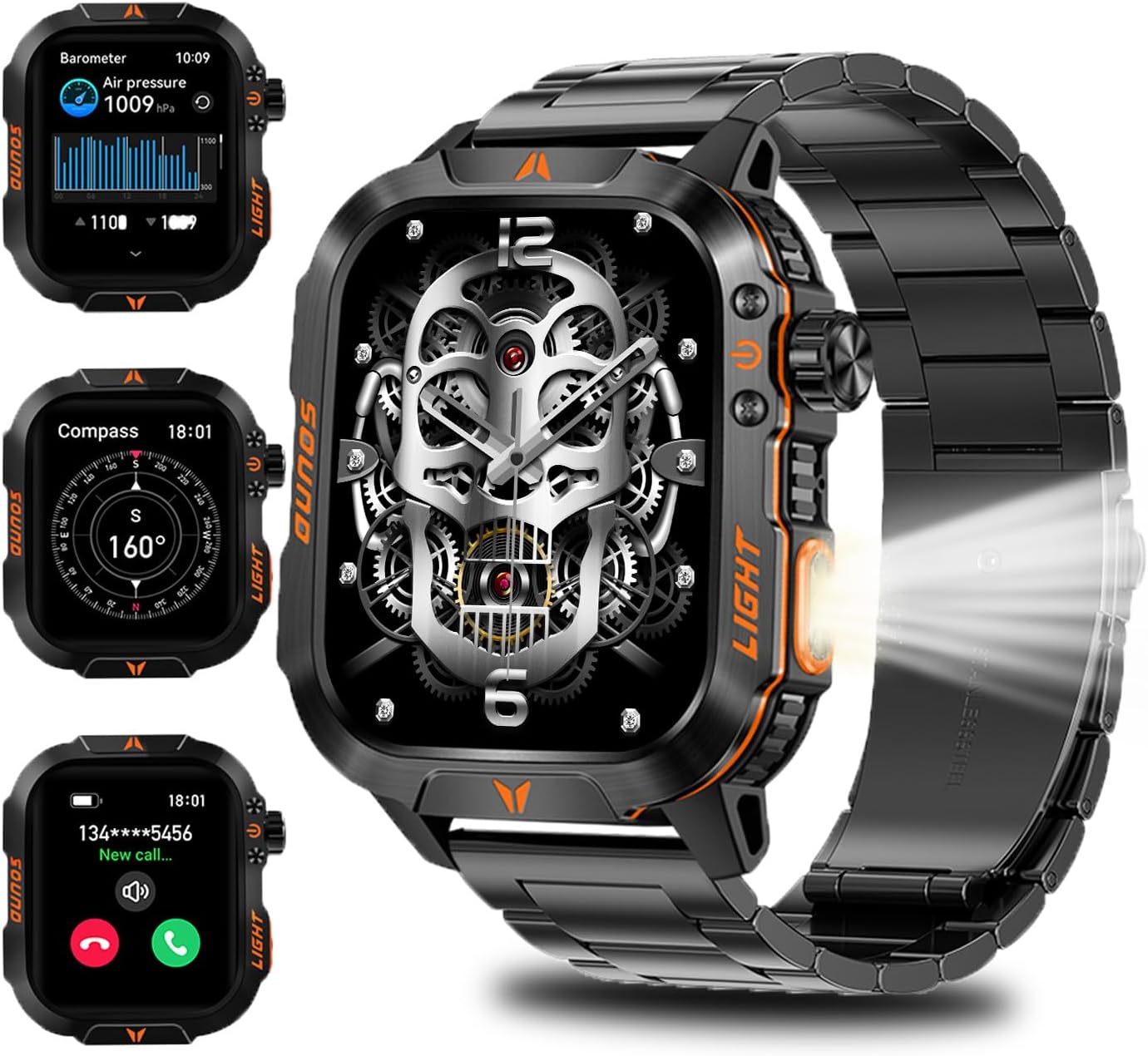
Figure 1: QTLLBT Military Smartwatch showcasing its main display and key features.
2. Setup
2.1. Unboxing and Initial Charge
Upon unboxing, ensure all components are present: the smartwatch, charging cable, and user manual. Connect the magnetic charging cable to the charging points on the back of the watch and plug the USB-A end into a compatible power source. The watch will display a charging indicator.
2.2. App Installation and Pairing
- Download the App: Scan the QR code displayed on the watch screen or in the manual to download the 'FitCloud Pro' application from your smartphone's app store (available for Android and iOS).
- Enable Bluetooth: Ensure Bluetooth is enabled on your smartphone.
- Pairing: Open the 'FitCloud Pro' app, navigate to the device binding section, and select 'Scan to bind'. The app will detect your smartwatch (e.g., HT26). Follow the on-screen prompts to complete the pairing process. Confirm the binding request on both your phone and the smartwatch.
- Initial Settings: Once paired, the watch will synchronize time, date, and language settings from your smartphone. You can further customize these settings within the watch's menu or the app.
Video 1: Demonstrates the unboxing, initial setup, and pairing process of the QTLLBT Military Smartwatch with a smartphone.
3. Operating Instructions
3.1. Basic Navigation
- Touchscreen: Swipe left, right, up, or down to navigate through menus and screens. Tap to select an option.
- Side Buttons/Crown: The physical buttons and rotating crown on the side of the watch provide additional navigation and quick access functions. Refer to the watch's on-screen prompts for specific button functionalities.
3.2. Accessing Features
From the main watch face, swipe in different directions to access various functions:
- Swipe Down: Quick settings menu (brightness, flashlight, do not disturb, etc.).
- Swipe Up: Notifications and messages.
- Swipe Left/Right: Access widgets for health data, sports modes, weather, music control, etc.
- Press Crown/Side Button: Access the main application menu.

Figure 2: Navigating through the smartwatch's application menu.
4. Features
4.1. Health Monitoring
The smartwatch is equipped with high-precision sensors for continuous health monitoring:
- Heart Rate: Real-time heart rate tracking.
- Blood Oxygen (SpO2): Measures blood oxygen saturation levels.
- Blood Pressure: Provides blood pressure readings.
- Sleep Tracking: Monitors sleep stages (deep sleep, light sleep, awake time) and provides a comprehensive sleep quality analysis.

Figure 3: Health monitoring interface showing heart rate and blood oxygen levels.
4.2. Communication (Smart Calls & Notifications)
Stay connected directly from your wrist:
- Bluetooth Calls: Utilize the built-in speaker and microphone to answer, make, or hang up calls.
- Message Reminders: Receive notifications for calls, SMS, and app alerts directly on your watch.
- Music Control: Play, pause, skip tracks, and adjust volume for music playing on your connected smartphone.
Figure 4: Smartwatch displaying incoming call and message notifications.
4.3. Sports Modes & Activity Tracking
The smartwatch supports over 100 indoor and outdoor sports modes, tracking various metrics:
- Activity Data: Records steps, calories burned, distance, and activity time.
- Sports Modes: Select from a wide range of activities like walking, running, cycling, hiking, and more.

Figure 5: Interface showing available sports modes and real-time activity data.
4.4. Outdoor Tools
Designed for outdoor adventures, the watch includes:
- Compass: Provides directional guidance.
- Altimeter: Measures current altitude.
- Barometer: Displays atmospheric pressure.
- LED Flashlight: A built-in light for convenience in low-light conditions.
Figure 6: Smartwatch displaying barometer and compass readings.
4.5. Other Functions
- Customizable Dials: Choose from multiple dial styles or download more via the app.
- Alarm Clock: Set multiple alarms.
- Weather Forecast: Get real-time weather updates.
- Remote Photos: Control your phone's camera remotely.
- Find Phone: Locate your paired smartphone.
- Voice Assistant: Interact with your device using voice commands.

Figure 7: Customizable watch faces and smart functions like voice assistant and music control.
5. Maintenance
5.1. Waterproof Performance
The QTLLBT Military Smartwatch features IP68 waterproofing, built to military standards. It can withstand immersion up to 100 meters and operate in extreme temperatures ranging from -20°C to 60°C, as well as 10ATM pressure. This allows for use during swimming, in rain, or during other water-related activities.

Figure 8: Smartwatch demonstrating its IP68 waterproof capabilities.
Video 2: Short demonstration of the smartwatch's durability and waterproof features.
5.2. Battery Life and Charging
The smartwatch is powered by a 600mAh Lithium Polymer battery, offering extended usage:
- Usage Duration: Approximately 7-10 days with typical use.
- Standby Duration: Up to 60 days.
- Charging Time: Approximately 2.5 hours for a full charge.
To charge, align the magnetic charging cable with the contacts on the back of the watch. Ensure a secure connection for efficient charging.

Figure 9: Battery life and charging details for the smartwatch.
5.3. Cleaning
Wipe the watch and band regularly with a soft, damp cloth. Avoid using harsh chemicals or abrasive materials that could damage the device.
6. Troubleshooting
- Watch Not Turning On: Ensure the watch is fully charged. Connect it to the charger and wait a few minutes before attempting to power it on.
- Pairing Issues: Make sure Bluetooth is active on your phone and the watch is within range. Restart both the watch and your phone, then try pairing again via the 'FitCloud Pro' app.
- Inaccurate Health Readings: Ensure the watch is worn snugly on your wrist, not too tight or too loose. Clean the sensors on the back of the watch.
- No Text on Menu Items: Familiarize yourself with the icons in the watch's menu. The companion app may offer more descriptive labels.
- Band Adjustment: If adjusting the metal band, professional assistance may be required due to tight pins.
- Third-Party App Compatibility: The smartwatch is designed to integrate with its dedicated 'FitCloud Pro' app. Compatibility with other third-party applications is not guaranteed.
7. Specifications
| Feature | Specification |
|---|---|
| Model Number | a494f23a-6d36-4bc5-8e32-6b164afd9db3 |
| Screen Size | 2.01 Inches |
| Battery Capacity | 600 Milliamp Hours (Lithium Polymer) |
| Memory Storage | 128 MB |
| Operating System | iOS, Android |
| Connectivity | Bluetooth |
| Water Resistance | IP68 |
| Item Weight | 6.4 ounces |
8. Warranty and Support
For detailed warranty information, technical support, or service inquiries, please refer to the official QTLLBT website or contact their customer service department. Keep your purchase receipt as proof of purchase.