Introduction
The Makeid L1 Label Maker is a portable and rechargeable device designed for creating custom labels for various organizational needs in office, home, and school environments. It utilizes thermal printing technology, eliminating the need for ink, and connects wirelessly via Bluetooth to compatible Android or iOS devices for label design and printing.
Key features include support for multiple font styles, numbers, symbols, emojis, and icons, ensuring clear and lasting prints. The easy-peel-and-stick printing tape is waterproof, fade-resistant, and leaves no sticky residue. A built-in cutter provides precise label cutting.
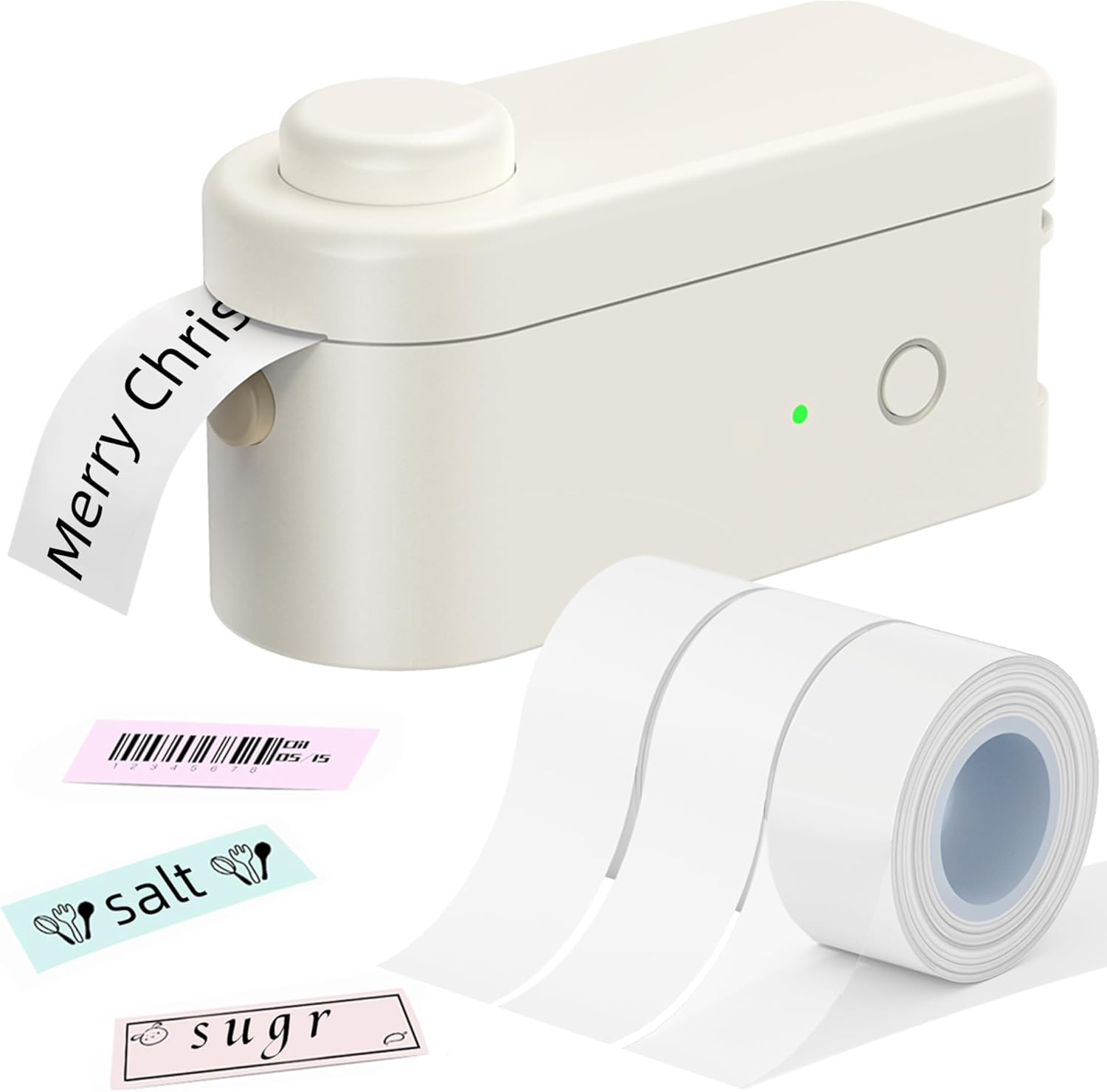
The Makeid L1 Label Maker shown with included label tapes.
What's in the Box
- 1 x Makeid L1 Label Maker
- 1 x Roll of white label paper
- 1 x Type-C charging cable
- 1 x User Manual
- 1 x Quick Guide
Official unboxing video for the Makeid L1 Label Maker, demonstrating the contents of the product package.
Setup
1. Loading Label Tape
Open the label maker's cover. Insert the label tape roll into the designated compartment, ensuring the tape feeds out correctly through the printer's exit slot. Close the cover securely.
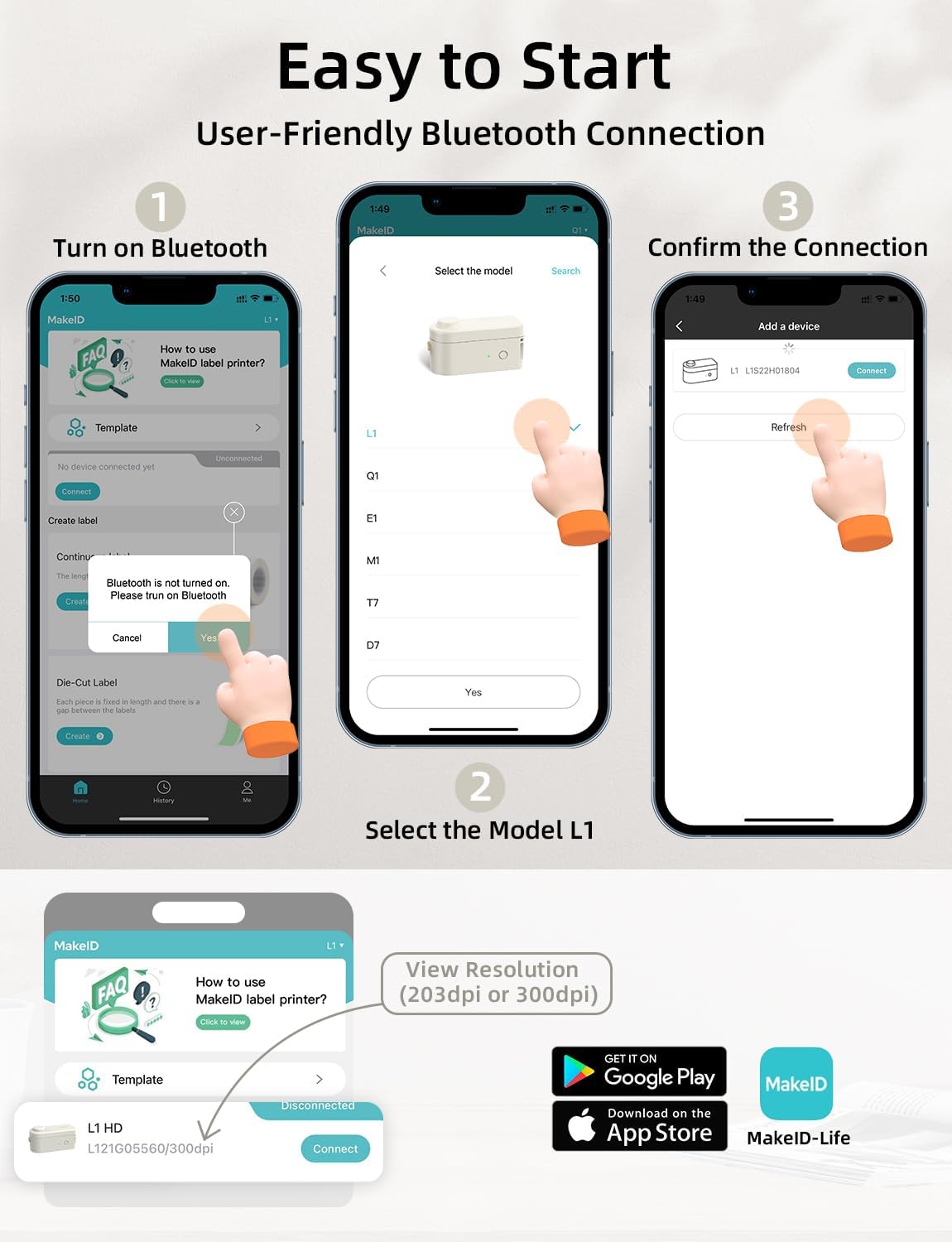
Image showing the correct method for loading the label tape into the Makeid L1 Label Maker.
2. Bluetooth Connection
Download the official "MakeID-Life" app from your smartphone's app store (available for Android and iOS). Turn on the label maker by pressing the power button. Enable Bluetooth on your smartphone and open the "MakeID-Life" app. Follow the in-app instructions to connect to your L1 Label Maker. Ensure Bluetooth is connected via the app, not directly through phone settings.

Visual guide for connecting the Makeid L1 Label Maker to a smartphone via Bluetooth using the dedicated app.
Operating Instructions
1. Designing Labels
Within the "MakeID-Life" app, you can customize your labels. The app supports various fonts, numbers, symbols, emojis, and icons. You can also adjust label size and layout. The app features an auto-detect function for label templates.

Screenshot of the Makeid-Life app interface, showing options for multi-font selection and DIY label customization.
2. Printing and Cutting
Once your label design is complete, press the "Print" button in the app. The label maker will print the label. After printing, use the built-in cutter by pressing the designated button on the device to cleanly cut the label. The labels feature a split-back design for easy peeling.

Demonstration of the one-touch cutting feature on the Makeid L1 Label Maker after printing.
Overview of the Makeid L1 Label Maker's features and various applications in daily life, including printing and application.
Demonstration of the Makeid L1 Label Maker's ease of use for various labeling tasks.
Maintenance
The Makeid L1 Label Maker uses thermal printing technology, meaning no ink cartridges are required. To maintain optimal print quality, regularly clean the print head with a soft, lint-free cloth. Ensure the label tape compartment is free of dust and debris. Store the device in a cool, dry place away from direct sunlight.
When replacing label tape, ensure the new roll is properly aligned to prevent jams or misprints. Only use genuine Makeid label tapes for best results and to avoid damaging the printer.
Troubleshooting
- Printer not connecting via Bluetooth: Ensure the label maker is powered on and fully charged. Verify Bluetooth is enabled on your smartphone and you are connecting through the "MakeID-Life" app, not directly through phone settings. Try restarting both the printer and your phone.
- Poor print quality: Check if the label tape is loaded correctly and is not wrinkled or damaged. Clean the print head. Ensure the battery is not low, as low power can affect print quality.
- Labels not cutting properly: Ensure the label tape is fully extended after printing before pressing the cutter button. Check for any obstructions in the cutting mechanism.
- Label jams: Open the cover and carefully remove any jammed tape. Ensure the tape is loaded smoothly and not twisted.
- App issues: Ensure your "MakeID-Life" app is updated to the latest version. Try clearing the app's cache or reinstalling it if problems persist.
Specifications
| Feature | Detail |
|---|---|
| Brand | Makeid |
| Model Name | Label Maker (L1) |
| Item Model Number | L1-W203&W2T1-CRUS-02 |
| Connectivity Technology | Bluetooth |
| Printing Technology | Thermal |
| Printer Output | Monochrome |
| Resolution | 203 x 203 dpi, 300 x 300 dpi |
| Maximum Media Size | 0.63 x 13 inch |
| Sheet Size | 9/12/16mm*4m, 12mm*35mm Inches |
| Ink Color | Black (Thermal) |
| Item Weight | 9.9 ounces |
| Product Dimensions | 3.84 x 2.18 x 1.57 inches |
| Batteries | 1 Lithium Polymer battery (included) |
Warranty & Support
The Makeid L1 Label Maker comes with a limited warranty. For specific warranty details and duration, please refer to the documentation included with your product or contact Makeid customer support.
For technical support, troubleshooting assistance, or inquiries regarding your product, please contact Makeid Creations directly. You can typically find contact information in the user manual or on the official Makeid website.


