
AT&T 4130T
AT&T Essentials True Wireless Bluetooth Comfort Fit Stereo in-Ear Earbuds
Model: 4130T
Product Overview
The AT&T Essentials True Wireless Bluetooth Comfort Fit Stereo in-Ear Earbuds are designed for high-quality wireless audio. They feature extended battery life, advanced noise cancellation for clear calls, and intuitive smart controls. The earbuds and charging case are IPX4 water and dust resistant, making them suitable for various environments.

Image: The AT&T Essentials True Wireless Earbuds are shown in their open charging case, displaying the digital battery percentage and individual earbud charge indicators. The earbuds are black and fit snugly within the case.
Setup and Initial Use
Charging the Earbuds and Case
Before first use, fully charge the earbuds and the charging case. Connect the charging case to a USB power source using the provided cable. The LED display on the case will indicate the charging status and battery level.

Image: A close-up of the AT&T Essentials charging case with the lid open, showing the digital battery display. The display shows "100" indicating a full charge, along with individual battery bars for the left and right earbuds.
Video: This video demonstrates the charging process and the LED battery display of the AT&T Essentials True Wireless Earbuds charging case. It shows the case being plugged in and the digital percentage increasing, indicating the charge level.
Pairing with a Bluetooth Device
- Ensure the earbuds are in the charging case and the case has sufficient charge.
- Open the charging case. The earbuds will automatically enter pairing mode.
- On your device (smartphone, tablet, etc.), navigate to the Bluetooth settings.
- Select "ATTTW" from the list of available devices.
- Once connected, a confirmation sound will play, and the device will show "Connected".

Image: The AT&T Essentials True Wireless Earbuds in their charging case are shown next to a smartphone screen displaying Bluetooth settings. The device name "ATTTW" is highlighted as connected, illustrating the pairing process.
Operating Instructions
Smart Touch Controls
The earbuds feature responsive one-touch smart controls for easy management of audio playback and calls.
- Play/Pause: Single tap on either earbud.
- Next Track: Double tap on the right earbud.
- Previous Track: Double tap on the left earbud.
- Answer/End Call: Single tap on either earbud during an incoming call or active call.
- Reject Call: Press and hold either earbud for 2 seconds during an incoming call.
- Activate Voice Assistant: Triple tap on either earbud.
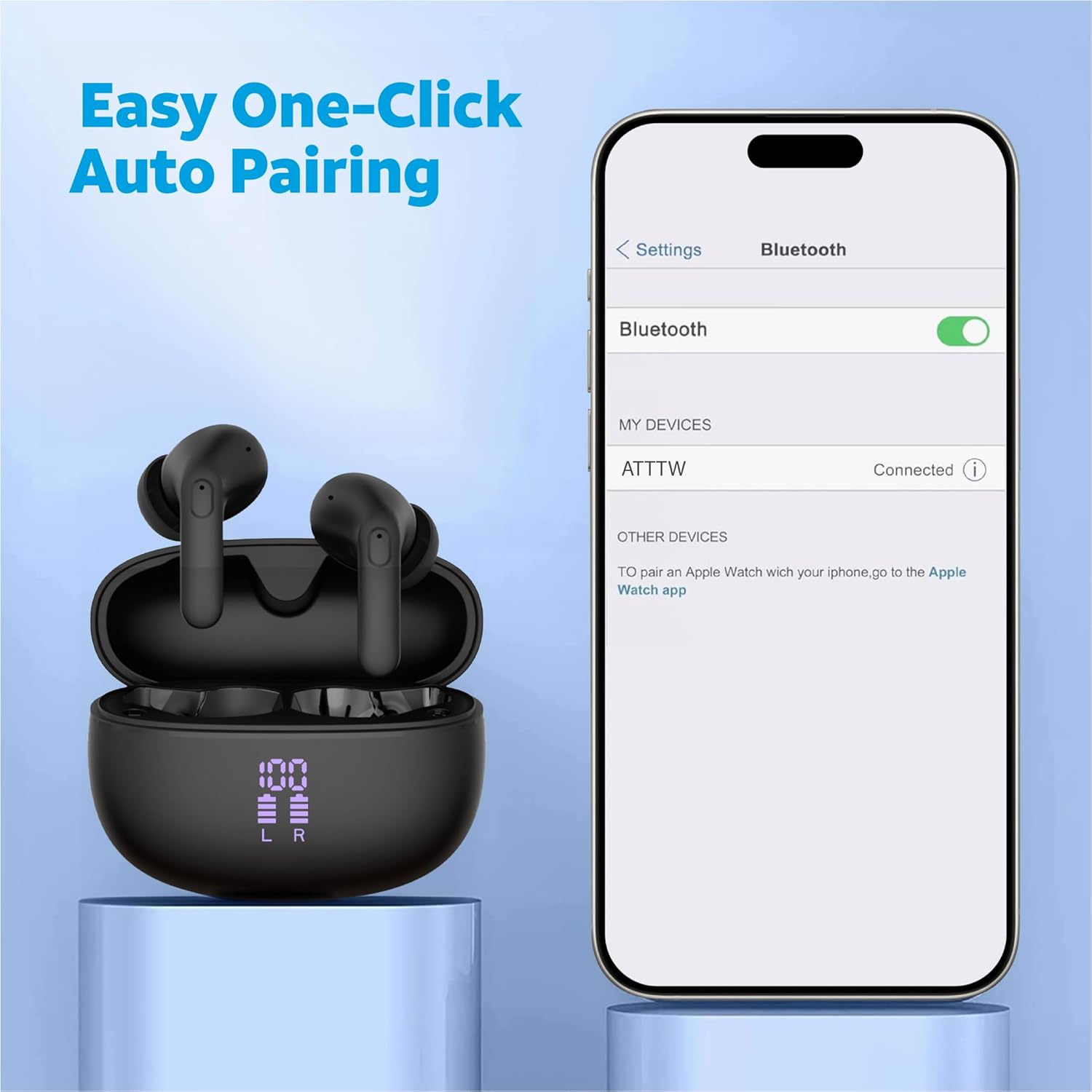
Image: A detailed view of an AT&T Essentials earbud, highlighting the touch control area with various icons representing functions like call management, music playback, and volume control, indicating its smart touch capabilities.
Environmental Noise Cancellation (ENC)
The built-in quad environmental noise cancellation technology ensures your voice is clear during phone calls, even in noisy environments. This feature automatically activates during calls to filter out background noise.

Image: An exploded view of an AT&T Essentials earbud, showcasing its internal components, including the speaker driver and circuitry. Text overlays indicate "Built-In Quad Environmental Noise Cancellation" and "Experience Crystal-Clear Calls and Immersive Sound with Advanced ENC Technology."
Maintenance and Care
Proper maintenance ensures the longevity and optimal performance of your earbuds.
- Cleaning: Regularly clean the earbuds and charging case with a soft, dry, lint-free cloth. Do not use abrasive cleaners or solvents.
- Ear Tips: Remove ear tips periodically and clean them with a damp cloth. Ensure they are completely dry before reattaching.
- Water and Dust Resistance: The earbuds and charging case are IPX4 rated, meaning they are resistant to splashing water from any direction. They are not waterproof and should not be submerged in water. Avoid exposure to excessive moisture or dust.
- Storage: When not in use, store the earbuds in their charging case to protect them and keep them charged. Store in a cool, dry place away from direct sunlight and extreme temperatures.
Troubleshooting
| Problem | Possible Cause | Solution |
|---|---|---|
| Earbuds not pairing | Earbuds not in pairing mode; Bluetooth off on device; previously paired device interfering. | Ensure earbuds are in case and lid is open. Turn Bluetooth off and on again on your device. Forget "ATTTW" from your device's Bluetooth list and re-pair. |
| No sound from one earbud | Low battery; earbud not properly connected; earbud settings. | Place both earbuds back in the charging case, close the lid for 5 seconds, then open. Ensure both earbuds are charged. Check device audio balance settings. |
| Charging case not charging | Faulty cable or power adapter; dirty charging port. | Try a different USB-C cable and power adapter. Clean the charging port on the case gently with a dry cotton swab. |
| Poor call quality | Environmental noise; earbud placement; weak Bluetooth connection. | Ensure earbuds are properly seated in your ears. Move closer to your connected device. Avoid extremely noisy environments if possible. |
Specifications
| Feature | Detail |
|---|---|
| Model Name | True Wireless Comfort Fit Earbuds |
| Model Number | 4130T |
| Connectivity Technology | Wireless (Bluetooth) |
| Battery Life (Listening Time) | Up to 35 Hours (with charging case) |
| Noise Control | Active Noise Cancellation (ENC for calls) |
| Water Resistance Level | IPX4 (Water Resistant) |
| Control Type | Touch Control |
| Frequency Response | 20 Hz - 20 KHz |
| Impedance | 140 Ohm |
| Sensitivity | 80 dB |
| Included Components | Wireless Charging Case |
| Color | Black |
| Item Weight | 2.64 ounces |
| UPC | 849944091350 |
Warranty and Support
For warranty information and technical support, please refer to the official AT&T Accessories website or contact their customer service directly. Keep your proof of purchase for any warranty claims.
You can visit the AT&T Store online for more information: AT&T Store
Related documents4130T


Ask a question about this manual
Ask about setup, troubleshooting, compatibility, parts, safety, or missing instructions. Manuals+ will review the question and use this page’s manual context to help answer it.