
1. Introduction
This manual provides detailed instructions for the installation, operation, and maintenance of your ExBrite 36"x30" Lighted Medicine Cabinet. Please read this manual thoroughly before installation and use to ensure proper function and safety. Keep this manual for future reference.
2. Safety Information
WARNING: Risk of Electric Shock. Ensure power is disconnected before installation or servicing.
- All electrical work must be performed by a qualified electrician in accordance with local codes and regulations.
- Do not install in areas with excessive humidity or direct water spray.
- Handle glass components with care to prevent breakage and injury.
- Ensure the mounting surface is structurally sound and can support the weight of the cabinet.
- Do not overload shelves; each tempered glass shelf supports up to 30 lbs.
- The defogging function automatically shuts off after 60 minutes for safety.
3. Product Overview
The ExBrite Lighted Medicine Cabinet is designed to provide functional storage and enhanced lighting for your bathroom. Key features include:
- Stepless Dimming: Adjust brightness from 10% to 100%.
- 3-Color Temperature Control: Seamlessly switch between 3000K (warm), 4500K (natural), and 6000K (cool) light.
- Enhanced Defogging: Quickly warms the mirror surface to approximately 40°C, with automatic shut-off after 60 minutes.
- Tempered Glass Shelves: Three adjustable 8mm thick shelves, each supporting up to 30 lbs.
- Built-in Power Outlets & USB Ports: Two 1800W high-power dual outlets and two USB ports for charging and powering devices.
- Interior Sensor Light: 6000K LED light automatically turns on when the cabinet door is opened.
- Smart Display: Integrated digital clock and room temperature display.
- Double-Layer Aluminum Frame: IP44-rated waterproof aluminum frame for durability.
- Double-Sided Mirror: Mirrors on both sides of the door for continuous reflection even when open.

Figure 3.1: Overview of the ExBrite Lighted Medicine Cabinet's main features.

Figure 3.2: The cabinet features a double-sided mirror and a hidden handle for a clean aesthetic and added convenience.
4. Specifications
| Feature | Description |
|---|---|
| Model Number | 11MC3630V6DX |
| Dimensions (D x W x H) | 5.5" x 36" x 30" |
| Mounting Type | Recessed / Surface Mount |
| Material | Aluminum Frame, Tempered Glass |
| Weight Limit (per shelf) | 30 lbs |
| Item Weight | 57.9 lbs |
| Power Outlets | 2 x 1800W (120Vac, 15A Max) |
| USB Ports | 2 |
| Color Temperature Range | 3000K - 6000K |
| Dimming Range | 10% - 100% |
| Defogger Auto Shut-off | 60 minutes |
| Certifications | ETL, UL (critical components) |

Figure 4.1: Product and Cutout Dimensions.

Figure 4.2: Cutout Dimension Reference Table.
5. Installation
The ExBrite Lighted Medicine Cabinet can be installed as either a surface mount or a recessed mount. Ensure all electrical connections are made by a qualified professional.
5.1. Pre-Installation Checklist
- Verify all components are present and undamaged.
- Ensure the electrical supply is turned off at the circuit breaker.
- Prepare the wall for either surface or recessed mounting.
5.2. Mounting Options

Figure 5.1: Surface-Mounted vs. Recessed-Mounted Installation.
5.3. Mounting Bracket System
The cabinet utilizes a robust mounting bracket system for secure installation.

Figure 5.2: The cabinet features a double-assured wall bracket for stable support and easier installation.
5.4. Installation Video Guide
For a visual guide on installation and features, please refer to the official product video:
Video 5.1: ExBrite Lighted Medicine Cabinet Installation and Features Overview. This video demonstrates the installation process and highlights various functionalities of the medicine cabinet.
6. Operating Instructions
6.1. Power On/Off and Lighting Control
The mirror features touch-sensitive controls integrated into the mirror surface.
- Power Button: Tap to turn the LED lighting on or off.
- Stepless Dimming: Long press the power button to adjust the brightness from 10% to 100%. Release when desired brightness is achieved.
- Color Temperature Adjustment: Tap the color temperature button to cycle through 3000K (warm white), 4500K (natural white), and 6000K (cool white).
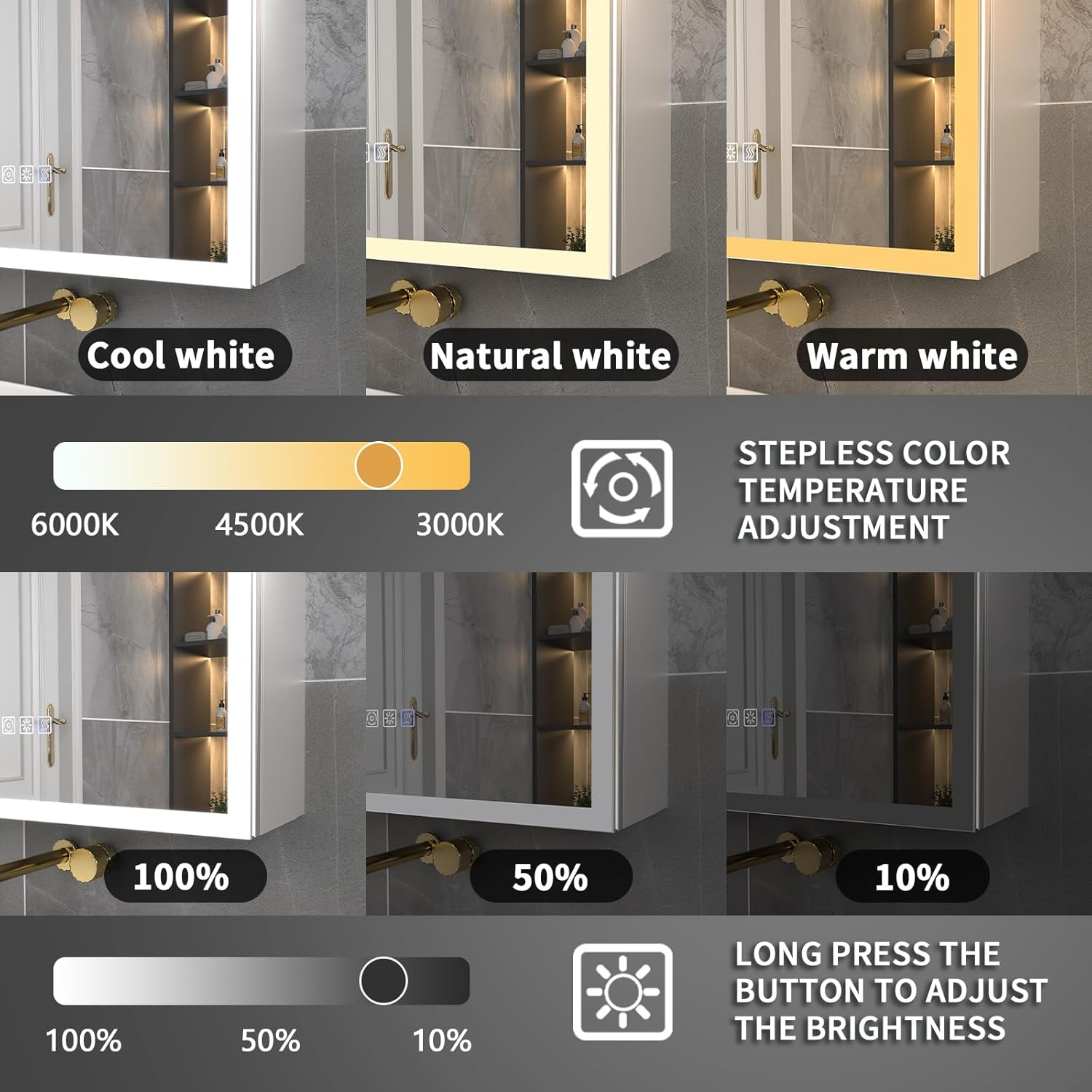
Figure 6.1: Stepless Dimming and 3-Color Temperature Control.

Figure 6.2: Detailed controls for color temperature and brightness adjustment.
6.2. Defogging Function
Activate the defogger to clear condensation from the mirror surface.
- Defog Button: Tap the defog button (often indicated by a steam icon) to activate the defogging function.
- The defogger will automatically turn off after 60 minutes.

Figure 6.3: One-Touch Anti-Fog Activation.

Figure 6.4: The anti-fog function is designed for convenience and energy efficiency.
6.3. Interior Sensor Light
The interior of the cabinet is equipped with a sensor light.
- The 6000K LED interior light automatically activates when the cabinet door is opened, providing illumination for contents.
6.4. Clock & Temperature Display
The mirror surface displays the current time and room temperature.
- The digital clock and temperature display are always visible for quick reference.
- The blue backlight for the display can be controlled.

Figure 6.5: Blue Backlight with On/Off Control for the smart display.
6.5. Power Outlets & USB Ports
The cabinet includes internal power and USB ports for convenience.
- Two 1800W power outlets and two USB ports are located inside the cabinet.
- Use these for charging electric toothbrushes, shavers, hairdryers, and other small appliances.

Figure 6.6: Built-in Power Outlets and USB Ports.

Figure 6.7: The outlets are designed to handle high-wattage appliances.
7. Maintenance
7.1. Cleaning
- Use a soft, damp cloth and a mild glass cleaner for the mirror surface.
- For the aluminum frame and interior, use a soft cloth with a non-abrasive cleaner.
- Avoid abrasive cleaners, solvents, or harsh chemicals that may damage the finish or electronic components.
7.2. Shelf Adjustment
The tempered glass shelves are adjustable to customize storage space.
- Carefully remove items from the shelf.
- Lift the shelf slightly and slide it out of its supports.
- Reinsert the shelf into the desired height using the provided shelf pins. Ensure it is securely seated.

Figure 7.1: Adjustable Tempered Glass Shelves and Soft-Close Hinges.

Figure 7.2: Close-up of adjustable shelves and hinges.
7.3. Frame Durability
The cabinet features an anodized aluminum frame for enhanced durability.

Figure 7.3: Anodized Aluminum Frame benefits.
8. Troubleshooting
| Problem | Possible Cause | Solution |
|---|---|---|
| LED light not turning on | No power supply; Faulty wiring; Damaged LED strip | Check circuit breaker; Verify wiring connections; Contact customer support |
| Defogger not working | Defogger not activated; Electrical issue | Ensure defog button is pressed; Check power supply; Contact customer support |
| Outlets/USB ports not working | No power supply; Overload; Faulty wiring | Check circuit breaker; Reduce load; Verify wiring connections; Contact customer support |
| Clock/Temperature display incorrect | Initial setup required; Sensor malfunction | Refer to operating instructions for setting; Contact customer support |
9. Warranty & Support
ExBrite products are designed for quality and durability. This product comes with a warranty to cover manufacturing defects.
- Warranty Period: Up to 1 Year Warranty.
- Returns: 30-Day Free Returns.
For customer service inquiries, technical support, or warranty claims, please contact ExBrite customer support. Replies are typically provided within 24 hours.

Figure 9.1: ExBrite Customer Service Information.


