
1. Product Overview
This manual provides instructions for the SOFTSEA Full Size Platform Bed, Model YZSWD157. This modern bed frame features integrated LED lighting, a convenient charging station, and two under-bed storage drawers. Please read this manual thoroughly before assembly and use to ensure proper setup and safe operation.
The bed frame is designed for a full-size mattress and offers a sturdy foundation without the need for a box spring. Its integrated features enhance bedroom functionality and ambiance.

Image 1.1: SOFTSEA Full Size Platform Bed with LED light illuminated and the charging station visible on the headboard shelf.
2. Setup and Assembly
The SOFTSEA Full Size Platform Bed is designed for straightforward assembly. It is conveniently packaged in two parcels. We recommend two individuals for assembly, which typically takes approximately 60-90 minutes.
2.1 Before You Begin
- Unpack All Components: Carefully remove all parts from the packaging and lay them out on a clean, soft surface to prevent scratches.
- Verify Parts: Compare the received parts with the included parts list in your separate assembly instruction manual to ensure all components are present.
- Tools Required: Ensure you have any necessary tools as specified in the assembly manual (e.g., Allen wrench, screwdriver).
2.2 Assembly Steps
- Follow the step-by-step instructions provided in the dedicated assembly instruction manual included with your product.
- Important Note: Do not fully tighten all hardware until the entire assembly is complete. This allows for minor adjustments and ensures proper alignment of all parts.
- Once all components are in place and aligned, gradually tighten all screws and bolts securely.

Image 2.1: The SOFTSEA Full Size Platform Bed frame, illustrating the metal slat support system and the under-bed drawer runners before mattress placement.

Image 2.2: Dimensional diagram of the SOFTSEA Full Size Platform Bed, including measurements for the bed frame and the individual storage drawers.
3. Operating Instructions
3.1 Smart LED Light Operation
The bed frame is equipped with an integrated LED light strip located on the headboard. This light can be controlled via a remote control or a dedicated mobile application.
- Power On/Off: Use the designated button on the remote or within the app to turn the LED light on or off.
- Brightness Adjustment: Adjust the light intensity to your preference using the brightness controls.
- Color Selection: Choose from a variety of colors to match your mood or room decor.
- Mode Selection: Select different lighting modes (e.g., static, flashing, fading) as desired.
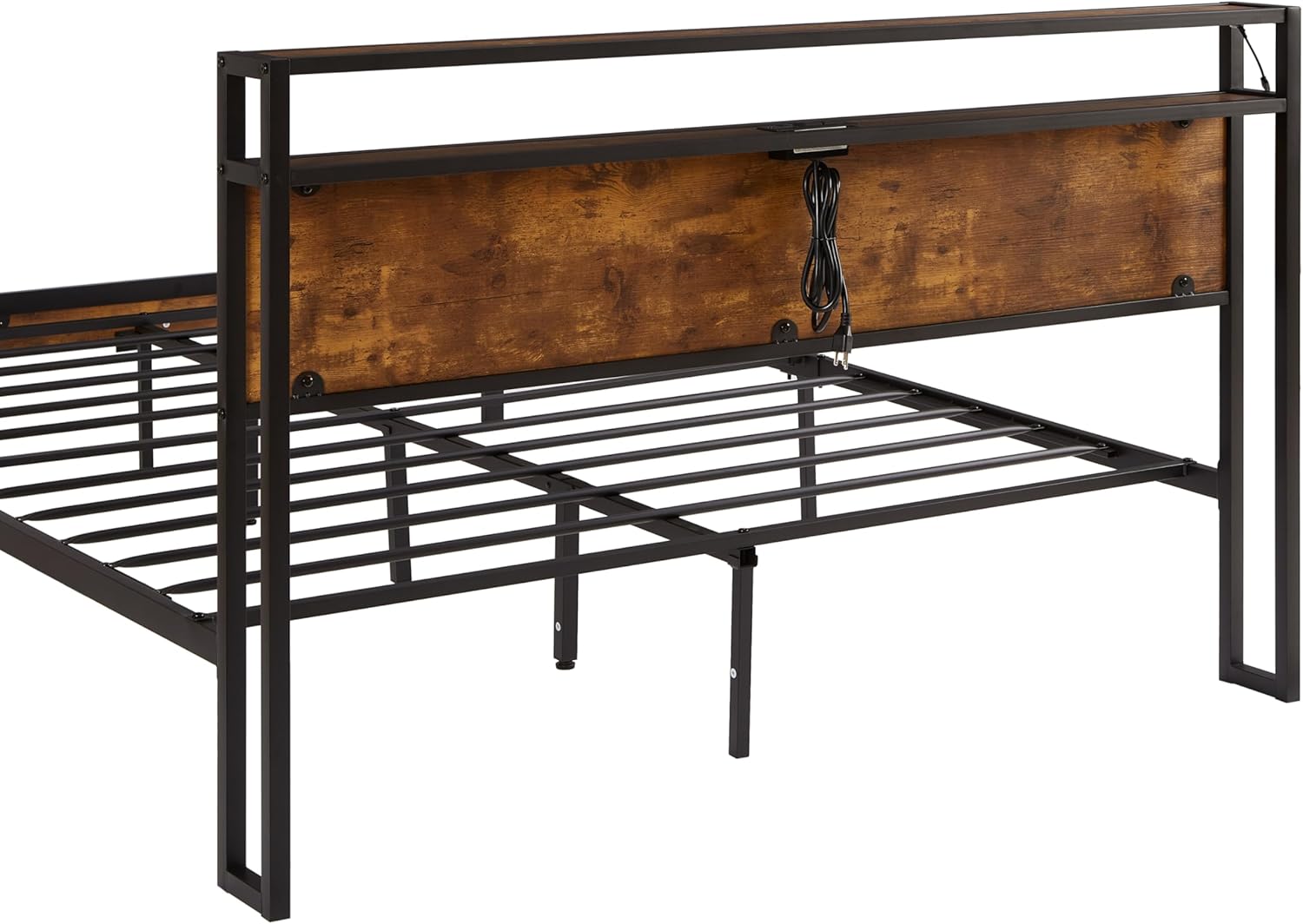
Image 3.1: Detailed view of the headboard, highlighting the LED light strip and the integrated charging station with power outlets and USB ports.
3.2 Charging Station Usage
The headboard features a built-in charging station for your convenience. It includes 2 standard AC outlets and 2 USB ports.
- Connecting Devices: Plug your electronic devices (e.g., smartphones, tablets, lamps) directly into the AC outlets or USB ports.
- Power Source: Ensure the bed frame's power cord is securely plugged into a functional wall outlet for the charging station to operate.
- Safety: Do not overload the charging station. Refer to the specifications for maximum power output.
3.3 Storage Drawers
The bed frame includes two spacious storage drawers located under the bed. These drawers are ideal for storing seasonal clothes, bedding, books, or other personal belongings, helping to keep your bedroom tidy.
- Opening/Closing: Gently pull the drawers out to open and push them in to close. Ensure they are properly aligned with their tracks.
- Capacity: Avoid overloading the drawers to ensure smooth operation and prevent damage to the drawer mechanism.

Image 3.2: The SOFTSEA Full Size Platform Bed with both under-bed storage drawers fully extended, showcasing their capacity for storing items like folded towels and blankets.
4. Maintenance
Regular maintenance will help prolong the life and appearance of your SOFTSEA Platform Bed.
- Cleaning the Frame: Wipe the metal and engineered wood surfaces with a soft, damp cloth. Avoid using harsh chemicals or abrasive cleaners, which can damage the finish.
- Cleaning the LED Strip: Gently wipe the LED strip with a dry, soft cloth to remove dust. Ensure the power is disconnected before cleaning.
- Checking Connections: Periodically check all screws and bolts to ensure they remain tight. Re-tighten if necessary to maintain stability and prevent squeaking.
- Drawer Maintenance: Keep the drawer tracks clean and free of debris to ensure smooth operation.
5. Troubleshooting
If you encounter any issues with your SOFTSEA Platform Bed, refer to the following common solutions:
5.1 Bed Frame Stability / Noise
- Issue: The bed frame feels unstable or makes squeaking noises.
- Solution: Check all bolts and screws, especially those connecting the main frame components and slats. Tighten any loose hardware. Ensure the bed is on a level surface.
5.2 LED Light Not Working
- Issue: The LED light does not turn on or respond to controls.
- Solution: Ensure the bed frame's power cord is securely plugged into a functional wall outlet. Check the connection of the LED strip to the power source. Verify the remote control batteries are functional.
5.3 Charging Station Not Functioning
- Issue: Devices are not charging when plugged into the AC outlets or USB ports.
- Solution: Confirm the bed frame's main power cord is plugged in. Test the wall outlet with another device. Ensure the devices you are trying to charge are working correctly. Avoid exceeding the charging station's maximum power output.
5.4 Drawers Sticking or Not Sliding Smoothly
- Issue: Drawers are difficult to open or close.
- Solution: Check if the drawers are overloaded. Ensure there are no obstructions in the drawer tracks. Verify that the drawer runners are properly aligned and free of debris.
6. Product Specifications
| Brand | SOFTSEA |
| Model Number | YZSWD157 |
| Size | Full |
| Color | Brown+Black |
| Material | Engineered Wood, Metal |
| Overall Product Dimensions | 81.5"L x 53.9"W x 39"H |
| Overall Product Weight | 52 lbs |
| Bed Weight Capacity | 600 lbs |
| Number of Bed Slats | 11 |
| Special Features | 2 Storage Drawers, LED Lights, Charging Station (2 AC outlets, 2 USB ports) |
| Assembly Required | Yes |
| Manufacturer | SOFTSEA |
| ASIN | B0DK78DM25 |
7. Warranty and Support
For specific warranty information regarding your SOFTSEA Full Size Platform Bed, please refer to the warranty card included with your product packaging or contact the retailer from whom you purchased the item. Warranty terms and conditions may vary.
Should you require technical assistance, replacement parts, or have questions not covered in this manual, please contact the SOFTSEA customer support or the retailer directly. Please have your model number (YZSWD157) and purchase information ready when contacting support.