
1. Safety Information
Please read all instructions carefully before installation and use. Keep this manual for future reference.
- Electrical Safety: This unit is ETL certified and critical components are UL certified. Installation must be performed by a qualified electrician in accordance with local electrical codes. Ensure power is disconnected at the circuit breaker before any installation or maintenance.
- Water Exposure: The cabinet has an IP44-rated waterproof aluminum frame. Avoid direct water spray onto electrical components.
- Glass Handling: The cabinet features tempered glass shelves and door. Handle with care to prevent breakage. Edges of the mirror may be sharp; wear protective gloves during installation.
- Weight Capacity: Each 8mm thick tempered glass shelf supports up to 30 lbs. Do not exceed this weight limit.
- Defogger: The defogging function automatically shuts off after 60 minutes for safety.
- Power Outlets: The built-in dual 1800W power outlets and USB ports are designed for bathroom appliances. Do not overload.
2. Package Contents
Verify all components are present and undamaged before proceeding with installation.
- ExBrite Lighted Medicine Cabinet (40"x30")
- Tempered Glass Shelves (3 adjustable)
- Mounting Hardware (screws, anchors)
- Installation Manual

Image 1: Cabinet Dimensions and Cutout Requirements. This diagram illustrates the overall dimensions of the 40"x30" medicine cabinet and the necessary cutout dimensions for recessed installation, including width, height, and depth.
3. Installation Instructions
The ExBrite Lighted Medicine Cabinet can be installed as either a surface-mounted unit or a recessed-mounted unit. Professional installation is recommended for electrical connections.
3.1 Mounting Options
- Surface Mount: The cabinet is mounted directly onto the wall surface.
- Recessed Mount: The cabinet is inserted into a cutout in the wall, providing a flush appearance. Refer to Image 1 for cutout dimensions.

Image 2: Surface-Mounted vs. Recessed-Mounted Installation. This image shows two identical medicine cabinets, one installed directly on the wall (surface-mounted) and the other integrated into the wall (recessed-mounted), demonstrating the aesthetic difference between the two installation types.
3.2 General Installation Steps (Refer to included diagram for detailed steps)
- Prepare the Area: Ensure the wall surface is clean and clear. For recessed mounting, create the wall cutout according to the dimensions provided in Image 1.
- Verify Clearance: Confirm adequate space for the cabinet door to open fully (Door Wide Open model).
- Mark Mounting Holes: Use the provided mounting bar as a template to mark the drill points on the wall.
- Secure Mounting Bar: Drill pilot holes and secure the mounting bar to the wall using appropriate screws and anchors.
- Electrical Connection: Connect the cabinet's electrical wiring to the household electrical supply. This step requires professional expertise. The cabinet is designed for hardwired installation.
- Hang the Cabinet: Carefully lift the cabinet and engage it with the mounting bar.
- Adjust Shelves: Install the tempered glass shelves into the desired positions using the adjustable shelf supports.

Image 3: Cabinet Installation Diagram. This diagram provides a step-by-step visual guide for installing the medicine cabinet, including marking, securing the mounting bar, and hanging the unit.
Video 1: ExBrite Lighted Medicine Cabinet Overview. This video provides a general overview of the ExBrite Lighted Medicine Cabinet, demonstrating its features, installation options (surface and recessed mount), and internal storage capabilities. It highlights the LED lighting, defogger, and power outlets.
4. Operating Instructions
The ExBrite Lighted Medicine Cabinet features intuitive touch controls integrated into the mirror surface.
4.1 Touch Controls
The mirror surface includes touch-sensitive buttons for various functions:
- Power/Brightness Control: Tap to turn the LED light on/off. Long press to adjust brightness steplessly from 10% to 100%.
- Color Temperature Control: Tap to cycle through 3 color temperatures (3000K Warm White, 4500K Natural White, 6000K Cool White). Long press for stepless color temperature adjustment.
- Defog Function: Tap to activate/deactivate the defogger. The defogger automatically turns off after 60 minutes.
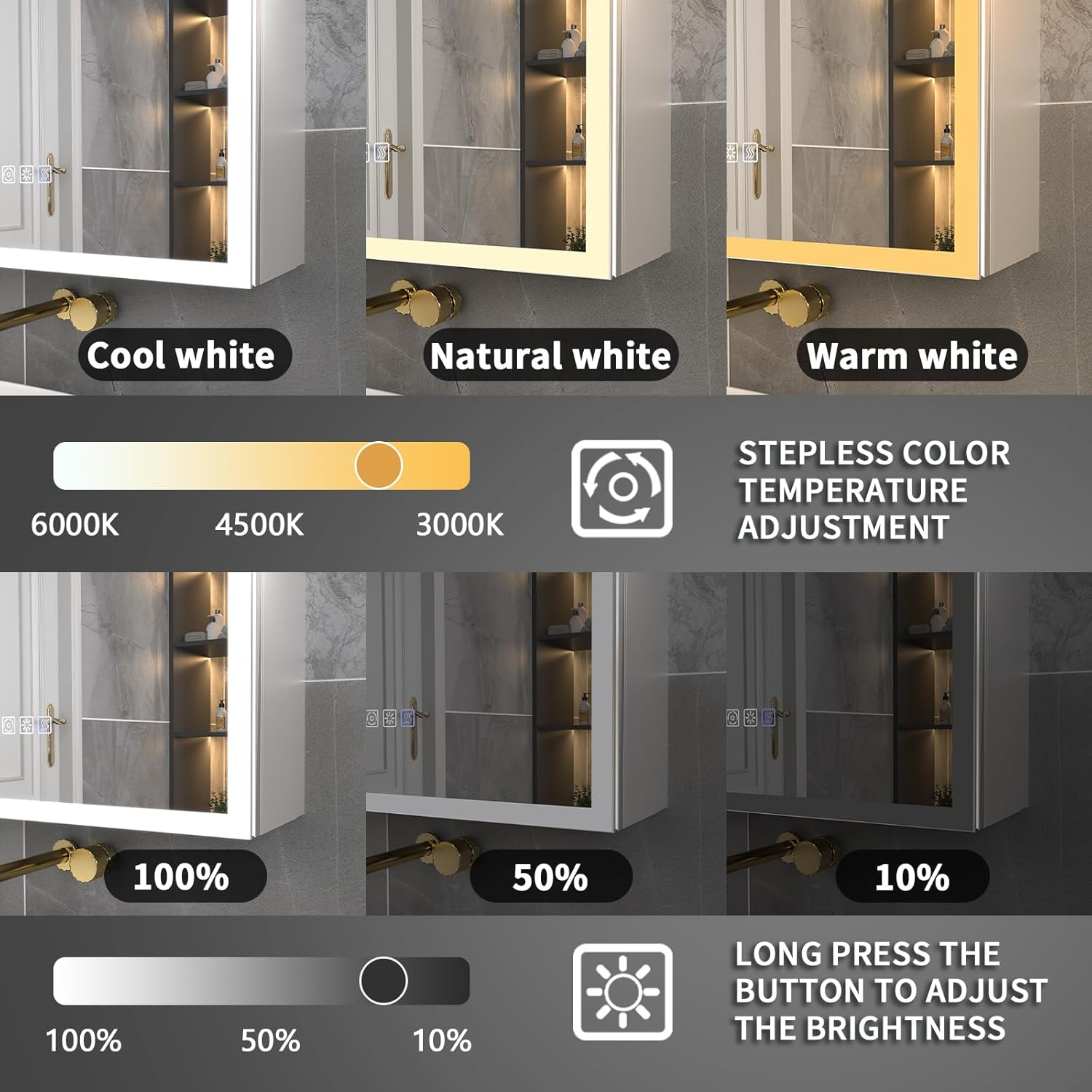
Image 4: Lighting Control Features. This image illustrates the stepless dimming capability, allowing brightness adjustment from 10% to 100%, and the 3-color temperature options (Cool White, Natural White, Warm White) with stepless adjustment from 3000K to 6000K.
4.2 Smart Display
The integrated digital display shows the current time and room temperature.
4.3 Interior Sensor Light
A built-in 6000K LED interior light automatically illuminates when the cabinet door is opened, providing clear visibility of contents.
4.4 Power Outlets and USB Ports
The cabinet includes two 1800W dual power outlets and two USB ports inside, suitable for charging and powering small electronic devices and bathroom appliances.

Image 5: Internal Power Outlets and USB Ports. This image highlights the two 1800W power outlets and two USB ports located inside the cabinet, designed for convenient charging and powering of devices like hairdryers, shavers, and electric toothbrushes.
5. Care and Maintenance
Regular cleaning and proper care will ensure the longevity and optimal performance of your medicine cabinet.
- Cleaning the Mirror: Use a soft, lint-free cloth and a non-abrasive glass cleaner. Avoid spraying cleaner directly onto the mirror surface, especially near the edges and electrical components. Spray onto the cloth first.
- Cleaning the Cabinet: Wipe the aluminum frame and interior surfaces with a soft, damp cloth. Avoid harsh chemicals or abrasive cleaners.
- Electrical Components: Ensure the cabinet is dry before using any electrical outlets or USB ports. Do not attempt to clean or repair electrical components yourself.
- Hinges: The 110° soft-close hinges are designed for durability. Avoid forcing the doors open or closed.
6. Troubleshooting Guide
If you encounter any issues, refer to the following common problems and solutions. If the problem persists, contact customer support.
| Problem | Possible Cause | Solution |
|---|---|---|
| LED light does not turn on. | No power supply; loose connection; faulty LED driver. | Check circuit breaker. Ensure all connections are secure. Contact customer support if issue persists. |
| Defogger is not working. | Defogger not activated; electrical issue. | Ensure the defogger button is pressed. Check power supply. |
| Clock/Temperature display is inaccurate or not working. | Power interruption; internal sensor issue. | Verify stable power supply. Contact customer support for sensor issues. |
| Power outlets/USB ports are not functional. | No power; overloaded circuit. | Check power supply to the cabinet. Ensure connected devices do not exceed 1800W total. |
7. Product Specifications
| Feature | Detail |
|---|---|
| Brand | ExBrite |
| Model Name | Lighted medicine cabinet |
| Item Model Number | 11MC4030V6DX |
| Product Dimensions | 5.5"D x 40"W x 30"H |
| Item Weight | 66 Pounds |
| Mounting Type | Wall Mount (Recessed/Surface) |
| Frame Material | Aluminum |
| Number of Shelves | 3 (Adjustable, Tempered Glass) |
| Lighting Features | Stepless Dimming (10-100%), 3-Color Temperature (3000K-6000K), Interior Sensor Light (6000K) |
| Special Features | Defog Function (60-min auto-off), Digital Clock, Room Temperature Display, Lighting Memory Function |
| Power Outlets | Dual 1800W AC Outlets, 2 USB Ports |
| Safety Certifications | ETL Certified (complete unit), UL Certified (critical components) |
| Door Style | Door Wide Open |
| UPC | 658215406737 |
8. Warranty and Support
ExBrite is committed to providing quality products and customer satisfaction.
- Warranty: The product typically comes with up to a 1-year warranty. Please refer to your purchase documentation for specific warranty terms.
- Returns: This product is returnable until Jan 31, 2026 (based on purchase date).
- Customer Service: For any questions, technical assistance, or warranty claims, please contact ExBrite customer support. Response by email is typically within 24 hours.
- Manufacturer: ExBrite USA

Image 6: Customer Service Information. This image displays icons representing ExBrite's customer support, including email response within 24 hours, a 30-day free return policy, and up to a 1-year warranty.


