
1. Safety Information
To ensure safe operation and prevent injury or damage, please read and adhere to the following safety guidelines:
- Avoid using the massage chair in damp, high-temperature, or flammable/explosive environments.
- Always unplug the unit from the power outlet when it is unattended or not in use for extended periods.
- This product is designed for indoor use only. Do not use it outdoors.
- Keep the power cord away from heat sources, sharp objects, and areas where it could be walked on or pinched.
- Ensure the chair is placed on a stable, level surface.
- Do not allow children or pets to play on or around the massage chair.
- Consult a physician before use if you have any medical conditions, are pregnant, or have a pacemaker.
2. Setup
2.1 Unboxing and Initial Placement
The iBooMas M109 Massage Chair arrives fully assembled. Carefully remove the chair from its packaging. Ensure all accessories are present before discarding packaging materials.

Image: The iBooMas M109 Massage Chair, illustrating its dimensions and the compact packaging it arrives in, highlighting that it comes fully assembled.
Video: This video demonstrates the unboxing process of the iBooMas M109 Massage Chair and how to check for all included components, such as the user manual and screen components.
Video: A detailed unboxing guide for the iBooMas M109 Massage Chair, showing how to prepare the chair for first use, including accessory identification.
2.2 Installing the Screen Bracket
Locate the screen bracket and the main control screen. Securely attach the screen bracket to the designated slot on the chair's armrest. Then, carefully place the control screen onto the bracket.
Video: This segment of the unboxing guide demonstrates the installation of the screen bracket for the iBooMas M109 Massage Chair's control panel.
2.3 Power Connection
Connect the power cord to the chair's power inlet and then plug it into a grounded electrical outlet. Ensure the power cord is not tangled or obstructed.
3. Operating Instructions
3.1 Control Methods
The iBooMas M109 offers three convenient ways to control your massage experience:
- Smartphone App: Download the dedicated app to customize and save your preferred massage modes.
- Large LCD Screen: Use the intuitive touch screen for easy navigation and selection of functions.
- Quick-Side Buttons: Access key functions directly from the armrest panel, which also includes a USB charging port.

Image: The iBooMas M109 Massage Chair highlighting its three control methods: a smartphone app, a large LCD screen, and convenient quick-side buttons with a USB charging port.
Video: This video illustrates the three flexible control methods available for the iBooMas M109 Massage Chair, including the app, LCD screen, and quick-side buttons.
3.2 App Downloading and Registration
To utilize the smartphone app control, download the 'Massage Chair' app from your device's app store. Follow the on-screen instructions to register your account and pair it with your iBooMas M109 chair.
Video: A step-by-step guide on downloading and registering the iBooMas Massage Chair control app for seamless smartphone integration.
3.3 Body Scan and Personalized Massage
Upon starting a massage program, the chair performs an automatic body scan to detect your shoulder position and customize the massage rollers to your body's unique contours. This ensures precise and effective massage coverage from neck to thighs along the 53-inch SL track.

Image: The iBooMas M109 Massage Chair demonstrating its ergonomic smart features, including body scan for personalized massage, 3D full body massage, and Thai stretch.
3.4 Zero Gravity Function
Engage the Zero Gravity feature to recline the chair into a position that elevates your legs above your heart. This posture evenly distributes body weight, alleviates spinal pressure, and promotes deeper relaxation and improved circulation. The M109 offers multiple Zero Gravity recline angles.

Image: The iBooMas M109 Massage Chair in a deep Zero Gravity position, illustrating its benefits for pressure relief, improved circulation, Thai stretch, and better sleep.
Video: This video demonstrates the Zero Gravity recline feature of the iBooMas M109 Massage Chair, showcasing its various comfort steps and extended footrest.
3.5 Massage Programs and Techniques
The chair features 12 automatic massage programs tailored for different needs, such as Sport Care, Spine Care, and Sleep. You can also select from 6 massage techniques (Clapping, Kneading, Knock, Tapping, Shiatsu, Rolling) and adjust 6 intensity levels and 3 massage widths for a customized experience.
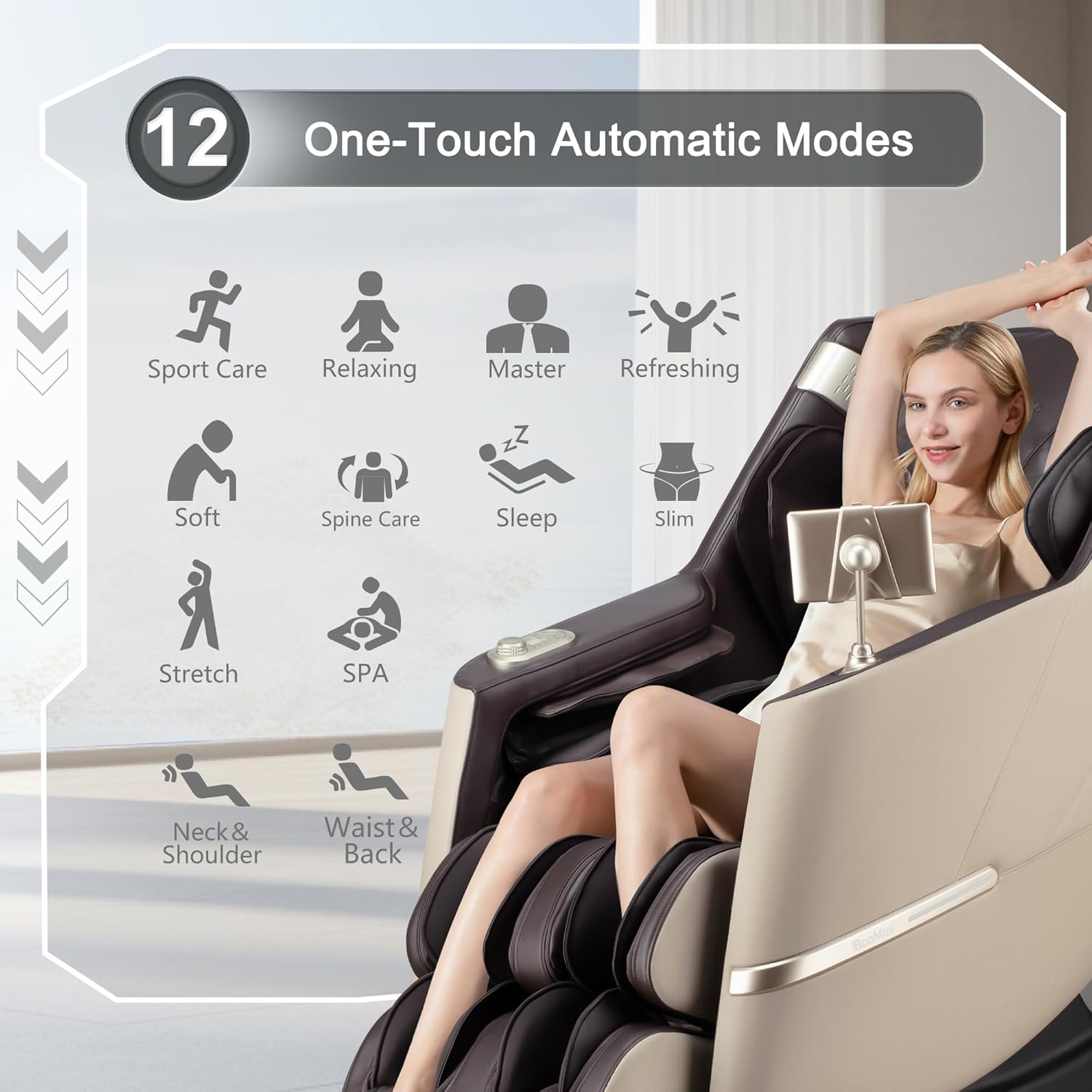
Image: The iBooMas M109 Massage Chair illustrating its 12 one-touch automatic massage modes, including Sport Care, Relaxing, Master, Refreshing, Soft, Spine Care, Sleep, Slim, Stretch, SPA, Neck & Shoulder, and Waist & Back.

Image: A visual representation of the iBooMas M109's 3D human-like massage hands and the 6 professional massage techniques available: Clapping, Kneading, Knock, Tapping, Shiatsu, and Rolling, with 6 adjustable intensity levels.
3.6 Airbag Massage and Heat Therapy
The chair features full-body airbags with 3 adjustable intensities to gently compress and release, easing stiffness in various areas. Targeted heat therapy is available for the lower back and feet to soothe muscles and enhance relaxation.

Image: The iBooMas M109 Massage Chair illustrating the areas covered by airbag massage (shoulder, arm, calf, foot) and the locations of heat therapy (waist, foot), alongside foot roller massage.
Video: This video showcases the full body airbag massage feature of the iBooMas M109, demonstrating its three adjustable intensities for comprehensive muscle relief.
3.7 Foot Rollers and Extended Footrest
The footrest features integrated rollers that provide deep kneading massage to the soles of your feet, relieving tension. The footrest can extend up to 7 inches to accommodate users of various heights, ensuring full leg support.

Image: The iBooMas M109 Massage Chair's foot area, detailing the 7-inch extended footrest, instep heating for foot stiffness, foot rollers for tired feet, and leg airbags for relaxation.
Video: Official product video showcasing the features of the iBooMas M109 SL Track Massage Chair, including the extendable footrest, foot rollers, and heat therapy.
3.8 Bluetooth Connectivity
Connect your Bluetooth-enabled device to the chair's integrated speakers to enjoy music or audio during your massage session. Activate calming mood lights for an enhanced multi-sensory experience.
4. Maintenance
4.1 Cleaning Instructions
To maintain the appearance and longevity of your iBooMas M109 Massage Chair:
- Spot Clean: For minor spills or stains, use a soft, damp cloth with a mild, non-abrasive cleaner. Gently blot the affected area.
- Wipe Clean: Regularly wipe down the chair's surfaces with a dry or slightly damp cloth to remove dust and dirt.
- Avoid using harsh chemicals, solvents, or abrasive cleaning tools, as these can damage the faux leather material.
- Ensure the chair is unplugged before cleaning.
4.2 Storage
If storing the chair for an extended period, ensure it is clean and dry. Store it in a cool, dry place away from direct sunlight and extreme temperatures. The chair features smooth-rolling wheels at its base for easy repositioning.
5. Troubleshooting
If you encounter any issues with your iBooMas M109 Massage Chair, please refer to the following common troubleshooting steps:
- No Power: Ensure the power cord is securely plugged into both the chair and a working electrical outlet. Check if the outlet has power by plugging in another device.
- Massage Not Starting: Verify that the chair is powered on and that a massage program has been selected via the LCD screen, app, or quick-side buttons.
- Unusual Noises: Minor operational sounds are normal. If you hear loud or unusual noises, immediately stop the massage, unplug the chair, and contact customer support.
- Remote/App Not Responding: Ensure the remote control has fresh batteries (if applicable) or that your smartphone is properly paired via Bluetooth to the chair. Restart the app or chair if necessary.
- Massage Intensity Too Strong/Weak: Adjust the intensity settings using the control panel or app. The chair offers multiple intensity levels for customization.
If the problem persists after attempting these steps, please contact iBooMas customer support for further assistance.
6. Specifications
| Feature | Detail |
|---|---|
| Brand | iBooMas |
| Model Name | M109 Massage Chair Full Body |
| Color | Brown & Beige |
| Material | Faux Leather, Foam, Memory Foam, Sponge (Fill) |
| Product Dimensions (D x W x H) | 57.9" x 29.53" x 43.3" |
| Item Weight | 141.1 Pounds |
| Maximum Weight Recommendation | 300 Pounds |
| SL-Track Length | 53 inches (Neck to Thigh Coverage) |
| Massage Programs | 12 Automatic Modes |
| Massage Techniques | 6 (Clapping, Kneading, Knock, Tapping, Shiatsu, Rolling) |
| Intensity Levels | 6 Roller Speed, 3 Airbag Intensities |
| Heat Therapy | Lower Back, Feet |
| Foot Rollers | Yes |
| Zero Gravity Positions | Multiple Recline Angles |
| Control Methods | Smartphone App, LCD Touch Screen, Quick-Side Buttons |
| Connectivity | Bluetooth, USB Port |
| Assembly Required | No (Arrives Assembled) |
| Indoor/Outdoor Usage | Indoor Only |
7. Warranty and Support
7.1 Warranty Information
The iBooMas M109 Massage Chair comes with a comprehensive 3-year warranty covering non-user-induced damage to core components:
- Year 1: Free parts and labor.
- Years 2-3: Free parts. Customer bears shipping costs.
- Year 4 onward: Customer bears all parts and shipping costs.
Please retain your proof of purchase for warranty claims.
7.2 Customer Support
iBooMas is committed to customer satisfaction. We offer 24/7 customer support to assist you with any questions or issues you may have regarding your massage chair. Our online support team is available for 12 hours daily to provide prompt assistance.
For support, please refer to the contact information provided in your product packaging or visit the official iBooMas website.


