
1. Introduction
The FiiO DM13 is a versatile portable stereo CD player designed for high-fidelity audio playback. It integrates advanced audio architecture, including dual DACs and headphone amplifiers, to deliver clear and dynamic sound. This manual provides essential information for setting up, operating, and maintaining your DM13 CD player.
2. Product Overview
2.1 Key Features
- High-Fidelity Audio: Features dual CS43198 DACs and dual SGM8262 headphone amplifiers for professional audio quality and 99-level delicate volume control.
- Compact Design, Powerful Output: Dimensions of approximately 144x137x27mm with a balanced output power up to 660mW, capable of driving most earbuds and connecting to external amplifiers.
- USB Ripping and Recording: Supports ripping CDs to WAV format on mobile storage devices for easy transfer and playback.
- Multiple Output Options: Includes 3.5mm and 4.4mm headphone outputs, 3.5mm and 4.4mm line outputs for active speakers/amplifiers, and optical/coaxial digital audio outputs for external high-end decoders.
- Dual Power Supply Modes: "D.MODE" switch allows direct USB power without consuming battery, extending battery life.
- Long-Lasting Battery: Equipped with a 3750mAh pure cobalt lithium battery providing up to 10 hours of continuous playback.
- Custom LCD Display: Clear display shows volume, track number, and playback duration.
2.2 Product Components and Controls
The FiiO DM13 features a sleek design with intuitive controls and various input/output ports.

Image 1: FiiO DM13 Portable CD Player with the lid open, revealing the CD mechanism and the front display panel.

Image 2: FiiO DM13 Portable CD Player with the lid closed, showcasing the control buttons on the top surface and the digital display on the front.
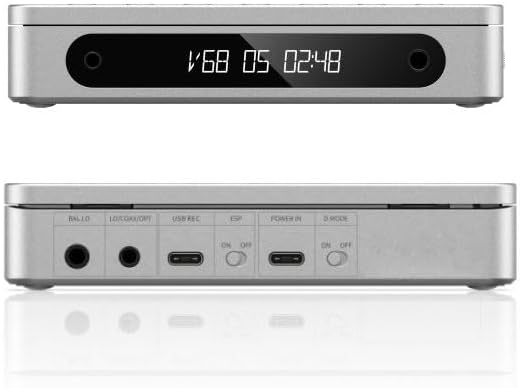
Image 3: Front and rear views of the FiiO DM13. The front shows the display and headphone jacks. The rear panel displays various ports including balanced output, line out/coaxial/optical, USB recording, ESP switch, power input, and D.MODE switch.

Image 4: FiiO DM13 Portable CD Player with a compact disc placed in the tray, lid open.
3. Setup
3.1 Initial Charging
Before first use, fully charge the FiiO DM13 using the provided USB cable connected to a compatible USB power adapter (not included). The device includes a 3750mAh lithium-ion battery.
3.2 Powering On/Off
Press and hold the power button to turn the device on or off.
3.3 Connecting Audio Devices
- Headphones: Connect headphones to the 3.5mm or 4.4mm headphone output jacks on the front panel.
- Active Speakers/Amplifiers: Use the 3.5mm or 4.4mm line output interfaces on the rear panel to connect to active speakers or external amplifiers.
- External DACs: Utilize the optical or coaxial digital audio outputs on the rear panel for connection to external high-end decoders.
3.4 Desktop Mode (D.MODE)
When connected to a USB power source, switch the "D.MODE" toggle on the rear panel to the "ON" position. This allows the DM13 to be powered directly by USB, bypassing the battery and preserving its lifespan.
4. Operating Instructions
4.1 Playing a CD
- Open the CD compartment lid.
- Place a CD onto the spindle, ensuring it is seated correctly.
- Close the CD compartment lid.
- The player will read the disc. Playback should begin automatically or can be initiated using the play/pause button.
4.2 Volume Control
The DM13 features a 99-level volume control, adjusted via the CS43198 DAC. Use the volume buttons on the device to increase or decrease the audio output level.
4.3 USB CD Ripping and Recording
The DM13 supports ripping audio from CDs to WAV format onto a connected USB storage device.
- Connect a FAT32 formatted USB storage device (32GB or lower capacity recommended) to the USB REC port.
- Insert a CD into the player.
- Follow the on-screen prompts or refer to the device's menu for initiating the ripping process.
- Once complete, the WAV files can be transferred to other devices.
4.4 Playback Modes
The DM13 supports gapless playback and loop playback. Specific controls for these modes can be found in the device's menu or by referring to the button functions.
4.5 Electronic Skip Protection (ESP)
The ESP feature helps prevent audio interruptions during movement. Activate the ESP switch on the rear panel when using the player in portable scenarios.
5. Maintenance
- Keep the device clean by wiping it with a soft, dry cloth.
- Avoid exposing the player to extreme temperatures, humidity, or direct sunlight.
- Do not attempt to disassemble the device, as this will void the warranty.
- Handle CDs carefully to prevent scratches and ensure optimal playback.
6. Troubleshooting
| Problem | Possible Cause / Solution |
|---|---|
| No audio output from headphone port. | Ensure the output mode is set to "PRE OUT". Press and hold the power button to cycle through output modes until "PRE OUT" is selected. Check headphone connection. |
| Disc not reading or skipping during playback. | Check if the CD is clean and free of scratches. Ensure the CD is properly seated in the tray. Activate Electronic Skip Protection (ESP) if moving the player. |
| Device not powering on. | Ensure the battery is charged. Connect the device to a USB power source. If using Desktop Mode, ensure the D.MODE switch is "ON" and USB power is connected. |
| USB ripping not working. | Verify the USB storage device is FAT32 formatted and has sufficient space. A Type-C USB flash drive with 32GB or lower capacity is recommended. |
7. Specifications
| Feature | Detail |
|---|---|
| Brand | FiiO |
| Model Name | DM13 |
| Item Model Number | DM13 |
| Color | Silver |
| Connectivity Technology | USB |
| Package Dimensions | 8.66 x 7.87 x 1.57 inches |
| Item Weight | 1.47 pounds |
| Batteries | 1 Lithium Ion battery required (included) |
| Included Components | Cable |
8. Warranty and Support
For warranty information and technical support, please refer to the official FiiO website or contact FiiO customer service directly. Keep your purchase receipt for warranty claims.
Visit the FiiO Store on Amazon for more product information and support resources.


