
Miady K8
Miady Wireless Portable Charger K8 User Manual
Model: K8
1. Introduction
This user manual provides essential information for the safe and efficient operation of your Miady Wireless Portable Charger. Please read this manual thoroughly before using the device and retain it for future reference.
Package Contents
- 1x Miady Wireless Portable Charger (Model K8)
- 1x USB Type-C Charging Cable
- 1x User Manual
2. Safety Information
To ensure safe operation and prevent damage, please observe the following precautions:
- Do not expose the device to extreme temperatures, direct sunlight, or high humidity.
- Avoid dropping or subjecting the device to strong impacts.
- Do not disassemble, repair, or modify the device yourself. Contact qualified service personnel for assistance.
- Keep out of reach of children.
- Use only the provided or certified charging cables.
- Ensure proper ventilation during charging.
- Remove your phone case for optimal suction and wireless charging performance.
3. Product Overview
The Miady Wireless Portable Charger (Model K8) is a compact 5000mAh power bank featuring a unique electric suction design for secure attachment to your smartphone. It supports both 15W wireless charging and 22.5W wired charging via its USB Type-C port.
Key Features:
- Electric Suction Feature: Motorized suction cups securely attach the power bank to your phone.
- Portable Design: Compact and lightweight (4.6 oz, 4 x 2.1 x 0.7 inches) for easy carrying.
- 5000mAh Capacity: Provides approximately one full charge for most smartphones.
- Wireless Charging: Up to 15W wireless output.
- Wired Charging: Up to 22.5W via USB Type-C port.
- Wide Compatibility: Supports most smartphones with wireless charging (Samsung, Google, OnePlus, Motorola, iPhone) and wired charging for Android and iPhone.
- LED Indicators: Four white LED lights indicate remaining battery charge (each light represents 25%).
- Safety Protections: Equipped with NTC temperature sensor and smart chip to prevent overheating and protect battery.
- Pass-Through Charging: Charge your phone wirelessly while recharging the power bank via cable.
Component Identification:

Figure 3.1: Product Components
This image displays the Miady Wireless Portable Charger from an angled top-down view, highlighting its key components. Visible features include the wireless charging area (circular pad), Type-C Input/Output port, LED Indicators (four small dots), Pressure Relief Button (small oval button on the side), and ON/OFF Button (larger oval button on the side).
4. Setup
Initial Charging of the Power Bank
- Connect the provided USB Type-C cable to the Type-C Input/Output port on the power bank.
- Connect the other end of the cable to a compatible USB power adapter (not included) or a computer's USB port.
- The LED indicators will light up to show the charging progress. All four LEDs will be solid when fully charged.
It is recommended to fully charge the power bank before its first use.
5. Operating Instructions
Wireless Charging with Electric Suction
- Ensure your smartphone supports wireless charging.
- For optimal performance, remove your phone case before attaching the power bank.
- Align the wireless charging area of the power bank with the charging coil on the back of your phone.
- Gently press the power bank onto the back of your phone. The motorized suction cups will automatically activate to create a secure hold.
- The power bank will begin wirelessly charging your phone. Check your phone's screen for the charging indicator.
- To detach the power bank, press the Pressure Relief Button located on the side of the power bank. This will release the suction.

Figure 5.1: Electric Suction Mechanism
This image illustrates the unique powerful suction design of the Miady power bank. It shows the power bank attached to a phone, with a 12LB weight hanging from it, demonstrating its strong tensile force. Insets show the "Pressure Relief Button: One-Press Detach" and the "Super Electric Vacuum Suction Cup."

Figure 5.2: Attachment and Detachment Process
This image shows a sequence of three steps for using the power bank with a phone. Step 1: "Snap it on your cell phone" shows the power bank being aligned. Step 2: "If the fit is not secure, it will continue to automatically remove air to fit the phone" shows the power bank securely attached. Step 3: "Detach easily by pressing the pressure relief button" shows a finger pressing the release button.
Wired Charging
- Connect your device's charging cable (USB-C to USB-C, or USB-C to Lightning) to the Type-C Input/Output port on the power bank.
- Connect the other end of the cable to your smartphone or other compatible device.
- The power bank will automatically begin charging your device.
Pass-Through Charging
The Miady Wireless Portable Charger supports pass-through charging, allowing you to charge your phone wirelessly while simultaneously recharging the power bank itself via a wired connection.
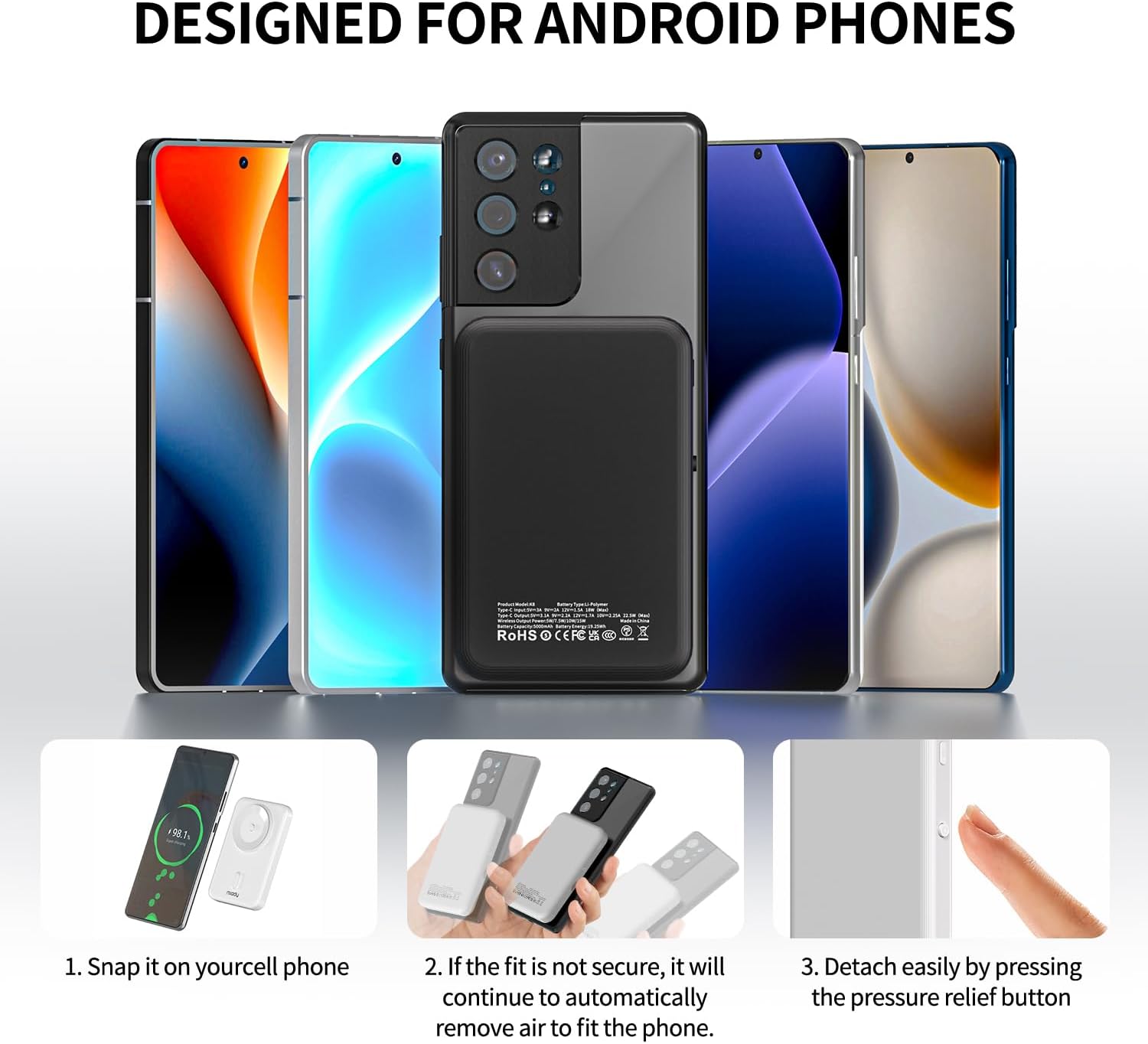
Figure 5.3: Pass-Through Charging in Action
This image shows the Miady power bank wirelessly charging a smartphone, while the power bank itself is being recharged via a USB-C cable connected to an external power source. Both devices display charging indicators.
Checking Battery Level
Press the ON/OFF button briefly to check the remaining battery level of the power bank. The four LED indicators will light up:
- 4 LEDs: 75% - 100% charge
- 3 LEDs: 50% - 75% charge
- 2 LEDs: 25% - 50% charge
- 1 LED: 0% - 25% charge (recharge soon)
6. Maintenance
- Clean the device with a soft, dry cloth. Do not use harsh chemicals or abrasive materials.
- Keep the suction cups clean and free of dust or debris to ensure optimal adhesion.
- Store the power bank in a cool, dry place when not in use.
- If storing for extended periods, charge the power bank to approximately 50% every three months to preserve battery health.
7. Troubleshooting
| Problem | Possible Cause | Solution |
|---|---|---|
| Power bank not charging device wirelessly. |
|
|
| Power bank not charging via cable. |
|
|
| Electric suction not working or detaching. |
|
|
| LED indicators not lighting up. |
|
|
8. Specifications
| Feature | Detail |
|---|---|
| Model | K8 |
| Battery Capacity | 5000mAh (Lithium Polymer) |
| Wireless Output | Up to 15W |
| Wired Output/Input (USB-C) | Up to 22.5W |
| Dimensions | 4.09 x 2.68 x 0.71 inches (10.39 x 6.81 x 1.80 cm) |
| Weight | 4.6 ounces (130 grams) |
| Color | White |
| Manufacturer | Shenzhen Hongbaina Technology Co., Ltd |
| Country of Origin | China |
9. Warranty and Support
Miady products are designed and manufactured to the highest quality standards. For warranty information and customer support, please refer to the warranty card included with your product or visit the official Miady website.
If you encounter any issues or have questions regarding your Miady Wireless Portable Charger, please contact Miady customer service for assistance.
Miady Official Store: Visit the Miady Store on Amazon
10. Video Demonstration
Watch the official product video for a visual guide on the features and operation of the Miady Wireless Portable Charger.
Video 10.1: Miady 5000mAh Power Bank with Powerful Electric Suction
This video demonstrates the key features of the Miady Wireless Portable Charger, including its unique electric suction design, 15W fast wireless charging capability, and compact size. It also highlights the internal components and available color options.
Related documentsK8

Ask a question about this manual
Ask about setup, troubleshooting, compatibility, parts, safety, or missing instructions. Manuals+ will review the question and use this page’s manual context to help answer it.