
1. Introduction
Thank you for choosing the LOSSIGY 36V 150Ah LiFePO4 Lithium Battery. This advanced battery system is designed for high-performance applications such as golf carts and trolling motors, offering superior energy density, stable performance, and a long cycle life. This manual provides essential information for the safe and efficient installation, operation, and maintenance of your battery and charger.
The battery features a built-in 200A Bluetooth Battery Management System (BMS) for comprehensive protection and a touch monitor for real-time status display. It also includes a dedicated 36 Volt 25A charger.
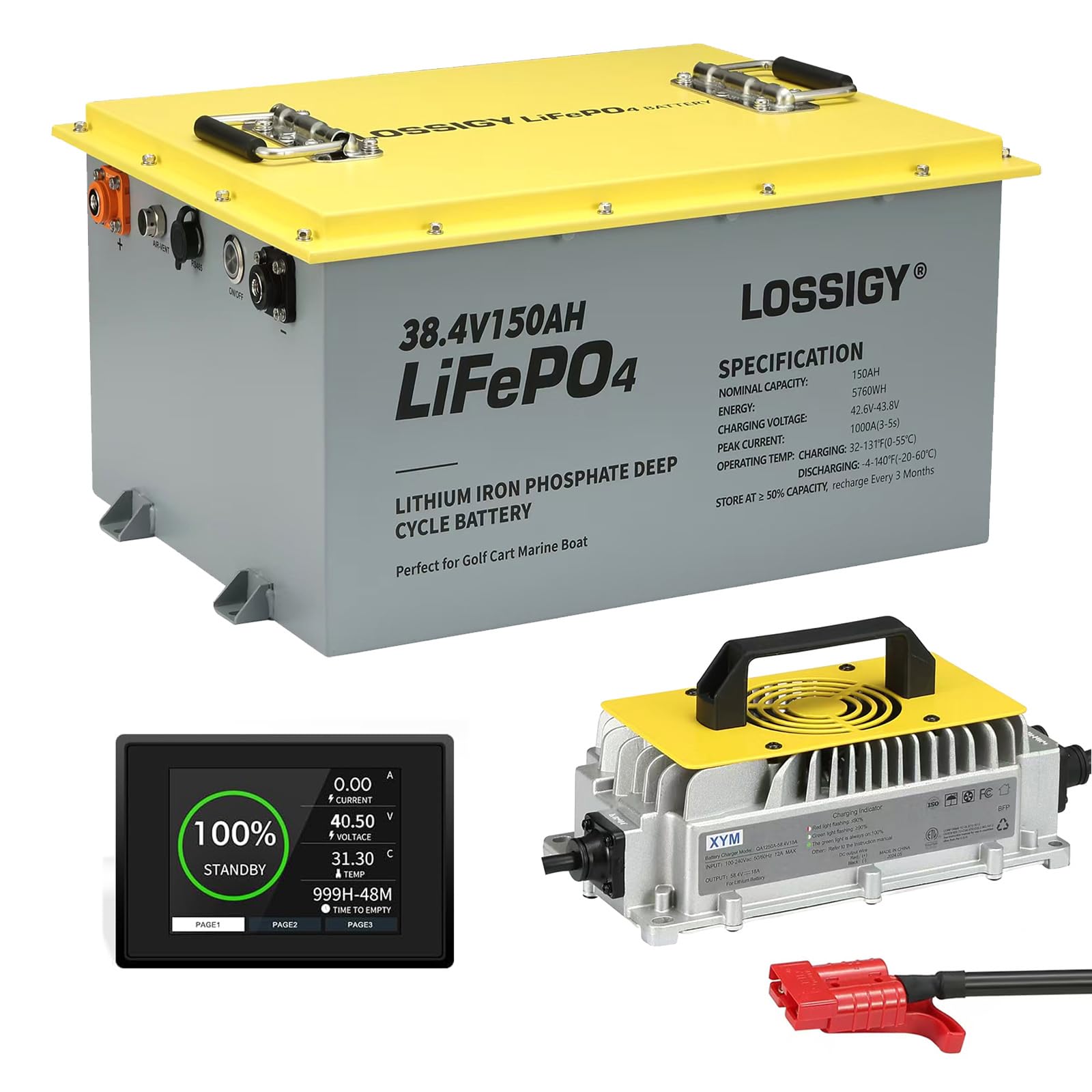
Image 1.1: LOSSIGY 36V 150Ah LiFePO4 Lithium Battery in a golf cart application.
2. Safety Instructions
Read all safety instructions carefully before installing or operating the battery. Failure to follow these instructions may result in electric shock, fire, serious injury, or property damage.
- General Safety:
- Do not disassemble, modify, or puncture the battery.
- Keep the battery away from fire, heat sources, and direct sunlight.
- Avoid short-circuiting the battery terminals.
- Ensure proper ventilation around the battery during operation and charging.
- Wear appropriate personal protective equipment (PPE) such as gloves and eye protection when handling the battery.
- Keep out of reach of children.
- Charging Safety:
- Only use the provided LOSSIGY 36 Volt 25A charger. Using incompatible chargers may damage the battery or cause fire.
- Charge the battery in a well-ventilated area.
- Do not charge the battery near flammable materials.
- Monitor the battery during charging. Disconnect immediately if you observe any unusual heat, smell, or deformation.
- Installation Safety:
- Ensure the vehicle's power system is off before installation.
- Connect positive to positive and negative to negative terminals correctly. Reverse polarity can cause severe damage.
- Secure the battery firmly to prevent movement during operation.
- Do not connect batteries with different voltages or capacities in series or parallel, except as specified for parallel connection (up to 4 units).

Image 2.1: Built-in BMS protections for the LOSSIGY LiFePO4 battery.
3. Package Contents
Verify that all items are present and undamaged upon unpacking:
- 1 x LOSSIGY 36V 150Ah LiFePO4 Lithium Battery
- 1 x 36 Volt 25A Battery Charger
- 1 x User Manual (this document)
- M8 Stud Terminals (removable)
4. Setup and Installation
4.1 Initial Inspection
Before installation, inspect the battery for any physical damage. Ensure terminals are clean and free of debris.
4.2 Battery Installation
- Turn off all power to the golf cart or application where the battery will be installed.
- Remove existing batteries if applicable.
- Place the LOSSIGY LiFePO4 battery in a secure, well-ventilated location. Ensure it is firmly mounted to prevent movement.
- Connect the positive (+) terminal of the battery to the positive lead of your system.
- Connect the negative (-) terminal of the battery to the negative lead of your system.
- Tighten all connections securely.
4.3 Parallel Connection (Optional)
The LOSSIGY 36V 150Ah battery supports parallel connection for increased capacity, up to a maximum of 4 batteries. When connecting in parallel:
- Ensure all batteries are of the same model and have similar states of charge before connecting.
- Connect positive terminals together and negative terminals together.
- Use appropriate gauge cables for parallel connections to handle increased current.
4.4 Initial Charging
It is recommended to fully charge the battery before its first use.
- Connect the charger to the battery's charging port.
- Plug the charger into a standard AC power outlet.
- The charger will indicate charging status (refer to charger's specific indicators).
- Once fully charged, disconnect the charger from the AC outlet, then from the battery.
4.5 Bluetooth App Connection
The battery features a Bluetooth BMS for remote monitoring via a smartphone application.
- Download the official LOSSIGY Bluetooth app from your device's app store.
- Ensure Bluetooth is enabled on your smartphone.
- Open the app and follow the on-screen instructions to pair with your LOSSIGY battery.
- Once connected, you can monitor real-time battery status, including voltage, current, temperature, and state of charge.

Image 4.1: Monitoring battery status via touch monitor and Bluetooth app.
5. Operation
5.1 Powering On/Off
Once installed and connected, the battery is ready for use. The BMS automatically manages power delivery and protection. There is no manual power button on the battery itself; it activates upon connection to a load.
5.2 Monitoring Battery Status
You can monitor the battery's status through two methods:
- Integrated Touch Monitor: The battery features a built-in touch screen display that shows real-time information such as State of Charge (SOC), voltage, current, temperature, and individual cell voltages.
- Bluetooth App: Use the LOSSIGY smartphone app to remotely view detailed battery parameters and historical data.
5.3 Usage Guidelines
- The battery is designed for deep cycle applications, offering 100% Depth of Discharge (DOD).
- The 200A BMS provides a peak current of 1000A (for 3-5 seconds), suitable for demanding applications like golf cart acceleration or trolling motor bursts.
- Ensure the continuous load does not exceed the maximum continuous current of 150A (5760W).
- For optimal lifespan, avoid consistently discharging the battery to its absolute minimum.

Image 5.1: The LOSSIGY battery provides extended range for golf cart applications.
6. Maintenance
6.1 Charging
- Always use the provided 36 Volt 25A charger.
- Charge the battery after each significant use to maintain optimal performance and extend lifespan.
- The recommended charging current is 25A.
- The charge voltage range is 42.6V-43.8V, with a full charge voltage range of 40.2V-41.4V.
6.2 Cleaning
Keep the battery terminals and casing clean and dry. Use a dry cloth to wipe off any dust or dirt. Do not use solvents or abrasive cleaners.
6.3 Storage
If storing the battery for an extended period:
- Store the battery at approximately 50% State of Charge (SOC).
- Store in a cool, dry place with a storage temperature range of 10°F to 122°F (-12°C to 50°C).
- Avoid extreme temperatures.
- Periodically check the battery's charge level and recharge if necessary to prevent deep discharge.
7. Troubleshooting
The built-in Battery Management System (BMS) protects the battery from various issues. If you experience problems, refer to the following common scenarios:
| Problem | Possible Cause | Solution |
|---|---|---|
| Battery not charging |
|
|
| Battery not discharging / No power output |
|
|
| Bluetooth app not connecting |
|
|
If you encounter issues not listed here or if the suggested solutions do not resolve the problem, please contact LOSSIGY customer support.
8. Specifications

Image 8.1: LOSSIGY 36V 150Ah LiFePO4 Battery product specifications.
| Parameter | Value |
|---|---|
| Model | 36V150Ah+Charger |
| Total Capacity | 150Ah |
| Nominal Voltage | 38.4V |
| Charge Voltage Range | 42.6V - 43.8V |
| Full Charge Voltage Range | 40.2V - 41.4V |
| Recommended Charging Current | 25A |
| BMS Continuous Current | 200A |
| Peak Current (3-5s) | 1000A |
| Max Continuous Discharge Current | 150A |
| Max Continuous Load | 5760W |
| Usable Energy | 5.76Wh |
| Waterproof Grade | IP65 |
| Operating Temperature (Charging) | 32°F ~ 113°F (0°C ~ 45°C) |
| Operating Temperature (Discharge) | -4°F ~ 140°F (-20°C ~ 60°C) |
| Storage Temperature | 10°F ~ 122°F (-12°C ~ 50°C) |
| Product Dimensions (L x W x H) | 16.5(17.7) x 12.6(13.7) x 8.6 inch (420(450) x 320(350) x 220 mm) |
| Terminals | Removable M8 stud terminal |
| Battery Cell Composition | Lithium-Phosphate (LiFePO4) |
| Cycle Life | At least 4000 cycles |
9. Warranty and Support
LOSSIGY is committed to providing high-quality products and excellent customer service.
- Warranty: This product comes with a 5-year warranty, covering defects in materials and workmanship under normal use.
- After-Sales Service: LOSSIGY offers 90 days of worry-free after-sales service.
- Technical Support: 24-hour online professional technical support is available to assist with any issues or questions you may have.
For warranty claims, technical assistance, or any other inquiries, please contact LOSSIGY customer support through the official website or your purchase platform.