
Qaba 370-340V80PK
Qaba 2-Seater Ride-On UTV Instruction Manual
Model: 370-340V80PK
Introduction
This manual provides essential information for the safe assembly, operation, and maintenance of your Qaba 2-Seater Ride-On UTV. Please read all instructions carefully before use and retain this manual for future reference.

Image: The Qaba 2-Seater Ride-On UTV in pink, showcasing its robust design and LED headlights.
Safety Information
Always prioritize safety when operating the ride-on UTV. Adult supervision is required at all times. Ensure children wear appropriate safety gear, such as helmets, when operating the vehicle.
- Do not operate the vehicle near roads, motor vehicles, steep inclines, swimming pools, or other bodies of water.
- Only use on flat, dry surfaces.
- Ensure all assembly steps are completed correctly and all fasteners are secure before first use.
- The maximum weight capacity for this vehicle is 110 lbs (50 kg).
- Recommended age for users is 3-8 years.
Package Contents
Before beginning assembly, verify that all parts listed below are present and undamaged.
- Qaba 2-Seater Ride-On UTV main body
- Wheels (4)
- Steering Wheel
- Seats (2)
- Charger
- Assembly Hardware Kit
- Instruction Manual
Note: The 24V battery is pre-installed.
Setup and Assembly
Assembly is required for this product. Please follow these steps carefully.
- Wheel Installation: Attach each wheel to its respective axle, ensuring the shock absorbers are correctly aligned and secured. Use the provided fasteners.

Image: Diagram showing the four wheels with spring suspension for a smooth ride.
- Steering Wheel Attachment: Secure the steering wheel to the steering column. Ensure it clicks into place or is fastened according to the specific hardware provided.
- Seat Installation: Place the two seats into their designated positions on the UTV body and secure them with the provided screws or clips.

Image: The 2-seater configuration of the UTV, showing ample space for two young riders.
- Initial Charge: Before first use, fully charge the 24V battery for 8-12 hours. Refer to the charging section for details.
Operating Instructions
Starting the UTV
- Locate the power button, typically on the dashboard. Press to turn on the vehicle.
- The LED lights will illuminate upon power-on.
Driving Controls
- Forward/Reverse Switch: Use the lever on the dashboard to select forward or reverse motion.
- Foot Pedal: Press the foot pedal to accelerate. Release to brake.
- Speed Selection: The UTV features adjustable speed levels (2.5-3.7 mph). Use the "FAST" and "SLOW" switches on the control panel to select the desired speed.

Image: Close-up of the UTV's control panel, showing buttons for music, horn, and speed selection (Fast/Slow).
Interactive Features
- Music: Press the music button on the steering wheel or dashboard to play built-in tunes.
- Horn: Press the horn button on the steering wheel for a realistic horn sound.
- LED Lights: The front LED lights automatically turn on when the vehicle is powered.

Image: The steering wheel area highlighting the music and horn functions for interactive play.
Battery Charging
The UTV is powered by a 24V 7AH battery. Proper charging ensures optimal performance and battery longevity.
- Only use the charger provided with the vehicle.
- Locate the charging port, typically near the battery compartment.
- Plug the charger into the charging port, then plug the charger into a standard wall outlet.
- The charging indicator light on the charger will show the charging status (e.g., red for charging, green for fully charged).
- Initial charge time: 8-12 hours.
- Subsequent charge time: 8-10 hours, or until the indicator turns green. Do not charge for more than 18 hours.
- Charge the battery after each use, and at least once a month during periods of non-use to maintain battery health.
Maintenance
- Cleaning: Wipe the vehicle with a soft, damp cloth. Do not use abrasive cleaners or solvents. Avoid spraying water directly onto electrical components.
- Storage: Store the UTV in a dry, cool place away from direct sunlight and moisture. If storing for extended periods, ensure the battery is fully charged.
- Battery Care: Regularly check battery terminals for corrosion. Keep the battery charged as per the charging instructions.
- Inspections: Periodically check all nuts, bolts, and fasteners to ensure they are tight. Inspect wheels and tires for wear or damage.
Troubleshooting
| Problem | Possible Cause | Solution |
|---|---|---|
| Vehicle does not move | Battery low or dead; Loose battery connection; Blown fuse; Faulty switch/motor. | Charge battery; Check battery terminals; Replace fuse; Contact customer support. |
| Vehicle runs slowly | Undercharged battery; Overloaded vehicle; Operating on unsuitable surface. | Fully charge battery; Reduce weight; Operate on flat, hard surfaces. |
| No sound from music/horn | Volume too low; Wiring issue; Speaker malfunction. | Increase volume; Check connections; Contact customer support. |
| Lights not working | Loose connection; Damaged LED; Electrical fault. | Check wiring; Contact customer support. |
Specifications
| Feature | Detail |
|---|---|
| Model Number | 370-340V80PK |
| Product Dimensions (L x W x H) | 46.9" x 31.1" x 28" (119.1 cm x 79 cm x 71.1 cm) |
| Item Weight | 44.5 lbs (20.2 kg) |
| Battery | 24V 7AH (Nonstandard Battery, included) |
| Motors | Dual 24V Motors |
| Speed Range | 2.5 - 3.7 mph (4 - 6 km/h) |
| Weight Capacity | 110 lbs (50 kg) |
| Recommended Age | 3 - 8 years |
| Manufacturer | Aosom LLC |
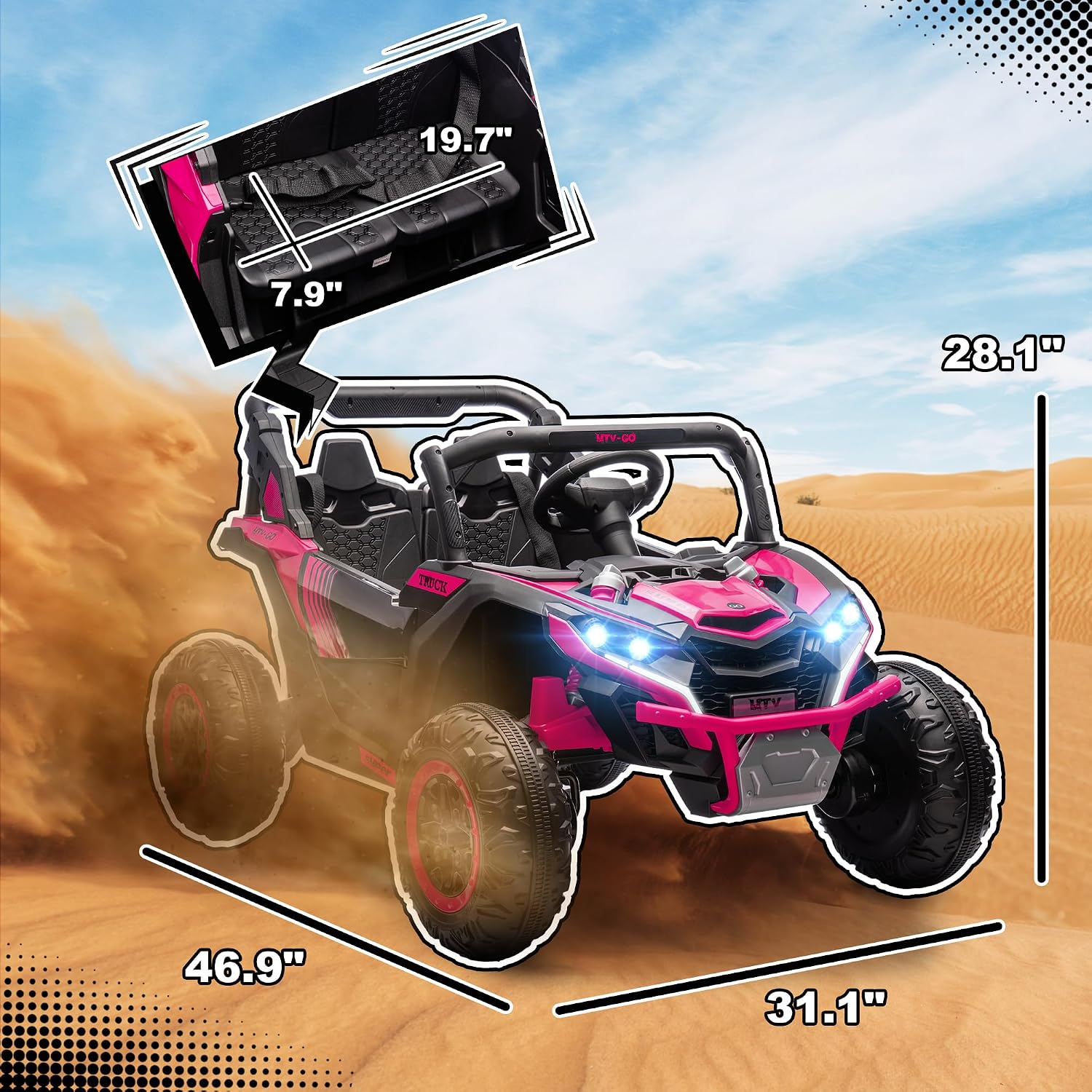
Image: Detailed diagram illustrating the dimensions of the Qaba 2-Seater Ride-On UTV.
Warranty and Support
For warranty information, parts replacement, or technical support, please contact Aosom LLC, the manufacturer of Qaba products.
- Manufacturer: Aosom LLC
- Refer to your purchase documentation or the manufacturer's website for specific warranty terms and contact details.
Related documents370-340V80PK


Ask a question about this manual
Ask about setup, troubleshooting, compatibility, parts, safety, or missing instructions. Manuals+ will review the question and use this page’s manual context to help answer it.