1. Introduction
This user manual provides detailed instructions for the installation, operation, and maintenance of your Moman H4C Motorcycle Helmet Headset with 1080P Camera and PML1 Bike Motorcycle Phone Holder. This product combines communication, recording, and navigation support to enhance your riding experience. Please read this manual thoroughly before use to ensure proper functionality and safety.
2. Safety Information
Always prioritize safety when operating your motorcycle. Adhere to the following guidelines:
- Ensure all components are securely installed before riding.
- Do not attempt to adjust the phone holder or headset while riding.
- Maintain awareness of your surroundings; do not let the device distract you.
- Keep the device away from extreme temperatures and direct water exposure (beyond its IPX rating).
- Use only the provided charging cables and accessories.
3. Package Contents
Verify that all items are present in your package:
- Moman H4C Motorcycle Helmet Headset with Camera
- Moman PML1 Bike Motorcycle Phone Holder
- 32GB Memory Card (pre-installed or separate)
- User Manual
- Installation Tools/Accessories (e.g., mounting brackets, screws, adhesive pads, charging cable)
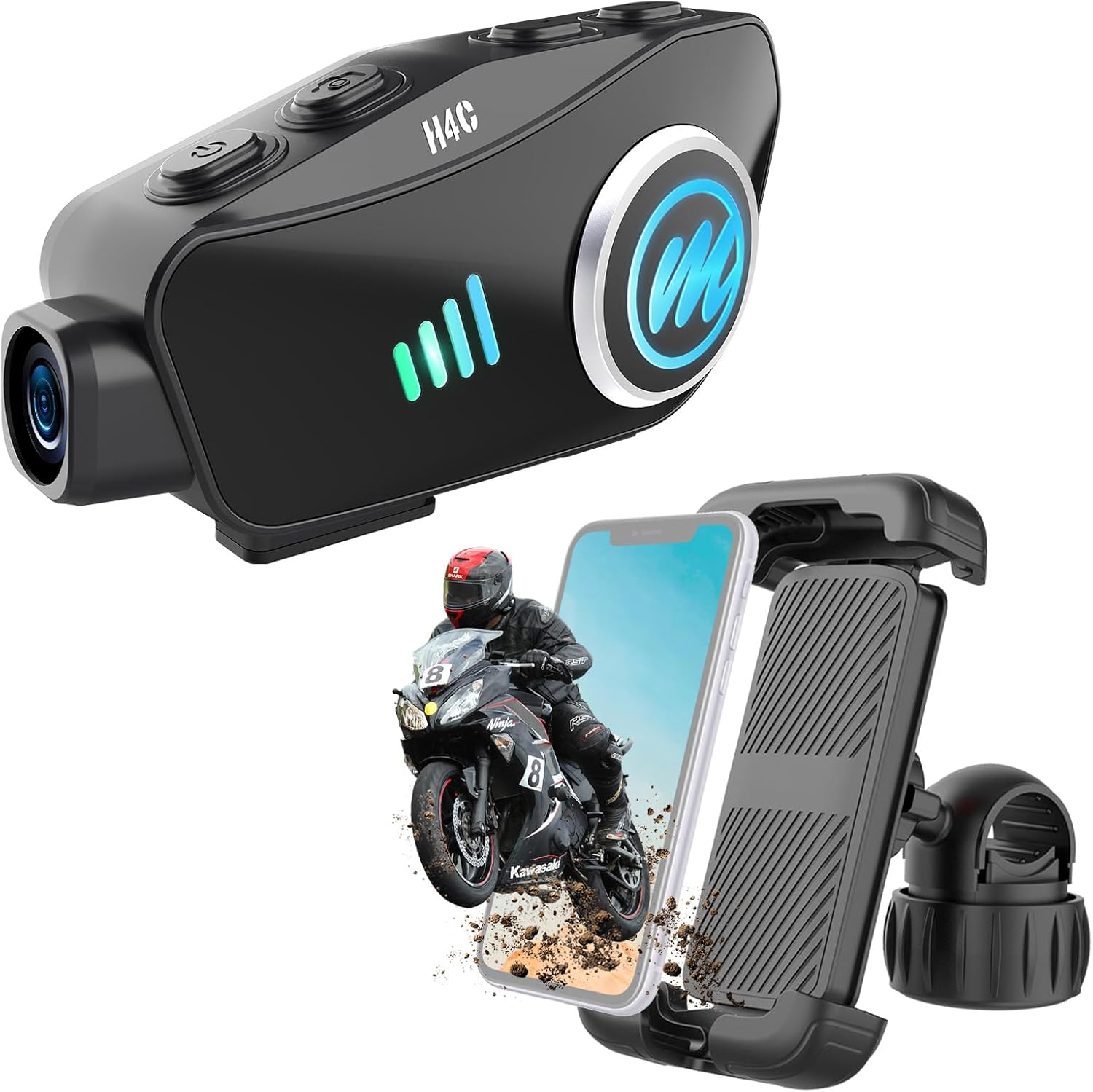
Image: The Moman H4C Helmet Headset and PML1 Phone Holder, showing both main components of the product bundle.
4. Product Overview
4.1 Moman H4C Helmet Headset with Camera
The H4C headset integrates a communication system with a high-definition camera for recording your rides. It features Bluetooth 5.3 for stable connections and supports simultaneous connection to two smartphones.
- 1080P HD Camera: Records video at 1080p resolution with a 120° wide-angle lens.
- 360° Body Rotation: Allows flexible camera angle adjustment.
- Loop Recording: Ensures continuous recording by overwriting older files when the memory card is full.
- Wi-Fi Function: Connects to the "RoadCam" app for viewing and downloading footage.
- Bluetooth 5.3: For stable audio streaming and phone calls.
- Dual Smartphone Connection: Connects to two phones simultaneously for navigation, calls, and music.
- AI Voice Assistant: Hands-free control for various functions.

Image: Visual comparison demonstrating the 1080P HD recording capability of the H4C camera.

Image: Illustration of the H4C camera's 120-degree wide-angle view and 360-degree rotational adjustment for flexible shooting.
4.2 Moman PML1 Bike Motorcycle Phone Holder
The PML1 phone holder provides a secure and accessible mounting solution for your smartphone on your motorcycle handlebars. It is designed for quick installation and robust protection.
- Tool-Free Installation: Quick and easy attachment to handlebars.
- One-Hand Operation: Auto-retracting design for effortless phone insertion and removal.
- All-Round Protection: Features telescopic arms, full silicone pads, and a security lock to prevent drops and scratches.
- Wide Compatibility: Fits smartphones from 4.7 to 6.8 inches.

Image: Depiction of the PML1 phone holder's comprehensive protection features, including anti-shake and anti-slip rubber.
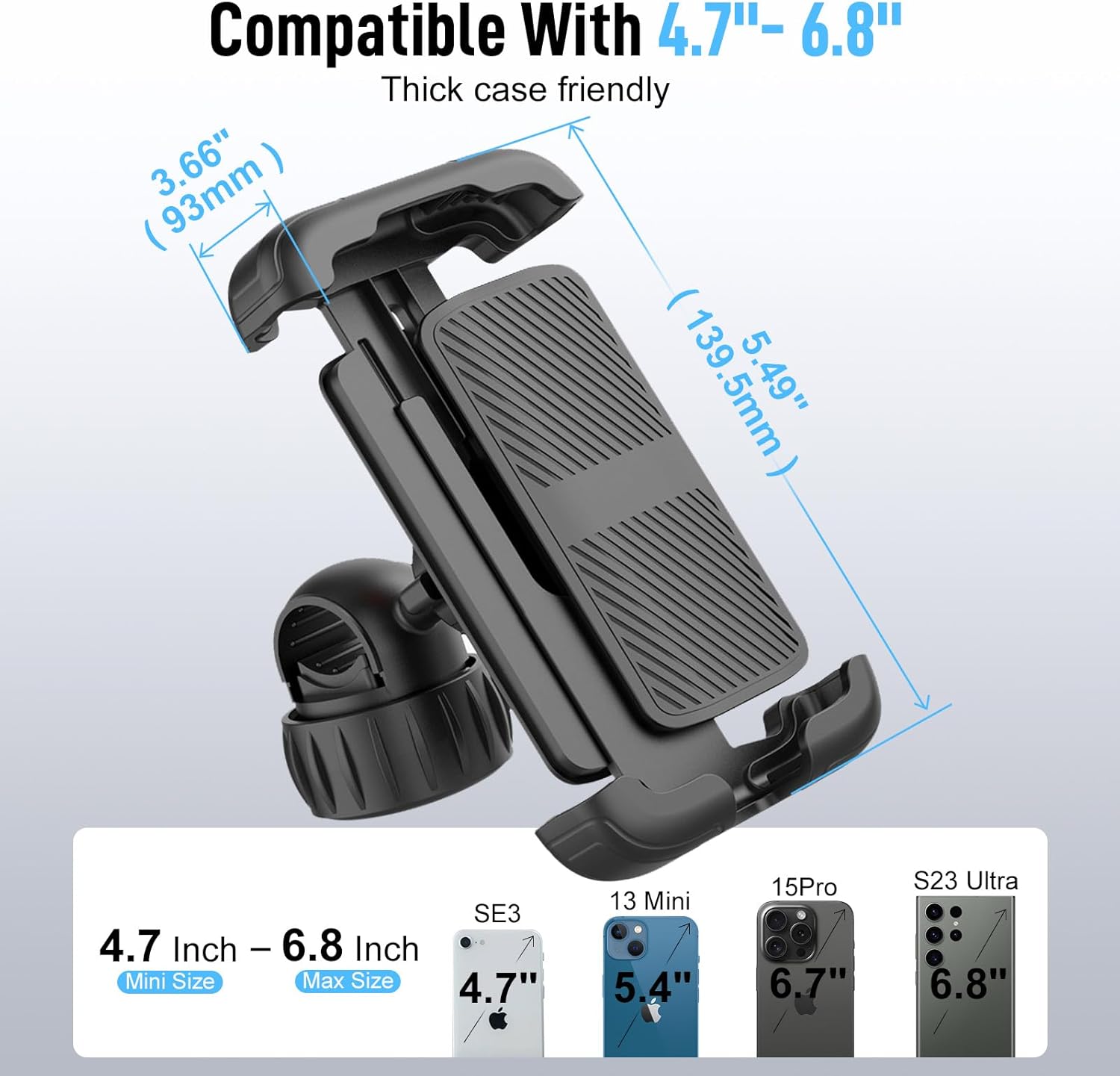
Image: Diagram illustrating the Moman PML1 phone holder's compatibility with various smartphone sizes, ranging from 4.7 to 6.8 inches.
5. Setup and Installation
5.1 Moman H4C Helmet Headset Installation
- Choose Mounting Location: Select a suitable flat surface on the side of your helmet for the headset. Ensure it does not obstruct your vision or helmet functionality.
- Clean Surface: Clean the chosen area thoroughly with an alcohol wipe and let it dry completely.
- Attach Mounting Bracket: Use the provided adhesive pad or clamp mount to securely attach the H4C mounting bracket to the helmet. Press firmly for 30 seconds if using adhesive.
- Slide in Headset: Slide the H4C headset onto the mounted bracket until it clicks into place.
- Position Microphone and Speakers: Route the microphone and speaker wires inside the helmet lining. Position the speakers inside the ear pockets and the microphone near your mouth for clear audio.
- Insert Memory Card: Locate the TF card slot on the H4C unit and insert the provided 32GB memory card. Ensure it is inserted correctly until it clicks.
5.2 Moman PML1 Phone Holder Installation
- Identify Handlebar Location: Choose a clear section on your motorcycle handlebar that does not interfere with controls or gauges.
- Open Clamp: Loosen the screw on the handlebar clamp of the PML1 holder to open it.
- Attach to Handlebar: Place the clamp around the handlebar and tighten the screw until the holder is firmly secured. Ensure it is stable and does not rotate freely.
- Adjust Angle: Adjust the viewing angle of the phone holder to your preference.
6. Operating Instructions
6.1 Moman H4C Headset Operation
Power On/Off
- Power On: Press and hold the Power button for approximately 3 seconds until the indicator light turns on and you hear a voice prompt.
- Power Off: Press and hold the Power button for approximately 3 seconds until the indicator light turns off.
Bluetooth Pairing
- First Device Pairing: With the H4C off, press and hold the Power button for 5-7 seconds until the indicator light flashes red and blue alternately, indicating pairing mode. On your smartphone, search for "Moman H4C" in Bluetooth settings and connect.
- Second Device Pairing: After the first device is connected, briefly press the Power button once to enter pairing mode again (light flashes red/blue). Connect the second smartphone.
Camera Operation
- Start Recording: Press the Camera button once to start video recording. The indicator light will change to solid blue.
- Stop Recording: Press the Camera button again to stop recording. The indicator light will return to its previous state.
- Loop Recording: The device automatically manages storage. When the memory card is full, the oldest unprotected files will be overwritten.

Image: Diagram illustrating the loop recording functionality of the H4C camera, ensuring continuous video capture.
Wi-Fi Function and App Control
- Download App: Download the "RoadCam" app from your smartphone's app store (Google Play or Apple App Store).
- Activate Wi-Fi: On the H4C, press and hold the Wi-Fi button (if available, or follow app instructions) to activate the Wi-Fi hotspot.
- Connect to App: Connect your smartphone to the H4C's Wi-Fi network (SSID and password usually found on the device or in the app).
- View/Download Footage: Use the RoadCam app to view live camera feed, playback recorded videos, and download files to your phone.

Image: Illustration showing the H4C's Wi-Fi hotspot feature and its connectivity with the "RoadCam" mobile application for easy media management.
AI Voice Assistant
- Activate: Once connected to your smartphone, briefly press the Voice Assistant button (or a designated button) to activate your phone's AI voice assistant (e.g., Siri, Google Assistant).
- Commands: Use voice commands for navigation, making calls, playing music, checking weather, etc.

Image: Depiction of the H4C's AI Voice Assistant functionality, enabling hands-free control for various tasks like calls, music, and navigation.
6.2 Moman PML1 Phone Holder Operation
- Inserting Phone: With one hand, gently push the top arm of the holder upwards. Place your phone into the holder, ensuring it sits securely on the bottom support. Release the top arm to allow it to retract and grip the phone firmly.
- Removing Phone: Gently push the top arm upwards to release the phone, then lift the phone out.
- Security Lock: After inserting your phone, engage the security lock mechanism (if present, typically a small lever or switch) to prevent accidental release, especially on bumpy roads. Disengage the lock before removing the phone.

Image: Illustration demonstrating the easy one-hand operation of the PML1 phone holder, including its security lock feature.
7. Maintenance
- Cleaning: Use a soft, dry cloth to wipe down the headset and phone holder. For stubborn dirt, a slightly damp cloth can be used, but ensure no moisture enters ports or openings.
- Storage: Store the devices in a cool, dry place away from direct sunlight and extreme temperatures when not in use.
- Battery Care: For optimal battery life, avoid fully discharging the H4C battery frequently. Charge it regularly.
- Firmware Updates: Check the Moman official website or the RoadCam app periodically for firmware updates to ensure optimal performance and new features.
8. Troubleshooting
| Problem | Possible Cause | Solution |
|---|---|---|
| Device does not power on. | Low battery. | Charge the device fully. |
| Cannot pair with smartphone. | Device not in pairing mode; Bluetooth off on phone; interference. | Ensure H4C is in pairing mode (flashing red/blue). Turn phone's Bluetooth off and on. Move away from other wireless devices. |
| Video recording issues (e.g., stops, corrupted). | Memory card full or corrupted; low battery; incorrect card format. | Check memory card capacity. Format the card (FAT32) if issues persist. Ensure sufficient battery. Use a high-speed TF card (Class 10 or higher). |
| Phone holder not holding phone securely. | Security lock not engaged; phone size mismatch; worn pads. | Ensure the security lock is engaged. Verify phone size is within 4.7-6.8 inches. Check silicone pads for wear. |
| App cannot connect to H4C Wi-Fi. | Wi-Fi not activated on H4C; incorrect password; phone already connected to another Wi-Fi. | Activate H4C Wi-Fi. Double-check Wi-Fi password. Disconnect phone from other Wi-Fi networks. Restart both devices. |
9. Specifications
9.1 Moman H4C Helmet Headset
- Model Name: H4C
- Video Capture Resolution: 1080p
- Camera Angle: 120° Wide Angle
- Camera Rotation: 360° Adjustable
- Recording Feature: Loop Recording
- Connectivity: Bluetooth 5.3, Wi-Fi
- Memory Card Support: Up to 256GB TF card (32GB included)
- Control Method: App, Buttons, AI Voice Assistant
- Battery Life (Recording): Up to 6.5 hours
- Special Features: Dual Smartphone Connection, HiFi Stereo Audio
- Note: This product does not have intercom function.
9.2 Moman PML1 Phone Holder
- Model Name: PML1
- Compatible Phone Size: 4.7" - 6.8"
- Mounting Type: Handlebar Clamp
- Installation: Tool-Free, Quick Release
- Features: One-Hand Operation, Security Lock, Anti-Shock, Anti-Slip Silicone Pads
10. Warranty and Support
Moman products are designed and manufactured to the highest quality standards. For information regarding warranty coverage, technical support, or service inquiries, please refer to the warranty card included in your package or visit the official Moman website. Keep your purchase receipt as proof of purchase for warranty claims.
Manufacturer: Moman
Date First Available: October 15, 2024


