
1. Introduction
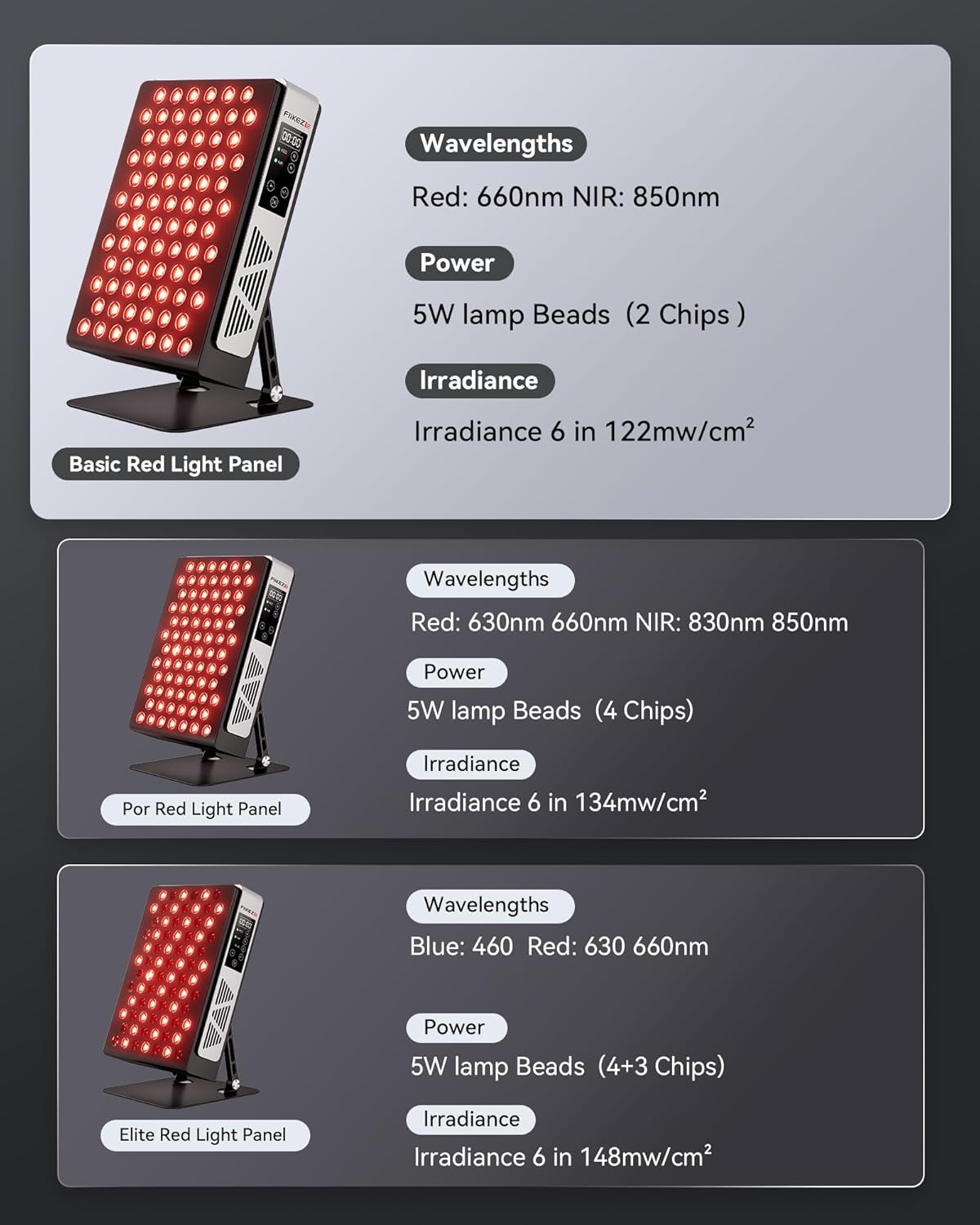
Thank you for choosing the FliKEZE Advanced Red Light Therapy Panel Basic 78. This device is designed to provide targeted red light (660nm) and near-infrared light (850nm) therapy for various wellness applications. Please read this manual thoroughly before use to ensure safe and effective operation.
2. Safety Information
WARNING: Always wear the provided protective eyewear during operation to protect your eyes from intense light exposure.
- Do not look directly into the LEDs when the device is on.
- Keep the device away from water or damp environments.
- Ensure proper ventilation during use to prevent overheating.
- Do not use if the device or power cord is damaged.
- Consult a healthcare professional before use if you have any medical conditions, are pregnant, or are taking photosensitizing medications.
- Statements regarding dietary supplements have not been evaluated by the FDA and are not intended to diagnose, treat, cure, or prevent any disease or health condition.
3. Product Features
- 78 Dual Chip Flicker-Free LEDs: Equipped with 78 high-power 5W dual-chip lamp beads for enhanced irradiance and coverage.
- Dual Wavelengths: Delivers red light at 660nm and near-infrared light at 850nm in a 1:1 ratio. Users can select 660nm, 850nm, or both simultaneously.
- Adjustable Brightness: Features 5 levels of adjustable light intensity (20-100%).
- Integrated Timer: Session timer adjustable from 5 to 30 minutes.
- Durable Construction: Full metal appearance design for durability and aesthetics.
- Adjustable Stand: 180° adjustable stand for convenient positioning and targeted treatment.
- High Irradiance: Delivers 122mW/cm² at 6 inches for efficient cell energy metabolism and tissue repair.
- Long Service Life: LEDs designed for up to 10,000 hours of use with minimal light decay.

4. Setup
- Unpack the Device: Carefully remove the red light therapy panel and all accessories from the packaging.
- Position the Stand: Adjust the 180° stand to your desired angle for stable placement on a flat surface (table, floor, or bed).
- Connect Power: Plug the power cord into the device's power input port, then connect the other end to a suitable electrical outlet.
- Wear Protective Eyewear: Always put on the provided safety goggles before turning on the device.
5. Operating Instructions
- Power On: Locate the main power switch on the back of the device and flip it to the 'ON' position.
- Select Wavelength Mode: Use the control panel buttons to select your desired light mode:
- R (Red): Activates 660nm red light.
- N (NIR): Activates 850nm near-infrared light (invisible).
- R+N: Activates both red and near-infrared light simultaneously.
- Adjust Brightness: Use the '+/-' buttons to cycle through the 5 brightness levels (P1-P5, representing 20-100% intensity).
- Set Timer: Press the timer button to select a session duration (5, 10, 15, 20, 25, or 30 minutes). The display will show the remaining time.
- Start/Pause: Press the Play/Pause button to start or pause your therapy session.
- Power Off: After your session, press the Play/Pause button to stop, then flip the main power switch to 'OFF' and unplug the device.


6. Usage Recommendations
For optimal results, use the FliKEZE Red Light Therapy Panel for 10-30 minutes daily, 3-7 times a week. Position the device 6-12 inches from the target area.
6.1. General Wellness & Recovery
Red light therapy can support overall well-being, including improving sleep, skin health, wound healing, relieving muscle pain, and improving vision. It is beneficial for exercise recovery and post-surgery healing.


6.2. Skin Appearance
The red light (660nm) stimulates collagen production and promotes skin healing, enhancing skin clarity and boosting collagen for a youthful glow.

6.3. Targeted Relief
Near-infrared light (850nm) penetrates deeper into the skin, aiding in pain relief and enhancing cellular repair processes. This is beneficial for relaxing deeper muscles, boosting blood circulation, and improving metabolism, particularly for shoulders, neck, and back pain.

6.4. Sleep Improvement
Using red light therapy can help balance your sleep cycle, leading to deeper and more restful sleep.

6.5. Irradiance and Coverage
The device offers varying irradiance and coverage depending on the distance from the skin. For example, at 6 inches, it provides 122mW/cm² irradiance with an 18"x14" coverage area.

6.6. Product Overview Video
6.7. Red Light Therapy for Body Video
6.8. User Experience Video
6.9. Benefits for Athletes Video
7. Maintenance
- Cleaning: Ensure the device is unplugged and cool before cleaning. Wipe the surface with a soft, dry cloth. Do not use abrasive cleaners or immerse the device in water.
- Storage: Store the device in a cool, dry place away from direct sunlight when not in use.
- Inspection: Regularly inspect the power cord and device for any signs of damage. Do not operate if damaged.
8. Troubleshooting
- Device Not Turning On: Check if the power cord is securely plugged into both the device and the wall outlet. Ensure the main power switch is in the 'ON' position.
- Lights Not Emitting: Verify that a light mode (Red, NIR, or both) has been selected on the control panel. Remember that 850nm Near-Infrared light is invisible to the naked eye.
- Timer Not Working: Ensure a session duration has been set using the timer button and the Play/Pause button has been pressed to start the session.
- Overheating: If the device feels excessively hot, turn it off immediately and allow it to cool down. Ensure the cooling fan is not obstructed.
9. Specifications
| Feature | Detail |
|---|---|
| Model Number | Basic 78 |
| LEDs | 78 Dual Chip Flicker-Free Lamp Beads (5W each) |
| Wavelengths | Red: 660nm, Near-Infrared: 850nm (1:1 ratio) |
| Adjustable Brightness | 5 levels (20-100%) |
| Timer | 5-30 minutes |
| Irradiance | 122mW/cm² at 6 inches |
| Product Dimensions | 14.76 x 12.99 x 6.1 inches |
| Weight | 10.32 Pounds |
| EMF Emissions | Zero |
| Service Life | Up to 10,000 hours |
10. Warranty and Support
The FliKEZE Advanced Red Light Therapy Panel Basic 78 comes with a 3-year warranty. For any questions, technical support, or warranty claims, please contact FliKEZE customer service through the retailer where you purchased the product or visit the official FliKEZE website for contact information.
FliKEZE Store: Visit the FliKEZE Store on Amazon
11. Legal Disclaimer
Statements regarding dietary supplements have not been evaluated by the FDA and are not intended to diagnose, treat, cure, or prevent any disease or health condition.


