
1. Introduction
The BUYDEEM LP55 5-in-1 Multi-Cooker is a versatile kitchen appliance designed to simplify your cooking process. It offers five distinct cooking modes: Slow Cook, Sear/Sauté, Braise, Bean, and Soup. This appliance is compatible with various flat-bottom cookware types up to 7 inches in diameter, allowing for flexible meal preparation. It features two temperature settings and a programmable timer for precise control, along with an automatic 2-hour keep-warm function.

Image: The BUYDEEM LP55 5-in-1 Multi-Cooker shown with different types of cookware and fresh ingredients, highlighting its versatility.
2. Important Safety Instructions
When using electrical appliances, basic safety precautions should always be followed to reduce the risk of fire, electric shock, and/or injury to persons, including the following:
- Read all instructions before using the appliance.
- Do not touch hot surfaces. Use handles or knobs.
- To protect against electrical shock, do not immerse cord, plugs, or the appliance body in water or other liquid.
- Close supervision is necessary when any appliance is used by or near children.
- Unplug from outlet when not in use and before cleaning. Allow to cool before putting on or taking off parts.
- Do not operate any appliance with a damaged cord or plug, or after the appliance malfunctions or has been damaged in any manner.
- The use of accessory attachments not recommended by the appliance manufacturer may cause injuries.
- Do not use outdoors.
- Do not let cord hang over edge of table or counter, or touch hot surfaces.
- Do not place on or near a hot gas or electric burner, or in a heated oven.
- Extreme caution must be used when moving an appliance containing hot oil or other hot liquids.
- Always attach plug to appliance first, then plug cord into the wall outlet. To disconnect, turn any control to "off", then remove plug from wall outlet.
- Do not use appliance for other than intended use.
- This appliance is for household use only.
3. Product Overview
3.1 Components
Familiarize yourself with the main components of your BUYDEEM LP55 Multi-Cooker:

Image: Labeled diagram showing the Central Thermostat, Heating Area, Heating Induction Ring, BPA-free Silicone Ring, and LCD Display of the multi-cooker.
- Central Thermostat: Detects the temperature of the cookware.
- Heating Area: The primary surface where cookware is placed for heating.
- Heating Induction Ring: Provides efficient and even heat distribution.
- BPA-free Silicone Ring: Ensures stability and safety for cookware.
- LCD Display: Shows cooking mode, temperature settings, and timer.
- Control Panel: Includes TEMP, MENU, WARM, CANCEL buttons, and a TIME/START/PAUSE dial.
3.2 Control Panel
The control panel allows you to select cooking modes, adjust temperature, and set the timer.

Image: A hand adjusting the dial on the control panel, showing the TEMP, MENU, WARM, CANCEL buttons and the TIME/START/PAUSE dial.
- TEMP Button: Cycles through temperature settings (Low, High).
- MENU Button: Selects desired cooking mode (Slow Cook, Sear/Sauté, Braise, Bean, Soup).
- WARM Button: Activates the automatic 2-hour keep-warm function.
- CANCEL Button: Stops the current cooking program.
- TIME/START/PAUSE Dial: Rotate to set cooking time, press to start or pause cooking.
4. Setup
- Unpacking: Carefully remove the multi-cooker from its packaging. Retain packaging for future storage or transport.
- Initial Cleaning: Before first use, wipe the exterior of the appliance with a damp cloth. Ensure the heating area is clean and dry. Do not immerse the main unit in water.
- Placement: Place the multi-cooker on a stable, flat, heat-resistant surface, away from walls and other appliances to ensure proper ventilation.
- Power Connection: Plug the power cord into a grounded electrical outlet. The LCD display will illuminate.
5. Operating Instructions
5.1 Compatible Cookware
The BUYDEEM LP55 is designed to be compatible with various flat-bottom pots and pans. For optimal performance, use cookware with a diameter under 7 inches. Examples include nonstick pots, saucepans, sauté pans, and Dutch ovens.
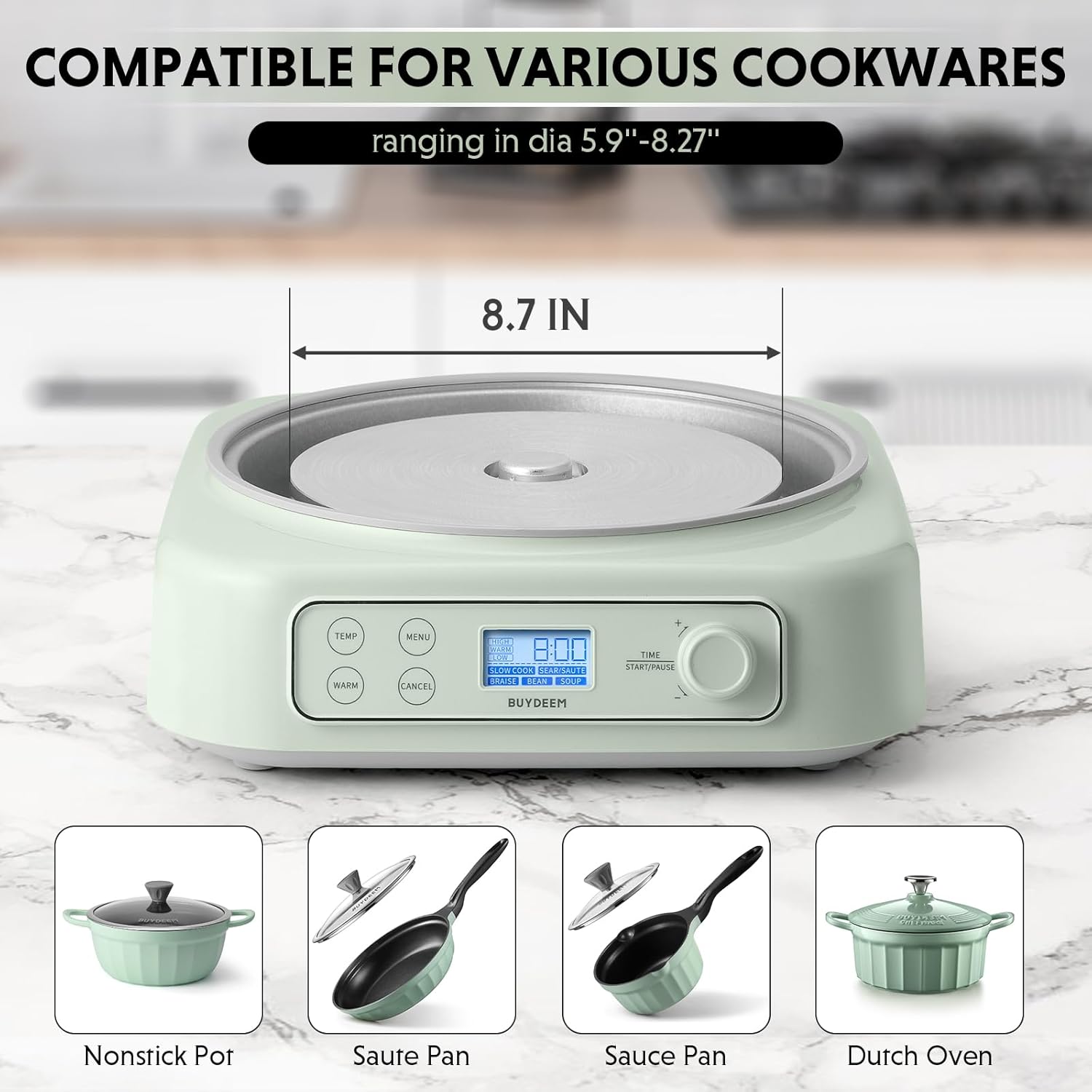
Image: The multi-cooker base with examples of compatible cookware: a nonstick pot, sauté pan, sauce pan, and Dutch oven, along with their approximate diameter compatibility.
Note: The pot is not included with the multi-cooker.
5.2 Selecting a Cooking Mode
The appliance offers five cooking modes. Press the MENU button repeatedly to cycle through the available options on the LCD display:

Image: The multi-cooker with a pot, and an overlay illustrating the five cooking modes: Slow Cook, Sear/Sauté, Braise, Bean, and Soup.
- Slow Cook: Ideal for recipes requiring long, gentle cooking.
- Sear/Sauté: For browning ingredients before slow cooking or for quick sautéing.
- Braise: Suitable for cooking meat and vegetables slowly in liquid.
- Bean: Optimized for cooking various types of beans.
- Soup: For preparing soups and broths.
5.3 Temperature Settings
After selecting a cooking mode, you can adjust the temperature. Press the TEMP button to switch between two temperature settings:

Image: A close-up of the control panel with a visual representation of Low, Warm, and High temperature ranges.
- Low: For extended cooking times.
- High: For faster cooking or searing.
The appliance also features an automatic 2-hour Keep Warm function that activates after cooking is complete. You can also manually activate it by pressing the WARM button.
5.4 Setting the Timer
To set the cooking time:
- Select your desired cooking mode and temperature.
- Rotate the TIME/START/PAUSE dial to adjust the cooking duration. The timer can be set for up to 24 hours.
- Press the TIME/START/PAUSE dial to begin cooking.
- To pause cooking, press the dial again. Press it once more to resume.
- To cancel the program at any time, press the CANCEL button.
Image: A hand rotating the TIME/START/PAUSE dial to set the cooking duration.
6. Maintenance and Cleaning
Proper maintenance ensures the longevity and optimal performance of your multi-cooker.
- Before Cleaning: Always unplug the appliance from the power outlet and allow it to cool completely before cleaning.
- Exterior Cleaning: Wipe the exterior of the multi-cooker with a soft, damp cloth. Do not use abrasive cleaners or scouring pads, as they may damage the finish.
- Heating Area: Gently wipe the heating area with a damp cloth. For stubborn food residue, use a mild detergent and a soft sponge, then wipe clean with a damp cloth and dry thoroughly.
- Do Not Immerse: The main unit of the multi-cooker is NOT dishwasher safe and should never be immersed in water or any other liquid.
- Storage: Store the appliance in a dry place when not in use.
7. Troubleshooting
If you encounter issues with your BUYDEEM LP55 Multi-Cooker, refer to the following common problems and solutions:
| Problem | Possible Cause | Solution |
|---|---|---|
| Appliance does not turn on. | Not plugged in; power outage; faulty outlet. | Ensure the power cord is securely plugged into a working outlet. Check your home's circuit breaker. |
| Cooking not starting after setting. | START/PAUSE dial not pressed; no cookware detected. | Press the TIME/START/PAUSE dial to initiate cooking. Ensure a compatible pot is placed on the heating area, depressing the central thermostat. |
| Food not cooking evenly. | Incorrect cookware size; insufficient liquid; lid not sealed properly. | Use cookware with a flat bottom and a diameter under 7 inches. Ensure adequate liquid for slow cooking. Verify the lid is properly seated on your cookware. |
| Timer function not working as expected. | Misunderstanding of timer limits or mode-specific settings. | The timer can be set for up to 24 hours. Some modes may have default minimum or maximum times. Refer to the specific mode instructions. If issues persist, contact customer support. |
| "Sear/Sauté" mode time cannot be extended. | Mode limitation. | The Sear/Sauté mode may have a fixed duration. If longer searing is required, you may need to restart the mode or use an alternative method. |
If the problem persists after trying these solutions, please contact BUYDEEM customer support.
8. Specifications
| Feature | Detail |
|---|---|
| Model Number | LP55 |
| Brand | BUYDEEM |
| Product Dimensions | 12"D x 10.8"W x 3.8"H |
| Item Weight | 5.65 pounds |
| Material | Stainless Steel |
| Color | Cozy Greenish |
| Wattage | 1000.0 W |
| Voltage | 120.0 V |
| Control Method | Touch |
| Number of Settings | 7 (referring to modes/temp combinations) |
| Dishwasher Safe | No (main unit) |
| Compatible Cookware Diameter | Under 7 inches (flat-bottom) |
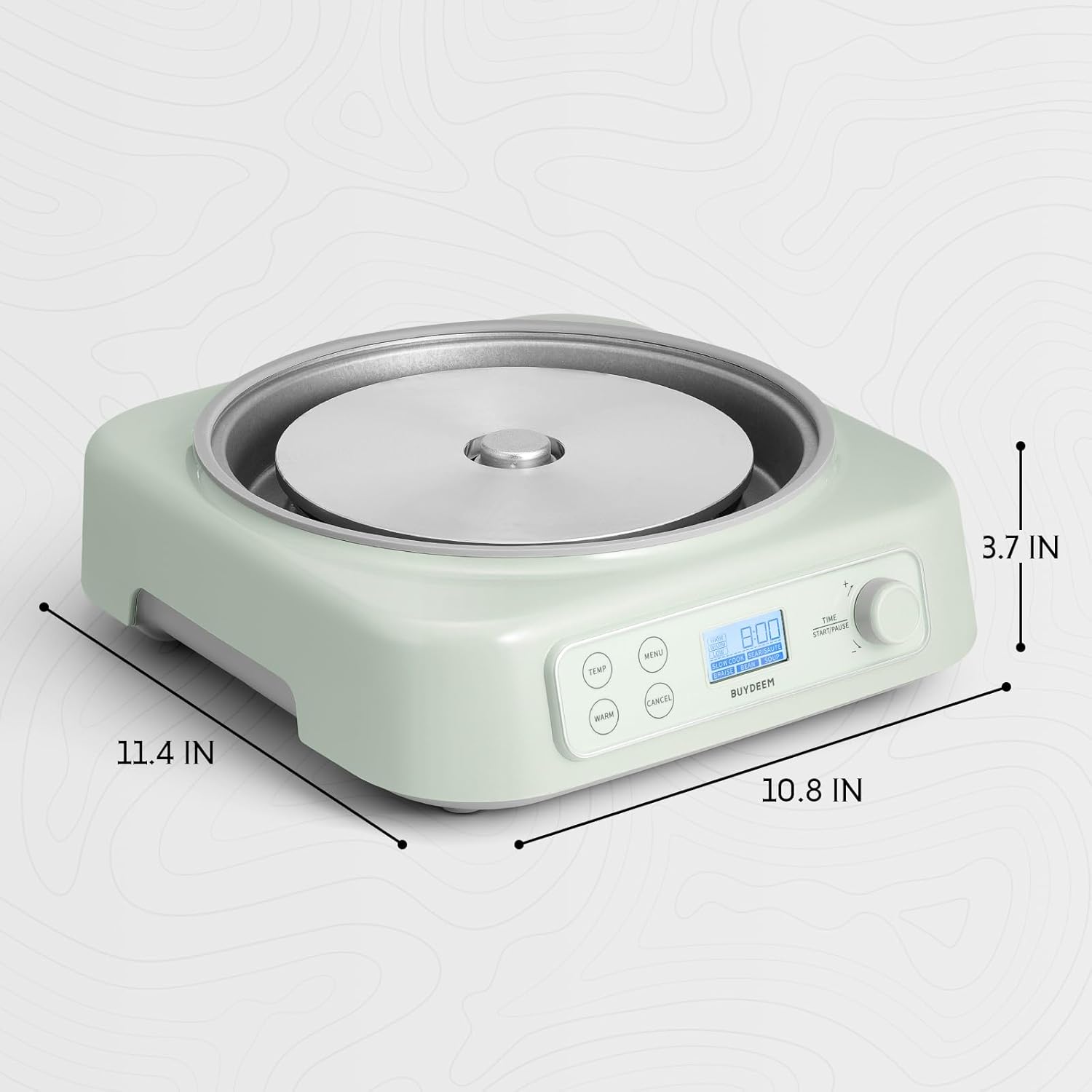
Image: Diagram illustrating the dimensions of the BUYDEEM LP55 Multi-Cooker: 11.4 inches length, 10.8 inches width, and 3.7 inches height.
9. Warranty and Support
BUYDEEM products are manufactured with quality and performance in mind. For information regarding warranty coverage, please refer to the warranty card included with your product or visit the official BUYDEEM website.
If you have any questions, concerns, or require technical assistance, the BUYDEEM support team is available to help. Please contact them through the official BUYDEEM website or the contact information provided in your product documentation.
For further assistance, you may visit the BUYDEEM Store on Amazon.


