
1. Introduction
This manual provides essential instructions for the safe and effective use of your URIT PFS-30/PFS-30A 5-in-1 Lipid Test Kit. This device is designed for rapid and comprehensive lipid panel testing, offering results for Total Cholesterol, Triglycerides, HDL, LDL, and the TC/HDL ratio from a single blood sample.
The kit is engineered for ease of use, requiring only a minimal blood sample and providing results in approximately 2 minutes. It also features an integrated memory for storing up to 300 test results with time and date stamps, enabling convenient health trend tracking.
Important: This device is for informational purposes and should not replace professional medical advice or diagnosis. Consult your healthcare provider for interpretation of results and any health concerns.
2. Package Contents
Verify that all items listed below are present in your URIT 5-in-1 Lipid Test Kit package:
- URIT PFS-30A Lipid Test Meter (Monitor)
- Lancing Device
- Test Strips (10 Cholesterol Test Strips included)
- Capillary Tubes
- Lancets
- Code Card (for test strip alignment)
- Storage Bag
- Instruction Manual

3. Setup and First-Time Use
3.1 Setting Time and Date
When using the device for the first time, you will need to set the current year, month, and day. This ensures accurate time-stamping of your test results.
- Press the 'M' or 'S' buttons to adjust the year, month, and day.
- Press the middle button (power button) to confirm each setting.
- After setting the time, the device will automatically shut down.
3.2 Preparing the Lancing Device
The lancing device is used to obtain a small blood sample. Follow these steps to prepare it:
- Rotate the front of the lancing device to remove the cap.
- Insert a new lancet firmly into the lancing device.
- Gently twist and remove the protective cap from the lancet.
- Replace the lancing device cap.
- Rotate the rear of the lancing device to set the penetration depth (usually 1-5, adjust as needed for your skin type).
- Pull back the grey end of the lancing device until it clicks, indicating it is cocked and ready for use.
3.3 Checking the Code
Each batch of test strips comes with a code card. It is crucial to ensure the code displayed on the meter matches the code on your test strip vial for accurate results.
- With the device turned OFF, insert the code card into the test strip slot.
- Turn on the device. The code will be displayed on the screen.
- Compare this code with the code printed on your test strip vial. If they match, you can proceed with testing. If they do not match, do not use the test strips and contact customer support.
4. Operating Instructions
4.1 Blood Sample Collection
Proper blood collection is essential for accurate results. Follow these steps carefully:
- Wash your hands thoroughly with soap and warm water, then dry them completely.
- Disinfect the chosen fingertip (typically the side of the ring or middle finger) with an alcohol swab and allow it to air dry.
- Hold the prepared lancing device firmly against the disinfected fingertip and press the launch button to prick the finger.
- Gently squeeze the finger to form a round drop of blood. Wipe away the first drop of blood with a clean tissue or cotton swab.
- Gently squeeze again to form a second, larger drop of blood.
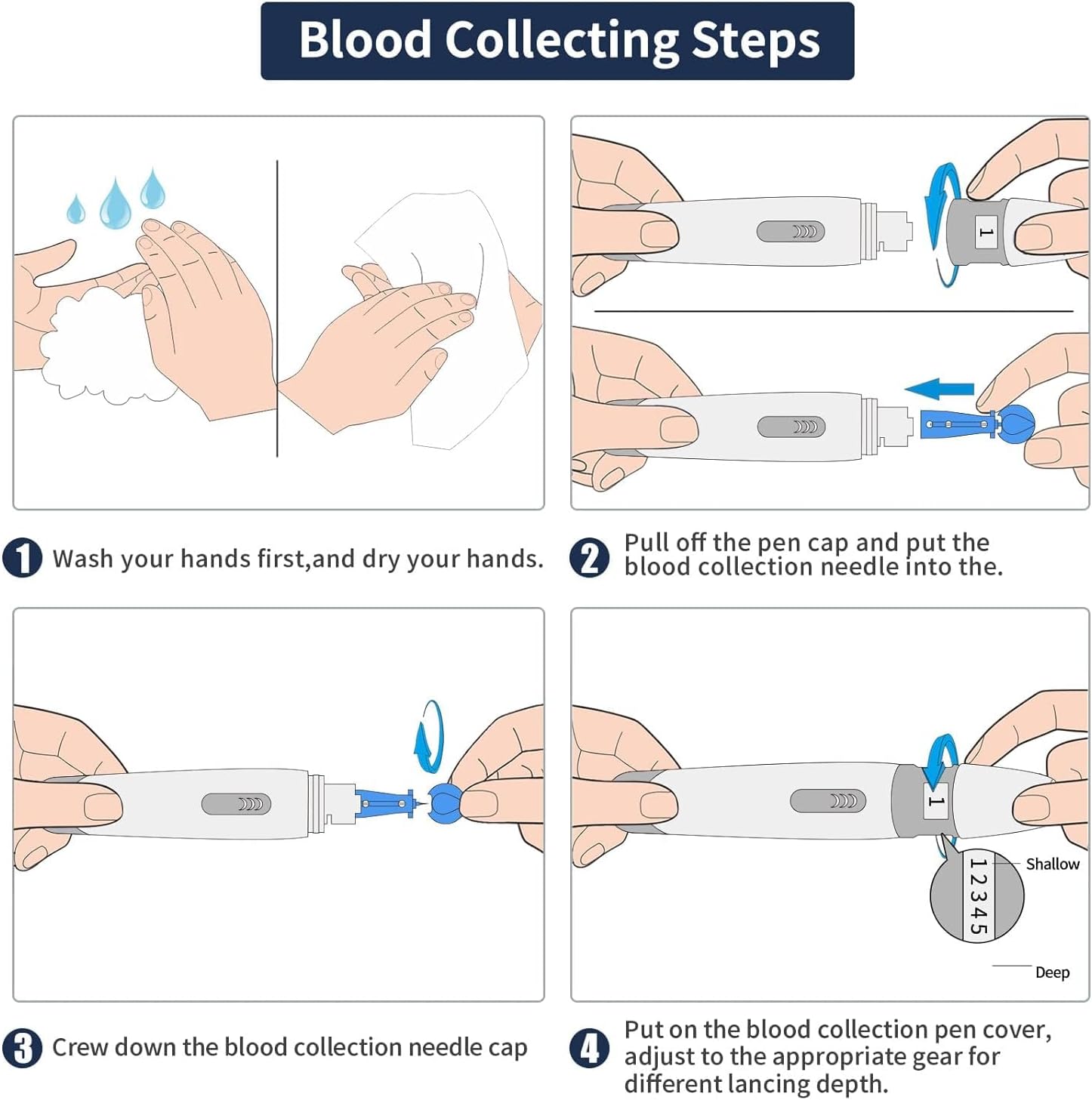
4.2 Applying Blood to the Test Strip
Once you have a sufficient blood sample, apply it to the test strip:
- Turn on the device and insert a test strip into the testing slot. Ensure the white round hole on the strip is facing up.
- When the blood drop symbol on the screen is flashing, apply the blood sample to the test hole of the strip. You can either directly drop the blood or use a capillary tube/pipette to transfer it.
- Ensure a full sample is applied at once. Small amounts over several drops can lead to incorrect results.

4.3 Reading Results
After applying the blood sample, the device will begin its analysis:
- The device screen will show a countdown animation.
- Wait for approximately 2 minutes for the results to be processed.
- The results for Total Cholesterol, Triglycerides, HDL, LDL, and TC/HDL ratio will be displayed on the screen. Use the 'S' button to cycle through the different parameters.

4.4 Understanding Your Results
The URIT PFS-30/PFS-30A provides a comprehensive lipid panel. Consult your healthcare provider for personalized interpretation of your results and to understand what your numbers mean for your health.
- Total Cholesterol (TC): The total amount of cholesterol in your blood.
- Triglycerides (TG): A type of fat found in your blood.
- High-Density Lipoprotein (HDL): Often called "good" cholesterol.
- Low-Density Lipoprotein (LDL): Often called "bad" cholesterol.
- TC/HDL Ratio: The ratio of total cholesterol to HDL cholesterol.


5. Data Storage
The URIT PFS-30/PFS-30A meter has an internal memory capable of storing up to 300 of your most recent test results. Each record includes the test value, along with the corresponding time and date stamp.
To review past results, press the 'M' button when the device is on. You can navigate through the stored data using the 'M' and 'S' buttons.

6. Maintenance
6.1 Cleaning the Meter
To ensure the longevity and accuracy of your device, keep it clean:
- Wipe the exterior of the meter with a soft, damp cloth.
- Do not use harsh chemicals, abrasive cleaners, or immerse the device in water.
- Ensure the test strip slot is free from dust or debris.
6.2 Storage
Store the URIT Lipid Test Kit and all its components in a cool, dry place, away from direct sunlight and extreme temperatures. Keep it out of reach of children.
- Store test strips in their original vial with the cap tightly closed to protect them from moisture.
- Do not use expired test strips.
7. Troubleshooting
If you encounter issues with your URIT Lipid Test Kit, refer to the following common problems and solutions:
| Problem | Possible Cause | Solution |
|---|---|---|
| Meter does not turn on | Low or dead batteries | Replace batteries with new ones. |
| Error message displayed | Incorrect code, insufficient blood sample, expired strip, or strip inserted incorrectly. | Verify code, re-test with a new strip and sufficient sample, check strip expiration date and insertion. |
| Inconsistent results | Improper sample collection, environmental factors (temperature), or expired strips. | Ensure proper technique, test in recommended temperature range, use fresh strips. |
| Code on meter does not match strip vial | Using the wrong code card or strips from a different batch. | Ensure you are using the code card that came with the current batch of test strips. Do not use strips if codes do not match. |
If the problem persists after attempting these solutions, please contact URIT customer support.
8. Specifications
- Product Name: URIT 5-in-1 Lipid Test Kit
- Model: PFS-30A
- Test Parameters: Total Cholesterol, Triglycerides, HDL, LDL, TC/HDL Ratio
- Result Time: Approximately 2 minutes
- Sample Volume: 35–40 µL
- Memory Capacity: Up to 300 test results with time and date stamps
- Power Source: (Not specified in input, typical for such devices is AAA batteries)
- Operating Temperature: (Not specified in input, refer to device packaging)
- Storage Temperature: (Not specified in input, refer to device packaging)
- Package Dimensions: 7.13 x 6.02 x 2.72 inches
- Package Weight: 14.89 ounces
- Manufacturer: URIT
9. Warranty and Support
For warranty information, technical support, or any questions regarding the URIT PFS-30/PFS-30A 5-in-1 Lipid Test Kit, please refer to the warranty card included in your package or contact URIT customer service directly. Contact details can typically be found on the product packaging or the official URIT website.
Please note that statements regarding dietary supplements have not been evaluated by the FDA and are not intended to diagnose, treat, cure, or prevent any disease or health condition.

