
1. Introduction
Thank you for choosing the HTC True Wireless Earbuds 6. These earbuds are designed to provide a high-quality audio experience with advanced features such as Bluetooth 5.3 connectivity, smart touch controls, and a comfortable in-ear design. This manual will guide you through the setup, operation, maintenance, and troubleshooting of your new earbuds.
2. Product Overview
The HTC True Wireless Earbuds 6 offer immersive stereo sound, extended playtime, and robust connectivity, making them ideal for various activities from exercising to gaming.

Image: The HTC True Wireless Earbuds 6 in pink, shown with their clear charging case.
Key Features:
- Immersive Stereo Sound: High-quality audio with powerful bass and dynamic treble.
- Smart Touch Control: Intuitive controls for music playback, calls, and voice assistant.
- Extended Playtime: Up to 5 hours on a single charge, with 22 hours total playtime using the charging case.
- Bluetooth 5.3: Ensures instant pairing, stable connection, and low latency.
- IPX5 Sweatproof: Designed to resist sweat and light rain, suitable for workouts.
- Wide Compatibility: Works seamlessly with iOS and Android devices.
3. Setup
3.1 Initial Charging
Before first use, fully charge the earbuds and the charging case. Connect the provided USB-C cable to the charging case and a power source. The indicator light on the case will show charging status.
3.2 Pairing with Your Device
- Ensure the earbuds are in the charging case and the case has power.
- Open the charging case lid. The earbuds will automatically enter pairing mode.
- On your device (smartphone, tablet), go to Bluetooth settings and turn Bluetooth on.
- Select "HTC TWS6" from the list of available devices.
- Once connected, you will hear a confirmation tone, and the earbuds will be ready for use.

Image: Illustration of Bluetooth 5.3 technology, highlighting low latency, strong compatibility, and extended transmission range up to 10 meters.
3.3 Wearing the Earbuds
Choose the ear tips that provide the most comfortable and secure fit for optimal sound quality and noise isolation. Gently insert the earbuds into your ear canal and twist slightly to secure them.
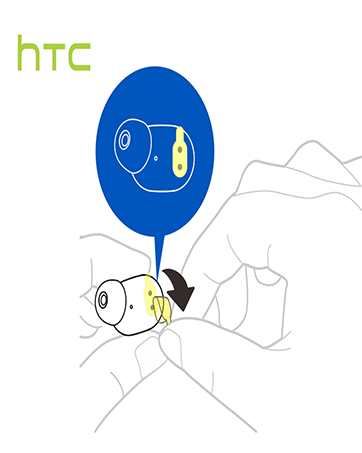

Image: Dimensions of the HTC True Wireless Earbuds 6 charging case, showing its compact size for portability.
4. Operating Your Earbuds
4.1 Smart Touch Controls
The HTC True Wireless Earbuds 6 feature intuitive touch controls on each earbud. Refer to the table below for common functions:

Image: A visual guide to the smart touch controls on the HTC True Wireless Earbuds 6, detailing actions for playback, calls, volume, and voice assistant.
| Function | Action |
|---|---|
| Play/Pause | Tap left/right earbud once |
| Next Track | Tap and hold right earbud for 2 seconds |
| Previous Track | Tap and hold left earbud for 2 seconds |
| Volume Up | Tap left earbud twice |
| Volume Down | Tap right earbud twice |
| Answer Call | Tap left earbud once |
| Hang Up Call | Tap right earbud once |
| Reject Call | Tap and hold earbud for 2 seconds |
| Activate Voice Assistant | Tap right earbud three times |
4.2 Stereo and Mono Mode
The earbuds can be used together for stereo sound or individually (mono mode) for calls or to save battery. Simply take one earbud out of the case to use it independently.

Image: The HTC True Wireless Earbuds 6 and charging case, demonstrating their use with smartphones for an HD stereo sound experience.
5. Maintenance and Care
Proper care will extend the lifespan of your HTC True Wireless Earbuds 6.
- Cleaning: Use a soft, dry cloth to clean the earbuds and charging case. Do not use harsh chemicals or abrasive materials.
- Water Resistance: The earbuds are IPX5 sweatproof, meaning they can withstand splashes and sweat. Do not submerge them in water or expose them to heavy rain.
- Storage: When not in use, store the earbuds in their charging case to protect them and keep them charged. Avoid extreme temperatures.
6. Troubleshooting
If you encounter issues with your earbuds, try the following solutions:
- Earbuds not pairing:
- Ensure both earbuds are charged.
- Turn off Bluetooth on your device, then turn it back on.
- Forget "HTC TWS6" in your device's Bluetooth settings and re-pair.
- Place earbuds back in the case, close the lid, wait a few seconds, then open to reset.
- No sound from one earbud:
- Ensure both earbuds are charged.
- Try placing both earbuds back in the case and taking them out again.
- Clean the charging contacts on both the earbuds and the case.
- Low volume or poor sound quality:
- Adjust the volume on your device and through the earbud touch controls.
- Ensure ear tips are properly seated and form a good seal in your ear.
- Clean any debris from the earbud speaker mesh.
- Charging issues:
- Ensure the USB-C cable is securely connected to both the case and the power source.
- Try a different USB-C cable or power adapter.
- Clean the charging contacts on the earbuds and inside the case.
7. Technical Specifications
| Feature | Specification |
|---|---|
| Model Name | TWS6 |
| Connectivity Technology | Wireless (Bluetooth) |
| Bluetooth Version | 5.3 |
| Battery Life (Earbuds) | Up to 5 Hours |
| Total Playtime (with Case) | Up to 22 Hours |
| Charging Time | Approximately 5 Hours (for full system charge) |
| Water Resistance Level | IPX5 Sweatproof |
| Control Method | Touch |
| Ear Placement | In Ear |
| Compatible Devices | Smartphones, Tablets (iOS, Android) |
| Item Weight | 3.03 ounces |
| UPC | 768649987938 |
8. Warranty and Support
HTC stands behind the quality of its products.
- Warranty: Your HTC True Wireless Earbuds 6 come with a 360 Days Warranty Extension. Please retain your proof of purchase for warranty claims.
- Customer Support: For any questions, technical assistance, or warranty inquiries, please contact our 7*24 Live Chat Support.
- Online Resources: Visit the official HTC Store for more product information and support: HTC Official Store


