Introduction
The MELONARE PM-1 Wireless In-Ear Monitor System provides a stable, low-latency audio monitoring solution for live shows, studio recording, and band rehearsals. Utilizing UHF 500MHz frequency hopping technology, it ensures clear and reliable sound transmission. This system includes one beltpack transmitter and four receivers, offering flexible mono/stereo selection and automatic pairing for ease of use.
What's in the Box
- 1 x Wireless Transmitter
- 4 x Wireless Receivers
- 1 x User Manual
- 1 x 3-in-1 USB Type-C Cable
- 1 x Dual USB Type-C Cable
- 1 x 3.5mm Audio Cable
- 4 x 3.5mm Audio Splitter Cables
- 1 x 6.35mm TRS Male to 3.5mm Female Adapter
- 1 x 6.35mm TS Male to 3.5mm Female Adapter

Figure 1: Package Contents. This image displays all components included in the MELONARE PM-1 system, such as the transmitter, receivers, charging cables, audio cables, and adapters.
Product Overview
The MELONARE PM-1 system consists of a transmitter and multiple receivers, designed for robust wireless audio monitoring.
Transmitter
- Power Button: Turns the unit on/off.
- Channel Switch: For selecting frequencies (though auto-pairing simplifies this).
- Audio Input: Connects to your audio source (mixer, sound card, etc.).
- Audio Output: For monitoring directly from the transmitter.
- Battery Indicator: Shows current battery level.
- RF Indicator: Illuminates when a stable radio frequency connection is established.
- MONO/STEREO Switch: Toggles between mono and stereo audio modes.
- Type-C USB Charging Port: For charging the transmitter.
Receiver
- Power Button: Turns the unit on/off.
- Volume Control: Adjusts the audio output level.
- Audio Output: 3.5mm jack for connecting headphones or in-ear monitors.
- Battery Indicator: Shows current battery level.
- RF Indicator: Illuminates when a stable radio frequency connection is established.
- MONO/STEREO Switch: Toggles between mono and stereo audio modes.
- Type-C USB Charging Port: For charging the receiver.

Figure 2: Transmitter and Receiver Components. This diagram provides a clear view of the various inputs, outputs, and controls on both the PM-1 transmitter and receiver units.
Setup Guide
1. Charging the Devices
Before initial use, ensure both the transmitter and receivers are fully charged. Use the provided USB Type-C cables to connect them to a power source. The battery indicator will show charging status:
- Green: 100%-75% battery
- Yellow: 74%-50% battery
- Orange: 49%-25% battery
- Red: 24%-1% battery
A full charge provides up to 5 hours of continuous use.
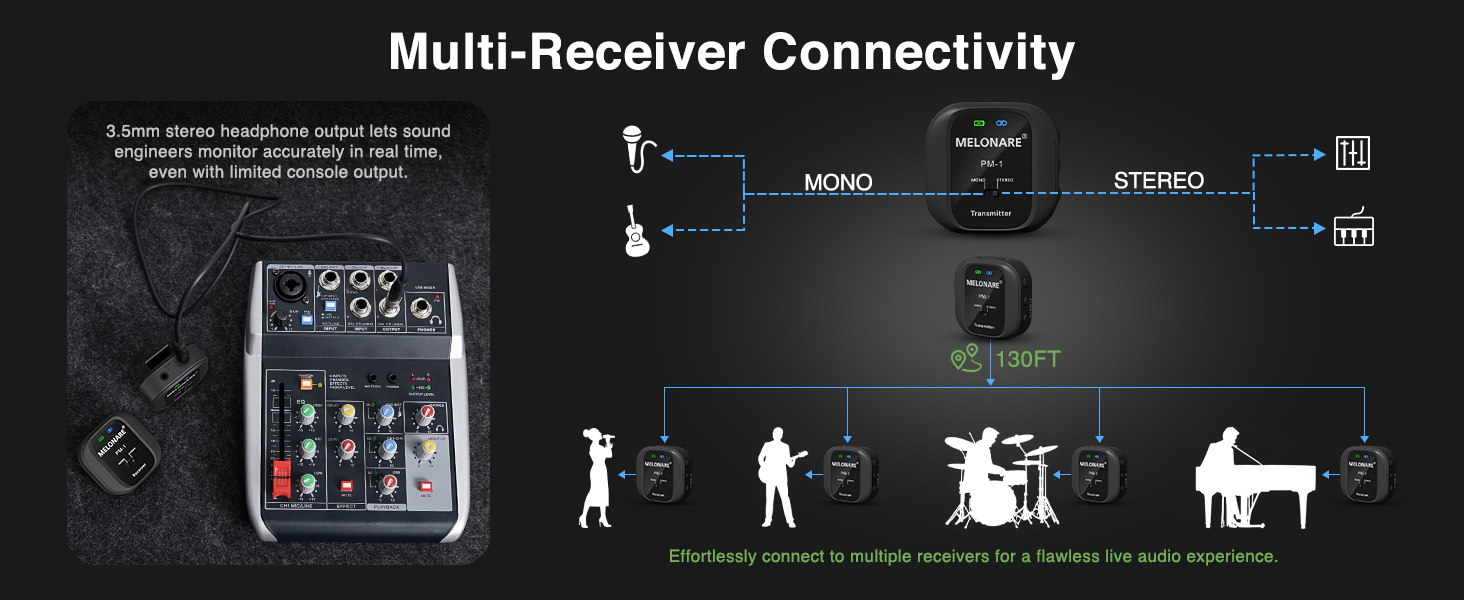
Figure 3: Battery Indicators and Charging. This image illustrates the battery level indications and how to charge the transmitter and receiver units.
2. Automatic Pairing
The PM-1 system features automatic pairing for quick setup:
- Long press the power button on the transmitter to turn it on.
- Long press the power button on each receiver to turn them on.
- The units will automatically pair. The RF indicator on both the transmitter and receivers will glow blue, confirming a successful connection.

Figure 4: Automatic Pairing. This image demonstrates the simplicity of pairing the PM-1 system, allowing users to quickly connect and begin monitoring.
3. Connecting to Audio Source
Connect the transmitter to your audio source using the appropriate cables and adapters. The system is compatible with various devices:
- Mixers
- Sound Cards
- Speakers
- Guitar Amps
- Music Production Equipment
Use the included 3.5mm audio cable for standard connections. For professional audio equipment, utilize the 6.35mm TS (mono) or TRS (stereo) adapters as needed.

Figure 5: Connecting to a Mixer. This image illustrates how to connect the PM-1 transmitter to a mixer's 3.5mm stereo headphone output for real-time audio monitoring.
Video 1: PM-1 Wireless In-Ear Monitor System Overview. This video demonstrates the setup and key features of the MELONARE PM-1 system, including its connectivity options and ease of use.
Operating Instructions
1. Mono/Stereo Selection
The system supports both mono and stereo modes, allowing you to choose based on your monitoring preference. Use the MONO/STEREO switch on both the transmitter and receivers to toggle between modes:
- Mono Mode: Provides identical audio to both earpieces for precise tonal feedback.
- Stereo Mode: Delivers separate audio to each earpiece for enhanced spatial awareness.
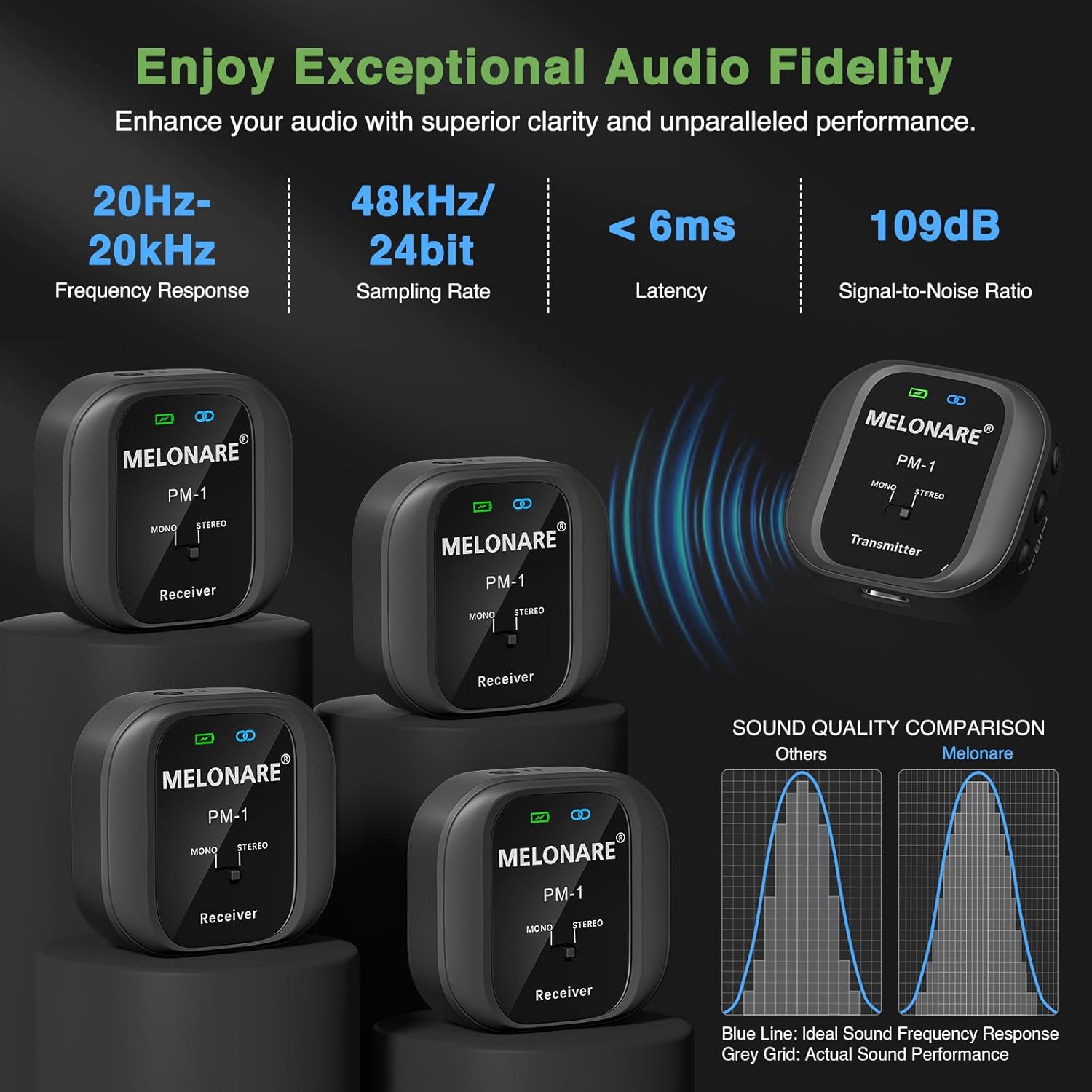
Figure 6: Mono/Stereo Modes. This image explains the difference between mono and stereo audio output and how to select the desired mode on the PM-1 units.
2. Volume Control
Adjust the monitoring volume using the volume control buttons on the receiver. Note that the volume adjustment offers distinct steps rather than a continuous range. Fine-tune your overall audio level from your mixer or sound source for optimal listening.
3. One-to-Many Connectivity
One transmitter can connect to multiple receivers simultaneously, making it ideal for bands or teams requiring shared audio monitoring. The system maintains a stable connection up to 130 feet (approximately 40 meters) in open environments.

Figure 7: One-to-Many Connectivity. This image illustrates how a single PM-1 transmitter can broadcast audio to multiple receivers, enabling seamless team monitoring.
Maintenance
To ensure the longevity and optimal performance of your MELONARE PM-1 system, follow these maintenance guidelines:
- Cleaning: Use a soft, dry cloth to clean the exterior of the transmitter and receivers. Avoid using abrasive cleaners or solvents.
- Storage: Store the units in a cool, dry place away from direct sunlight, extreme temperatures, and high humidity.
- Battery Care: For extended storage, charge the batteries to approximately 50% every few months to prevent deep discharge.
- Cable Management: Avoid sharp bends or kinks in the cables to prevent internal damage.
Troubleshooting
| Problem | Possible Cause | Solution |
|---|---|---|
| No Sound / Intermittent Audio |
|
|
| Poor Audio Quality / Distortion |
|
|
| Volume too low or too high (limited steps) | Limited volume steps on receiver. | Adjust the primary output volume from your mixer or audio source for finer control. |
Specifications
| Feature | Detail |
|---|---|
| Model Name | PM-1-4R |
| Brand | MELONARE |
| Wireless Frequency | UHF 500MHz |
| Latency | < 6 ms |
| Number of Frequencies | 10 |
| Effective Distance | Up to 130 ft (approx. 40 meters) |
| Mono/Stereo Mode | Selectable |
| Frequency Response | 20Hz-20kHz |
| Sampling Rate | 48kHz/24bit |
| Signal-to-Noise Ratio | 109 dB |
| Battery Life | Up to 5 hours |
| Charging Time | 2 Hours |
| Headphones Jack | 3.5 mm Jack |
| Material | Plastic |
| Item Weight | 12.3 ounces (total system) |
Warranty and Support
For warranty information or technical support, please refer to the contact details provided on the product packaging or visit the official MELONARE website. Keep your purchase receipt for warranty claims.
Official MELONARE Store: MELONARE Amazon Store


