
Callez 702TA
Callez 702TA USB Wired Headset User Manual
Model: 702TA | Brand: Callez
Introduction
Thank you for choosing the Callez 702TA USB Wired Headset. This headset is designed for clear communication and comfort, featuring dual microphone noise cancellation and Environmental Noise Cancellation (ENC) technology. It is ideal for telework, online meetings, and various communication platforms. This manual provides essential information for setting up, operating, maintaining, and troubleshooting your headset to ensure optimal performance.
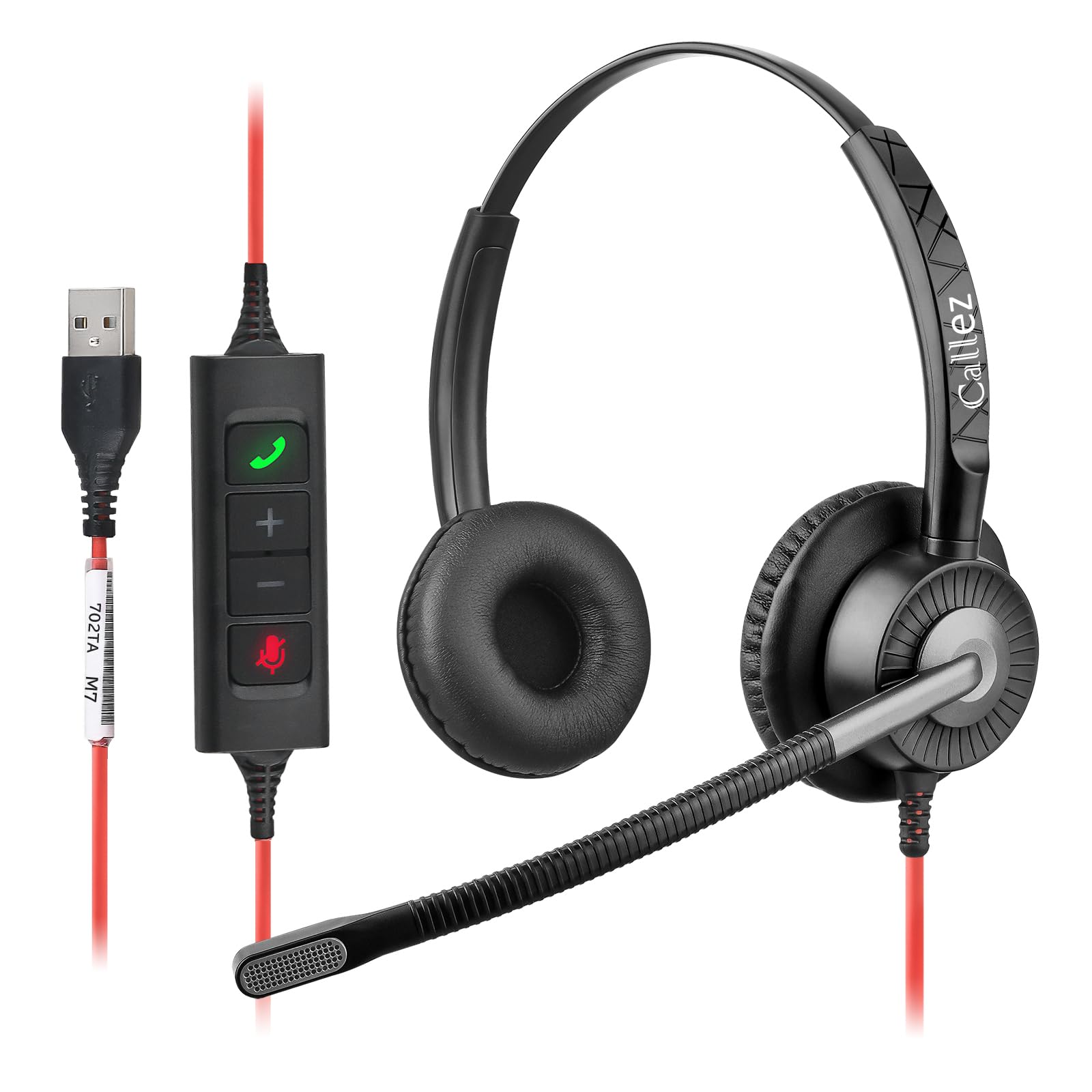
Image: Callez 702TA USB Wired Headset, showcasing its design and comfortable earcups.
Product Overview
Key Features
- Dual Microphone Noise Cancellation & ENC Function: Equipped with two microphones to reduce ambient noise and enhance voice clarity during calls.
- Comfortable Design: Soft memory foam ear pads and an ultra-lightweight, adjustable headband ensure comfort for extended wear. The microphone boom is flexible for optimal positioning.
- Wide Compatibility: Plug-and-play USB-A connection, compatible with Windows 2000/7/8/10/XP/Vista, Mac OS X, and leading UC platforms like Line, Zoom, Microsoft Teams, and Skype for Business.
- Convenient Inline Audio Control: Features an integrated remote control with buttons for answering/ending calls, microphone on/off (mute), volume up, and volume down.
Components
The Callez 702TA headset consists of the following main components:
- Adjustable Headband
- Soft Memory Foam Ear Pads
- Flexible Boom Microphone
- Inline Control Unit (with Answer/End, Mute, Volume Up/Down buttons)
- USB-A Connector

Image: Detailed view of the inline control unit and USB-A connector, highlighting call, mute, and volume buttons.
Setup
Connecting the Headset
- Locate an available USB-A port on your computer (PC, Laptop, Mac).
- Plug the USB-A connector of the Callez 702TA headset into the USB-A port.
- The headset is plug-and-play and typically requires no additional driver installation. Your operating system should automatically detect and configure the device.

Image: Callez 702TA headset connected to a laptop via its USB-A cable, ready for use.
Adjusting for Comfort
- Headband: Adjust the headband by sliding the earcups up or down until they rest comfortably over your ears.
- Ear Pads: The soft memory foam ear pads are designed for comfort during long periods of use. Ensure they fully cover your ears for optimal sound isolation.
- Microphone: Position the flexible boom microphone approximately 1-2 inches (2.5-5 cm) from your mouth for the best voice pickup. The microphone can rotate 350 degrees, allowing you to wear the headset with the microphone on either your left or right side.

Image: Illustrations demonstrating the adjustable headband, rotatable earcups, and 350-degree rotating boom microphone for ergonomic fit.
Operating Instructions
Inline Control Functions
The inline control unit provides easy access to essential call management features:
- Answer/End Call Button: Press to answer an incoming call or end an active call. This button can also be used to cancel calls or display a window to join an ongoing Microsoft Teams meeting (requires appropriate access permissions).
- Volume Up (+) Button: Press to increase the listening volume.
- Volume Down (-) Button: Press to decrease the listening volume.
- Microphone Mute Button: Press to mute or unmute your microphone. A red indicator light on the inline control unit will illuminate when the microphone is muted.

Image: A user wearing the Callez 702TA headset, illustrating the dual noise-cancelling microphone and its effectiveness in reducing ambient noise.
Environmental Noise Cancellation (ENC)
The Callez 702TA headset utilizes dual microphones and advanced ENC technology with an A8 algorithm to effectively reduce background noise. This ensures that your voice is transmitted clearly to the other party, even in noisy environments.
Maintenance
- Cleaning: Use a soft, dry cloth to clean the headset. Do not use liquid cleaners or solvents.
- Storage: Store the headset in a cool, dry place when not in use. Avoid extreme temperatures.
- Cable Care: Avoid sharp bends or excessive pulling on the USB cable to prevent damage.
- Ear Pads: The memory foam ear pads are designed for durability, but gentle handling will prolong their lifespan.
Troubleshooting
- No audio or microphone not working:
- Ensure the USB-A connector is fully inserted into the port.
- Check your computer's sound settings to ensure the Callez 702TA headset is selected as the default playback and recording device.
- Verify that the microphone is not muted using the inline control button (red light indicates mute).
- Adjust the volume using the inline controls and your computer's system volume.
- Try connecting the headset to a different USB port or another computer to rule out port or system issues.
- Poor microphone sound quality or others cannot hear me clearly:
- Ensure the microphone boom is positioned correctly, approximately 1-2 inches from your mouth.
- Check your application (e.g., Zoom, Teams) microphone settings to ensure the Callez 702TA is selected and its input volume is adequate.
- The microphone has high directionality for noise cancellation. Ensure the microphone capsule is pointed towards your mouth. If it's slightly off, your voice might not be picked up effectively.
- Test the microphone in a quiet environment to isolate potential background noise issues.
- Inline control buttons are not responding:
- Ensure the headset is properly connected to your computer.
- Restart the application you are using (e.g., communication software).
- For call answer/end functions, ensure the application supports HID (Human Interface Device) controls from the headset.
Specifications
| Brand | Callez |
| Model Number | 702TA |
| Connectivity | Wired, USB-A |
| Ear Placement | On Ear |
| Impedance | 32 Ohms |
| Noise Control | Sound Isolation, Dual Microphone Noise Cancellation, ENC Function |
| Microphone | Included, High Performance, Flexible Boom, 350° Rotation |
| Controls | Inline: Answer/End Call, Volume Up/Down, Mute |
| Compatibility | Windows 2000/7/8/10/XP/Vista, Mac OS X, UC Platforms (Line, Zoom, Microsoft Teams, Skype for Business) |
| Material | Metal, Leather, Plastic |
| Color | Gray |
Warranty and Support
Callez provides after-sales service for this product. If you encounter any issues or have questions regarding your Callez 702TA USB Wired Headset, please contact us through your order history on the platform where you purchased the product. Our support team will assist you with troubleshooting or warranty claims.
Please retain your proof of purchase for warranty purposes.
Related documents702TA


Ask a question about this manual
Ask about setup, troubleshooting, compatibility, parts, safety, or missing instructions. Manuals+ will review the question and use this page’s manual context to help answer it.