
1. Introduction
Thank you for choosing the Hello Kitty Bluetooth Wireless Earbuds. These earbuds are designed to provide a high-quality audio experience with the convenience of wireless connectivity. This manual will guide you through the setup, operation, and maintenance of your new earbuds.
2. What's in the Box
Your Hello Kitty Bluetooth Wireless Earbuds package includes the following items:
- Hello Kitty Bluetooth Wireless Earbuds (Left and Right)
- Hello Kitty-shaped Charging Case
- USB Charging Cable
- User Manual (this document)

Image: Front view of the Hello Kitty Bluetooth Wireless Earbuds packaging, showing the earbuds and charging case.

Image: Back view of the Hello Kitty Bluetooth Wireless Earbuds packaging, detailing product features and specifications.
3. Product Overview
The Hello Kitty Bluetooth Wireless Earbuds are designed for comfort and ease of use, featuring a distinctive Hello Kitty aesthetic.
3.1. Earbuds
- Ergonomic Design: Designed for a snug, secure fit in your ears.
- Built-in Microphone: For hands-free calls.
- Touch Controls: Manage music and calls directly from the earbuds.
3.2. Charging Case
- Hello Kitty Shape: A stylish and portable charging case.
- Battery Indicator: Lights on the case indicate charging status.
- USB-C Port: For charging the case.
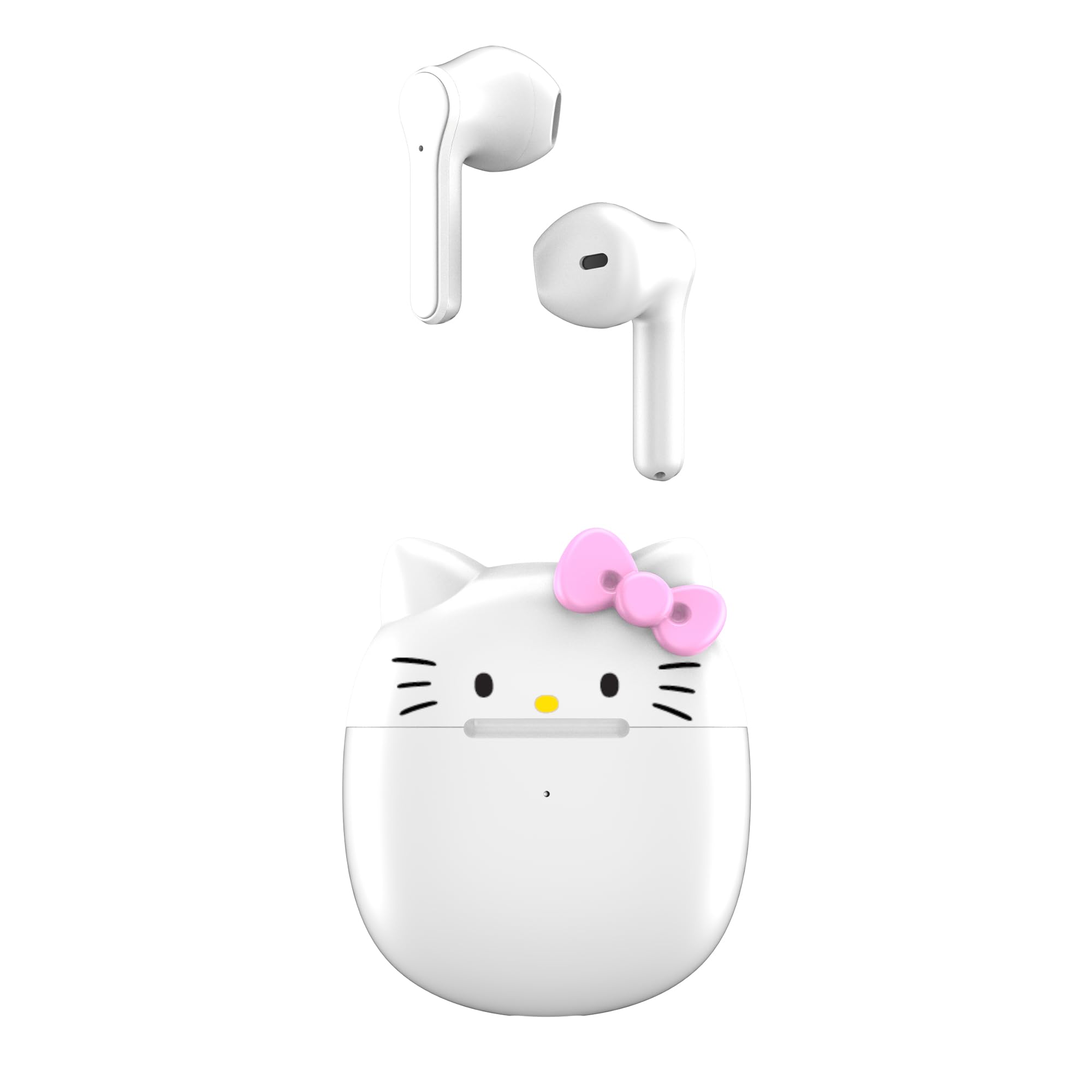
Image: The Hello Kitty wireless earbuds resting in their open Hello Kitty-shaped charging case.

Image: An alternative view of the Hello Kitty wireless earbuds and their charging case, highlighting the design.
Video: An overview of the Hello Kitty Bluetooth Wireless Earbuds, showcasing their design and key features.
4. Setup
4.1. Charging the Case and Earbuds
- Before first use, fully charge the charging case and earbuds.
- Place the earbuds into the charging case. Ensure they are properly seated.
- Connect the USB charging cable to the charging port on the case and to a power source (e.g., USB wall adapter, computer USB port).
- The indicator lights on the case will show the charging status. Once fully charged, the lights may turn off or change color.
4.2. Pairing with a Device
- Ensure the earbuds are charged and placed inside the charging case.
- Open the charging case lid. The earbuds will automatically enter pairing mode.
- On your device (smartphone, tablet, etc.), go to the Bluetooth settings.
- Search for available devices and select "Hello Kitty Earbuds" or "HKTWSMD-HK-MFN" from the list.
- Once connected, you will hear an audio prompt, and the earbuds will be ready for use.
5. Operating
The Hello Kitty earbuds feature intuitive touch controls for easy management of your audio and calls.
5.1. Power On/Off
- Power On: Open the charging case, or press and hold the touch area on both earbuds for 3 seconds.
- Power Off: Place the earbuds back into the charging case and close the lid, or press and hold the touch area on both earbuds for 5 seconds.
5.2. Music Playback Controls
- Play/Pause: Single tap either earbud.
- Next Track: Double tap the right earbud.
- Previous Track: Double tap the left earbud.
- Volume Up: Triple tap the right earbud.
- Volume Down: Triple tap the left earbud.
5.3. Call Management
- Answer/End Call: Single tap either earbud during an incoming call.
- Reject Call: Press and hold either earbud for 2 seconds during an incoming call.
5.4. Voice Assistant
- Activate Voice Assistant: Press and hold either earbud for 3 seconds (e.g., Siri, Google Assistant).
6. Maintenance
Proper maintenance ensures the longevity and optimal performance of your earbuds.
- Cleaning: Use a soft, dry cloth to clean the earbuds and charging case. Do not use harsh chemicals or abrasive materials.
- Storage: Store the earbuds in their charging case when not in use to protect them and keep them charged.
- Avoid Water: While designed for daily use, avoid submerging the earbuds or charging case in water.
7. Troubleshooting
If you encounter any issues, please refer to the following common solutions:
| Problem | Solution |
|---|---|
| Earbuds not pairing | Ensure earbuds are charged. Turn off and on your device's Bluetooth. Place earbuds back in case, close, then open to re-enter pairing mode. |
| No sound from one earbud | Check battery level of both earbuds. Re-pair the earbuds with your device. |
| Charging case not charging | Verify the USB cable is securely connected to both the case and the power source. Try a different USB cable or power adapter. |
| Poor sound quality | Ensure earbuds are clean and properly seated in your ears. Move closer to your connected device to avoid interference. |
8. Specifications
| Feature | Detail |
|---|---|
| Model Name | Hello Kitty Bluetooth Wireless Earbuds |
| Model Number | HKTWSMD-HK-MFN |
| Brand | Hello Kitty |
| Connectivity Technology | Wireless (Bluetooth) |
| Bluetooth Version | 4.0 |
| Battery Life (with charging case) | Up to 30 Hours |
| Included Components | Charging Case |
| Material | Plastic |
| Item Weight | 0.45 Pounds (7.2 ounces) |
| Control Method | Push Button, Touch |
| Special Feature | Lightweight, Microphone Included, Rechargeable Battery |
| Manufacturer | Southern Telecom |
9. Warranty and Support
For warranty information and customer support, please refer to the documentation provided with your purchase or visit the manufacturer's official website. Keep your proof of purchase for any warranty claims.
Manufacturer: Southern Telecom


