
1. Introduction
This instruction manual provides essential information for the safe assembly, operation, and maintenance of your KAI-ROAD White Vanity Desk. Please read this manual thoroughly before assembly and retain it for future reference.
2. Safety Information
WARNING: Always unplug the vanity desk before assembly or disassembly. Keep electrical components away from water. Do not place heavy objects on the vanity desk that could cause it to tip over. Always follow the assembly instructions carefully to avoid injury.
3. Package Contents
Please verify that all components listed in your product's included assembly guide are present and undamaged before beginning assembly. If any parts are missing or damaged, please contact KAI-ROAD customer support.
4. Assembly Instructions
Refer to the detailed step-by-step assembly guide included in your product packaging. Ensure all screws and fasteners are securely tightened. Two people are recommended for assembly to ensure stability and ease of construction.
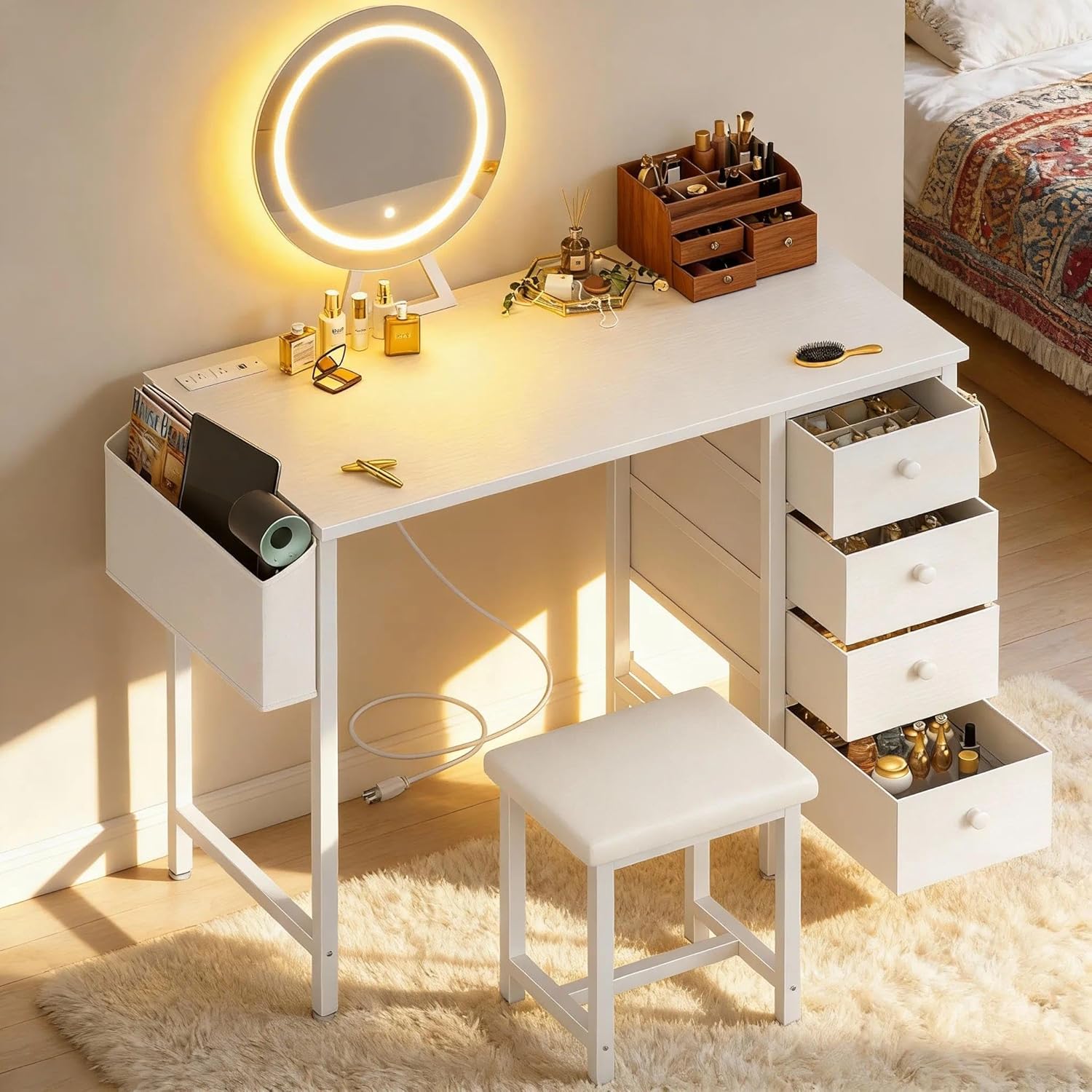
Image 1: Fully assembled KAI-ROAD White Vanity Desk with mirror, stool, and accessories.

Image 2: KAI-ROAD White Vanity Desk positioned in a bedroom, showcasing its compact design.
5. Features Overview
- Vanity Mirror with Lights: A round mirror with built-in LED lights provides soft, balanced illumination for makeup application.
- Clutter-Free Organization: Features 4 spacious fabric drawers, a large side pocket, and two hooks for storing makeup, accessories, and electronics.
- Ultimate Comfort and Style: Includes a thick-sponged PU padded stool for comfortable seating during use.
- Stay Powered and Connected: A built-in charging station with 2 standard plug sockets and 2 USB ports allows for convenient charging of multiple devices.
- Versatile, Modern Design: This multi-functional piece can serve as a vanity desk, a workspace, or a compact computer desk.

Image 3: Close-up of the removable hook on the side of the vanity desk, useful for hanging bags or headphones.

Image 4: Detail of the built-in power strip, showing two standard outlets and two USB ports for charging devices.

Image 5: The matching cushioned stool, designed for comfort and stability during extended use.
6. Operating Instructions
6.1. Using the LED Mirror
The round mirror features integrated LED lighting with three color modes (3000K, 4000K, 6000K) and adjustable brightness. To change the color mode, touch the switch on the mirror. To adjust brightness, long-press the switch until the desired level is reached.

Image 6: Illustration of the three distinct color lighting modes (3000K, 4000K, 6000K) available on the LED mirror.
6.2. Using the Built-in Power Outlet
The vanity desk includes a built-in power strip with two standard AC outlets and two USB ports. Connect the desk's power cord to a wall outlet. You can then plug in your electronic devices directly into the power strip on the desk surface for convenient charging and power access.
7. Maintenance and Care
To maintain the quality and appearance of your vanity desk, wipe surfaces with a damp cloth. Avoid using harsh chemicals or abrasive cleaners. Ensure all electrical connections are dry before use.
8. Troubleshooting
- LED Mirror Not Lighting Up: Ensure the power cord is securely plugged into a functional wall outlet and the desk's power strip is receiving power. Check the mirror's connection to the desk.
- Power Outlets/USB Ports Not Working: Verify the main power cord is connected. Test with a different device to confirm the issue is with the outlet and not the device.
- Desk Instability: Recheck all assembly screws and ensure they are tightened. Ensure the desk is placed on a flat, even surface.
9. Specifications
| Feature | Detail |
|---|---|
| Brand | KAI-ROAD |
| Model Number | Vanity Desk |
| Color | White |
| Size | 40" with 4 Drawers |
| Product Dimensions | 15.7"D x 40"W x 31.5"H |
| Item Weight | 30 pounds |
| Frame Material | Metal |
| Assembly Required | Yes |
| Power Outlet | 2 AC Sockets, 2 USB Ports |

Image 7: Detailed diagram illustrating the dimensions of the KAI-ROAD White Vanity Desk.
10. Warranty and Support
For warranty information or technical support, please refer to the documentation included with your product or contact KAI-ROAD customer service directly. Contact details can typically be found on the manufacturer's website or your purchase receipt.