
1. Introduction
Thank you for choosing the MekedeTech DUDUAUTO DUDU7 Car Radio Stereo. This intelligent navigation head unit is designed to enhance your driving experience with advanced features, including a 9.5-inch 2K IPS touchscreen, Android 13 operating system, wireless CarPlay, and Android Auto. This manual provides essential information for installation, operation, and maintenance to ensure optimal performance and longevity of your device.
2. Safety Information
- Professional Installation Recommended: Installation of this device requires technical knowledge and experience with car electronics. It is highly recommended to have it installed by a qualified professional to prevent damage to the unit or your vehicle.
- Vehicle Compatibility: This unit is specifically designed for Mazda CX-5 models from 2008-2015. Ensure compatibility before installation.
- Power Supply: Connect the unit to a 9V~16V DC power supply only. Incorrect voltage can cause damage.
- Wiring: Ensure all wiring connections are secure and correctly matched to avoid short circuits or malfunctions.
- Driving Safety: Do not operate the device in a manner that distracts you from driving. Always prioritize road safety.
- Temperature: Avoid exposing the unit to extreme temperatures or direct sunlight for prolonged periods.
3. Package Contents
Please check the package for the following items:
- MekedeTech DUDUAUTO DUDU7 Head Unit
- Dashboard Mount
- Necessary Wiring Harnesses (specific to Mazda CX-5 2008-2015)
- GPS Antenna
- USB Cables
- User Manual (this document)
4. Setup and Installation
This head unit is designed for a Plug & Play installation in Mazda CX-5 models from 2008 to 2015. However, specific considerations apply:
- Pre-Installation Check: Before beginning, ensure your vehicle's ignition is off and the battery is disconnected.
- Remove Old Unit: Carefully remove the existing car radio stereo and dashboard components as required for access.
- Wiring Connections: Connect the provided wiring harness to the vehicle's existing connectors. Ensure all connections are firm and correct.
- Harmon Sound System: If your Mazda CX-5 is equipped with a Harmon Sound System, an additional power cable with CANBUS is required to enable audio output. Please search for ASIN B0CTJRJVMQ to obtain the correct cable.
- GPS Antenna: Mount the GPS antenna in a location with a clear view of the sky, typically on the dashboard or under the windshield, away from metal obstructions.
- USB Connections: Connect any external USB devices or cables as needed. The unit includes one USB 3.2 GEN1 (Type-C) and three USB 2.0 ports.
- Mounting: Secure the DUDUAUTO DUDU7 head unit using the provided dashboard mount and screws.
- Final Check: Reconnect the vehicle battery and test the unit's functionality before fully reassembling the dashboard.

Image: Comparison showing the car dashboard before and after the installation of the MekedeTech DUDUAUTO DUDU7 head unit. The new unit integrates seamlessly into the Mazda CX-5 dashboard.
5. Operating Instructions
5.1 General Operation
- Power On/Off: The unit typically powers on with the vehicle's ignition. A power button on the unit (if present) or a long press on the home button may also control power.
- Touchscreen Interface: Navigate the Android 13 operating system using the responsive 9.5-inch 2K IPS touchscreen. Swipe, tap, and pinch gestures are supported.
- Volume Control: Adjust audio volume using the on-screen controls or your vehicle's steering wheel controls (if integrated).

Image: Screenshots displaying the DUDU OS 3.0 user interface with various applications and a new custom dynamic wallpaper feature.
5.2 Wireless/Wired CarPlay and Android Auto
The DUDUAUTO DUDU7 supports both wireless and wired CarPlay and Android Auto for seamless smartphone integration.
- Wireless Connection: Enable Bluetooth and Wi-Fi on your smartphone. On the head unit, open the CarPlay/Android Auto application and follow the on-screen instructions to pair your device.
- Wired Connection: Connect your smartphone to one of the unit's USB ports using a compatible USB cable. The CarPlay/Android Auto interface should launch automatically.
- Functionality: Once connected, you can access navigation, make calls, send/receive messages, and play music directly from your phone's interface displayed on the head unit.
5.3 Bluetooth 5.0 (Qualcomm 3031)
The unit features a Qualcomm 3031 Bluetooth 5.0 chip, supporting aptX HD protocol for high-quality audio streaming and stable connections.
- Pairing: Go to the Bluetooth settings on the head unit and enable Bluetooth. Search for available devices on your smartphone and select the DUDUAUTO DUDU7 to pair.
- Hands-Free Calling: Make and receive calls directly through the head unit, utilizing the built-in digital noise-cancelling microphone.
- Audio Streaming: Stream music from your smartphone to the car's speakers with enhanced audio quality.
5.4 GPS Navigation
Equipped with a Dual Band 6-mode positioning chip (L1+L5), the unit offers improved GPS accuracy and speed.
- Navigation Apps: Use pre-installed navigation applications or download your preferred apps from the Google Play Store.
- Lane-Level Accuracy: The dual-band GPS supports lane-level navigation, providing precise positioning.
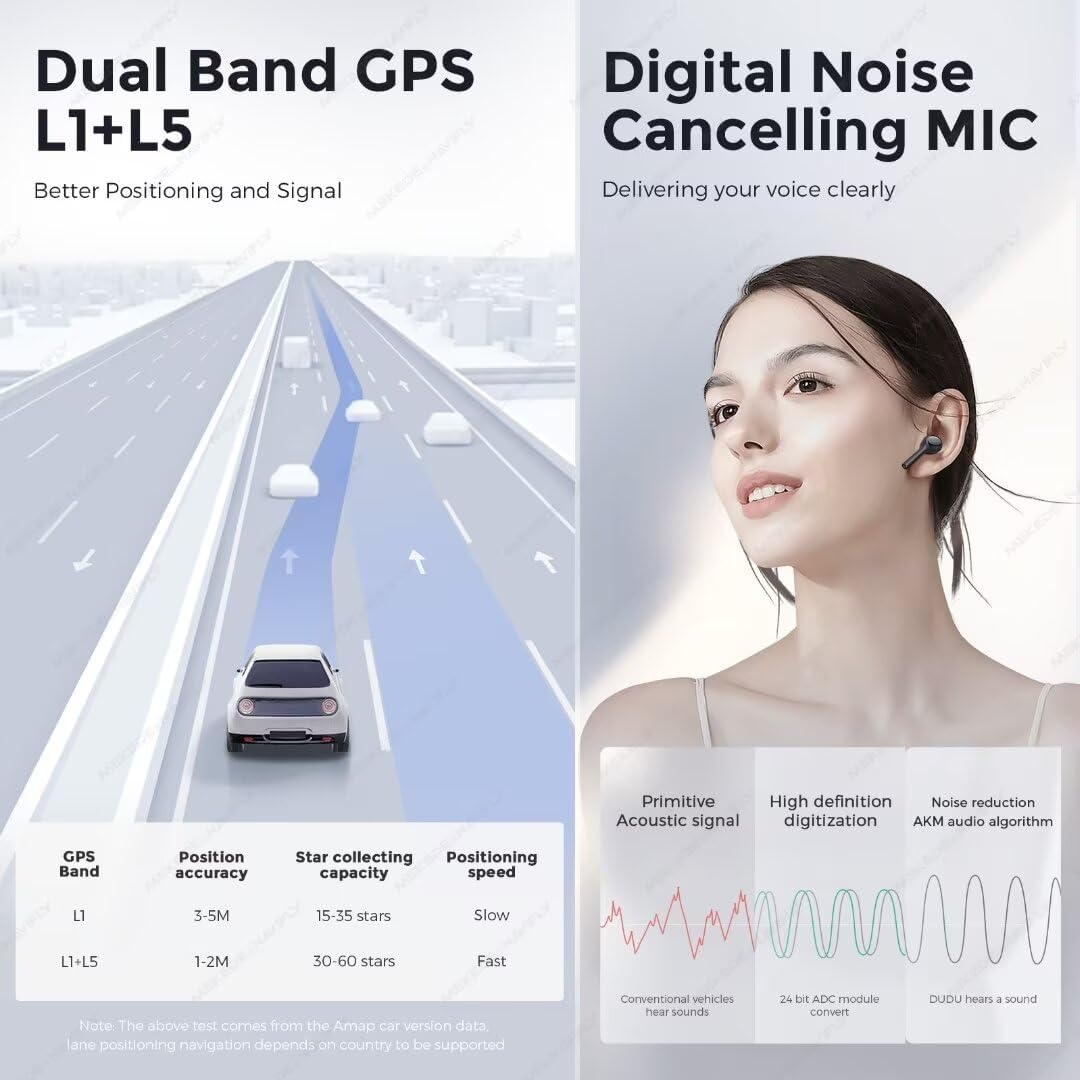
Image: Illustrates the benefits of Dual Band GPS (L1+L5) for better positioning and signal, and the Digital Noise Cancelling Microphone for clear voice transmission.
5.5 Audio Features
The DUDUAUTO DUDU7 integrates advanced audio components for a superior sound experience.
- Power Amplifier: Features a TDA7808 Digital AB type power amplifier.
- DSP: Utilizes an AKM7739 Velvet Audio Technology DSP for enhanced sound processing.
- Audio Output: Provides Optical + Coaxial and RCA 5.1 Channel Outputs for flexible audio system integration.

Image: Details of the audio components, including the AKM7739 DSP Velvet Audio Technology and TDA7808 digitally enhanced amplifiers, designed for a rich acoustic experience.
5.6 Wi-Fi Connectivity
The unit supports 802.11a/b/g/n/ac Wi-Fi, including 5G Wi-Fi, for internet access.
- Connecting to Wi-Fi: Go to the Wi-Fi settings, scan for available networks, and connect to your desired network.
- Online Features: Access online maps, stream music/videos, and download apps from the Google Play Store.
5.7 Optional 360 Panorama System
The DUDUAUTO DUDU7 supports a 360 panoramic image system. This feature requires an additional 360 chip and may incur extra costs.
6. Maintenance
- Screen Cleaning: Use a soft, lint-free cloth to gently wipe the touchscreen. Avoid abrasive cleaners or solvents.
- Software Updates: Periodically check for software updates to ensure optimal performance and access to new features. Updates can usually be found in the system settings or on the manufacturer's website.
- Avoid Liquids: Keep the unit away from liquids to prevent damage.
- Temperature Control: Do not leave the unit in direct sunlight or extreme temperatures for extended periods, as this can affect its lifespan.
7. Troubleshooting
If you encounter issues with your DUDUAUTO DUDU7, refer to the following common troubleshooting steps:
| Problem | Possible Cause | Solution |
|---|---|---|
| No Power | Loose power connection, blown fuse, incorrect wiring. | Check all power cables and fuses. Ensure correct voltage supply (9V-16V). Verify wiring harness connections. |
| No Sound | Volume too low, mute activated, incorrect audio settings, Harmon Sound System issue. | Increase volume. Check mute status. Verify audio output settings. If your car has a Harmon Sound System, ensure the correct CANBUS power cable (ASIN B0CTJRJVMQ) is installed. |
| GPS Signal Loss/Inaccuracy | GPS antenna obstruction, poor antenna placement, software issue. | Ensure GPS antenna has a clear view of the sky. Relocate antenna if necessary. Restart the unit. Check for software updates. |
| Bluetooth Connection Issues | Device not discoverable, interference, incorrect pairing. | Ensure Bluetooth is enabled on both devices. Delete previous pairings and re-pair. Move away from potential interference sources. |
| CarPlay/Android Auto Not Connecting | Incorrect cable, software glitch, phone settings. | Try a different USB cable (for wired). Ensure CarPlay/Android Auto is enabled on your phone. Restart both the head unit and your phone. |
If problems persist after attempting these solutions, please contact customer support.
8. Specifications
Detailed technical specifications for the MekedeTech DUDUAUTO DUDU7 (Model: DUDU7-8-128-9.5):
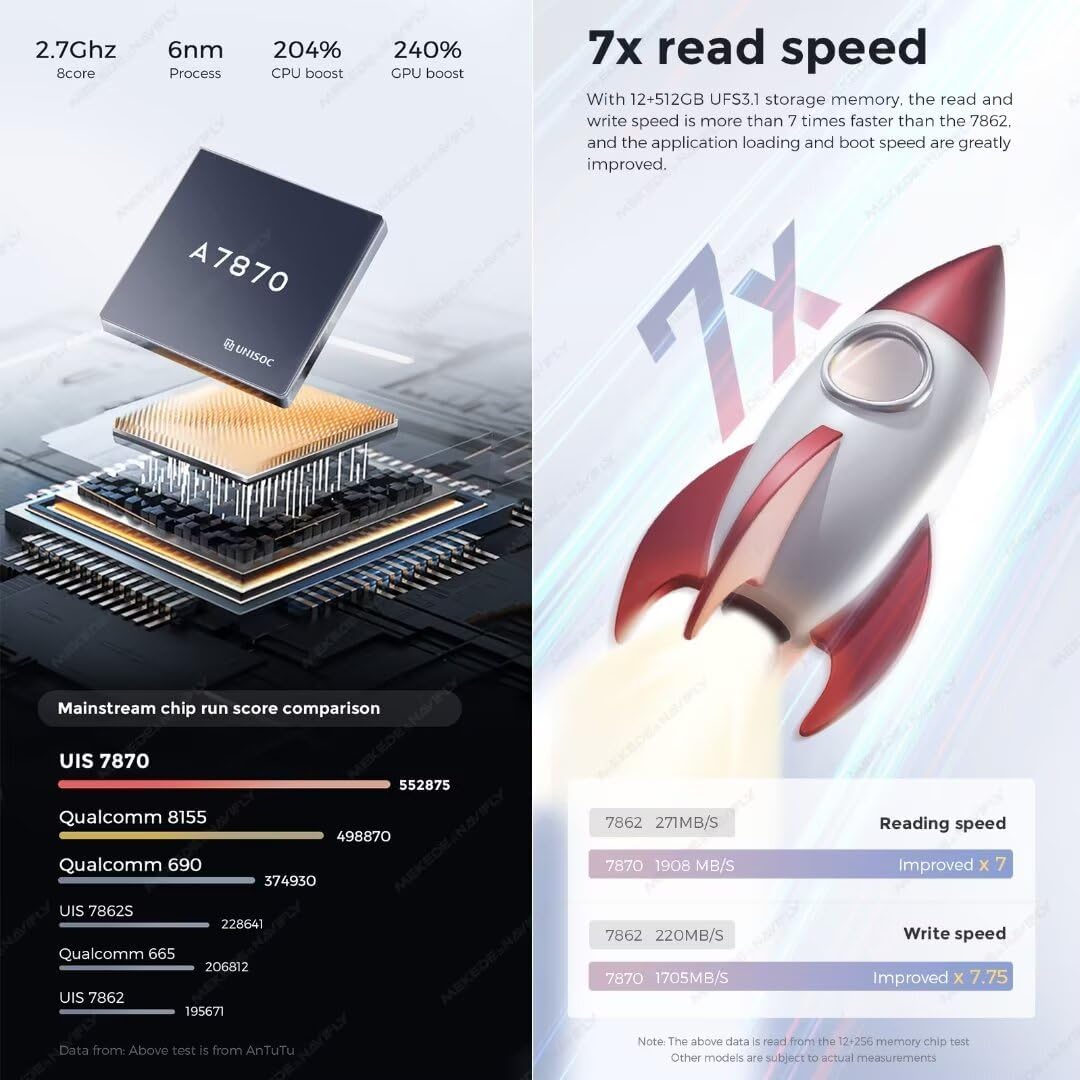
Image: Illustrates the UIS7870 8-core CPU performance and the 7x faster read speed of UFS 3.1 storage compared to previous generations.
| Feature | Specification |
|---|---|
| Model Name | MKD-DUDU7-8-128-9.5 |
| Operating System | Android 13 |
| CPU | 8 Core UIS7870 (Customized version A76 2.7Ghz 6nm processor) |
| Memory (RAM/ROM) | 8GB RAM, 128GB ROM (UFS 3.1) |
| Screen Size | 9.5 inches |
| Display Type | 2K 2000x1200 IPS QLED Touch Screen (Capacitive) |
| GPS | Dual Band 6 mode (L1 L5 B1 B2a E1 E5a) |
| Microphone | Digital Noise Cancellation Microphone |
| Bluetooth | Qualcomm 3031 Chip, BT5.0, Supports aptX HD protocol |
| Wi-Fi | 802.11a/b/g/n/ac, Support 5G WIFI |
| USB Ports | 1x USB 3.2 GEN1 (TYPE-C), 3x USB 2.0 |
| Power Amplifier | TDA7808 Digital AB type |
| DSP | AKM7739 Velvet Audio Technology |
| Audio Output | Optical + Coaxial, RCA 5.1 Channel Outputs |
| Radio IC | TDA7708 |
| Work Voltage | 9V~16V |
| CarPlay/Android Auto | Wired and Wireless Support |
| Vehicle Compatibility | Mazda CX-5 (2008-2015) |
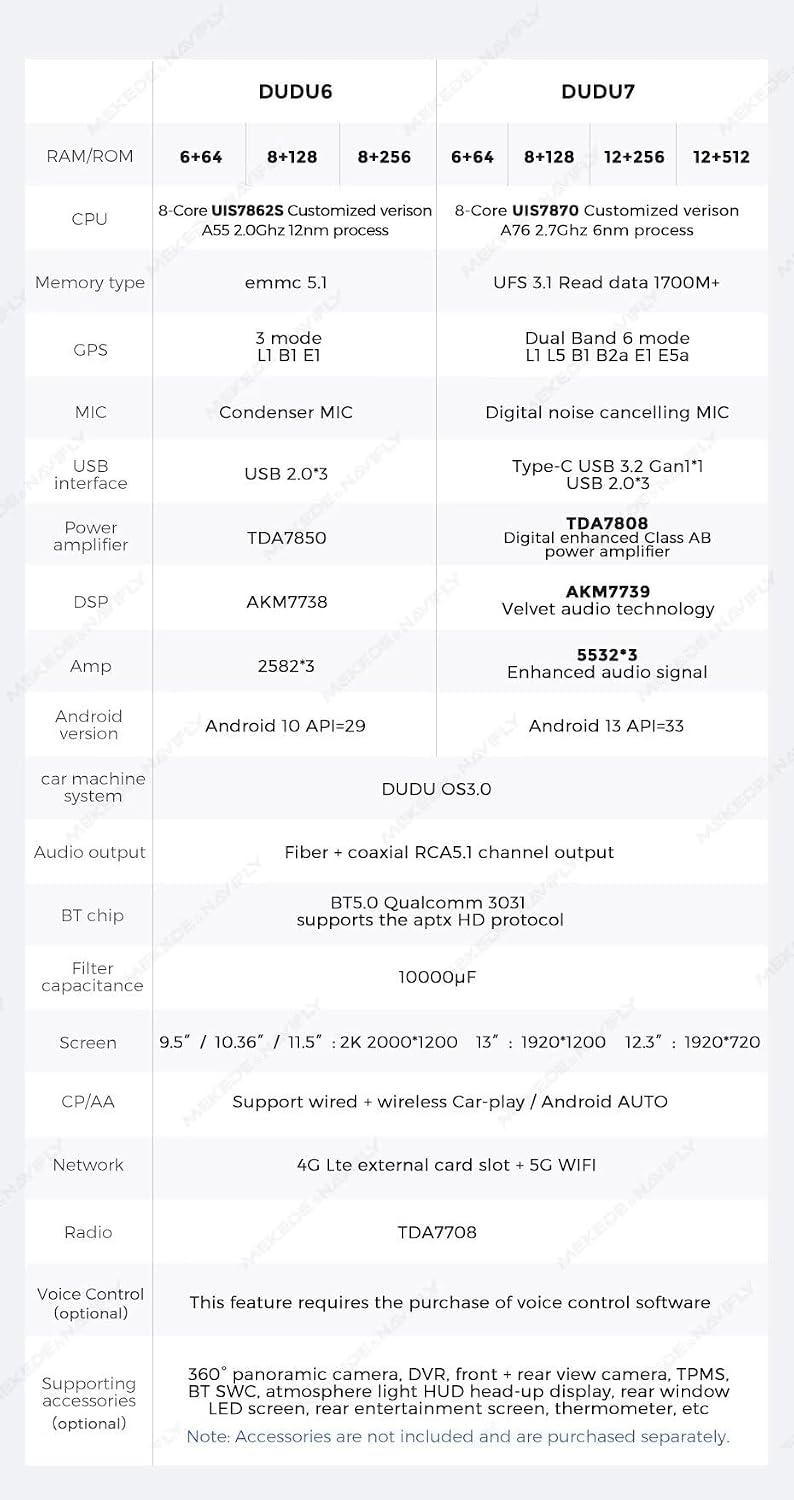
Image: A detailed table comparing the specifications of the DUDU6 and DUDU7 models, highlighting the advanced features of the DUDU7.
9. Warranty Information
The MekedeTech DUDUAUTO DUDU7 Car Radio Stereo comes with a 1-Year Warranty from the date of purchase. This warranty covers manufacturing defects and malfunctions under normal use. Please retain your proof of purchase for warranty claims. The warranty does not cover damage caused by improper installation, misuse, accidents, unauthorized repairs, or normal wear and tear.
10. Support
For further assistance, technical support, or to inquire about additional accessories, please visit the official MekedeTech store or contact their customer service.
MekedeTech Store: Visit the MekedeTech Store on Amazon