
KAI-ROAD 47" with 4 Drawers
KAI-ROAD White Vanity Desk with Mirror and Light - Model 47" with 4 Drawers User Manual
Model: 47" with 4 Drawers | Brand: KAI-ROAD
Introduction
Thank you for choosing the KAI-ROAD White Vanity Desk. This manual provides essential information for the safe assembly, operation, and maintenance of your new vanity desk. Please read it thoroughly before use and retain it for future reference.
Important Safety Information
- Always unplug the vanity when not in use.
- Be cautious of sharp edges and pinch points during assembly.
- Keep the vanity away from water to prevent electrical hazards.
- Ensure all connections are secure before use.
- Do not overload the power outlets.
Package Contents
Please verify that all components are present before beginning assembly:
- Vanity Desk Frame and Tabletop
- Round Mirror with Built-in LED Lights
- 4 Fabric Drawers
- Padded Stool
- Built-in Power Strip (2 standard plug sockets, 2 USB ports)
- Side Storage Pocket
- Removable Hooks (2)
- Assembly Hardware and Tools (typically included)
- Instruction Manual
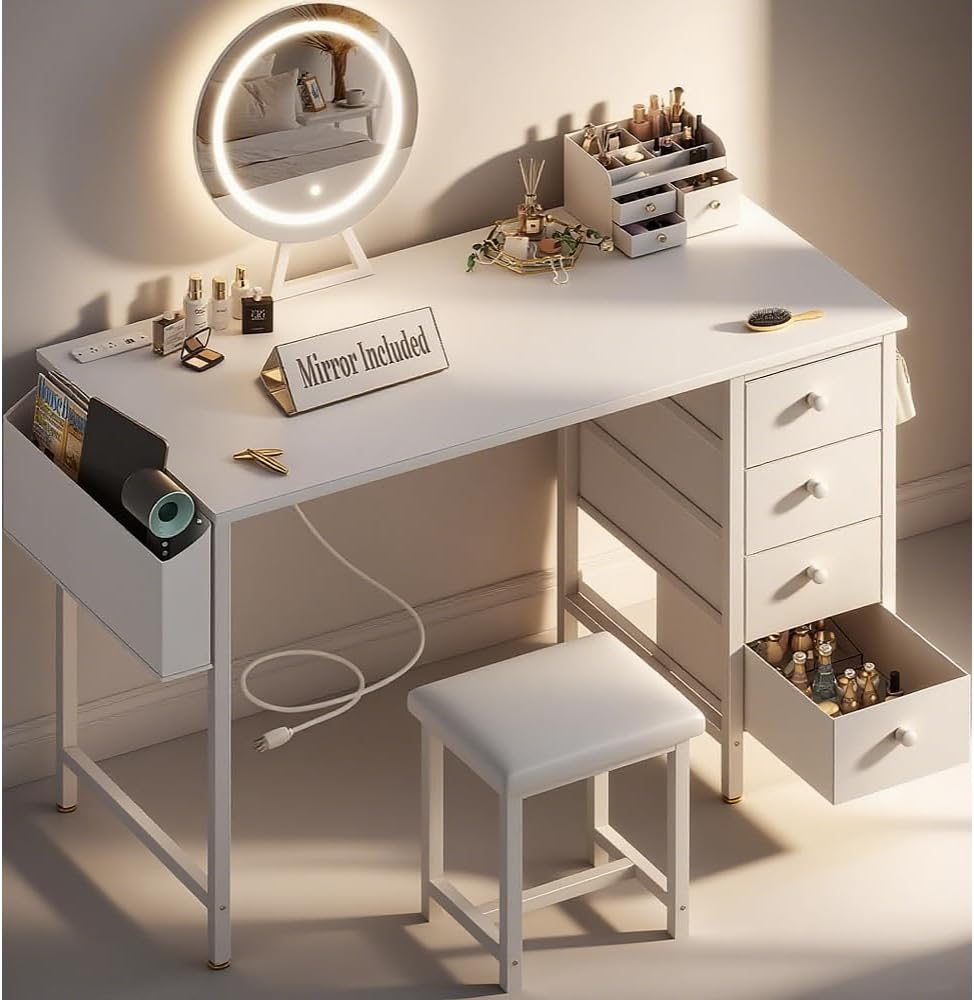
Image: Overview of the KAI-ROAD White Vanity Desk with mirror, stool, and storage features.
Setup and Assembly
Assembly is required for this vanity desk. Please follow the detailed step-by-step instructions provided in the separate assembly guide included with your package. Ensure all parts are correctly identified and securely fastened.
Key Assembly Points:
- Frame Assembly: Connect the metal frame components as per the diagrams.
- Tabletop Attachment: Securely attach the tabletop to the assembled frame.
- Drawer Installation: Insert the fabric drawers into their designated slots.
- Mirror Setup: Position the LED mirror on the tabletop and connect its power cable to the built-in outlet.
- Stool Assembly: Assemble the padded stool according to its specific instructions.
- Power Outlet Connection: Plug the vanity's main power cord into a wall outlet.
- Wall Protection: Utilize the included protective corner sliders to prevent damage to your wall.

Image: The KAI-ROAD vanity desk with mirror and stool, integrated into a bedroom environment.
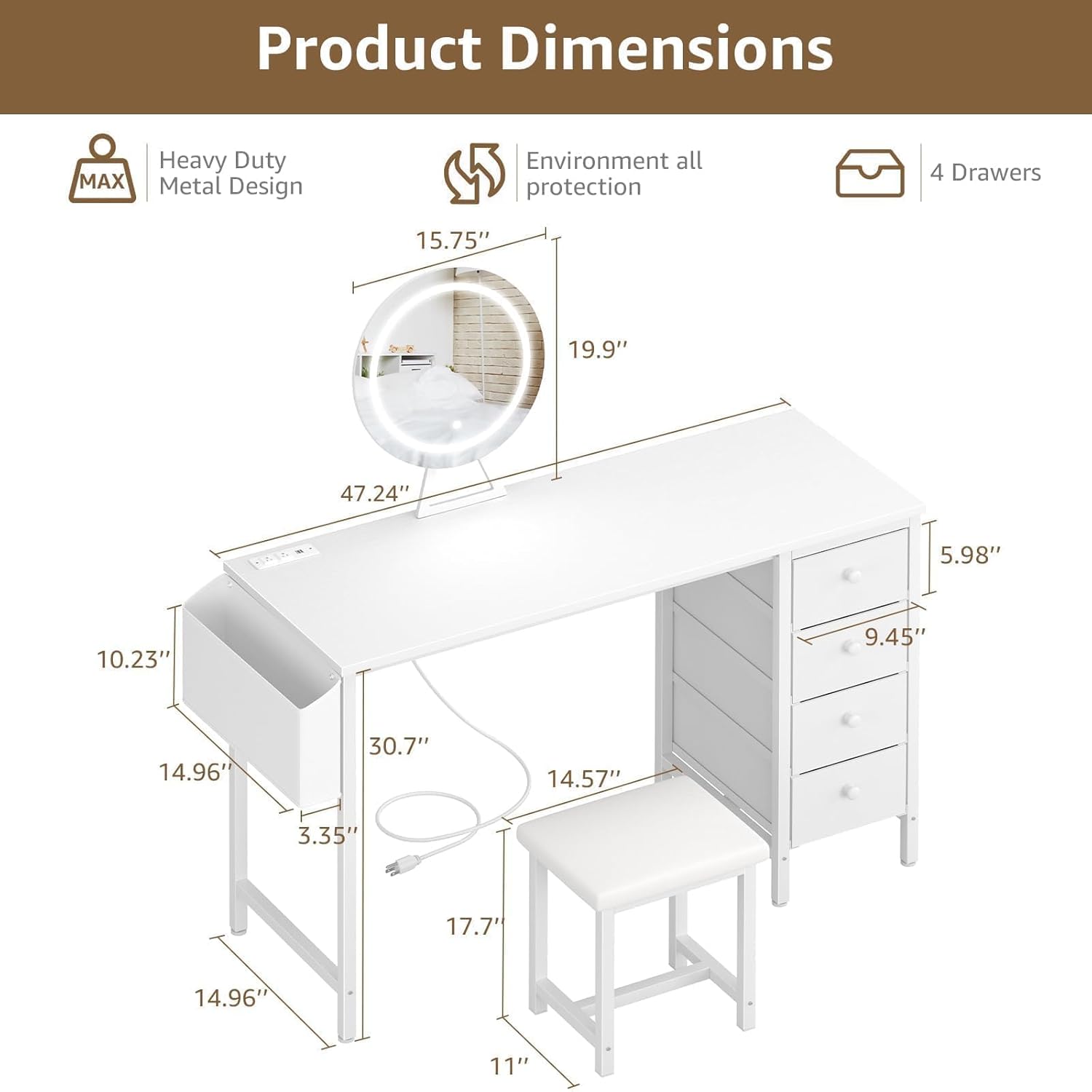
Image: Detailed product dimensions illustrating the size and layout of the vanity desk, including the mirror, side pocket, and drawers.
Operating Instructions
LED Mirror Lighting:
The round mirror features built-in LED lights with three adjustable lighting modes:
- Mode Selection: Touch the switch on the mirror to cycle through the 3 color lighting modes (3000K, 4000K, 6000K).
- Brightness Adjustment: Long press the switch to adjust the brightness level within the selected mode.

Image: Illustration of the three distinct color lighting modes (3000K, 4000K, 6000K) available on the vanity mirror, demonstrating how they appear on a user's reflection.
Built-in Power Outlet:
The vanity desk includes a convenient built-in power strip with 2 standard AC plug sockets and 2 USB ports.
- Plug in your electronic devices, such as hair tools, phones, or laptops, directly into the tabletop outlets.
- Ensure the vanity's main power cord is securely plugged into a wall outlet for the power strip to function.

Image: Close-up view of the built-in power strip on the vanity desk, showing two standard AC outlets and two USB ports in use.
Storage Features:
- Fabric Drawers: Utilize the four spacious fabric drawers for organizing makeup, accessories, and other personal items.
- Side Pocket: The large side pocket is ideal for storing larger items like magazines, hair dryers, or styling tools.
- Removable Hooks: Attach the two removable hooks to the side of the desk to hang bags, headphones, or other items.

Image: A close-up of the removable hook feature on the side of the vanity desk, demonstrating its use for hanging a handbag.
Maintenance and Care
- Cleaning: Wipe the surfaces of the vanity desk with a damp cloth. Avoid harsh chemicals or abrasive cleaners that may damage the finish.
- Dusting: Regularly dust the mirror and desk surfaces to maintain clarity and appearance.
- Drawer Care: The fabric drawers can be spot cleaned with a mild detergent if necessary. Ensure they are completely dry before reinserting.
- Electrical Components: Keep the power strip and mirror wiring dry and free from debris.
Troubleshooting
If you encounter any issues with your KAI-ROAD Vanity Desk, please refer to the following common solutions:
- Mirror Lights Not Working:
- Ensure the mirror's power cable is securely plugged into the vanity's built-in outlet.
- Verify that the vanity's main power cord is plugged into a functional wall outlet.
- Check if the wall outlet is receiving power (test with another device).
- Power Outlets Not Functioning:
- Confirm the vanity's main power cord is fully inserted into a live wall outlet.
- Avoid overloading the outlets; unplug some devices if too many are connected.
- Desk Instability:
- Check all screws and fasteners to ensure they are tightened properly.
- Ensure the desk is placed on a flat, even surface.
If problems persist, please contact KAI-ROAD customer support for assistance.
Product Specifications
| Feature | Detail |
|---|---|
| Brand | KAI-ROAD |
| Model | 47" with 4 Drawers |
| Color | White |
| Frame Material | Metal |
| Product Dimensions (D x W x H) | 15.7" x 47" x 31.5" |
| Item Weight | 30 pounds |
| Assembly Required | Yes |
| Mirror Lighting | 3-mode LED (3000K, 4000K, 6000K) |
| Power Outlet | 2 AC outlets, 2 USB ports (5V/2A) |
| Stool Seat Material | PU Padded |
| Stool Seat Height | 17.7 Inches |
| Storage | 4 Fabric Drawers, 1 Large Side Pocket, 2 Removable Hooks |
| Patent No. | 29977107 |
Warranty and Support
KAI-ROAD products are designed for durability and quality. For specific warranty details, please refer to the documentation included with your purchase or contact KAI-ROAD customer service.
Customer Support: If you have any questions, require assistance with assembly, or need to report a missing/damaged part, please contact KAI-ROAD directly through your purchase platform or the official KAI-ROAD website. Please have your order number and product model readily available.

Image: Visual guide demonstrating steps to contact KAI-ROAD customer support via the purchase platform after an order has been placed.
Ask a question about this manual
Ask about setup, troubleshooting, compatibility, parts, safety, or missing instructions. Manuals+ will review the question and use this page’s manual context to help answer it.