
Introduction
Thank you for choosing the ALUSSO Dusk to Dawn Outdoor Security Light, Model YDS03. This manual provides essential information for the safe installation, operation, and maintenance of your new lighting fixture. Please read these instructions thoroughly before installation and retain them for future reference.
Safety Information
- Electrical Safety: This fixture requires a hardwire connection to an AC 120V (108V-132V) power supply. Always disconnect power at the circuit breaker before installation, maintenance, or repair.
- Grounding: This is a Class II lighting fixture, which means it is double insulated and does not require a ground wire for safe operation.
- Professional Installation: If you are unsure about electrical wiring, consult a qualified electrician.
- Outdoor Use: The fixture is IP65 rated, providing protection against dust and water jets. Ensure all connections are sealed properly to maintain this rating.
- Do not attempt to modify the fixture. Use only original replacement parts if necessary.
Package Contents
Verify that all components are present before beginning installation:
- ALUSSO Dusk to Dawn Outdoor Security Light (Model YDS03)
- Mounting Hardware (screws, wire nuts, gasket)
- Instruction Manual

Image: Included accessories for installation, such as mounting screws and wire connectors. Junction box is not included.
Specifications
| Brand | ALUSSO |
| Model Number | YDS03 |
| Voltage | AC 120V |
| Wattage | 40W |
| Brightness | 4000 Lumens |
| Color Temperature (CCT) | 3000K (Warm White), 4000K (Neutral White), 6000K (Cool White) |
| Water Resistance Level | IP65 (Waterproof) |
| Light Source | LED |
| Number of Light Heads | 3 |
| Beam Angle | 300° |
| Detection Angle | 120° |
| Mounting Type | Wall Mount, Surface Mount |
| Material | Plastic |
Setup and Installation
This fixture is designed for hardwire installation on a standard 3-3.5 inch US outdoor junction box. Follow these steps carefully:
- Prepare for Installation: Turn off power at the circuit breaker before starting. Ensure the mounting surface is clean and stable.
- Mount the Bracket (Step 1): Secure the mounting bracket to your outdoor junction box using the provided screws. Ensure it is firmly attached.
- Wire Connections (Step 2): Connect the fixture's wires to your household wiring. Connect the live wire (black) to the live wire, and the neutral wire (white) to the neutral wire using the provided wire nuts. As this is a Class II fixture, no ground wire connection is required.
- Attach the Fixture (Step 3): Align the fixture with the mounting bracket and secure it with the central screw. Ensure the gasket is properly seated to maintain the IP65 rating.
- Adjust Light Heads: The three light heads are independently adjustable. Position them to cover your desired lighting area. The fixture offers a 300° beam angle and 120° detection angle for optimal coverage.
Image: Step-by-step installation guide for hardwiring the security light to an outdoor junction box.

Image: The adjustable light heads allow for precise direction of illumination and motion detection.
Operating Instructions
Your ALUSSO security light features adjustable color temperature and two operating modes:
1. Color Temperature Adjustment (3CCT)
The fixture offers three color temperature options: 3000K (Warm White), 4000K (Neutral White), and 6000K (Cool White). To change the color temperature, locate the CCT switch on the fixture body and slide it to your desired setting.

Image: Adjusting the color temperature switch on the light fixture.
2. Operating Modes
The light has two primary operating modes, controlled by your wall switch:
- Dusk to Dawn (D2D) Mode: In this mode, the light automatically turns on when ambient light levels are low (at dusk) and turns off when ambient light levels are high (at dawn).
- Always On Mode: In this mode, the light remains on continuously, regardless of ambient light.
To switch between modes:
- For D2D Mode: Quickly turn the wall switch OFF then ON. The light will flash once to indicate D2D mode is active.
- For Always On Mode: Quickly turn the wall switch OFF, then ON, then OFF, then ON again (OFF-ON-OFF-ON) within 3 seconds. The light will flash twice to indicate Always On mode is active.
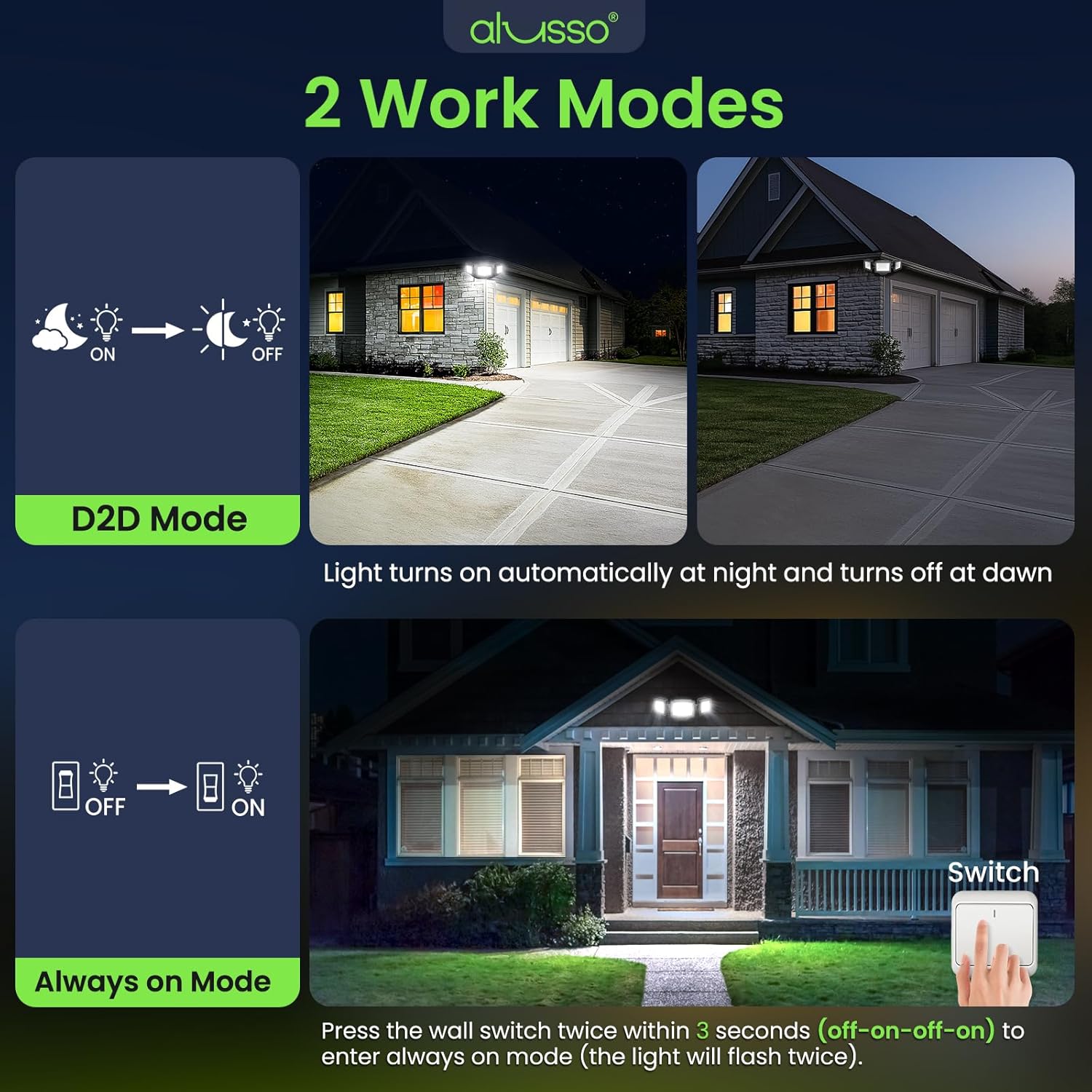
Image: Explanation of D2D mode and how to activate Always On mode using the wall switch.
Maintenance
The ALUSSO security light is designed for minimal maintenance due to its durable construction and IP65 rating.
- Cleaning: Periodically wipe the fixture with a soft, damp cloth to remove dirt and debris. Do not use abrasive cleaners or solvents.
- Inspection: Annually inspect the wiring and mounting for any signs of wear or damage. Ensure all connections remain secure.
- Weather Resistance: The IP65 rating ensures protection against various weather conditions, including rain and cold.

Image: The light is designed to withstand various weather conditions, including wet and cold environments, and is UV resistant.
Troubleshooting
If you encounter issues with your ALUSSO security light, refer to the following common problems and solutions:
- Light does not turn on:
- Check if the power is supplied to the fixture at the circuit breaker.
- Verify all wire connections are secure.
- Ensure the light is not in D2D mode during daylight hours.
- Light does not turn off (in D2D mode):
- Check for obstructions blocking the dusk-to-dawn sensor.
- Ensure there are no external light sources (e.g., streetlights, other fixtures) shining directly onto the sensor, which might prevent it from activating.
- Incorrect color temperature:
- Adjust the CCT switch on the fixture to your desired setting.
- Light flashes or flickers:
- Check for loose wiring connections.
- Ensure the voltage supply is stable (AC 120V).
Warranty and Support
The ALUSSO Dusk to Dawn Outdoor Security Light (Model YDS03) comes with a 5-year warranty from the date of purchase, covering defects in materials and workmanship.
For warranty claims, technical support, or any questions regarding your product, please contact ALUSSO customer service through the retailer's platform or the official ALUSSO website. Please have your purchase receipt and model number (YDS03) available when contacting support.