
Introduction
This manual provides instructions for the safe and efficient use of your iWALK 20000mAh 65W Portable Charger (Model LPR002). Please read this manual thoroughly before using the product and retain it for future reference.

Image: The iWALK 20000mAh 65W Portable Charger, showcasing its compact design and integrated retractable USB-C cable.
Product Overview
Key Features:
- High Capacity: 20,000mAh battery for extended power.
- Fast Charging: Up to 65W output for rapid charging of compatible devices.
- Integrated Retractable USB-C Cable: A 2.3 ft (approximately 27.56 inches) built-in USB-C cable for convenience and portability.
- Multiple Outputs: Features a USB-C cable (PD 65W), a USB-C port (PD 65W), and a USB-A port (QC 22.5W) for charging multiple devices simultaneously.
- LED Display: Digital display to show the precise charge level.
- Compact Design: Ergonomic and portable, designed to be smaller than other power banks of similar capacity.

Image: The iWALK portable charger highlighting its three distinct charging outputs.
Setup
Initial Charging of the Power Bank:
- Using the Built-in Cable: Extend the integrated USB-C cable from the power bank. Connect the USB-C end to a compatible wall charger (65W or higher recommended for fastest charging, not included).
- Using an External Cable: Alternatively, connect a USB-C to USB-C cable (not included) to the power bank's USB-C input port and then to a compatible wall charger.
- The LED display will show the charging progress. A full charge typically takes approximately 1.38 hours with a 65W charger.

Image: Illustration of the two methods for recharging the power bank.
Operating Instructions
Charging Your Devices:
- Using the Built-in Retractable USB-C Cable:
- Gently pull the retractable USB-C cable to extend it to the desired length (up to 2.3 ft).
- Connect the USB-C connector to your compatible device (e.g., laptop, smartphone, tablet).
- The power bank will automatically begin charging your device.
- To retract the cable, give it a gentle pull, and it will automatically retract into the unit.
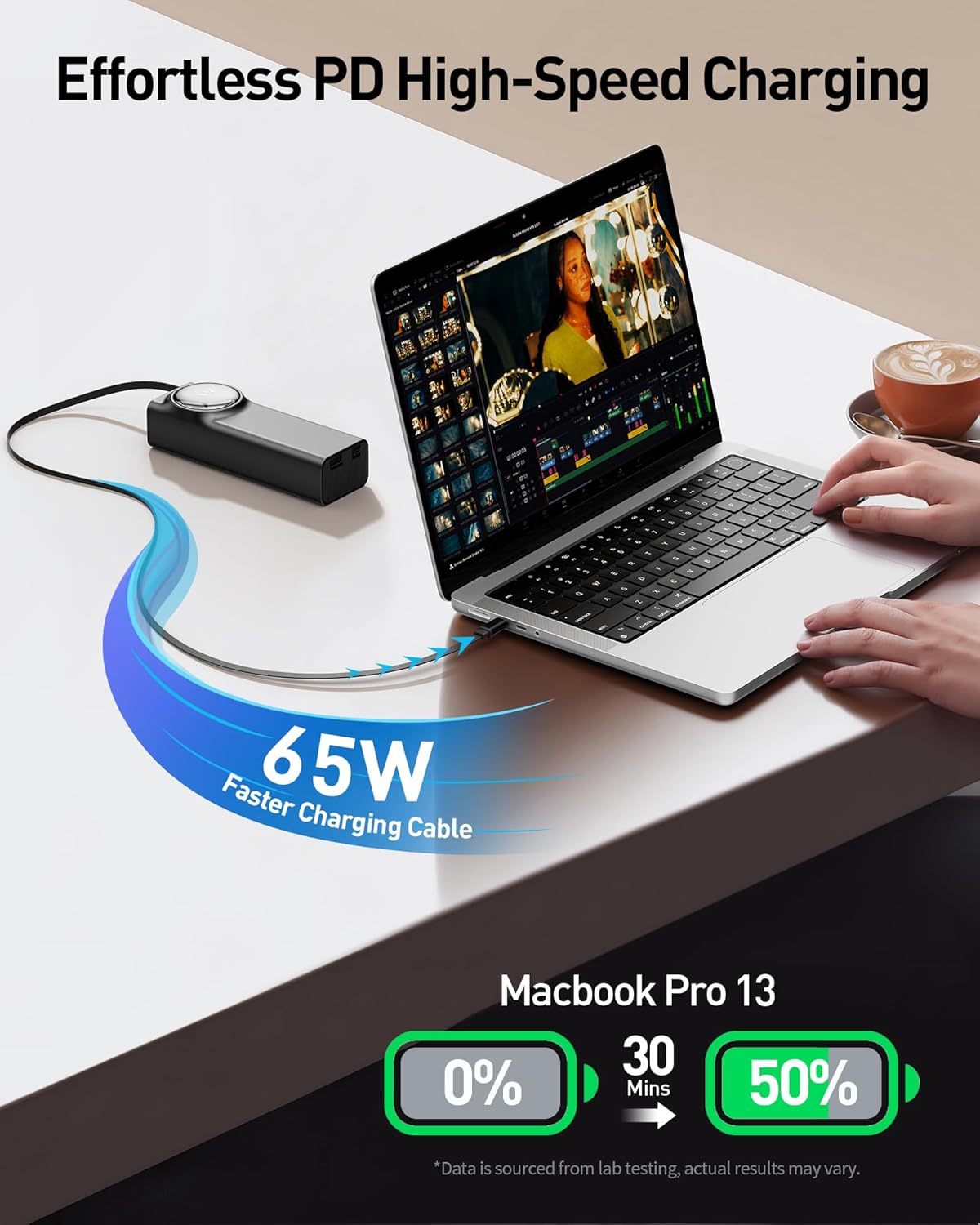
Image: Charging a laptop using the integrated USB-C cable.
- Using the USB-C Output Port:
- Connect a USB-C to USB-C cable (not included) from the power bank's USB-C output port to your device.
- The power bank will initiate charging.
- Using the USB-A Output Port:
- Connect a USB-A to compatible cable (not included) from the power bank's USB-A output port to your device.
- Charging will commence automatically.
- Simultaneous Charging: The power bank supports charging up to three devices concurrently using all available outputs. For optimal performance, charging a single device is recommended when high-speed charging is critical.
Checking Battery Level:
The integrated LED display on the power bank shows the remaining battery percentage, allowing you to monitor the charge status accurately.
Image: The smart LED display indicating battery percentage.
Maintenance
- Keep the power bank away from water, moisture, and extreme temperatures.
- Avoid dropping or subjecting the power bank to strong impacts.
- Clean the device with a dry, soft cloth. Do not use harsh chemicals or abrasive materials.
- Store the power bank in a cool, dry place when not in use. For long-term storage, it is recommended to charge the power bank to about 50-70% every three months to prolong battery life.
- Do not attempt to disassemble or repair the power bank yourself. This will void the warranty and may cause damage or injury.
Troubleshooting
| Problem | Possible Cause | Solution |
|---|---|---|
| Power bank not charging | Low battery; faulty charging cable/adapter; loose connection. | Ensure the power bank is connected to a working power source with a functional cable and adapter. Check connections. |
| Device not charging from power bank | Power bank battery depleted; incompatible cable; device not properly connected; device requires more power than available. | Recharge the power bank. Use a compatible cable. Ensure secure connection. Verify device power requirements. |
| Slow charging | Using a low-wattage charger/adapter for the power bank; using a non-fast charging cable; multiple devices charging simultaneously. | Use a 65W or higher power adapter for recharging the power bank. Use fast-charging compatible cables. Charge one device at a time for maximum speed. |
| Retractable cable not retracting smoothly | Mechanism obstruction or damage. | Ensure no debris is obstructing the cable path. Gently pull and release the cable. If the issue persists, contact customer support. |
Specifications
| Model Number | LPR002 |
| Battery Capacity | 20000 Milliamp Hours (mAh) |
| Max Output Power | 65W |
| Input/Output Ports | Built-in USB-C Cable (PD 65W), USB-C Port (PD 65W), USB-A Port (QC 22.5W) |
| Product Dimensions | 6.2 x 1.7 x 2 inches |
| Item Weight | 14.9 ounces |
| Battery Type | Lithium Polymer |
| Color | Black |
| Manufacturer | U2O GLOBAL CO.,LTD |
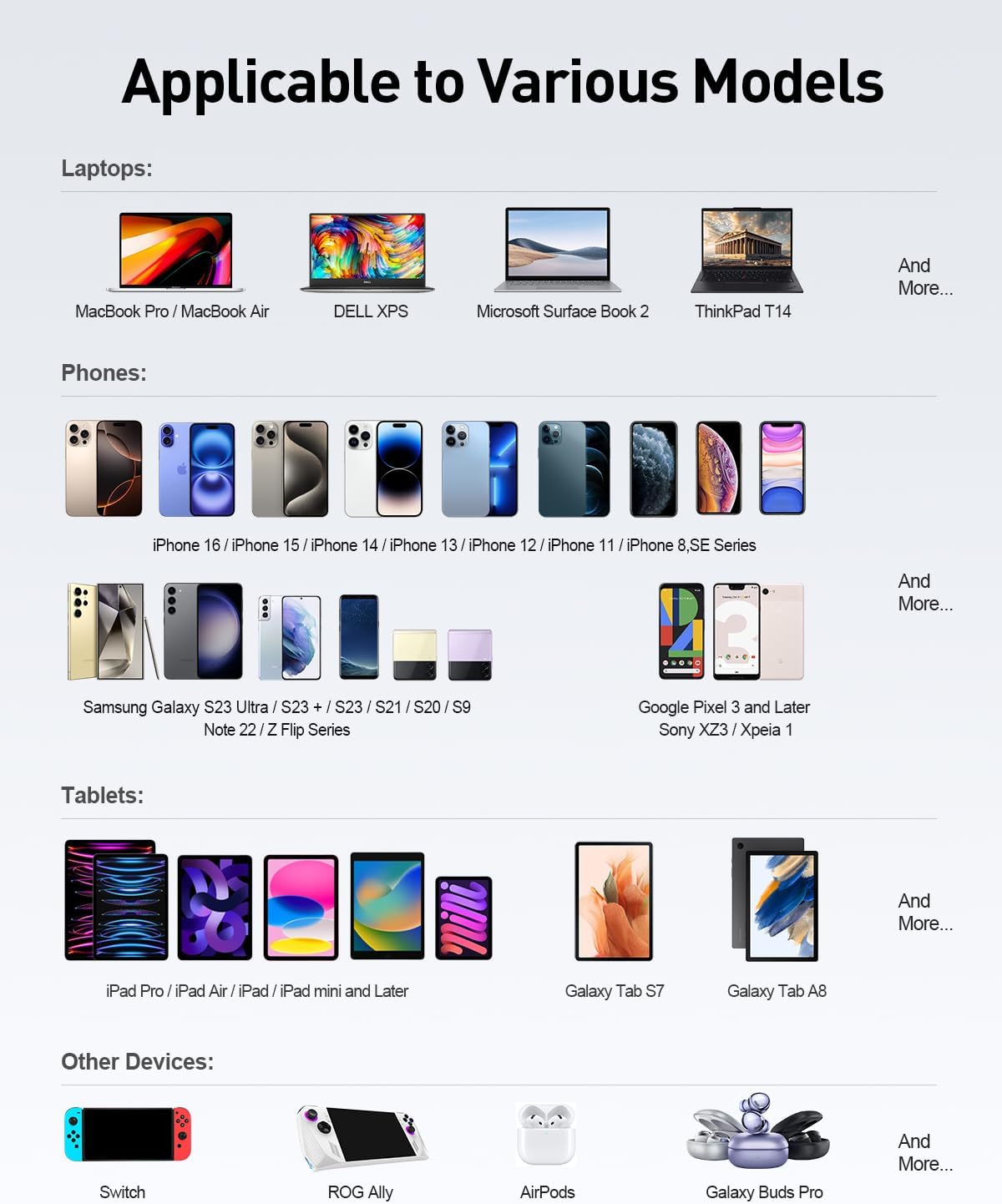
Image: Compatibility chart for various devices.
Safety Information
- Do not expose the power bank to fire or high temperatures.
- Do not immerse the power bank in water or other liquids.
- Keep out of reach of children.
- Do not use the power bank if it is damaged or appears to be swelling.
- Dispose of the power bank according to local regulations for electronic waste.
Warranty and Support
iWALK products come with a standard manufacturer's warranty. For detailed warranty information, product support, or to register your product, please visit the official iWALK website or contact their customer service directly.
Manufacturer: U2O GLOBAL CO.,LTD
For further assistance, please refer to the iWALK Store on Amazon.
