
1. Introduction and System Overview
The Aoeeki RF-003B is an 8.2MHz Radio Frequency (RF) retail anti-theft system designed to enhance security in various retail environments. This system utilizes advanced electromagnetic induction technology to detect RF tags and labels, triggering an alarm when unauthorized removal of tagged merchandise occurs.
Key Features:
- RF-8.2MHz Core Technology: Employs professional Electronic Article Surveillance (EAS) technology for reliable detection.
- Adjustable Detection Range: Flexible detection coverage from a few feet to several meters, customizable for different store layouts.
- Dual Audible & Visual Alarm: Triggers loud alarm sounds and blinking warning lights simultaneously upon detection.
- Comprehensive Protection: Integrates security tags, retail security sensors, and deactivation tools for a complete anti-theft solution.
2. Package Contents
Verify that all components listed below are included in your package:

Figure 2.1: Complete Package Contents
- Master Gate (x1) - Main control unit
- Slave Gate (x1) - Secondary unit
- Power Supply (x1) - Input 110V-220V AC
- Sync Cable (x1) - For Master-Slave connection
- Screws - For easy product securing
- Wireway (x1) - Aluminum alloy cable tray
- RF Tags (x100) - Merchandise Security
- Instruction Manual

Figure 2.2: System Components and Accessories
3. Setup and Installation
Follow these steps to properly set up and install your Aoeeki RF-003B security system.
3.1 Installation Diagram

Figure 3.1: System Installation Diagram
3.2 Installation Steps
- Unpack Components: Carefully remove all items from the packaging. Identify the transmitting machine (without light) and the receiving machine (with light and speaker).
- Connect Power Supply: Plug the power supply into the motherboard of the transmitting machine. Ensure a secure connection.
- Link Machines: Use the provided sync cable to connect the transmitting machine and the receiving machine. Route the cable neatly, ideally within the wireway.
- Secure Installation: Use the fixing screws to securely mount the security gates to the floor. Alternatively, use glass glue for fixed installation.
- Power On: Turn on the power switch on the power supply. The indicator light on the receiving machine should illuminate.
- Test System: Test the system's functionality using an RF anti-theft tag. Walk through the gates with a tagged item to ensure the alarm triggers correctly.
Video 3.2.1: Installation Guide for Aoeeki RF-003B Security Tags Sensor System. This video demonstrates the unpacking, connection of power and sync cables, and initial power-on sequence for the security gates.

Figure 3.2: Detailed Connection and Installation Steps
4. Operating Instructions
The Aoeeki RF-003B system operates by detecting RF tags that pass between the transmitting and receiving gates. When a tagged item, not properly demagnetized or removed, passes through the detection zone, the system activates an alarm.
4.1 Alarm Functionality

Figure 4.1: System Alarm Indicators
- Sensitive Sensing: The system provides quick and sensitive detection of RF tags.
- Immediate Alarm: Upon detection, the system triggers an immediate alarm.
- Audible Alarm: The alarm sound can reach up to 100dB, providing a clear warning.
- Visual Alarm: A red light warning is activated simultaneously with the audible alarm.
Video 4.1.1: Demonstration of Retail Anti-Theft Sensors in Operation. This video illustrates how the system detects a tagged item passing through the gates and triggers an alarm.
4.2 Tag Compatibility
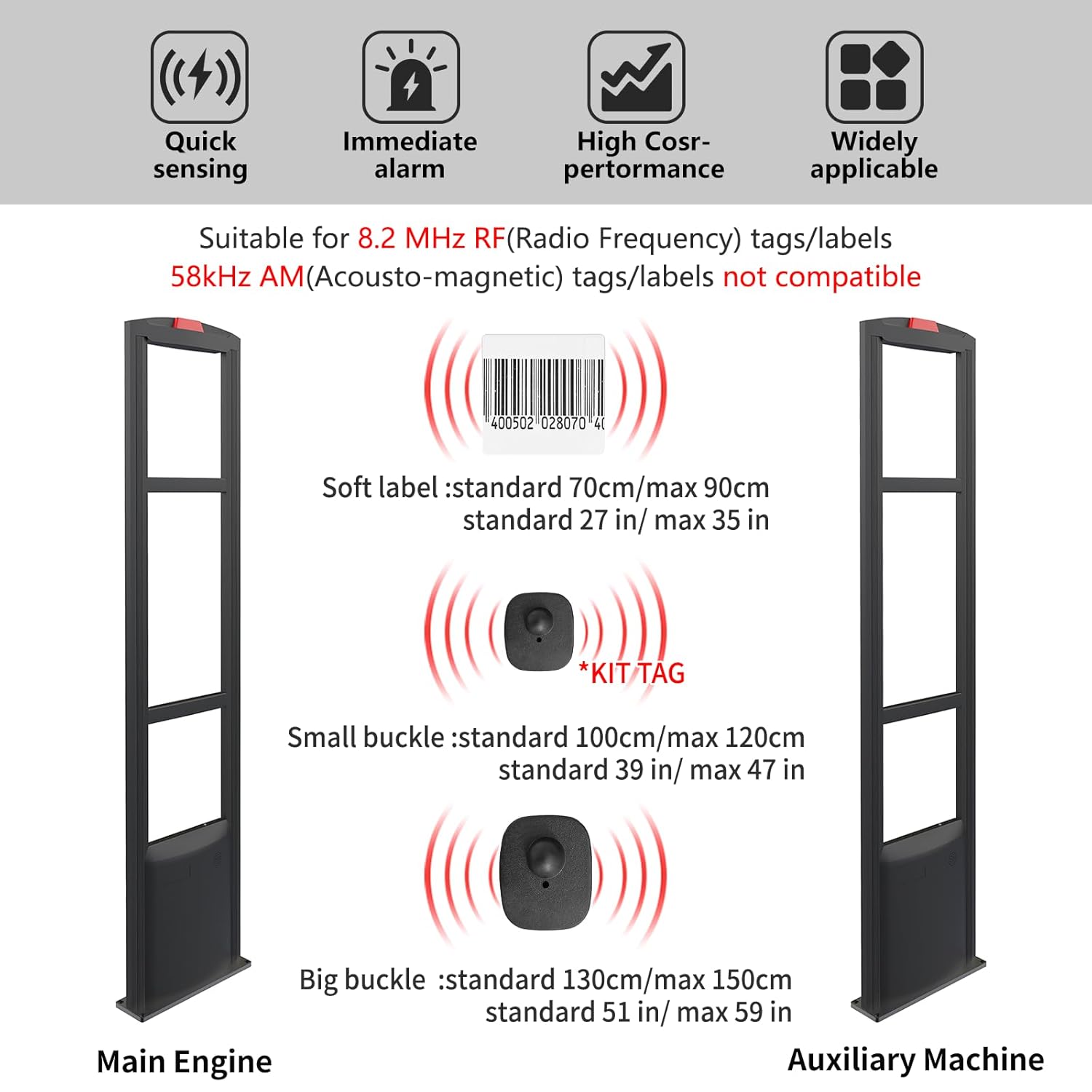
Figure 4.2: Tag Compatibility and Detection Ranges
- The system is compatible with 8.2 MHz RF (Radio Frequency) tags/labels.
- It is not compatible with 58kHz AM (Acousto-magnetic) tags/labels.
- Detection ranges vary by tag type:
- Soft label: Standard 70cm/max 90cm (27 in/max 35 in)
- Small buckle: Standard 100cm/max 120cm (39 in/max 47 in)
- Big buckle: Standard 130cm/max 150cm (51 in/max 59 in)
5. Important Placement Guidelines
Proper placement of the security gates is crucial for optimal performance and to prevent false alarms. Adhere to the following guidelines:

Figure 5.1: System Placement Guidelines
- Avoid Power Products: Do not place the security gates near other power products or electrical equipment, as this may cause interference.
- Maintain Distance from Tags: Ensure there are no anti-theft tags within 43 inches (approximately 109 cm) of the gates when the system is active, to prevent false alarms.
- Distance from Walls: Do not install the gates too close to walls. Maintain adequate clearance.
- Optimal Gate Separation: The distance between the transmitting and receiving gates should ideally exceed 43 inches (approximately 109 cm) for effective operation.
6. Maintenance
To ensure the longevity and optimal performance of your Aoeeki RF-003B security system, regular maintenance is recommended:
- Cleaning: Periodically wipe down the exterior of the gates with a soft, dry cloth. Avoid using abrasive cleaners or solvents.
- Cable Inspection: Regularly check all cables and connections for any signs of wear, damage, or loose connections. Replace damaged cables immediately.
- Environmental Conditions: Ensure the installation environment is free from excessive moisture, dust, and extreme temperatures, which can affect electronic components.
- Software/Firmware: Keep an eye out for any manufacturer updates or recommendations regarding software or firmware for improved performance.
7. Troubleshooting
If you encounter issues with your Aoeeki RF-003B security system, refer to the following common troubleshooting steps:
- No Power: Check if the power cable is securely connected to both the power supply and the wall outlet. Ensure the power switch is in the 'ON' position.
- No Alarm: Verify that the sync cable connecting the transmitting and receiving machines is properly installed. Ensure the RF tags used are 8.2MHz compatible.
- False Alarms: Review the placement guidelines in Section 5. Ensure there are no other RF devices or tagged items too close to the gates. Check for environmental interference.
- Weak Detection: Confirm the distance between the gates is within the recommended range. Ensure no obstructions are blocking the detection field.
- Intermittent Alarms: Check for loose connections or damaged cables. Ensure stable power supply.
If the problem persists after attempting these steps, please contact customer support for further assistance.
8. Specifications
| Parameter | Specification |
|---|---|
| Part Number | RF-003B |
| Frequency | 8.2MHz |
| Detection Width | 70-140cm |
| Power Supply | 110V-220V AC |
| Dimensions (per gate) | 1570 x 370 x 90mm |
| Weight (2 pcs) | 13.5 kg |
| Material | Premium Aluminum Alloy & Acrylic |
| Included Components | Security Tags Sensor (gates) |
| Batteries Included/Required | No |
9. Warranty and Support
For warranty information and technical support, please refer to the documentation included with your product or contact Aoeeki customer service directly. Keep your purchase receipt as proof of purchase for warranty claims.
Contact Information: Please visit the official Aoeeki website or refer to the contact details provided in your product packaging for the most up-to-date support information.
