
OWON HDS120
OWON HDS120 2-in-1 Oscilloscope + Multimeter User Manual
Model: HDS120 | Brand: OWON
Introduction
The OWON HDS120 is a versatile 2-in-1 device combining a digital oscilloscope and a 4½ digit multimeter. Designed for precision and ease of use, it features a 20000-count display, True RMS measurement capabilities, a 1MHz bandwidth, and a 5MS/s sampling rate. Its automatic range function simplifies measurements, making it suitable for a wide range of electronic testing and diagnostic tasks. This manual provides detailed instructions for the proper setup, operation, and maintenance of your HDS120 device.
What's in the Box

Figure 1: Package Contents. This image displays all items included in the OWON HDS120 product package. It shows the HDS120 unit, a black soft carrying bag, red and black multimeter test leads, a USB cable, and a quick start guide.
- OWON HDS120 Unit
- Soft Bag
- Multimeter Lead (Red and Black)
- USB Cable
- Quick Guide
Product Overview

Figure 2: Front View. This image shows the front of the OWON HDS120, highlighting its display screen and control buttons. The device is blue with black accents.
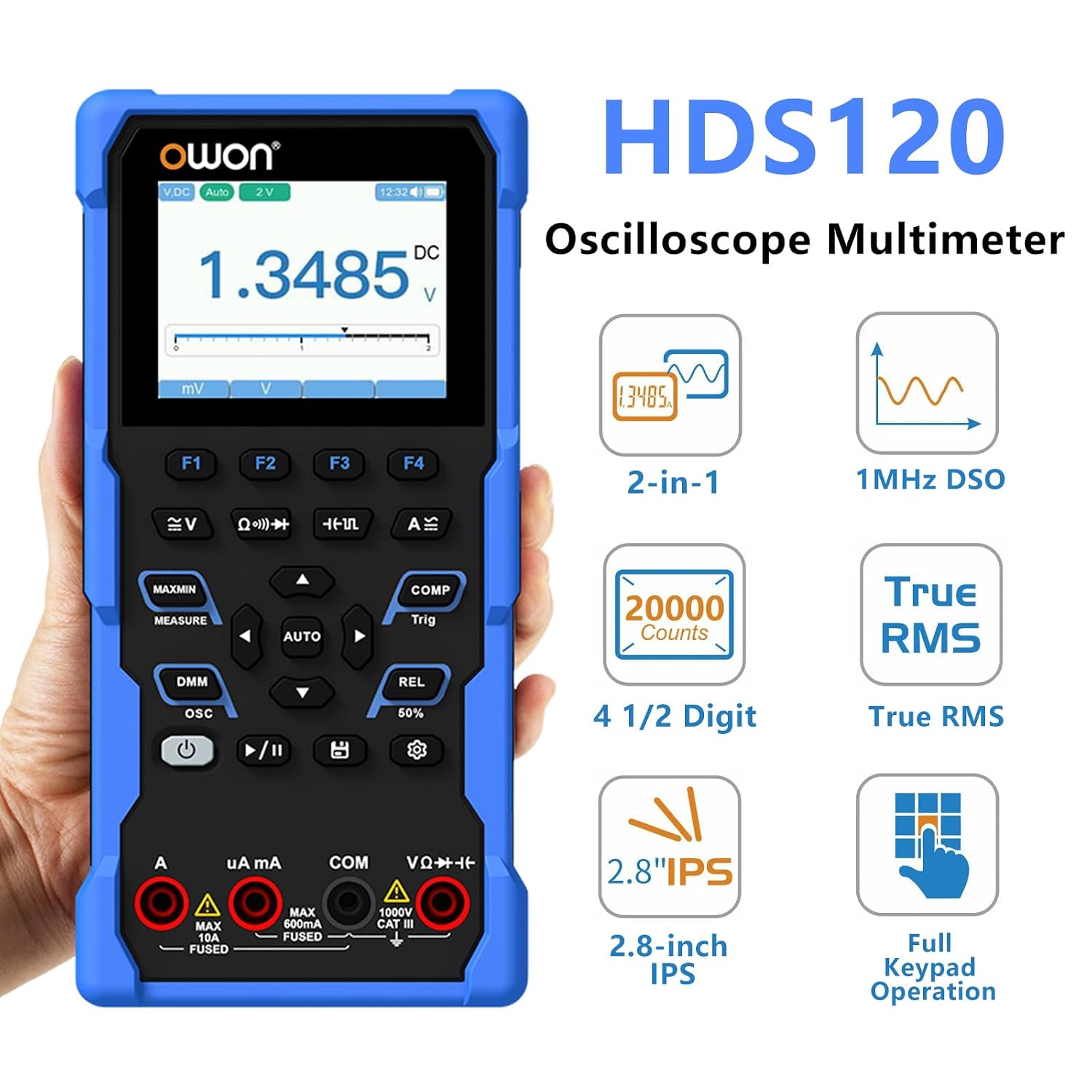
Figure 3: Key Features. This graphic illustrates the primary features of the HDS120, including its dual functionality as an oscilloscope and multimeter, 1MHz digital storage oscilloscope (DSO), 20000 counts, 4½ digit display, True RMS measurement, 2.8-inch IPS screen, and full keypad operation.

Figure 4: Measurement Functions. This image details the comprehensive measurement capabilities of the HDS120, including AC/DC Voltage, AC/DC Current, Resistance, Capacitance, Diode Test, On-off Warning, Duty Ratio Test, Frequency Test, Automatic ranging, Automatic Shutdown, Non-contact Voltage (NCV) test, and Reverse Display Backlight.

Figure 5: Product Dimensions. This image provides the physical dimensions of the HDS120, showing a height of 188mm, a width of 93mm, and a thickness of 41.5mm.
Setup
Battery Installation
The OWON HDS120 comes with 2 Lithium Ion batteries included. To install or replace batteries:
- Locate the battery compartment on the rear of the device.
- Open the battery cover.
- Insert the Lithium Ion batteries, ensuring correct polarity.
- Close the battery cover securely.
Initial Power On
Press and hold the power button (usually marked with a power symbol) until the display illuminates. The device will perform a self-test and then enter the default measurement mode.
Connecting Test Leads
Connect the red and black multimeter test leads to the appropriate input jacks on the bottom of the device. Ensure they are firmly seated for accurate readings.
Operating Instructions
Multimeter Functionality
The HDS120 offers a wide range of multimeter functions. Use the mode selection buttons to switch between different measurement types (Voltage, Current, Resistance, Capacitance, etc.).
- Voltage Measurement (AC/DC): Select the voltage mode (V~ for AC, V- for DC). Connect the test leads across the circuit or component to measure voltage.
- Current Measurement (AC/DC): Select the current mode (A~ for AC, A- for DC). Connect the meter in series with the circuit. Ensure proper fuse protection for high current measurements.
- Resistance Measurement (Ω): Select the resistance mode. Ensure the circuit is de-energized before measuring resistance.
- Diode Test and Continuity: Use these modes to check diode functionality and circuit continuity.
- Automatic Range: The device features an automatic range function, simplifying measurements by automatically selecting the appropriate range.
Oscilloscope Functionality
The integrated oscilloscope allows for waveform visualization and analysis. Switch to OSC mode to access these features.

Figure 6: Outdoor Use. This image shows the HDS120 being used to measure voltage in a car engine bay, demonstrating its clear 2.8-inch IPS screen with good viewing angles, suitable for outdoor environments.

Figure 7: Waveform Measurement. This image displays various waveforms (sine, square, triangular) captured by the HDS120, illustrating its 1MHz analog bandwidth and ability to automatically calculate and test Vmax.
- Waveform Display: The 2.8-inch IPS screen provides a clear display of waveforms.
- Bandwidth and Sampling Rate: With a 1MHz bandwidth and 5MS/s sampling rate, the oscilloscope can capture a variety of signals.
- Triggering: Adjust trigger settings to stabilize waveforms for analysis.
- Measurement of Strong Electrical Waveforms: The device is capable of rapid measurement of strong electrical waveforms.
- Direct Current Waveform Measurement: The current waveform can be directly measured using a probe.
Maintenance
Cleaning
To clean the device, use a soft, damp cloth. Do not use abrasive cleaners or solvents. Ensure the device is powered off and disconnected from any power source before cleaning.
Battery Care
If the device will not be used for an extended period, remove the batteries to prevent leakage and damage.
Storage
Store the HDS120 in a cool, dry place, away from direct sunlight and extreme temperatures. Use the provided soft bag for protection during storage and transport.
Troubleshooting
| Problem | Possible Cause | Solution |
|---|---|---|
| Device does not power on. | Low or dead batteries; incorrect battery installation. | Replace batteries; ensure correct polarity. |
| Inaccurate multimeter readings. | Loose test leads; incorrect mode selection; damaged leads. | Ensure leads are firmly connected; select appropriate measurement mode; inspect and replace damaged leads. |
| Unstable oscilloscope waveform. | Incorrect trigger settings; signal noise. | Adjust trigger level and mode; ensure proper grounding; reduce external interference. |
| Display is dim or unreadable. | Low battery; backlight setting. | Charge or replace batteries; adjust backlight brightness (if applicable). |
Specifications
| Feature | Detail |
|---|---|
| Product Name | OWON HDS120 2-in-1 Oscilloscope + Multimeter |
| Display Counts | 20000 Counts |
| Multimeter Digits | 4½ Digit |
| Oscilloscope Bandwidth | 1MHz |
| Sampling Rate | 5MS/s |
| Measurement Type | True RMS Tester |
| Ranging | Automatic Range |
| Power Source | Battery Powered (2 Lithium Ion batteries included) |
| Color | Blue |
| Style | Multimeter+Oscilloscope |
| Package Dimensions | 9.45 x 6.3 x 3.54 inches; 2.65 Pounds |
| Country of Origin | China |
Support
For technical support, warranty information, or service inquiries, please refer to the contact information provided in the Quick Guide included with your product or visit the official OWON website.
Note: Protection plans are available separately and are not part of the standard product warranty.
Related documentsHDS120


Ask a question about this manual
Ask about setup, troubleshooting, compatibility, parts, safety, or missing instructions. Manuals+ will review the question and use this page’s manual context to help answer it.