
1. Introduction
This manual provides detailed instructions for the operation and maintenance of your SEMIER Digital AM FM SW Movie Video Radio with Bluetooth. This versatile device offers a wide range of entertainment options, including AM, FM, and SW radio reception, video playback, MP3 music, picture browsing, e-book reading, and Bluetooth speaker functionality. Please read this manual thoroughly to ensure proper use and to maximize your enjoyment of the product.
2. What's in the Box
- AM FM SW Video Radio (1 unit)
- 1200 mAh Rechargeable Battery (3 units)
- USB Charging Cable (1 unit)
- User Manual (1 unit)
3. Product Overview
The SEMIER Digital AM FM SW Movie Video Radio is designed for portable entertainment, featuring a compact size and a clear 4.3-inch screen. Below are key features and components of the device.
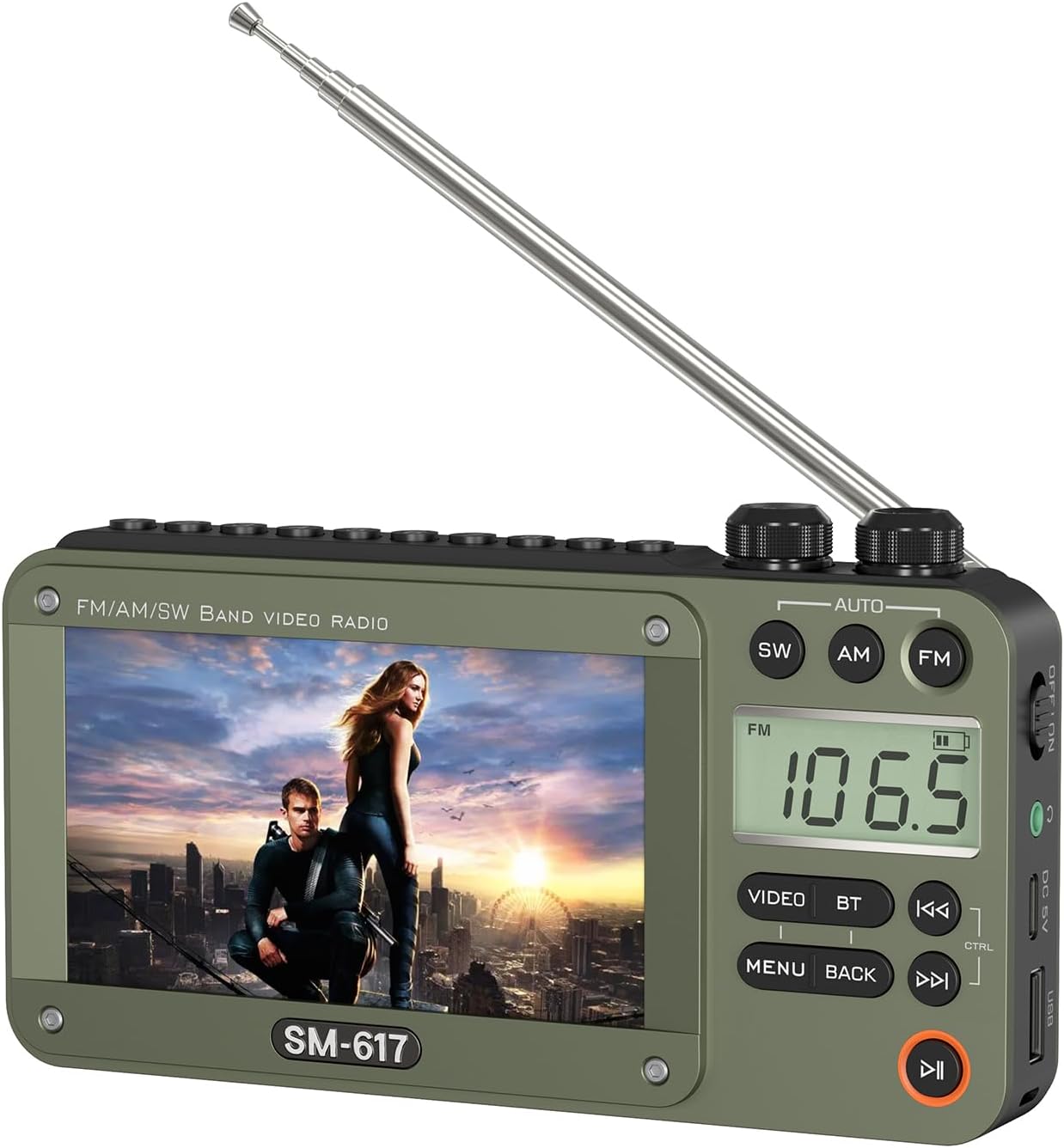
Front view of the SEMIER Digital AM FM SW Movie Video Radio, showcasing its 4.3-inch screen and control buttons.
A detailed view of the 4.3-inch display, which supports 720p and 1080p high-definition video playback.

Side view showing the USB port, DC 5V charging port, 3.5mm headphone jack, and power switch.

Top view highlighting the tuning and volume control knobs for easy adjustment.

Detailed view of the control buttons including Video, BT (Bluetooth), Menu, Back, and playback controls.
4. Setup
4.1 Battery Installation
The device requires three 1200mAh lithium batteries (included). To install, open the battery compartment cover on the back of the radio. Insert the batteries according to the polarity indicators (+/-) inside the compartment. Close the cover securely.

Illustration of inserting the rechargeable batteries into the dedicated compartment.
4.2 Antenna Extension
For optimal radio reception, extend the telescopic antenna fully. The antenna can be rotated and angled to improve signal strength.
4.3 Power On/Off
Locate the power switch on the side of the device. Slide the switch to the 'ON' position to power on the radio. To power off, slide the switch to the 'OFF' position.
5. Operating Instructions
This section details the various functions of your SEMIER radio. For a visual guide, please refer to the official product video below.
Official product video demonstrating key features including radio reception, media playback, and Bluetooth functionality.
5.1 Radio Functions (AM/FM/SW)
To select a radio band, press the corresponding `SW`, `AM`, or `FM` button on the device. Use the `TUN` (Tuning) knob to manually adjust the frequency. For automatic station scanning, press the `AUTO` button. The radio will scan and save available stations.

The radio features excellent reception capabilities across AM, FM, and SW bands, enhanced by a long antenna and advanced DSP chip.
5.2 Media Playback (Video, MP3, Photo)
Insert a USB drive or Micro SD card into the designated slot. The device supports various video formats (RM, AVI, MKV, FLV, MPG, MP4, DAT, MOV, 3GP), MP3 audio, and common image formats. Navigate through the on-screen menu using the `MENU` and `BACK` buttons, and the playback controls (`PLAY/PAUSE`, `PREVIOUS`, `NEXT`) to select and play your desired media.

The device supports playback from USB drives and TF (Micro SD) cards for videos, MP3 music, pictures, and e-books.
5.3 Bluetooth Speaker Function
To use the device as a Bluetooth speaker, press the `BT` button. The screen will display "BLUE" indicating Bluetooth mode. On your smartphone or computer, search for available Bluetooth devices and select "SM-617" (or similar model name) to pair. Once connected, you can stream audio wirelessly to the radio.

Effortlessly stream music from your phone or computer using Bluetooth 5.0 connectivity.
5.4 Headphone Use
For private listening, plug any standard 3.5mm headphones into the headphone jack located on the side of the device. The internal speaker will automatically mute when headphones are connected.

The 3.5mm earphone jack allows for personal audio enjoyment.
6. Maintenance
To ensure the longevity and optimal performance of your SEMIER radio, follow these maintenance guidelines:
- Cleaning: Use a soft, dry cloth to clean the exterior of the device. Avoid using abrasive cleaners or solvents, which may damage the surface.
- Battery Care: Recharge the batteries regularly, especially if the device will not be used for an extended period. Use only the provided USB charging cable or a compatible 5V DC power source.
- Storage: Store the radio in a cool, dry place away from direct sunlight, extreme temperatures, and high humidity.
- Handling: Avoid dropping the device or subjecting it to strong impacts, as this may damage internal components.
7. Troubleshooting
If you encounter issues with your SEMIER radio, please refer to the following common troubleshooting steps:
- Device does not power on: Ensure the batteries are correctly installed and fully charged. Connect the device to a power source using the USB charging cable to check if it powers on while charging.
- Poor radio reception: Fully extend the telescopic antenna. Try repositioning the radio or the antenna to find a stronger signal. Ensure you are within range of broadcast signals.
- Media files not playing: Verify that the USB drive or Micro SD card is properly inserted. Check if the media files are in a supported format (e.g., RM, AVI, MKV, FLV, MPG, MP4, DAT, MOV, 3GP for video; MP3 for audio). Ensure the storage device is not corrupted.
- Bluetooth not connecting: Ensure the radio is in Bluetooth pairing mode (displaying "BLUE"). On your external device, turn Bluetooth off and on again, then rescan for devices. Make sure the radio is within the effective Bluetooth range (typically 10 meters).
- No sound: Check the volume level using the `VOL` knob. If headphones are connected, ensure they are fully plugged in and functioning correctly.
8. Specifications
| Feature | Detail |
|---|---|
| Product Dimensions | 6.4 x 1.3 x 3.5 inches (6.4"L x 1.3"W x 3.5"H) |
| Item Weight | 12.3 ounces |
| Item Model Number | 667763782798 |
| Batteries | 3 Lithium Ion batteries required (included) |
| Special Feature | 4.3 inch Screen, Built-In AM Antenna, Rechargeable |
| Connectivity Technology | Bluetooth |
| Tuner Technology | AM |
| Power Source | Battery Powered |
| Radio Bands Supported | 3-Band (AM, FM, SW) |
| Water Resistance Level | Not Water Resistant |
9. Warranty and Support
For information regarding product warranty, please refer to the warranty card or documentation included with your purchase. If you require further assistance, technical support, or have questions not covered in this manual, please visit the official SEMIER website or contact their customer service department through the contact information provided with your product packaging.