
1. Product Overview
The Kakanuo Cordless Rechargeable Table Lamp offers versatile lighting with its portable design, touch control, and adjustable color temperature and brightness. Its built-in 5000mAh battery ensures long-lasting illumination, making it suitable for various indoor and outdoor settings.

Image 1: The Kakanuo Cordless Table Lamp, emphasizing its 5000mAh rechargeable battery and a runtime of 8-40 hours depending on brightness.

Image 2: Two Kakanuo Cordless Table Lamps positioned on a dining table, illustrating their wireless functionality and adaptability for different areas within the home.
2. Setup
2.1 Assembly
The Kakanuo Cordless Table Lamp can be assembled to two different heights: 14.7 inches or 9.3 inches. To adjust the height, simply screw or unscrew the detachable pole sections as desired. Ensure all connections are secure before use.

Image 3: A diagram illustrating the two available height configurations for the Kakanuo Cordless Table Lamp (14.7in and 9.3in), alongside key product specifications.
2.2 Initial Charging
Before first use, fully charge the lamp. Connect the provided USB-C cable to the charging port located at the base of the lamp head and plug the other end into a compatible USB power adapter (not included). A red light indicates charging, and a green light indicates a full charge. A full charge from a completely discharged state takes approximately 6 hours.

Image 4: A close-up of the Kakanuo Cordless Table Lamp's features, showing the touch button on top, detachable pole sections, a non-slip base pad, and the USB-C charging port with red (charging) and green (fully charged) indicator lights.
3. Operating Instructions
3.1 Power On/Off and Color Temperature Adjustment
To turn the lamp on or off, or to cycle through the three color temperature modes, simply tap the touch button located at the top of the lamp head. The available color temperatures are:
- 3000K Warm White: For a cozy and inviting ambiance.
- 5000K Daylight White: For bright, clear illumination.
- 4000K Natural White: A balanced light for general use.
3.2 Brightness Adjustment (Stepless Dimming)
To adjust the brightness, long-press the touch button. The brightness will smoothly transition between 5% and 100%. Release the button when the desired brightness level is reached. The lamp features a memory function, retaining your last brightness setting for each color mode.
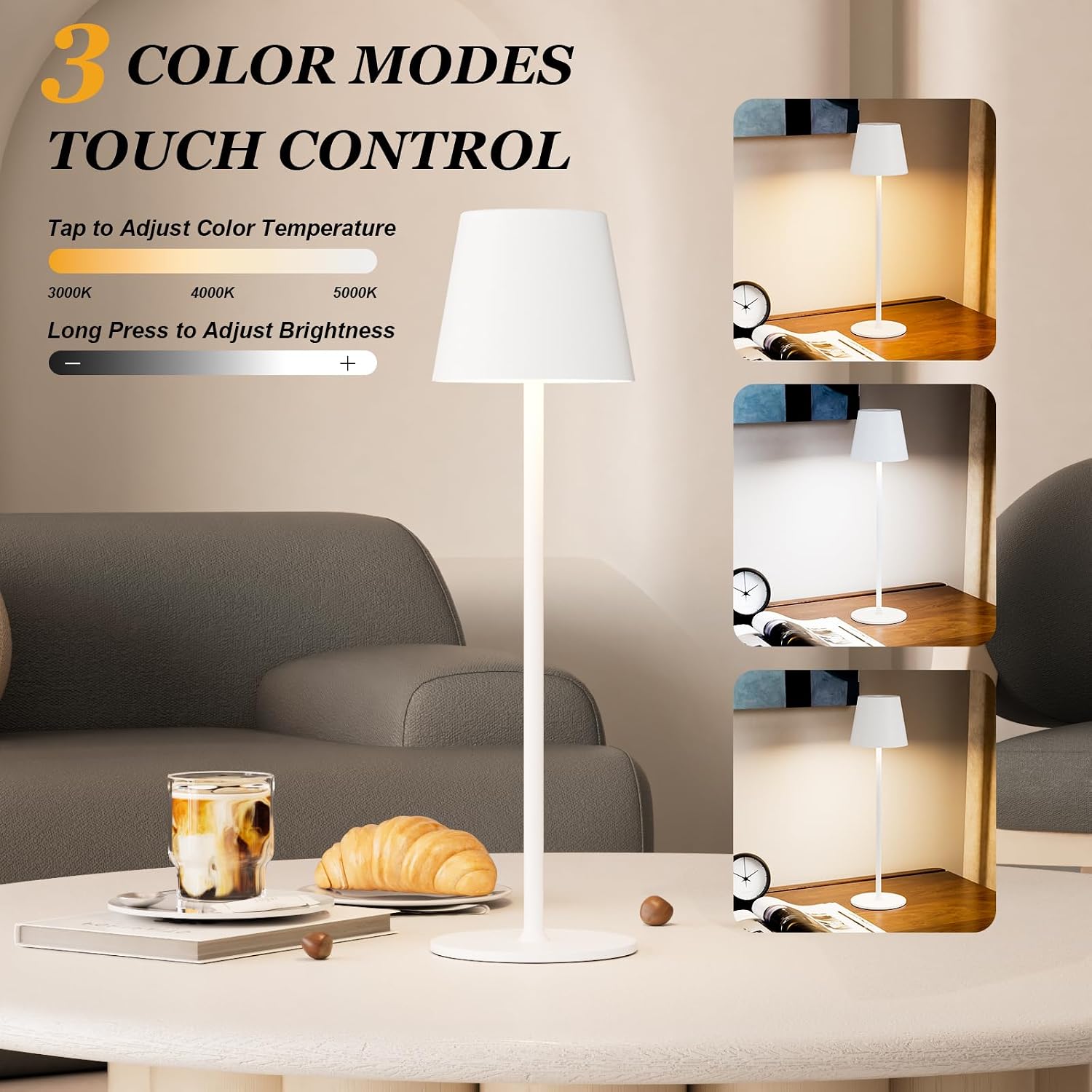
Image 5: The Kakanuo Cordless Table Lamp showcasing its three distinct color temperature modes (3000K warm white, 4000K natural white, and 5000K daylight white) and the intuitive touch control for stepless dimming.
Video 1: Official product video from Kakanuo demonstrating the features and operation of the Cordless Table Lamp, including touch controls and light settings.
4. Maintenance
4.1 Cleaning and Care
The lamp's surface is coated for water resistance, anti-scratch, and anti-corrosion properties. To clean, wipe with a soft, damp cloth. Avoid using abrasive cleaners or solvents that may damage the finish. Ensure the charging port is dry before connecting the USB-C cable.

Image 6: The Kakanuo Cordless Table Lamp in an outdoor setting during light rain, demonstrating its portable and waterproof capabilities.
4.2 Battery Care
To prolong battery life, avoid completely draining the battery frequently. Recharge the lamp when the light output noticeably diminishes. The built-in 5000mAh lithium-ion battery has a cycle life of 500 to 1000 charges, typically lasting 3-5 years with proper care.
5. Troubleshooting
5.1 Lamp Not Turning On
- Ensure the lamp is charged. Connect it to a power source using the USB-C cable and check for the red charging indicator light.
- Verify that the touch button is being tapped correctly. A firm, brief tap is usually sufficient.
5.2 Inconsistent Brightness or Color Change
- Ensure your finger is fully covering the touch button for consistent response.
- If the issue persists, fully charge the lamp and try again.
5.3 Short Battery Life
- Battery runtime varies from 8-40 hours depending on the brightness level used. Higher brightness consumes more power.
- Ensure the lamp is fully charged (green indicator light).
- Over time, all rechargeable batteries experience degradation. If battery life significantly decreases, consider contacting customer support.
6. Specifications
| Brand | Kakanuo |
| Model Number | 499bbc3e-9ab6-4207-8469-9d9c6778fe69 |
| Power Source | Battery Powered (5000mAh Lithium Ion, included) |
| Light Source Type | LED |
| Color Temperatures | 3000K Warm White, 4000K Natural White, 5000K Daylight White |
| Dimming Range | 5% to 100% (Stepless) |
| Control Method | Touch |
| Material | Metal, Plastic |
| Finish Type | Coated |
| Product Dimensions | 4"D x 4"W x 14.7"H (Adjustable to 9.3"H) |
| Item Weight | 1.33 Kilograms (approx. 2.92 pounds) |
| Voltage | 5 Volts (DC) |
| Water Resistance Level | Waterproof |
| Indoor/Outdoor Usage | Indoor, Outdoor |
7. Warranty and Support
Kakanuo provides a free replacement service within 6 months of purchase. If your lamp set has any defects or stops working during this period, please contact Kakanuo customer support for assistance. Key electronic components are UL listed, ensuring safety and quality.