
1. Introduction
Thank you for choosing the Radtel RT-20M Dual Band Mobile Radio. This high-performance transceiver is designed for reliable communication across various frequencies, including UHF, VHF, and aviation bands. With its robust features and durable construction, the RT-20M is suitable for professionals and enthusiasts alike. This manual provides essential information for the proper setup, operation, and maintenance of your device.
2. Product Overview
2.1 Key Features
- Expansive Channel Capacity: Features 999 programmable channels for seamless communication across diverse frequencies.
- Wide Frequency Range: Transmits and receives signals between 144-148MHz (VHF) and 420-450MHz (UHF), ensuring reliable coverage. Also receives 108-520 MHz, including 108-136 MHz AM (Aviation Band).
- Powerful Output: Delivers an impressive 25W RF power output for enhanced signal strength and clarity.
- NOAA Weather Alerts: Stay informed about impending weather conditions with integrated NOAA weather alert functionality.
- Durable Construction: Built to withstand demanding environments with a rugged and long-lasting design.
- Dual Display, Dual Standby: Allows monitoring of two different frequencies simultaneously.
- Record Supported Real-Time Playback: Ability to record and play back communications.

Figure 2.1.1: The Radtel RT-20M radio and microphone, illustrating its capability for strong signal penetration and high power output.
2.2 Components Included
The Radtel RT-20M package typically includes the following components:
- 1 x Radtel RT-20M Mobile Radio Unit
- 1 x Handheld Microphone
- 1 x Power Cable
- 1 x Mounting Bracket Kit
- 1 x User Manual (this document)

Figure 2.2.1: Radtel RT-20M Mobile Radio unit with handheld microphone and various views of the radio's sides, showing the speaker, antenna connector, and power input.
3. Setup
3.1 Mounting the Radio
Choose a secure and accessible location in your vehicle or operating area for mounting the radio. Ensure it does not obstruct airbags or driver visibility. Use the provided mounting bracket and hardware to firmly secure the unit.
3.2 Antenna Connection
Connect a suitable dual-band antenna (not included) to the antenna connector on the rear of the radio. Ensure the connection is tight and secure to prevent signal loss and damage.
3.3 Power Connection
Connect the supplied power cable to the radio's power input. Connect the other end of the power cable directly to your vehicle's 12V DC power source (e.g., battery) ensuring proper polarity (red to positive, black to negative). It is recommended to connect directly to the battery to avoid electrical noise and ensure stable power delivery. Install an appropriate fuse in the positive line.
3.4 Microphone Connection
Plug the handheld microphone into the designated microphone port on the front of the radio.

Figure 3.4.1: The Radtel RT-20M radio unit connected to its microphone, displaying frequency information and indicating record/playback capabilities.
4. Operating Instructions
4.1 Powering On/Off
Press and hold the power button (usually integrated with the volume knob) to turn the radio on or off.
4.2 Volume Adjustment
Rotate the volume knob clockwise to increase volume and counter-clockwise to decrease it.
4.3 Channel/Frequency Selection
The RT-20M supports 999 channels. Use the up/down arrow buttons on the radio or microphone to navigate through channels or adjust frequencies. The display will show the current channel number or frequency.

Figure 4.3.1: The Radtel RT-20M's clear big screen demonstrating dual display and dual standby functionality, showing two active frequencies.
4.4 Transmitting (PTT)
To transmit, press and hold the Push-To-Talk (PTT) button on the side of the microphone. Speak clearly into the microphone. Release the PTT button to stop transmitting and return to receive mode.
4.5 Dual Band / Dual Standby Operation
The radio can monitor two different frequencies simultaneously. Refer to the on-screen indicators for which frequency is currently active for transmission. Use the appropriate function button (e.g., A/B switch) to toggle between the primary and secondary frequency for transmission.
4.6 NOAA Weather Alerts
To activate NOAA weather alerts, navigate to the NOAA function in the menu. The radio will scan for and alert you to severe weather broadcasts in your area. Consult the specific menu options for enabling and disabling this feature.
4.7 VOX Function (Voice Operated Exchange)
The VOX function allows hands-free transmission when enabled. The radio will automatically transmit when it detects your voice. Adjust VOX sensitivity in the menu to prevent accidental transmissions or missed voice activation.
4.8 Record and Playback
The RT-20M supports recording and real-time playback of communications. Access the recording features through the radio's menu system. Consult the menu for options to start recording, stop recording, and play back stored audio.
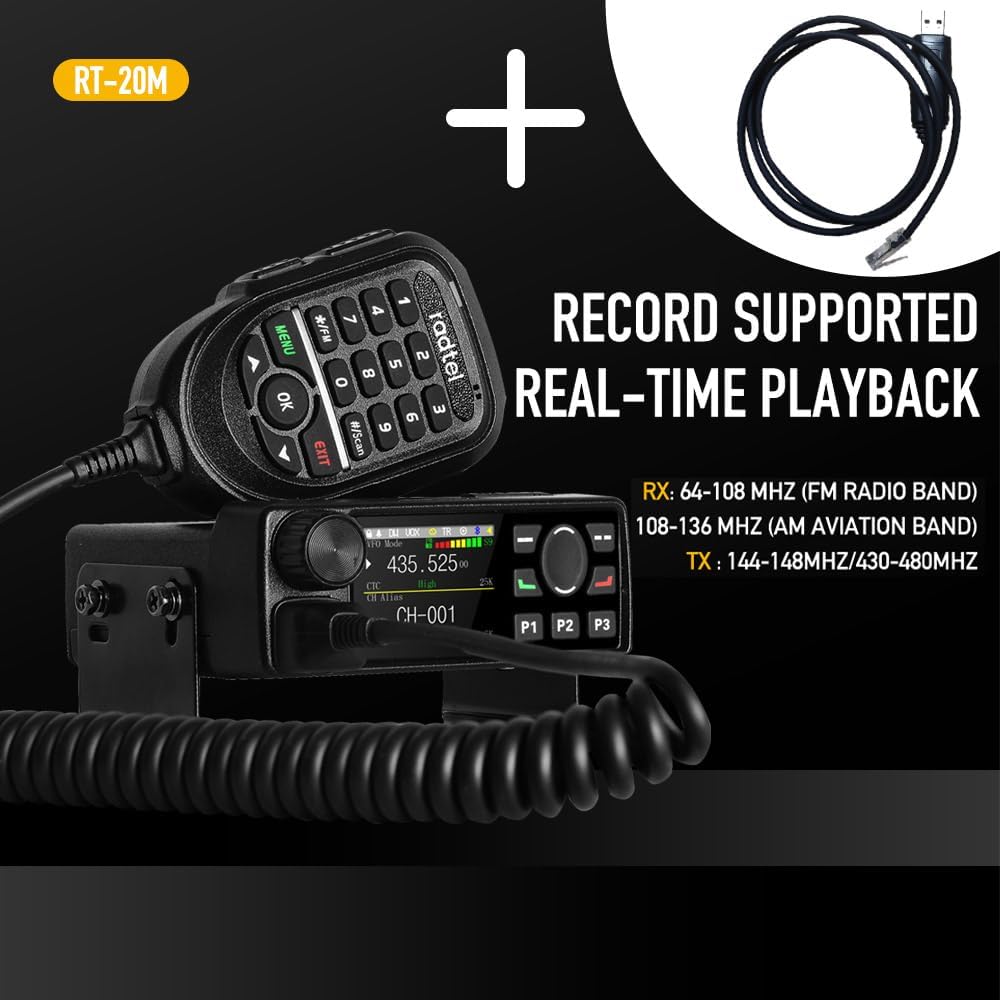
Figure 4.8.1: The Radtel RT-20M radio and microphone, shown with an optional programming cable, emphasizing its record supported real-time playback capabilities and frequency ranges.
5. Maintenance
5.1 Cleaning
Regularly clean the radio's exterior with a soft, damp cloth. Avoid using harsh chemicals or abrasive cleaners. Ensure the microphone and speaker grilles are free from dust and debris.
5.2 Connections
Periodically check all cable connections (power, antenna, microphone) to ensure they are secure and free from corrosion or damage.
5.3 Heat Dissipation
Ensure the radio's heat sink and ventilation areas are not obstructed to allow for proper heat dissipation, especially during prolonged transmission. The RT-20M features a large diameter speaker and quick heat dissipation design.

Figure 5.3.1: Side view of the Radtel RT-20M radio, highlighting its large diameter speaker and fins designed for quick heat dissipation.
6. Troubleshooting
| Problem | Possible Cause | Solution |
|---|---|---|
| Radio does not power on. | No power supply; Blown fuse; Incorrect wiring. | Check power cable connections; Inspect and replace fuse if necessary; Verify correct polarity. |
| No reception or poor signal. | Antenna not connected or damaged; Incorrect frequency/channel; Squelch level too high. | Check antenna connection; Verify frequency/channel settings; Adjust squelch level. |
| Cannot transmit. | PTT button faulty; Microphone not connected; Transmit frequency blocked. | Ensure microphone is securely connected; Check PTT button functionality; Verify transmit frequency is allowed and not busy. |
| Audio is distorted or low. | Volume too low; Speaker obstructed; Poor signal quality. | Adjust volume; Clear speaker grille; Improve antenna placement or signal path. |
7. Specifications
| Feature | Detail |
|---|---|
| Brand | radtel |
| Model | RT-20M |
| Number of Channels | 999 |
| Frequency Range (TX) | 144-148MHz (VHF), 420-450MHz (UHF) |
| Frequency Range (RX) | 108-520 MHz (including 108-136 MHz AM Air Band) |
| RF Power Output | 25W |
| Special Features | 25W Power, Air Band Rx, Dual Band UHF/VHF, NOAA Weather Alerts, VOX, Record/Playback |
| Tuner Type | AM/FM |
| Water Resistance Level | Not water resistant |
| Manufacturer | Xiamen Radtel Electronics co Ltd |
8. Warranty and Support
For warranty information and technical support, please refer to the documentation provided with your purchase or contact Radtel customer service directly. Keep your purchase receipt as proof of purchase for warranty claims.


